
Einführung
This manual provides detailed instructions for the safe and effective use of your BORUIT V3 and V7 EDC flashlights. Please read this manual thoroughly before operation to ensure proper functionality and longevity of your devices.
Aufstellen
Charging the Flashlights
Both BORUIT V3 and V7 flashlights are equipped with a Type-C charging port. Before first use, or when the battery is low, charge the flashlight using a standard USB-C cable and a compatible power source.
- Connect the Type-C cable to the flashlight's charging port.
- Verbinden Sie das andere Ende des Kabels mit einem USB-Netzteil oder einem USB-Anschluss Ihres Computers.
- For the V7 flashlight, a red light will flash during charging, and a green light will indicate a full charge.
- The V3 flashlight has a battery indicator display that shows charging status.
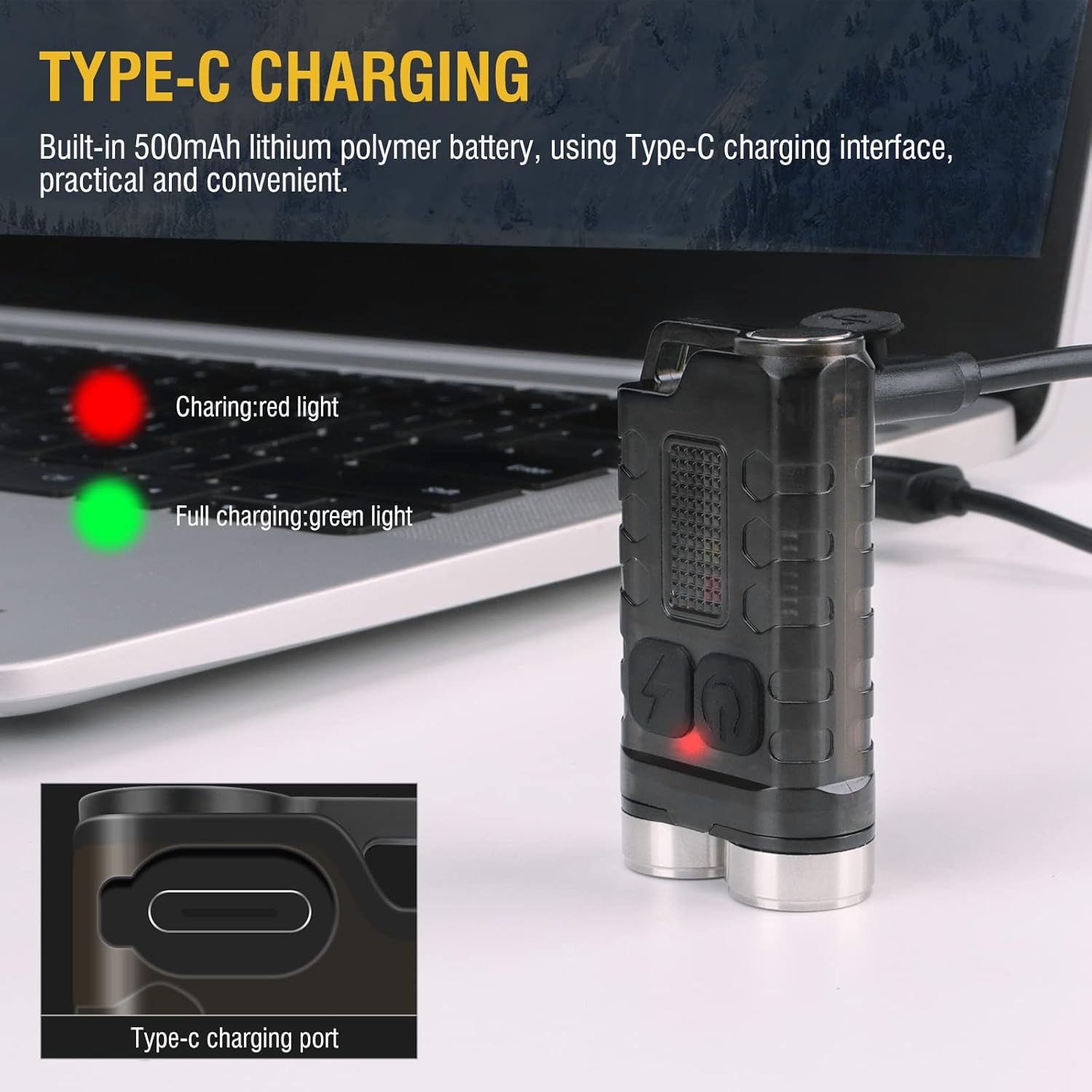
Image: BORUIT V3 flashlight charging via Type-C cable, with a red indicator light visible.

Image: BORUIT V7 flashlight and its Type-C charging cable.
Bedienungsanleitung
BORUIT V3 Flashlight Operation
The BORUIT V3 flashlight features 12 lighting modes, including 5 main light modes and 7 side light modes.
Hauptlichtmodi:
- Super hell
- Hohes Licht
- Mittelhell
- Schwaches Licht
- Wirtschaftlich
Seitenlichtmodi:
- Weißes Licht
- UV-Licht
- Rotlicht
- Rotlichtblitz
- Red Blue Light Flash
Operating the V3 Main Light:
- Ein-/Ausschalten: Press the main light switch button to turn on. Release to turn off.
- Modi ändern: Double-click the main light switch button to cycle through modes.
- Turn Off from Mode: Press and hold the main light switch button to turn off.
Operating the V3 Side Light:
- Weißes Licht: Long press the side light switch to turn on the white light. Long press again to turn it off.
- Red-Blue Flash: Click the side light switch three times to activate the red-blue flash.
- Modi ändern: Double-click the side light switch to cycle through other side light modes.
- Turn Off from Mode: Press and hold the side light switch to turn off.

Image: BORUIT V3 flashlight lighting modes and operation guide.
BORUIT V7 Flashlight Operation
The BORUIT V7 flashlight features 3 powerful LED lights and multi-color side lights. Specific mode cycling instructions are similar to the V3 model, typically involving single clicks, double clicks, and long presses of the power button to cycle through brightness levels and special modes.
Magnetic Tail and Clip:
The V7 flashlight includes a magnetic tail, allowing it to be attached to metallic surfaces for hands-free operation. A clip on the back enables secure attachment to pockets, straps, or hats.

Image: BORUIT V7 flashlight demonstrating its ultra-light and portable design with clip and keychain.

Image: BORUIT V7 flashlight utilizing its magnetic adsorption feature.
Wartung
To ensure optimal performance and extend the lifespan of your BORUIT flashlights, follow these maintenance guidelines:
- Reinigung: Wischen Sie das Gehäuse der Taschenlampe mit einem weichen,amp Tuch. Keine Scheuer- oder Lösungsmittel verwenden.
- Wasserbeständigkeit: The V3 is IP65 waterproof, and the V7 is IPX5 waterproof. While resistant to splashes and rain, avoid submerging the flashlights in water for extended periods. Ensure the charging port cover is securely closed to maintain water resistance.
- Lagerung: Store the flashlights in a cool, dry place away from direct sunlight and extreme temperatures. If storing for a long period, ensure the battery is partially charged (around 50%) to prevent deep discharge.
- Batteriepflege: Um die Batterieleistung zu erhalten, laden Sie sie regelmäßig auf, auch wenn Sie sie nicht häufig benutzen.

Image: BORUIT V3 flashlight demonstrating IP65 outdoor waterproof capability.
Fehlerbehebung
If you encounter issues with your BORUIT flashlight, refer to the following common troubleshooting steps:
- Taschenlampe schaltet sich nicht ein:
- Stellen Sie sicher, dass der Akku geladen ist. Schließen Sie ihn an ein Ladegerät an und überprüfen Sie die Kontrollleuchte.
- Verify that the power button is being pressed correctly according to the operating instructions (e.g., single press, double-click, long press).
- Gedimmte Lichtleistung:
- Der Akku ist möglicherweise schwach. Laden Sie die Taschenlampe auf.
- Ensure the flashlight is not in an economic or low-power mode. Cycle through the modes to a brighter setting.
- Ladeprobleme:
- Prüfen Sie Ladekabel und Netzteil auf Beschädigungen. Versuchen Sie es mit einem anderen Kabel oder einer anderen Stromquelle.
- Ensure the Type-C cable is fully inserted into the charging port.
Technische Daten
BORUIT V3 Flashlight
| Parameter | Detail |
|---|---|
| Material | PC + 304 Stainless Steel |
| Lumen | 900 lm |
| Lichtquelle | LED |
| Beleuchtungsmodi | 12 (5 Main, 7 Side) |
| Lichtfarbe | UV, White, Red, Blue Light |
| Ladeart | TYP C |
| Wasserdichtigkeit | IP65 |
| Bestrahlungsabstand | 100 Meter |
| Produktgröße | 15 mm * 31 mm * 56 mm |
BORUIT V7 Flashlight
| Parameter | Detail |
|---|---|
| Lichtquelle | 3 * LED |
| Lamp Luminous (lm) | 1100lm |
| Strahldistanz | 100 Meter |
| Batteriekapazität | 800mAh Polymer Lithium Batterie |
| Eingang | 5V |
| Ladezeit | 3 Stunden |
| Ladeanzeige | Red light flash (charging), Green light (full) |
| Schalenmaterial | Aluminiumlegierung |
| Wasserdichtigkeit | IPX5 |
| Lademodus | USB-C |
| Nettogewicht | 52g |
| Produktgröße | 64 mm * 37.5 mm * 21 mm |
Garantie und Support
Your BORUIT V3 and V7 flashlights come with a limited warranty. For specific warranty details, claims, or technical support, please refer to the warranty information provided at the time of purchase or contact BORUIT customer service directly through their official webWebsite oder autorisierte Händler.
Weitere Hilfe finden Sie unter BORUIT Store auf Amazon.