
Einführung
The Nonstop NSA2-BK Station A is a versatile bedside companion designed to enhance your daily routine. This device integrates a wireless Bluetooth speaker, an alarm clock, and a multi-functional charging station, providing convenience and relaxation in one compact unit. It features soothing soundscapes for improved sleep and multiple charging options for your devices.

Abbildung 1: Vorderseite view of the Nonstop NSA2-BK Station A, displaying the digital clock, alarm settings, and charging indicators.
Hauptmerkmale
- Kabelloser Bluetooth-Lautsprecher: Enjoy enhanced stereo sound for music, videos, and apps from your Bluetooth-enabled devices.
- Relaxation Soundscapes: Improve sleep quality with built-in soothing sounds, including gentle ocean waves, calming rain, and noise-masking ambient sounds.
- Wireless Qi Charging: Conveniently charge Qi-compatible smartphones by simply placing them on the top surface of the unit.
- Dual USB Universal Charging: Equipped with two USB ports to charge a variety of devices, including smartphones, iPads, Kindles, and wireless headphones.

Figure 2: Illustration of the relaxation sound features, showing icons for Gentle Waves, Soothing Rain, and White Noise.
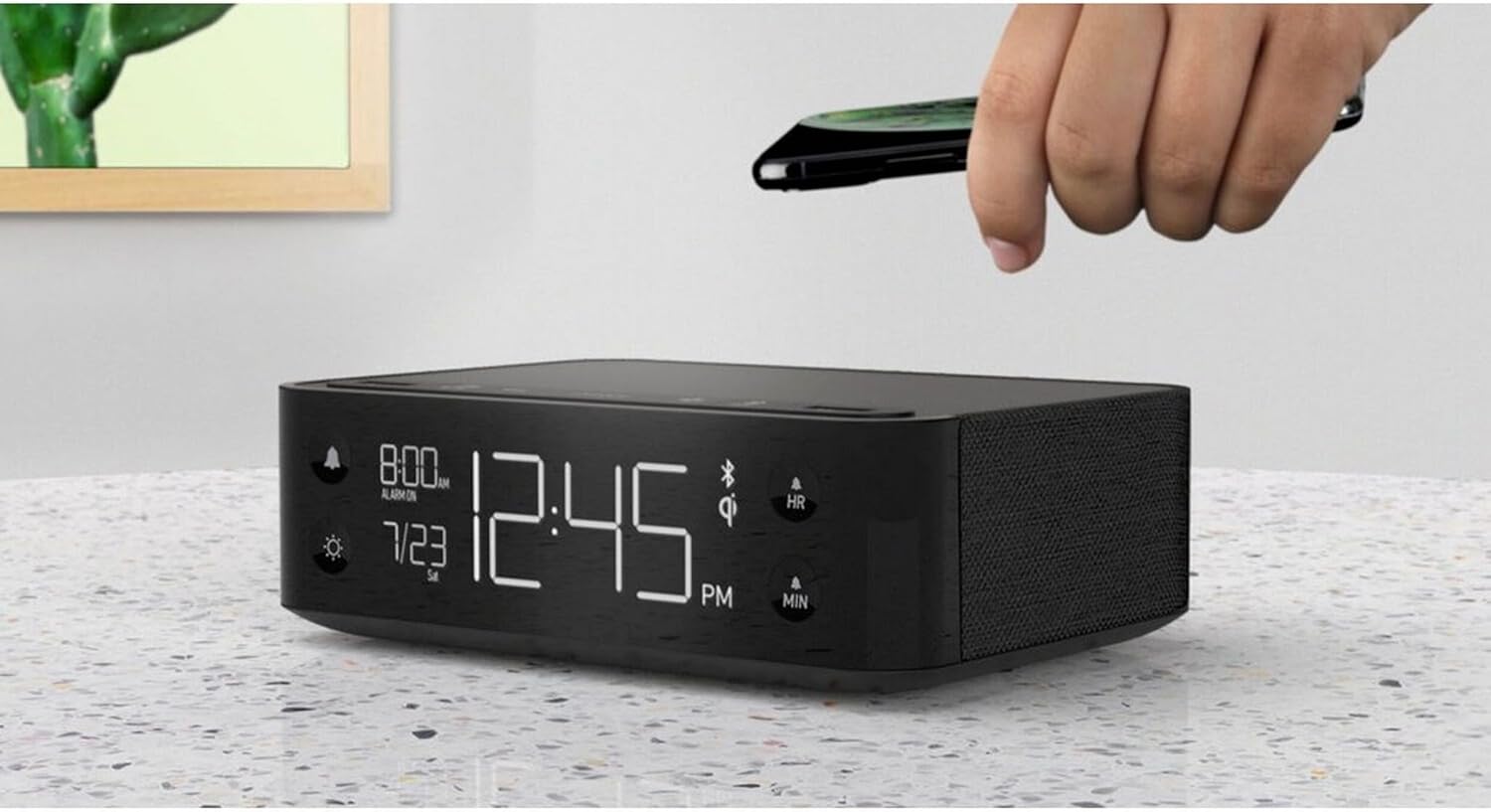
Figure 3: A smartphone being placed on the top surface of the Station A for wireless charging.
Aufstellen
1. Stromanschluss
- Unpack the Nonstop NSA2-BK unit and all accessories from the packaging.
- Connect the provided power adapter to the DC input port on the back of the unit.
- Plug the power adapter into a standard electrical outlet. The display will illuminate, indicating the unit is powered on.
2. Erste Uhrzeiteinstellung
Beim ersten Einschalten zeigt die Uhr möglicherweise eine Standardzeit an. Ausführliche Anweisungen zum Einstellen von Uhrzeit und Datum finden Sie in der „Bedienungsanleitung“.
3. Bluetooth-Kopplung
- Stellen Sie sicher, dass Bluetooth auf Ihrem Mobilgerät (Smartphone, Tablet usw.) aktiviert ist.
- On the Nonstop NSA2-BK, press the Bluetooth pairing button (refer to button layout in "Operating Instructions" if available, otherwise assume a standard Bluetooth icon button). The Bluetooth indicator on the display will flash.
- On your mobile device, search for available Bluetooth devices. Select "Nonstop NSA2-BK" from the list.
- Once paired, the Bluetooth indicator on the unit will become solid, and you will hear an audible confirmation.
4. Wireless Qi Charging Setup
No specific setup is required for wireless charging beyond connecting the unit to power. Simply place your Qi-compatible device on the designated charging pad on top of the unit. Ensure the device is centered for optimal charging.
Bedienungsanleitung
Einstellen von Uhrzeit und Datum
- Halten Sie die ZEITEINSTELLUNG button (or equivalent, often combined with HR/MIN buttons).
- Verwenden Sie die HR (Stunde) und MIN (Minute) buttons to adjust the time.
- Drücken Sie die ZEITEINSTELLUNG button again to confirm and move to date setting (if applicable).
- Verwenden Sie die HR Und MIN buttons to adjust the month and day.
- Drücken ZEITEINSTELLUNG , um zu beenden.
Einstellen und Verwenden des Alarms
- Halten Sie die WECKER GESTELLT button (bell icon). The alarm time will flash.
- Verwenden Sie die HR Und MIN Tasten zum Einstellen der gewünschten Weckzeit.
- Drücken WECKER GESTELLT zur Bestätigung erneut.
- Zum Aktivieren/Deaktivieren des Alarms drücken Sie die Taste ALARM EIN / AUS button (bell icon). An alarm indicator will appear/disappear on the display.
- Wenn der Alarm ertönt, drücken Sie die SCHLAFEN button (if available, or any button except alarm off) for a temporary pause. Press the ALARM EIN / AUS Taste zum vollständigen Ausschalten des Alarms.
Using Bluetooth Speaker
- Ensure the unit is paired with your device (see "Bluetooth Pairing" in Setup).
- Play audio from your paired device. Sound will be output through the NSA2-BK speaker.
- Adjust volume using the volume controls on your paired device or on the NSA2-BK unit (if available).
Playing Relaxation Sounds
- Drücken Sie die KLANG button (or similar, possibly a wave/rain icon).
- Press repeatedly to cycle through available soundscapes (Ocean Waves, Rain, Ambient Sounds).
- Halten Sie die KLANG button to turn off the soundscape.
Using Charging Functions
- Wireless Qi Charging: Place your Qi-compatible smartphone centrally on the top charging pad. A charging indicator on the display will illuminate.
- USB-Aufladung: Connect your device's USB charging cable to one of the two USB ports on the back or side of the unit. Charging will begin automatically.
Anpassen der Anzeigehelligkeit
- Drücken Sie die DIMMER button (sun icon).
- Press repeatedly to cycle through different brightness levels for the display.
Wartung
- Reinigung: Disconnect the power before cleaning. Use a soft, dry cloth to wipe the exterior of the unit. Do not use liquid cleaners or abrasive materials.
- Lagerung: Wenn Sie das Gerät über einen längeren Zeitraum lagern, trennen Sie es vom Stromnetz und bewahren Sie es an einem kühlen, trockenen Ort auf.
- Vermeiden Sie Flüssigkeiten: Das Gerät sollte nicht mit Wasser oder übermäßiger Feuchtigkeit in Berührung kommen.
- Belüftung: Sorgen Sie für ausreichende Belüftung rund um das Gerät, um eine Überhitzung zu vermeiden. Blockieren Sie die Belüftungsöffnungen nicht.
Fehlerbehebung
| Problem | Mögliche Ursache | Lösung |
|---|---|---|
| Gerät lässt sich nicht einschalten. | Netzteil nicht angeschlossen oder Steckdose nicht aktiv. | Stellen Sie sicher, dass das Netzteil fest mit dem Gerät und einer funktionierenden Steckdose verbunden ist. |
| Das Bluetooth-Gerät konnte nicht gekoppelt werden. | Unit is not in pairing mode; device is too far; another device is already connected. | Ensure the NSA2-BK is in pairing mode. Move device closer. Disconnect any previously paired devices. |
| Das kabellose Laden funktioniert nicht. | Device is not Qi-compatible; device not centered; foreign objects on pad; thick phone case. | Verify device supports Qi wireless charging. Re-position device centrally. Remove foreign objects or thick phone cases. |
| Das Laden über USB funktioniert nicht. | Cable is faulty; device is not compatible; unit is overloaded. | Try a different USB cable. Ensure device is compatible. Avoid charging too many high-power devices simultaneously. |
| Der Alarm ertönt nicht. | Alarm is not activated; volume is too low. | Ensure the alarm is set and activated (alarm indicator visible). Increase the unit's volume. |
Technische Daten
- Marke: Nonstop
- Modell: NSA2-BK
- Farbe: Black, Ocean
- Artikelgewicht: 3 Pfund
- Hardware-Schnittstelle: USB
- Kompatible Geräte: iPad, Smartphones, Kindle, Wireless Headphones (via USB/Qi)
- USB-Anschlüsse insgesamt: 2
- Wastage: 10 watts (for charging)
- UPC: 840148709171
- ASIN: B0C8LDWF57
- Als Erstes verfügbar: 29. Juli 2024
Garantie und Support
Specific warranty details for the Nonstop NSA2-BK are typically provided with the product packaging or on the manufacturer's official webBitte konsultieren Sie diese Quellen für umfassende Garantieinformationen.
For technical support, troubleshooting assistance beyond this manual, or inquiries regarding parts and service, please contact Nonstop customer support through their official webWebsite oder die Kontaktinformationen, die in der Originaldokumentation Ihres Produkts angegeben sind.
Hinweis: Bewahren Sie Ihren Kaufbeleg stets für Garantieansprüche auf.