
Fenton RP118B
Fenton RP118B Bluetooth-Plattenspieler – Benutzerhandbuch
Model: RP118B
1. Einleitung
This manual provides essential information for the safe and efficient operation of your Fenton RP118B Bluetooth Turntable. Please read it thoroughly before using the device and retain it for future reference.

Image 1.1: The Fenton RP118B Bluetooth Turntable in its open position, showcasing a vinyl record ready for playback.
2. Sicherheitshinweise
- Energiequelle: Stellen Sie sicher, dass das Netzteil mit der Lautstärke übereinstimmttage auf dem Gerät angegeben.
- Wasser und Feuchtigkeit: Setzen Sie das Gerät weder Regen noch Feuchtigkeit aus. Stellen Sie keine mit Flüssigkeiten gefüllten Gegenstände, wie z. B. Vasen, auf das Gerät.
- Belüftung: Sorgen Sie für ausreichende Belüftung. Decken Sie die Lüftungsöffnungen nicht ab.
- Hitze: Stellen Sie das Gerät nicht in der Nähe von Wärmequellen wie Heizkörpern, Heizlüftern, Öfen oder anderen Geräten (einschließlich) auf. ampKonverter (Lüfter), die Wärme erzeugen.
- Reinigung: Nur mit trockenem Tuch reinigen.
- Wartung: Überlassen Sie sämtliche Wartungsarbeiten qualifiziertem Servicepersonal.
3. Packungsinhalt
Prüfen Sie beim Auspacken, ob alle Artikel vorhanden sind:
- Fenton RP118B Bluetooth Turntable
- Netzteil
- USB Cable (for PC encoding)
- Bedienungsanleitung
4. Produktüberschreitungview
The Fenton RP118B turntable is designed for playing vinyl records. Its black polyurethane leather suitcase design provides a classic aesthetic. This turntable offers three playback speeds (33, 45, and 78 RPM). It features integrated stereo speakers for clear sound reproduction. Bluetooth connectivity allows for connecting external speakers, headphones, and other devices. The PC encoding function via USB enables conversion of vinyl records to MP3 files for digital archiving. The turntable includes a tonearm with manual or automatic stop functionality and a 3.5mm AUX input. Its belt drive system ensures stable record playback. The RP118B combines traditional vinyl playback with modern features in a compact format.

Bild 4.1: Überview of the Fenton RP118B's key features, including USB encoding, headphone output, integrated speakers, Bluetooth, and Line In.
4.1. Bedienelemente und Anschlüsse

Abbildung 4.2: Detailansicht view of the turntable's control panel and connection ports.
- Teller: Unterstützt die Schallplatte.
- Tonarm: Hält die Abtastnadel und tastet die Rillen der Schallplatte ab.
- Stylus/Needle: Liest die Audioinformationen aus der Aufnahme.
- Geschwindigkeitswähler: Switch between 33, 45, and 78 RPM.
- Automatischer Stoppschalter: Enables or disables automatic tonearm stop at the end of a record.
- Ein/Aus-/Lautstärkeregler: Schaltet das Gerät ein/aus und regelt die Lautstärke des Lautsprechers.
- Kontrollleuchte: Zeigt den Strom- und Bluetooth-Status an.
- Kopfhöreranschluss: Zum Anschließen von Kopfhörern.
- Line In (AUX) Jack: Zum Anschluss externer Audioquellen.
- USB-Anschluss: For PC connection for MP3 encoding.
- Line Out (RCA) Jacks: Zum Anschluss an externe Geräte ampLautsprecher oder Aktivlautsprecher.
- DC-5-V-Eingang: Zum Anschluss des Netzteils.
- BT OUT/PHONO/BT IN Switch: Selects Bluetooth transmission, Phono output, or Bluetooth reception mode.
5. Einrichtung
5.1. Auspacken und Aufstellen
- Nehmen Sie den Plattenspieler vorsichtig aus der Verpackung.
- Place the unit on a stable, level surface away from direct sunlight, heat sources, and excessive dust or vibration.
- Remove any protective materials from the tonearm and stylus.
5.2. Stromanschluss
- Connect the DC 5V power adapter to the DC 5V input port on the turntable.
- Stecken Sie den Adapter in eine geeignete Wandsteckdose.
5.3. External Audio Connections (Optional)
- To External Speakers/AmpReiniger: Connect RCA cables (not included) from the "Line Out" jacks on the turntable to the audio input of your ampVerstärker oder Aktivlautsprecher.
- To Headphones: Stecken Sie 3.5-mm-Kopfhörer in die Kopfhörerbuchse.
- From External Audio Source (AUX In): Connect a 3.5mm audio cable (not included) from your external device (e.g., MP3 player, smartphone) to the "Line In" jack on the turntable.
6. Bedienungsanleitung
6.1. Abspielen einer Schallplatte
- Öffnen Sie den Deckel des Plattenspielers.
- Legen Sie eine Schallplatte auf den Plattenteller.
- Wählen Sie die gewünschte Drehzahl (33, 45 oder 78 U/min) mit dem Drehzahlwahlschalter. Für Schallplatten mit 45 U/min setzen Sie den mitgelieferten 45-U/min-Adapter auf die Spindel.
- Drehen Sie den Ein-/Ausschalter/Lautstärkeregler im Uhrzeigersinn, um das Gerät einzuschalten.
- Set the BT OUT/PHONO/BT IN switch to "PHONO" mode.
- Lift the tonearm using the cue lever and position it over the desired track of the record.
- Senken Sie den Tonarm mithilfe des Tonarmlifts vorsichtig auf die Schallplatte ab. Die Wiedergabe der Schallplatte beginnt.
- Die Lautstärke wird mit dem Ein-/Ausschalter/Lautstärkeregler eingestellt.
- At the end of the record, if the Auto Stop switch is ON, the platter will stop rotating. If OFF, the platter will continue to rotate, and you must manually lift the tonearm.
- To stop playback, lift the tonearm and return it to its rest.

Image 6.1: The three-speed turntable platter, capable of playing 33 1/3, 45, and 78 RPM records.
6.2. Bluetooth Reception (BT IN)
Use this function to stream audio from your smartphone or tablet to the turntable's built-in speakers.
- Drehen Sie den Ein-/Ausschalter/Lautstärkeregler im Uhrzeigersinn, um das Gerät einzuschalten.
- Set the BT OUT/PHONO/BT IN switch to "BT IN" mode. The indicator light will flash, indicating pairing mode.
- Enable Bluetooth on your smartphone or tablet and search for "Fenton RP118B" (or similar).
- Select the turntable from the list of available devices to pair. Once paired, the indicator light will stop flashing and remain solid.
- Play music from your device. Audio will be streamed through the turntable's speakers.
- Stellen Sie die Lautstärke mit dem Ein-/Ausschalter/Lautstärkeregler am Plattenspieler und/oder an Ihrem angeschlossenen Gerät ein.

Image 6.2: The turntable utilizing Bluetooth wireless technology to receive audio from a smartphone.
6.3. Bluetooth Transmission (BT OUT)
Use this function to stream audio from your playing vinyl record to external Bluetooth speakers or headphones.
- Stellen Sie sicher, dass sich Ihr externer Bluetooth-Lautsprecher oder Ihre Kopfhörer im Kopplungsmodus befinden.
- Drehen Sie den Ein-/Ausschalter/Lautstärkeregler im Uhrzeigersinn, um das Gerät einzuschalten.
- Set the BT OUT/PHONO/BT IN switch to "BT OUT" mode. The indicator light will flash.
- The turntable will automatically search for and attempt to pair with nearby Bluetooth audio devices.
- Sobald die Kopplung hergestellt ist, hört die Kontrollleuchte auf zu blinken.
- Begin playing a vinyl record as described in section 6.1. The audio will be transmitted to your paired Bluetooth device.
- Adjust the volume on your connected Bluetooth speaker or headphones.
6.4. USB Encoding (Vinyl to MP3)
This feature allows you to convert your vinyl records into digital MP3 files auf Ihrem Computer.
- Verbinden Sie den Plattenspieler mit Ihrem Computer mithilfe des mitgelieferten USB-Kabels.
- Install the necessary recording software on your computer (software typically provided on a CD or available for download from the manufacturer's webSeite? ˅).
- Follow the instructions provided with the recording software to capture the audio from your vinyl record.
- Play the vinyl record on the turntable as you would normally. The audio will be sent to your computer for recording.
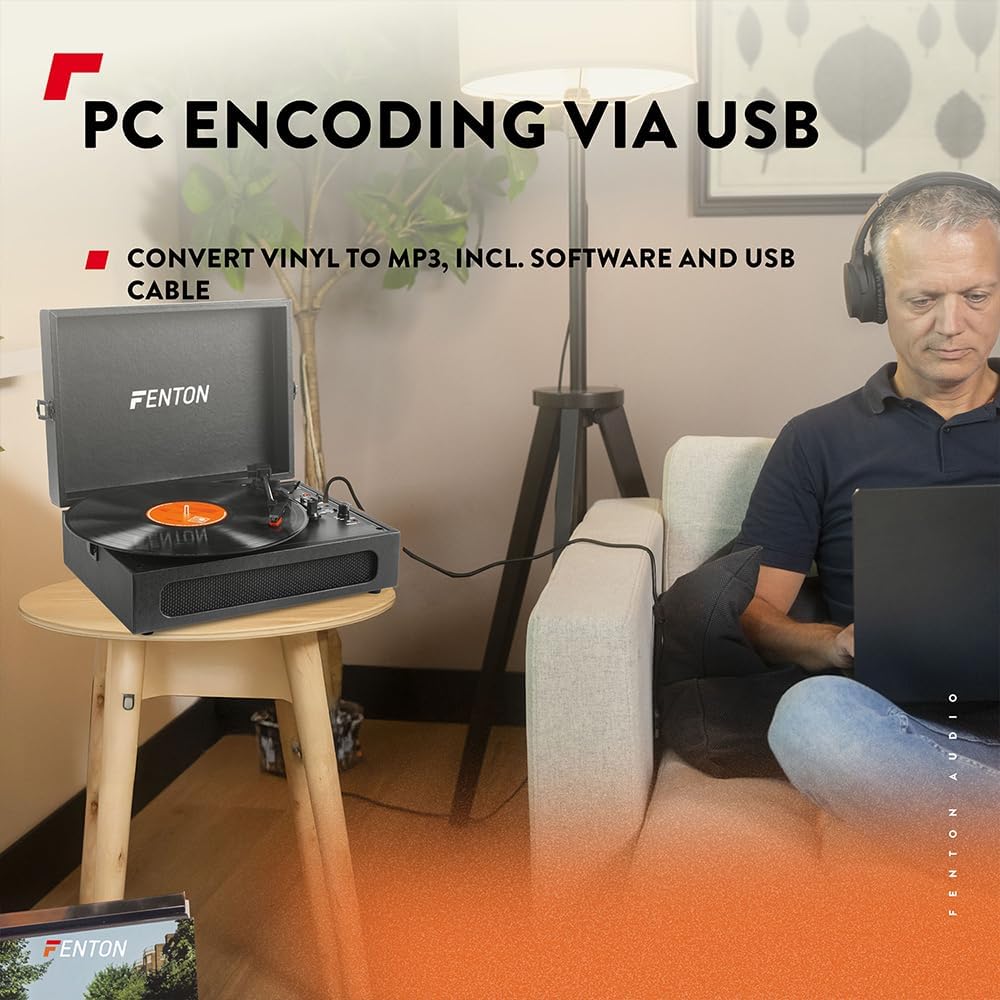
Image 6.3: USB encoding in progress, converting vinyl audio to MP3 files auf einem Computer.
6.5. Using the AUX Input (Line In)
Connect an external audio device (e.g., smartphone, MP3 player) to the turntable's built-in speakers.
- Connect a 3.5mm audio cable from your external device's headphone or line-out jack to the "Line In" jack on the turntable.
- Drehen Sie den Ein-/Ausschalter/Lautstärkeregler im Uhrzeigersinn, um das Gerät einzuschalten.
- Ensure the BT OUT/PHONO/BT IN switch is not in "BT IN" mode (it can be in PHONO or BT OUT, as Line In is a separate input).
- Spielen Sie Audio von Ihrem externen Gerät ab. Der Ton wird über die Lautsprecher des Plattenspielers ausgegeben.
- Stellen Sie die Lautstärke mit dem Ein-/Ausschalter/Lautstärkeregler am Plattenspieler und/oder an Ihrem angeschlossenen Gerät ein.
7. Wartung
7.1. Reinigung des Plattenspielers
- Trennen Sie das Gerät vor der Reinigung immer vom Stromnetz.
- Verwenden Sie ein weiches, trockenes Tuch, um die Außenflächen abzuwischen. Verwenden Sie keine Scheuermittel, Wachse oder Lösungsmittel.
- Gently brush the stylus with a soft brush designed for stylus cleaning, moving from back to front.
- Um Staubansammlungen zu vermeiden, sollte die Staubschutzkappe bei Nichtgebrauch geschlossen bleiben.
7.2. Austausch der Nadel
The stylus is a consumable part and will wear out over time. A worn stylus can damage your records and degrade sound quality. Replace the stylus after approximately 300-500 hours of playback, or if you notice a significant drop in sound quality or visible damage.
- Beachten Sie die Herstellerangaben. website or your retailer for compatible replacement styli.
- Follow the instructions provided with the replacement stylus for proper installation.
8. Fehlerbehebung
| Problem | Mögliche Ursache | Lösung |
|---|---|---|
| Kein Strom | Power adapter not connected; Power outlet not working; Power/Volume knob off. | Ensure power adapter is securely connected. Try a different outlet. Turn Power/Volume knob clockwise to ON. |
| Kein Ton von den Lautsprechern | Volume too low; BT OUT/PHONO/BT IN switch in incorrect position; Headphones connected. | Increase volume. Set switch to "PHONO" for vinyl or "BT IN" for Bluetooth reception. Disconnect headphones. |
| Ton verzerrt oder setzt aus | Record dirty or damaged; Stylus worn or dirty; Turntable not level. | Clean record. Clean or replace stylus. Place turntable on a level surface. |
| Probleme mit der Bluetooth-Kopplung | Device too far; Turntable not in pairing mode; Incorrect BT mode selected. | Move device closer. Ensure turntable is in "BT IN" (for reception) or "BT OUT" (for transmission) mode and indicator is flashing. Restart both devices. |
| Record stops prematurely (Auto Stop) | Der automatische Stoppschalter ist eingeschaltet. | This is normal operation. If you prefer continuous rotation, set the Auto Stop switch to OFF. |
9. Spezifikationen
| Marke | Fenton |
| Modellnummer | RP118B |
| Farbe | Schwarz |
| Material | Polyurethan |
| Motortyp | Riemenbetrieben |
| Wiedergabegeschwindigkeiten | 33 1/3, 45, 78 U/min |
| Kompatible Geräte | Personal computer, MP3 player, smartphone, headphones, speakers, tablet |
| Bluetooth-Version | 5.0 (for reception and transmission) |
| USB-Funktionalität | PC encoding (Vinyl to MP3) |
| Audioausgänge | RCA Line Out, 3.5mm Headphone Jack |
| Audioeingänge | 3.5-mm-AUX-Eingang |
| Integrierte Lautsprecher | Yes, stereo |
| Artikelgewicht | 3.25 Kilogramm |
| Stromversorgung | DC 5V (Adapter included) |

Image 9.1: Dimensions of the Fenton RP118B turntable.
10. Garantie und Support
For warranty information, please refer to the documentation included with your purchase or visit the official Fenton website. For technical support or service inquiries, please contact your retailer or the manufacturer directly.
Hersteller: Tronios BV
Ask a question about this manual
Ask about setup, troubleshooting, compatibility, parts, safety, or missing instructions. Manuals+ will review the question and use this page’s manual context to help answer it.