
1. Einleitung
This manual provides essential instructions for the safe and effective use of your FLYLINKTECH 4000A Portable Car Battery Jump Starter. Please read this manual thoroughly before operation and retain it for future reference. This device is designed to jump-start vehicles with dead or low-voltage batteries and can also function as a portable power bank and LED flashlight.
2. Lieferumfang
Prüfen Sie beim Öffnen der Verpackung, ob alle Artikel vorhanden sind:
- FLYLINKTECH CF900 Jump Starter Unit
- Intelligente Überbrückungskabel
- USB-C-Ladekabel
- Portable EVA Carrying Case
- Benutzerhandbuch (dieses Dokument)

Image: Contents of the FLYLINKTECH CF900 package. This includes the jump starter unit, smart jumper cables, a USB-C charging cable, a portable EVA carrying case, and the user manual.
3. Produktmerkmale
- High-Power Jump Starter: Delivers 4000A peak current, suitable for vehicles with up to 9.0L gas or 8.0L diesel engines. Capable of up to 30 jump starts on a single charge.
- Versatile Power Bank: Features an 18,000mAh battery capacity and dual USB ports, including Quick Charge 3.0, for charging various electronic devices. Maintains charge for up to 24 months when not in use.
- Multifunktionale LED-Taschenlampe: Equipped with a bright 600-lumen LED light offering standard, SOS, and strobe modes for emergencies. Provides up to 48 hours of continuous illumination.
- Erweiterte Sicherheitsfunktionen: Integrated smart protection system provides 10 layers of safety, including reverse polarity, over-current, and over-voltage protection. Ensures safe operation in extreme temperatures (-4°F to 140°F) and prevents sparks or incorrect connections.
- Langlebiges und tragbares Design: Compact and lightweight (820g) with a rugged ABS exterior for protection against impacts and scratches.

Bild: Detailliert view of the FLYLINKTECH CF900 jump starter, highlighting the LED display, power button, LED flashlight, USB output ports (USB1 5V/2.4A, USB2 Quick Charge 3.0), jump start socket, and 5V/2A USB-C input port.
4. Einrichten und Laden
Before first use, fully charge the jump starter. It is recommended to recharge the unit every 3-6 months to maintain optimal battery health.
- Suchen Sie den USB-C-Eingangsanschluss am Starthilfegerät.
- Connect the provided USB-C charging cable to the jump starter's input port.
- Connect the other end of the USB-C cable to a 5V/2A USB wall adapter (not included) or a compatible USB charging port.
- Der Ladefortschritt wird auf dem LCD-Display angezeigt. Laden Sie das Gerät, bis das Display 100 % anzeigt.

Image: The FLYLINKTECH jump starter functioning as a portable power bank, charging a smartphone and a tablet via its USB output ports. The image highlights the 18000mAh capacity and Quick Charge 3.0 feature.
5. Bedienungsanleitung
5.1. Starthilfe für Ihr Fahrzeug
Stellen Sie sicher, dass der Starthilfe-Booster mindestens zu 50 % geladen ist, bevor Sie versuchen, ein Fahrzeug mit Starthilfe zu starten.
- Connect Smart Jumper Cables: Insert the blue plug of the smart jumper cables completely into the jump start socket on the jump starter unit. Ensure a secure connection. The indicator light on the smart clamp will flash green and red.
- Anschluss an die Autobatterie: Befestigen Sie die rote Klamp an den Pluspol (+) der Autobatterie und den schwarzen Polamp an den Minuspol (-).
- Kontrollleuchte prüfen:
- Durchgängig grün: Connection is correct and safe. Proceed to start the vehicle.
- Durchgehend rot mit Piepton: Verpolung erkannt. Stecker trennen.amps und wieder korrekt anbringen.
- Grün blinkend: Akku voltage is too low. Press the "BOOST" button on the smart clamp for 3 seconds until the light turns solid green. Start the vehicle within 30 seconds.
- No Light/No Beep: Check connections or if the car battery is severely damaged.
- Startfahrzeug: Sobald die Kontrollleuchte dauerhaft grün leuchtet, starten Sie den Motor Ihres Fahrzeugs.
- Cl entfernenamps: As soon as the engine starts, remove the smart jumper cables from the car battery terminals first, then disconnect the blue plug from the jump starter unit.

Image: Easy operation guide for jump starting a car. Step 1: Insert the jump clamp into the booster. Step 2: Connect the clamps to the car battery. Step 3: Start your car. Step 4: Remove the clamps.
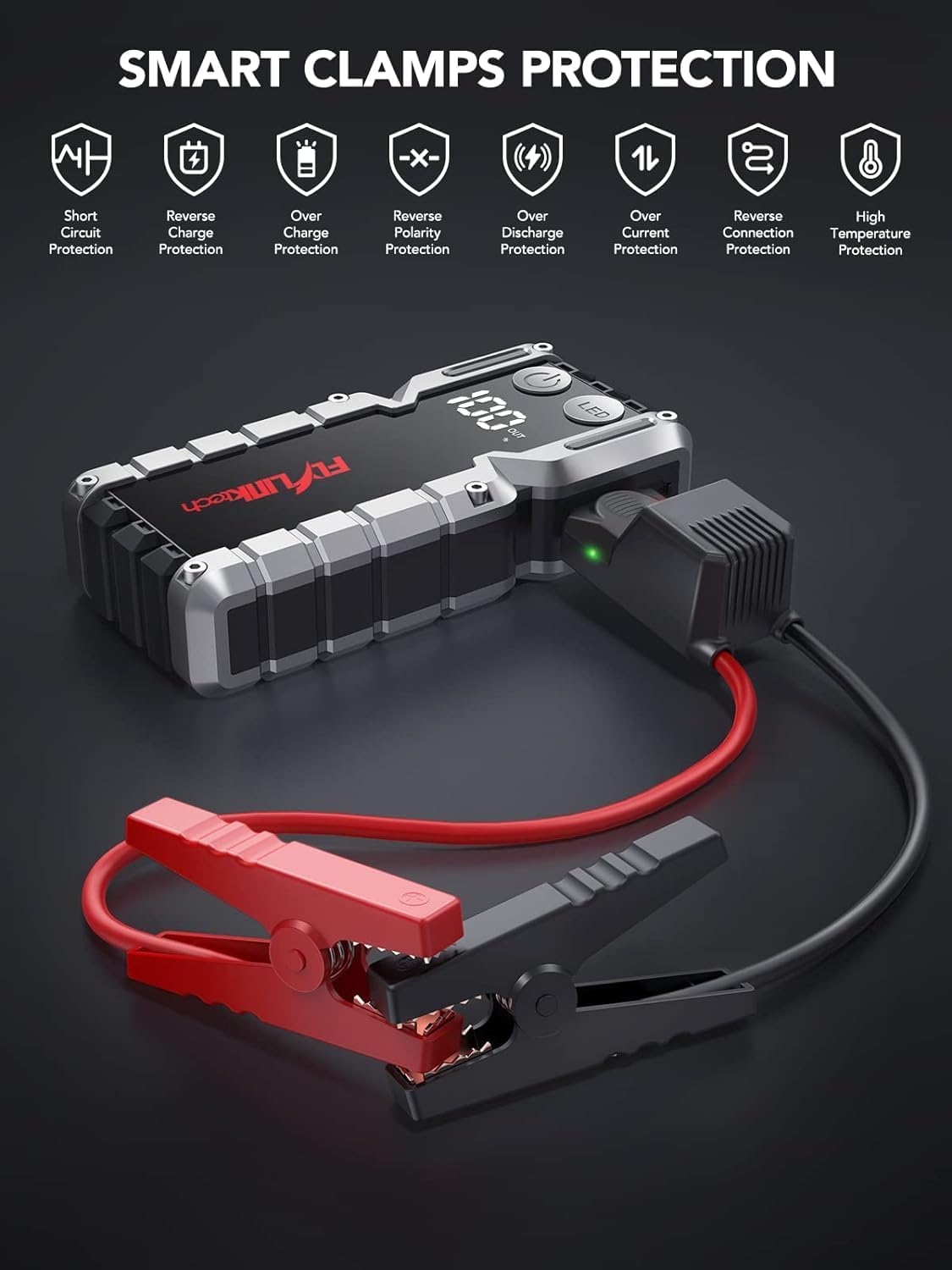
Bild: Smart Clamps Protection. Icons represent various safety features including short circuit protection, reverse charge protection, over charge protection, reverse polarity protection, over discharge protection, over current protection, and high temperature protection.
5.2. Verwendung als Powerbank
Mit dem Starthilfegerät können verschiedene USB-betriebene Geräte aufgeladen werden.
- Connect your device's USB charging cable to one of the USB output ports (USB1 or USB2 QC3.0) on the jump starter.
- Der Starthilfe-Booster beginnt automatisch mit dem Laden Ihres Geräts.
- Das LCD-Display zeigt die verbleibende Batterieladung an.tage des Starthilfegeräts.
5.3. Verwenden der LED-Taschenlampe
The built-in LED flashlight has three modes: standard, SOS, and strobe.
- Press and hold the "LED" button for 3 seconds to turn on the standard flashlight mode.
- Press the "LED" button again to cycle through the modes: Standard > SOS > Strobe.
- Press and hold the "LED" button for 3 seconds to turn off the flashlight.

Image: The built-in LED flashlight of the FLYLINKTECH jump starter, demonstrating its three modes: standard flashlight, SOS signal, and strobe light.
6. Wartung
- Store the jump starter in its portable EVA carrying case when not in use to protect it from dust and damage.
- Laden Sie das Gerät alle 3-6 Monate auf, auch wenn es nicht benutzt wird, um den Zustand des Akkus zu erhalten und seine Lebensdauer zu verlängern.
- Reinigen Sie die Außenseite mit einem weichen, trockenen Tuch. Verwenden Sie keine scharfen Chemikalien oder Scheuermittel.
- Keep the jump starter away from direct sunlight, heat sources, and moisture.
- Das Gerät darf nicht auseinandergenommen werden. Wartungsarbeiten dürfen nur von qualifiziertem Fachpersonal durchgeführt werden.
7. Fehlerbehebung
| Problem | Mögliche Ursache | Lösung |
|---|---|---|
| Starthilfegerät lässt sich nicht einschalten. | Der Akku ist vollständig entladen. | Charge the jump starter fully using the provided USB-C cable. |
| Das Fahrzeug startet nach dem Anschließen nicht. | Falsche Klamp Anschluss (umgekehrte Polarität). Starthilfebatterie zu schwach. Die Fahrzeugbatterie wurde stark beschädigt. Smart Klamp indicator not solid green. | Stellen Sie sicher, dass clampDie Verbindungen sind korrekt (rot an +, schwarz an -). Laden Sie die Starthilfe auf. Ziehen Sie einen professionellen Mechaniker zu Rate. Follow indicator light instructions in Section 5.1. If flashing green, use BOOST function. |
| Smart Klamp indicator is solid red and beeping. | Anschluss mit umgekehrter Polarität. | Trennen Sie sofort die Verbindung.amps and re-attach correctly (red to +, black to -). |
| Die Taschenlampe funktioniert nicht. | Batterie ist zu schwach. LED button not pressed correctly. | Laden Sie das Starthilfegerät auf. Press and hold the "LED" button for 3 seconds to activate. |
| Geräte, die nicht über USB-Anschlüsse geladen werden. | Starthilfebatterie zu schwach. Problem mit der Kabelverbindung. | Laden Sie das Starthilfegerät auf. Ensure USB cables are securely connected to both the jump starter and the device. Try a different cable. |
8. Spezifikationen
| Besonderheit | Detail |
|---|---|
| Modell | CF900 |
| Batteriekapazität | 18000 mAh (66.6Wh) |
| Spitzenstrom | 4000 A |
| Starthilfe-Ausgang | 12 V |
| USB1-Ausgang | 5 V/2.4 A |
| USB2-Ausgang (QC3.0) | 5V/2.4A, 9V/2A, 12V/1.5A |
| Typ-C-Eingang | 5 V/2 A |
| Betriebstemperatur | -20 °C bis 60 °C (-4 °F bis 140 °F) |
| Technische Daten | 19 cm x 9 cm x 4 cm (ca.) |
| Artikelgewicht | 820 g |
| Motorkompatibilität | Bis zu 9.0 l Benzin oder 8.0 l Diesel |
9. Garantie und Support
FLYLINKTECH provides the following support for this product:
- 3 Jahr kostenlose Garantie: Deckt Herstellungsfehler und Funktionsstörungen bei normalem Gebrauch ab.
- Lebenslanger technischer Support: Assistance with product usage, troubleshooting, and general inquiries.
- Kundenservice rund um die Uhr: Available around the clock for any questions or concerns.
For support, please refer to the contact information provided in your product packaging or visit the official Flylinktech webWebsite.