
1. Einleitung
Welcome to the user manual for your Re-Flix Superior Light Universal Remote Control. This 4-in-1 remote is designed for ease of use and comes pre-programmed for your Sat/DTT Canal+ device, eliminating the need for complex setup codes. Simply insert batteries, and your remote is ready for immediate operation. This manual provides essential information on setup, operation, maintenance, and troubleshooting to ensure optimal performance of your remote control.
2. Produktüberschreitungview
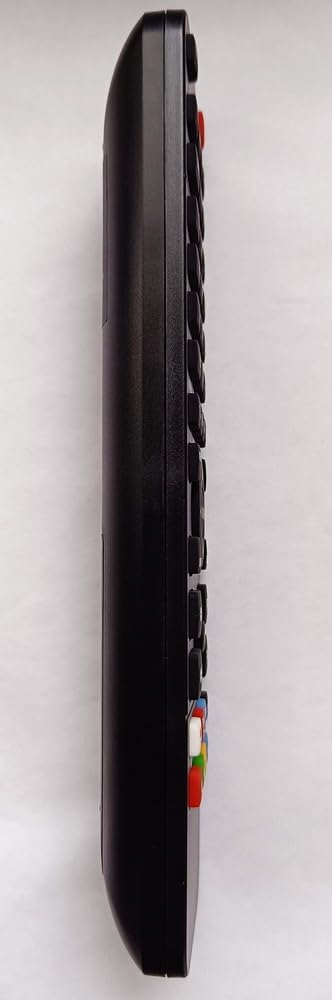
The Re-Flix Superior Light is a versatile 4-in-1 universal remote control. It is specifically pre-programmed to operate your Sat/DTT Canal+ device, offering a seamless out-of-the-box experience. The remote retains its programming even when batteries are removed, ensuring no data loss.

3. Einrichtung: Batterieeinbau
Your Re-Flix Superior Light remote control requires two AAA (1.5V) batteries for operation. Batteries are not included with the remote.
- Suchen Sie das Batteriefach auf der Rückseite der Fernbedienung (siehe Abbildung 2).
- Schieben Sie den Deckel des Batteriefachs nach unten oder drücken Sie den Riegel und heben Sie ihn an, um ihn zu öffnen.
- Legen Sie zwei AAA-Batterien ein und achten Sie dabei auf die richtige Polarität (+ und -), wie im Batteriefach angegeben.
- Setzen Sie die Abdeckung des Batteriefachs wieder ein, indem Sie sie so weit hineinschieben, bis sie sicher einrastet.
The remote is now ready for use.
4. Bedienungsanleitung
4.1 Erstgebrauch
Once batteries are installed, your Re-Flix Superior Light remote control is immediately ready to operate your pre-programmed Sat/DTT Canal+ device. No additional codes or setup steps are required for this specific device.
4.2 Grundfunktionen
The remote control provides standard functions for your television or set-top box, including:
- Leistung: Schaltet das Gerät ein oder aus.
- Kanal hoch/runter: Navigates through channels.
- Lautstärke erhöhen/verringern: Passt den Audiopegel an.
- Stumm: Schaltet den Ton stumm.
- Numerische Tastatur: Für direkten Kanaleingang.
- Menü/Leitfaden: Accesses device menus and program guides.
- Navigationstasten: For moving through menus and selections.
4.3 Programming Other Devices (Advanced)
While this remote is pre-programmed for your specified device, it is a 4-in-1 universal remote. To program it for other devices, a separate USB programmer is required. This USB programmer is not included with the remote control. Please refer to the instructions provided with the USB programmer for details on how to configure the remote for additional devices.
5. Wartung
5.1 Reinigung
To clean your remote control, use a soft, dry cloth. Avoid using liquid cleaners, abrasive materials, or solvents, as these can damage the remote's surface or internal components.
5.2 Batteriepflege
- Wenn die Fernbedienung längere Zeit nicht benutzt wird, sollten die Batterien entfernt werden, um ein Auslaufen und mögliche Schäden zu vermeiden.
- Tauschen Sie alle Batterien gleichzeitig gegen neue Batterien desselben Typs aus.
- Entsorgen Sie gebrauchte Batterien verantwortungsvoll gemäß den örtlichen Vorschriften.
The remote control is designed to retain its programming even when batteries are removed or depleted.
6. Fehlerbehebung
If you encounter issues with your Re-Flix Superior Light remote control, please refer to the following common solutions:
- Fernbedienung reagiert nicht:
- Stellen Sie sicher, dass die Batterien richtig und mit der richtigen Polarität eingelegt sind.
- Ersetzen Sie die alten Batterien durch neue AAA-Batterien.
- Check for any obstructions between the remote control and your device's infrared receiver.
- Ensure your device (TV, Sat/DTT box) is powered on.
- Incorrect commands or limited functionality:
- Verify that the model designation of your device or original remote control matches the model designation (G9STEC1) for which this remote was pre-programmed. Incompatibility can lead to partial or no functionality.
- If you have attempted to program the remote for other devices using a USB programmer, ensure the correct device mode is selected (if applicable).
7. Spezifikationen
| Marke | Re-Flix |
| Modellnummern | G9STEC1, 747516 |
| Typ | 4-in-1-Universalfernbedienung |
| Kompatibilität | Pre-programmed for Sat/DTT Canal+ (G9STEC1) |
| Batterien erforderlich | 2 x 1.5 V AAA (nicht im Lieferumfang enthalten) |
| Gewicht | 89 g |
| Abmessungen (L x B x H) | 21 x 4.7 x 2 cm |
| Hersteller | Superior Electronics (Re-Flix) |
8. Garantieinformationen
Specific warranty details for the Re-Flix Superior Light Universal Remote Control are not provided in the product information. For warranty terms and conditions, please consult your original purchase receipt, contact the retailer from whom you purchased the product, or visit the official Re-Flix / Superior Electronics webWebsite.
9. Unterstützung
For technical assistance, troubleshooting, or further inquiries regarding your Re-Flix Superior Light Universal Remote Control, please contact:
- Einzelhändler: The store or online platform where you purchased the product.
- Hersteller: Superior Electronics (Re-Flix)
- E-Mail: superior@superior-electronics.com
- WebWebsite: www.superior-electronics.com
- Adresse: Largo Lanciani, 2A, 00162 Rome, Italy