
1. Einleitung
This user manual provides essential information for the installation, operation, and maintenance of your Palit GeForce RTX 4060 StormX 8GB graphics card. Please read this manual thoroughly before installing and using the product to ensure proper functionality and to prevent damage.
2. Packungsinhalt
Prüfen Sie, ob alle Artikel in Ihrer Produktverpackung enthalten sind:
- Palit GeForce RTX 4060 8GB Storm X Graphics Card
- Kurzinstallationsanleitung (falls enthalten)
- Driver CD/DVD (if included, otherwise download latest drivers online)
3. Einrichtung und Installation
3.1 Checkliste vor der Installation
- Stellen Sie sicher, dass Ihr Netzteil die Mindestleistung (Watt) erfüllt.tage requirement (typically 550W or higher for an RTX 4060, check specific PSU recommendations).
- Confirm your motherboard has an available PCI Express x16 slot.
- Turn off your computer and disconnect the power cable before proceeding.
- Erden Sie sich, um jegliche statische Elektrizität abzuleiten.
3.2 Hardware-Installation
- Öffnen Sie das Gehäuse Ihres Computers.
- Locate an available PCI Express x16 slot on your motherboard.
- Entfernen Sie alle Abdeckungen der Erweiterungssteckplätze, die die Installation behindern.
- Carefully align the graphics card with the PCIe slot and press it firmly until it is securely seated. Ensure the retention clip locks into place.
- Befestigen Sie die Grafikkarte mit Schrauben am Gehäuse.
- Connect the required 8-pin PCIe power connector from your power supply to the graphics card.
- Schließen Sie Ihr Computergehäuse.

Abbildung 1: Vorderseite view of the Palit GeForce RTX 4060 StormX 8GB graphics card, showing the single fan cooling solution.
3.3 Treiberinstallation
- Verbinden Sie das Displaykabel (HDMI oder DisplayPort) von der Grafikkarte mit Ihrem Monitor.
- Schalten Sie Ihren Computer ein.
- Once the operating system loads, download the latest NVIDIA drivers for the GeForce RTX 4060 from the official NVIDIA webSeite? ˅ (www.nvidia.com/drivers).
- Folgen Sie den Anweisungen auf dem Bildschirm, um die Treiberinstallation abzuschließen. Ein Neustart des Systems kann erforderlich sein.
4. Bedienung der Grafikkarte
4.1 Displayanschlüsse
The Palit GeForce RTX 4060 StormX 8GB supports multiple display outputs. Connect your monitor(s) using the available ports:
- HDMI: For high-definition audio and video output.
- DisplayPort: Für hochauflösende Displays mit hoher Bildwiederholfrequenz.
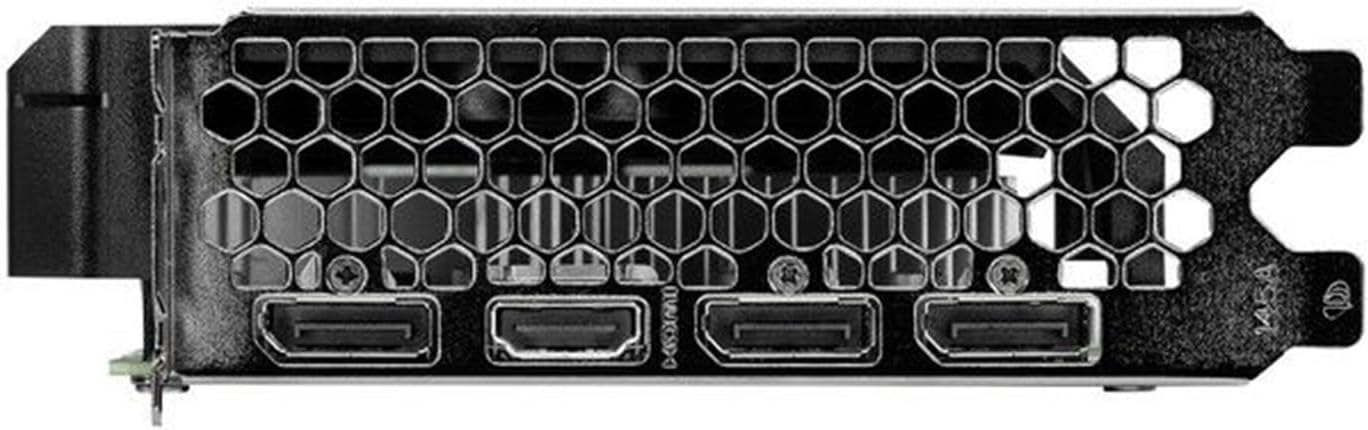
Figure 2: Rear I/O panel showing the HDMI and DisplayPort outputs.
4.2 Hauptmerkmale
- NVIDIA G-SYNC: Enjoy smooth, tear-free gameplay at high refresh rates when paired with a compatible G-SYNC monitor.
- DLSS 3 & Ray Tracing: Experience enhanced visual fidelity and performance in supported games with NVIDIA's Deep Learning Super Sampling and real-time ray tracing technologies.
- 0dB-Technologie: The fan remains off during light workloads, ensuring silent operation. Fan activation occurs only under heavier loads to maintain optimal temperatures.
- ThunderMaster Utility: Palit's proprietary software allows you to monitor GPU status, adjust fan speeds, and manage overclocking settings for personalized performance. Download from the official Palit webWebsite.
- Mini-ITX Form Factor Support: With a compact length of 17cm, this card is suitable for small form factor PC builds, offering powerful performance in a space-saving design.
5. Wartung
Regelmäßige Wartung trägt dazu bei, die Langlebigkeit und optimale Leistung Ihrer Grafikkarte zu gewährleisten.
- Staubentfernung: Periodically clean dust from the graphics card heatsink and fan using compressed air. Ensure the computer is powered off and unplugged before cleaning. Hold the fan blades gently to prevent over-spinning during cleaning.
- Treiber-Updates: Keep your graphics drivers updated by regularly checking the official NVIDIA website for the latest versions. Driver updates often include performance improvements, bug fixes, and support for new games.
- Temperaturüberwachung: Use monitoring software (like Palit ThunderMaster or other third-party tools) to keep an eye on GPU temperatures, especially during heavy loads, to ensure it operates within safe limits.
6. Fehlerbehebung
Sollten Sie Probleme mit Ihrer Grafikkarte haben, beachten Sie bitte die folgenden gängigen Schritte zur Fehlerbehebung:
- Keine Anzeigeausgabe:
- Stellen Sie sicher, dass das Displaykabel sowohl mit der Grafikkarte als auch mit dem Monitor fest verbunden ist.
- Vergewissern Sie sich, dass der Monitor eingeschaltet und auf die richtige Eingangsquelle eingestellt ist.
- Check if the graphics card is properly seated in the PCIe slot and the 8-pin power connector is firmly attached.
- Try connecting to a different display output port on the card or a different monitor if available.
- Treiberprobleme:
- Perform a clean installation of the latest drivers from the NVIDIA website. Use the 'Custom' installation option and select 'Perform a clean installation'.
- If issues persist, try rolling back to a previous stable driver version.
- Poor Performance/Crashes:
- Ensure your system meets the minimum requirements for the applications or games you are running.
- Monitor GPU temperatures to rule out overheating.
- Prüfen Sie, ob Hintergrundanwendungen Systemressourcen verbrauchen.
- Verify your power supply unit is sufficient and providing stable power.
- Lüftergeräusch:
- Stellen Sie sicher, dass keine Kabel oder Hindernisse die Lüfterflügel behindern.
- Clean any dust buildup on the fan and heatsink.
- Use the ThunderMaster utility to adjust fan curves if desired, but avoid setting fan speeds too low under load.
If these steps do not resolve your issue, please contact Palit customer support or your retailer for further assistance.
7. Spezifikationen
| Besonderheit | Spezifikation |
|---|---|
| Grafikprozessor | NVIDIA GeForce RTX 4060 |
| CUDA-Kerne | 3072 |
| Boost-Takt | 2460 MHz |
| Speichergröße | 8 GB GDDR6 |
| Speicherschnittstelle | 128-Bit |
| Speichergeschwindigkeit | 17 Gbit/s |
| Bustyp | PCI Express 4.0 x16 |
| Anzeigeausgänge | 1x HDMI, 3x DisplayPort |
| Maximale digitale Auflösung | 8K Ultra HD |
| Stromanschluss | 1x 8-polig |
| TDP | 115 Watt |
| Kühlung | Active (Single Fan) |
| Abmessungen (LxBxH) | 12.6 x 7.09 x 2.36 Zoll (ca. 320 x 180 x 60 mm) |
| Artikelmodellnummer | NE64060019P1-1070F |
8. Garantie und Support
Palit products are manufactured to the highest quality standards. This product is covered by a limited warranty provided by Palit or your retailer. Please refer to the warranty information provided with your purchase or visit the official Palit webDetaillierte Geschäftsbedingungen finden Sie auf der Website.
For technical support, driver downloads, or further assistance, please visit the official Palit webSeite unter www.palit.com or contact your local retailer.