
Einführung
This manual provides comprehensive instructions for the Veho Kuzo Sports Smart Watch F1S. Please read this manual carefully before using your device to ensure proper operation and to maximize its features. Keep this manual for future reference.

Bild: Vorderseite view of the Veho Kuzo Sports Smart Watch F1S, showcasing sein rundes Display und seine robuste Bauweise.
Sicherheitshinweise
Always follow basic safety precautions when using this device to reduce the risk of injury, electric shock, fire, or damage to the product.
- Versuchen Sie nicht, das Gerät zu zerlegen oder zu modifizieren.
- Halten Sie das Gerät von extremen Temperaturen und direkter Sonneneinstrahlung fern.
- Setzen Sie das Gerät keinen starken Stößen oder Stürzen aus.
- Konsultieren Sie vor Beginn eines neuen Trainingsprogramms einen Arzt, insbesondere wenn Sie bereits gesundheitliche Probleme haben.
- The device is water-resistant (IP68) but not waterproof for diving or high-pressure water activities.
Packungsinhalt
Stellen Sie sicher, dass alle Artikel in der Box vorhanden sind:
- Veho Kuzo Sports Smart Watch F1S (Black)
- Magnetic Charging Cradle (USB-A)
- Mehrsprachiges Benutzerhandbuch
Aufstellen
1. Aufladen der Smartwatch
Before first use, fully charge your Veho Kuzo F1S Smart Watch.
- Connect the magnetic charging cradle to a USB-A power source (e.g., computer USB port, wall adapter).
- Align the magnetic pins of the cradle with the charging contacts on the back of the watch. The watch will snap into place and display a charging indicator.
- Charge for approximately 2 hours for a full charge. A full charge provides up to 15 days of typical use.

Image: Graphic illustrating the 15-day battery life of the Veho Kuzo F1S Smart Watch.
2. Installation der Begleit-App
Um alle Funktionen freizuschalten und Daten zu synchronisieren, laden Sie die offizielle Begleit-App auf Ihr Smartphone herunter.
- The app is compatible with Apple iOS and Android devices.
- Suchen nach "Kuzo" or "Veho Kuzo" in your device's app store.
- Installieren Sie die App und folgen Sie den Anweisungen auf dem Bildschirm, um ein Konto zu erstellen.
3. Koppeln mit Ihrem Smartphone
After installing the app, pair your watch with your phone via Bluetooth.
- Stellen Sie sicher, dass Bluetooth auf Ihrem Smartphone aktiviert ist.
- Open the companion app and navigate to the device pairing section.
- Turn on your Veho Kuzo F1S Smart Watch.
- Select your watch from the list of available devices in the app.
- Bestätigen Sie die Kopplungsanfrage sowohl auf Ihrer Smartwatch als auch auf Ihrem Smartphone.

Image: A smartphone displaying the Veho Kuzo companion app, showing health and activity data.
Bedienungsanleitung
Grundlegende Navigation
The Veho Kuzo F1S features a 1.3-inch AMOLED touchscreen and physical buttons for navigation.
- Touch-Screen: Wischen Sie nach oben, unten, links oder rechts, um durch Menüs und Widgets zu navigieren. Tippen Sie, um Elemente auszuwählen.
- Seitentasten: Use the physical buttons on the side of the watch to return to the home screen, access sports modes, or other quick functions.
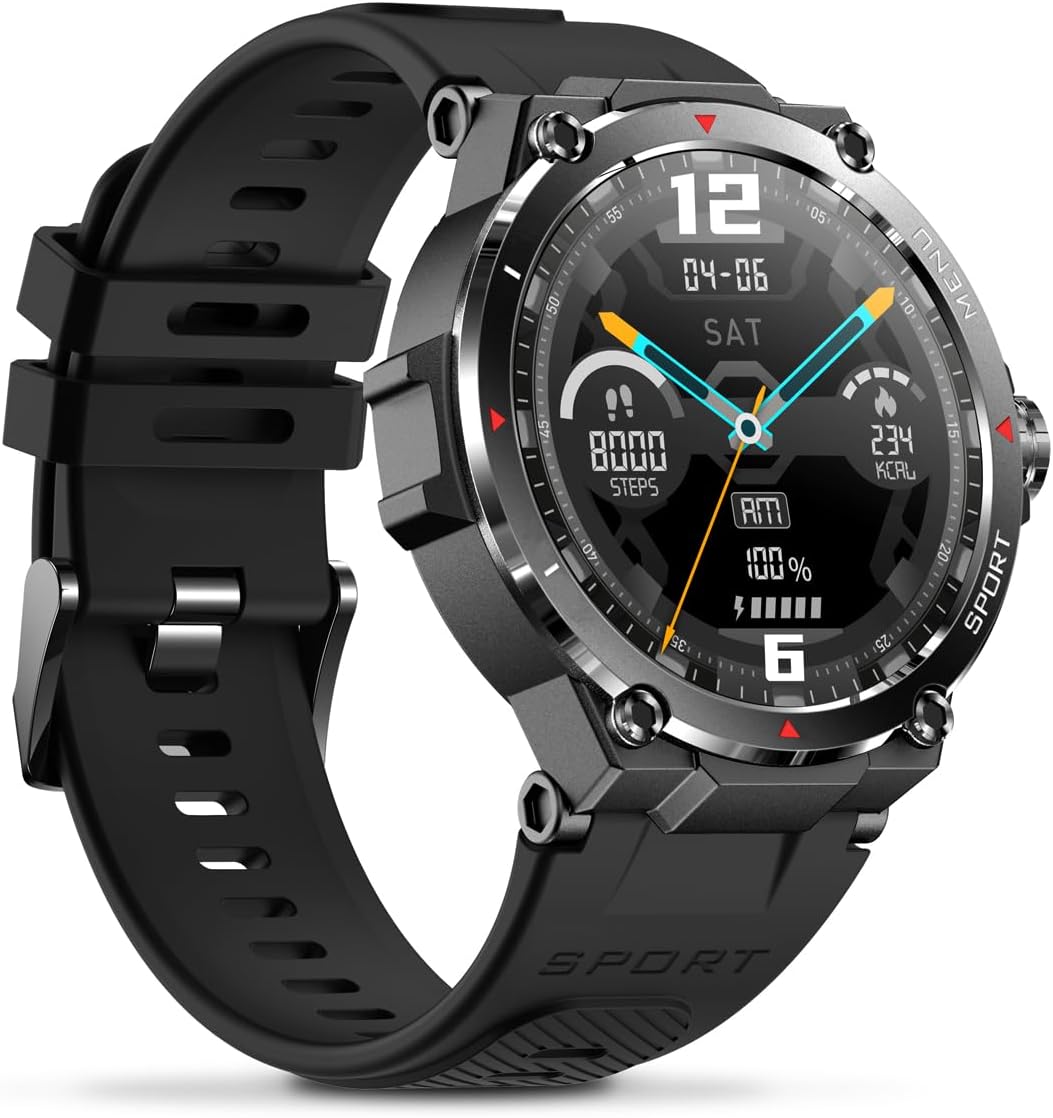
Abbildung: Seite view of the Veho Kuzo F1S Smart Watch, highlighting the control buttons and rugged casing.
Gesundheits- und Fitness-Tracking
The watch continuously monitors various health and fitness metrics.
- Herzfrequenz: Herzfrequenzüberwachung rund um die Uhr. View Echtzeitdaten auf der Uhr oder detaillierte Trendanalysen in der App.
- Blutsauerstoff: Messen Sie Ihren Blutsauerstoffgehalt.
- Aktivitätstracker: Tracks steps, calories burned, and distance covered. Supports walking, running, and cycling.
- Schlafmonitor: Monitors daily, weekly, and monthly sleep patterns, detailing deep sleep, light sleep, and awake times.
- Geographisches Positionierungs System: Built-in 3-mode GPS (GPS+Beidou+Glonass) and Assisted GPS (AGPS) for accurate outdoor performance tracking and live map positioning. Compatible with STRAVA.

Image: The Veho Kuzo F1S Smart Watch displaying heart rate monitoring data.
Intelligente Funktionen
- Benachrichtigungen: Receive push notifications from apps like WhatsApp, Twitter, Facebook, LinkedIn, Skype, YouTube, Messenger, and InstagRAM direkt auf Ihrer Uhr.
- Musiksteuerung: Control music playback (volume, skip tracks, play/pause) on your paired smartphone directly from the watch.
- Zeitfunktionen: Access alarm, timer, intermittent timer, stopwatch, and countdown functions.
- Telefon finden: Verwenden Sie Ihre Uhr, um Ihr gekoppeltes Smartphone zu orten.
- News/Weather App: Integrated news and weather application functionality.
- Anpassbare Zifferblätter: Choose from hundreds of different watch face designs through the companion app.
Wartung
Reinigung
Um das Aussehen und die Funktionalität der Uhr zu erhalten:
- Reinigen Sie Uhr und Armband regelmäßig mit einem weichen, fusselfreien Tuch.amp Tuch.
- Vermeiden Sie die Verwendung aggressiver Chemikalien oder Scheuermittel.
- Vor dem Laden sicherstellen, dass die Ladekontakte sauber und trocken sind.
Wasserbeständigkeit (IP68)
The Veho Kuzo F1S Smart Watch has an IP68 rating, meaning it is water-resistant in fresh water up to a maximum depth of 1.5 meters for up to 30 minutes, and is protected from dust.
- Do not use the watch for diving, snorkeling, or high-speed water sports.
- Vermeiden Sie den Kontakt der Uhr mit heißem Wasser, Dampf oder Reinigungsmitteln.
- Trocknen Sie die Uhr nach dem Kontakt mit Wasser gründlich ab.
Batteriepflege
- Laden Sie die Uhr regelmäßig auf, um die Batterieleistung zu erhalten.
- Vermeiden Sie es, den Akku häufig vollständig zu entladen.
- Bewahren Sie die Uhr an einem kühlen, trockenen Ort auf, wenn Sie sie längere Zeit nicht tragen.
Fehlerbehebung
If you encounter issues with your Veho Kuzo F1S Smart Watch, refer to the following common solutions:
- Uhr schaltet sich nicht ein: Ensure the watch is fully charged. Connect it to the charging cradle and check for the charging indicator.
- Kopplung mit dem Telefon nicht möglich:
- Stellen Sie sicher, dass Bluetooth auf Ihrem Telefon und Ihrer Uhr aktiviert ist.
- Stellen Sie sicher, dass sich die Uhr in Reichweite Ihres Telefons befindet.
- Starten Sie sowohl die Uhr als auch Ihr Telefon neu.
- Versuchen Sie, das Gerät über die App zu entkoppeln und anschließend erneut zu koppeln.
- Ungenaue Gesundheitsdaten:
- Achten Sie darauf, dass die Uhr eng am Handgelenk sitzt, aber nicht zu eng.
- Reinigen Sie den Sensor auf der Rückseite der Uhr.
- Environmental factors and skin conditions can affect accuracy.
- Benachrichtigungen werden nicht angezeigt:
- Überprüfen Sie die App-Benachrichtigungseinstellungen auf Ihrem Telefon und in der zugehörigen App.
- Stellen Sie sicher, dass die Uhr über Bluetooth mit Ihrem Telefon verbunden ist.
Weitere Unterstützung finden Sie im Supportbereich oder kontaktieren Sie den Kundendienst.
Technische Daten
| Modellname | F1S |
| Modellnummer | VSW-001-F1S-B (164426) |
| Anzeige | 1.3" AMOLED Touchscreen |
| Auflösung | 360 x 360 Pixel |
| Chipsatz | Dialogue14695, PPGHX3690 |
| Erinnerung | ROM 128 MB + RAM 2 MB |
| Bluetooth | Version 5.1 |
| Batteriekapazität | 300 mAh Lithium-Polymer-Akku |
| Arbeitszeit | Bis zu 15 Tage |
| Standby-Zeit | Bis zu 21 Tage |
| Ladezeit | Ca. 2 Stunden |
| Ladeart | USB-A to Magnetic Charging Cradle |
| Wasserbeständigkeit | IP68 (up to 1.5 meters for 30 minutes in fresh water) |
| GPS-System | 3-mode (GPS+Beidou+Glonass) |
| Maße | 46 mm x 12.9 mm |
| Gewicht | 51g |
| Gurtbreite | 22 mm |
| Armbandlänge | 260 mm |
| Betriebssystemkompatibilität | Android, iOS |
| Unterstützte Sprachen | All major languages (replicates paired smartphone language) |
Garantie und Support
The Veho Kuzo Sports Smart Watch F1S comes with a limited warranty. Please refer to the warranty card included in your package or visit the official Veho webAuf der Webseite finden Sie die detaillierten Garantiebedingungen.
Kundenservice
For technical support, troubleshooting, or warranty claims, please contact Veho customer service through their official webWebsite oder die in Ihrer Produktdokumentation angegebenen Kontaktinformationen.
- Online-Hilfe: www.veho-world.com/support (Examp(der tatsächliche Link kann abweichen)
- E-Mail: support@veho-world.com (Examp(Die tatsächliche E-Mail-Adresse kann abweichen.)