
Miracase 8ad21a1b-09de-4df8-8689-16518fb3ae13
Miracase 3-in-1 Cell Phone Holder User Manual
Model: 8ad21a1b-09de-4df8-8689-16518fb3ae13
Produkt überview
The Miracase 3-in-1 Cell Phone Holder is a versatile mounting solution designed for your car. It offers three different installation methods: dashboard, air vent, and windshield, providing flexibility to suit various vehicle interiors and user preferences. This holder is engineered for secure grip and easy adjustability, ensuring your smartphone remains stable and accessible during your travels.

Figure 1: Miracase 3-in-1 Cell Phone Holder components.
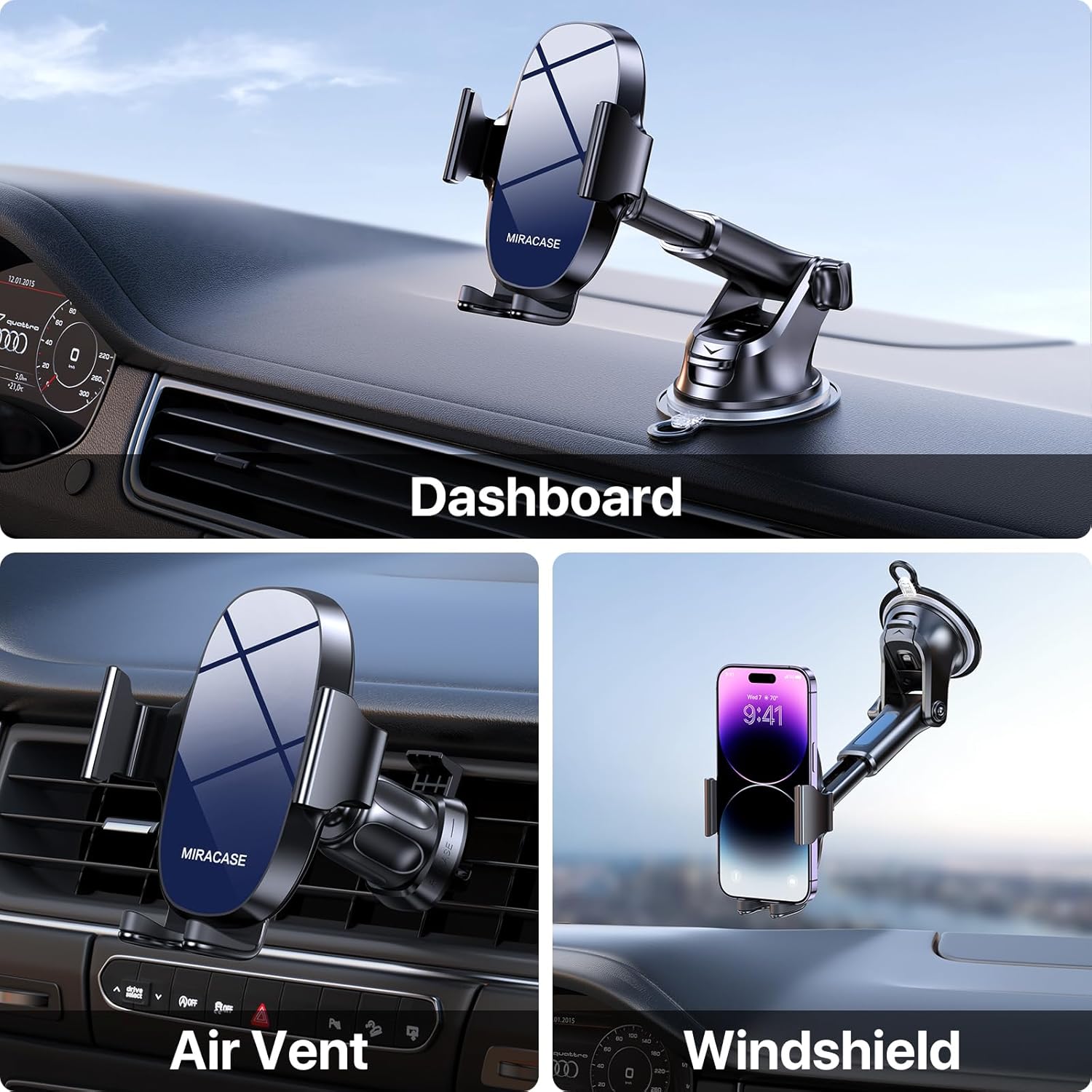
Figure 2: Demonstrating the three mounting options: Dashboard, Air Vent, and Windshield.
Setup und Installation
1. Choosing Your Mounting Location
This holder provides options for dashboard, windshield, or air vent installation. Select the location that offers the best visibility and accessibility without obstructing your driving view oder Fahrzeugsteuerungen.
2. Dashboard/Windshield Mount Installation
- Reinigen Sie die Oberfläche: Ensure the chosen dashboard or windshield area is clean and free of dust or oils. Use an alcohol wipe if necessary and let it dry completely.
- Befestigen Sie den Saugnapf: Press the suction cup firmly onto the desired smooth, flat surface.
- Lock the Suction: Push down the locking lever located at the base of the suction cup to create a strong vacuum seal.
- Armwinkel anpassen: Loosen the adjustment knob on the arm to set the desired angle, then tighten it securely.

Figure 3: The robust suction cup provides a secure hold, capable of withstanding various temperatures.
3. Air Vent Mount Installation
- Lüftungsclip anbringen: Slide the upgraded metal hook of the vent clip onto one of your car's air vent blades.
- Sichern Sie den Clip: Tighten the screw on the vent clip to firmly clamp it onto the vent blade, preventing wobbling.
- Stabilität gewährleisten: Gently tug on the installed vent clip to confirm it is securely attached before mounting the phone holder.

Figure 4: Close-up of the upgraded vent clip with metal hook for enhanced stability.

Figure 5: Dimensions of the air vent clip for compatibility reference.
4. Attaching Phone Holder to Mount
Once your chosen mount (suction cup or vent clip) is securely installed, attach the phone holder cradle to the spherical joint on the mount. Tighten the collar around the joint to lock the cradle in place.
Bedienungsanleitung
1. Placing and Removing Your Phone
- Offene Klamps: Press the release button located on the back of the phone holder to open the side clamparme Arme.
- Telefonnummer einfügen: Place your smartphone into the holder, ensuring it rests on the bottom support. The side clamps will automatically close to secure the phone.
- Telefon entfernen: Drücken Sie die Entriegelungstaste erneut, um den Verschluss zu öffnen.amps and carefully remove your phone.
2. Anpassen Viewing-Winkel
The Miracase phone holder features multiple adjustment points for optimal viewing:
- 360° Drehung: The phone cradle can rotate a full 360 degrees, allowing for both portrait and landscape viewing-Modi.
- 270° Winkeleinstellung: The arm of the holder can be adjusted up to 270 degrees, enabling you to find the perfect vertical angle.

Figure 6: The holder offers extensive adjustability for optimal viewwinkeln.
3. Telefonkompatibilität
This holder is designed to accommodate a wide range of smartphones, typically those with screen sizes between 4.0 and 7.0 inches. It is also compatible with various phone cases, including battery cases, wallet cases, OtterBox, and MagSafe cases, ensuring a secure fit without needing to remove your phone's protective cover.

Figure 7: Compatibility with various phone sizes and case types.
Wartung
- Reinigung des Saugnapfs: If the suction cup loses its stickiness, rinse it with warm water and let it air dry. Do not use harsh chemicals or abrasive materials.
- Allgemeine Reinigung: Wischen Sie die Handyhalterung mit einem weichen, fusselfreien Tuch ab.amp Mit einem Tuch Staub und Schmutz entfernen. Übermäßige Feuchtigkeit vermeiden.
- Lagerung: When not in use for extended periods, store the holder in a cool, dry place away from direct sunlight to preserve the integrity of the materials.
Fehlerbehebung
- Saugnapf hält nicht:
Lösung: Ensure the mounting surface is clean, smooth, and dry. Re-wet the suction cup slightly with water, press firmly, and then engage the locking lever. Avoid porous or textured surfaces. - Telefon hält nicht sicher:
Lösung: Ensure the side clamping arms are fully closed around your phone. Press the release button and re-insert the phone, allowing the arms to auto-clampPrüfen Sie, ob Hindernisse vorhanden sind. - Vent Clip Wobbles:
Lösung: Make sure the metal hook is fully inserted into the vent blade and the tightening screw is securely fastened. Some vent designs may not provide optimal stability. - Schwierigkeiten beim Einstellen des Winkels:
Lösung: Loosen the adjustment knobs sufficiently before attempting to change the angle or rotation. Tighten them firmly once the desired position is achieved.
Technische Daten
| Besonderheit | Detail |
|---|---|
| Marke | Miracase |
| Modellnummer | 8ad21a1b-09de-4df8-8689-16518fb3ae13 |
| Montagetyp | Dashboard / Air Vent / Windshield |
| Kompatible Geräte | Smartphones (4.0-7.0 Zoll) |
| Artikelgewicht | 9.1 Unzen |
| Verpackungsabmessungen | 5.04 x 4.76 x 2.64 Zoll |
| Besondere Merkmale | Adjustable, Upgraded Metal Hook Vent Clip |
| Farbe | Blau |
| Ursprungsland | China |
| Datum der ersten Verfügbarkeit | 1. August 2023 |
Garantie und Support
For warranty information and customer support, please refer to the official Miracase webBesuchen Sie die Website oder kontaktieren Sie direkt den Kundenservice. Die genauen Garantiebedingungen können je nach Region und Kaufdatum variieren.
Ask a question about this manual
Ask about setup, troubleshooting, compatibility, parts, safety, or missing instructions. Manuals+ will review the question and use this page’s manual context to help answer it.