
1. Einleitung
This manual provides detailed instructions for the installation, operation, and maintenance of your JOYING JY-UZS80N8 Single DIN Car Stereo. This advanced head unit features an 8-inch detachable touchscreen, integrated Apple CarPlay and Android Auto, a 48-band equalizer, AM/FM radio, and subwoofer output, designed to enhance your in-car audio and navigation experience.
Bitte lesen Sie diese Bedienungsanleitung vor der Benutzung des Geräts sorgfältig durch, um eine ordnungsgemäße Funktion und Sicherheit zu gewährleisten.

Image 1.1: The JOYING JY-UZS80N8 car stereo displaying the Apple CarPlay interface with navigation and media playback.
2. Produktkomponenten und mehrview
2.1 Was ist in der Box?
Das Paket enthält die folgenden Artikel:
- 8" Car Radio Unit x 1
- Universal ISO Harness x 1
- 4G-Antenne x 2
- 2 x USB-Kabel
- Externes Mikrofon x 1
- GPS-Antenne x 1
- Benutzerhandbuch x 1
- Installationskit x 1

Image 2.1: All included accessories and the main unit of the JOYING JY-UZS80N8 car stereo.
2.2 Hauptmerkmale
- 8-inch Detachable Touchscreen: High-resolution 1280x800 display with a full-fit design for clear visuals and wide viewwinkeln.
- Kabelloses Apple CarPlay & Android Auto: Seamless smartphone integration for navigation, calls, and media.
- Eingebautes 4G-Modul: Supports SIM card for internet access (data only, no calls/SMS).
- Erweiterte Audioverarbeitung: 48-band EQ, built-in DSP, optical fiber and coaxial digital output for superior sound quality.
- Schnellstart: Quick startup in approximately 2 seconds after the initial boot.
- GPS Navigation: Precise positioning with included GPS antenna and offline map support.
- HDMI-Ausgang: Supports external display for passenger entertainment.
3. Einrichtung und Installation
3.1 Hinweise vor der Installation
- Installation may require an additional installation frame kit, special ISO harness, amplifier adapter, or CANbus decoder depending on your vehicle model.
- The unit does not support factory car GPS antenna, backup camera, Bluetooth, USB, or microphone.
- Only JOYING accessories (DAB+ digital radio adapter, DVR, OBDII scanner, reverse camera, TPMS, steering wheel controller) are supported and must be ordered separately.
3.2 Kabelverbindungen
Refer to the wiring diagram for proper connection of power, speakers, antennas, and other peripherals. Ensure all connections are secure before powering on the unit.

Abbildung 3.1: Detailansicht view of the rear panel connections for the JOYING JY-UZS80N8 head unit.
3.3 Detachable Screen Adjustment
The 8-inch screen is detachable and can be adjusted vertically by 2.5cm up or down from its middle position, in 0.7cm increments, to suit your installation requirements.

Image 3.2: Illustration of the detachable screen's vertical adjustment capability.
4. Bedienungsanleitung
4.1 Benutzeroberfläche (UI)
The unit features a deep-optimized user interface tailored for in-car use. It allows for customization of widgets, display of current applications, and split-screen functionality.
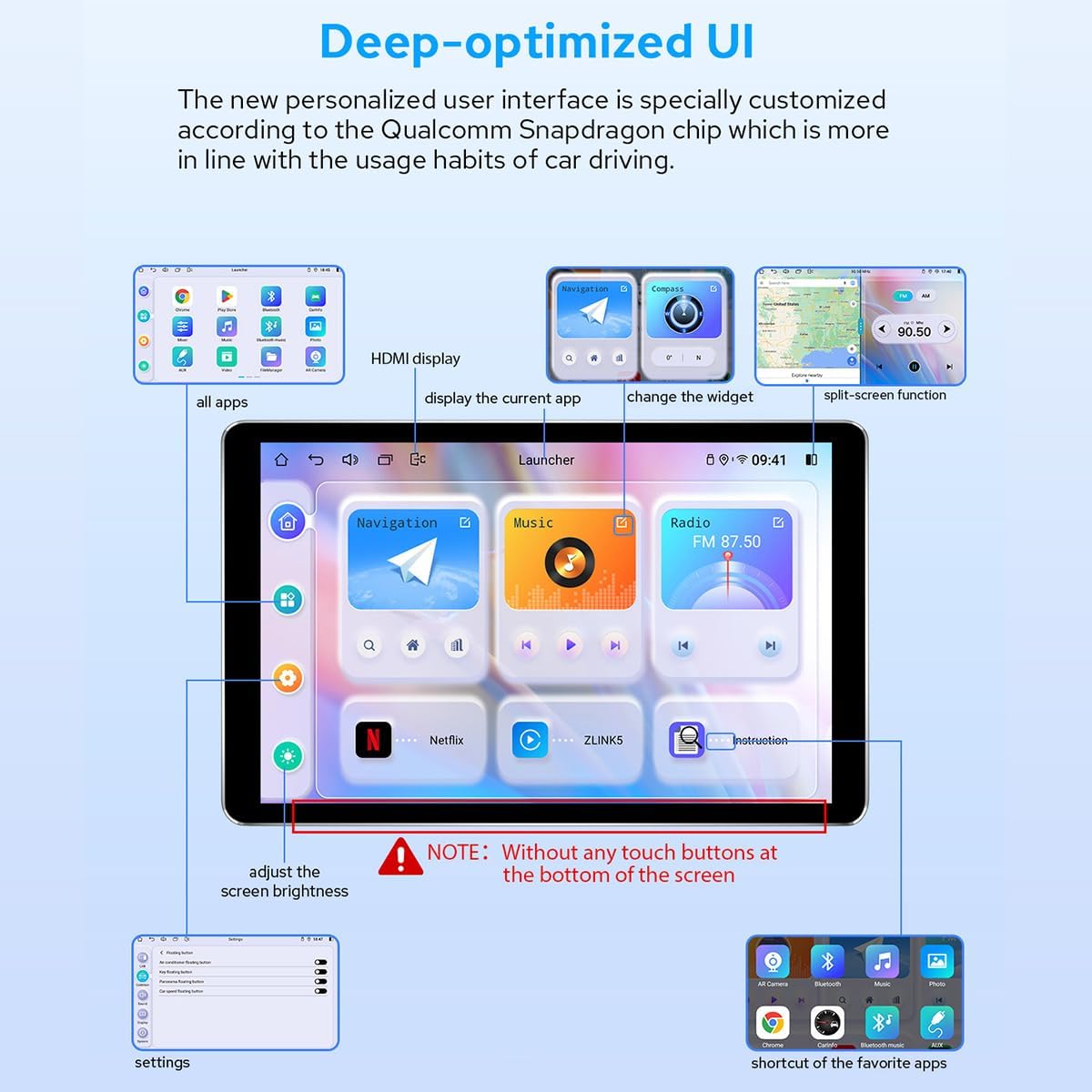
Bild 4.1: Überview of the personalized user interface with key features highlighted.
4.2 Gestensteuerung
Control the screen using intuitive two-finger gestures:
- Nach oben schieben: Performs a specific action (configurable).
- Herunterrutschen: Performs a specific action (configurable).
- Nach links schieben: Performs a specific action (configurable).
- Slide Right: Performs a specific action (configurable).
4.3 Floating Shortcut Key
Activate the floating shortcut key in the settings for easy access to frequently used functions while driving.

Image 4.2: Visual representation of Day & Night Mode, Gesture Control, and Floating Shortcut Key.
5. Konnektivität
5.1 Kabellose Apple CarPlay- und Android Auto-Unterstützung
Connect your smartphone via USB cable or Bluetooth to access Apple CarPlay or Android Auto. This allows you to use navigation, make calls, send messages, and listen to music directly from your phone's apps on the car stereo's display.

Image 5.1: Illustration of smartphone connectivity with Wireless CarPlay and Android Auto.
5.2 4G-Modul
Insert a SIM card into the dedicated slot for direct internet access. The built-in 4G module supports FDD-LTE and TDD-LTE bands. Note that this feature is for internet data only and does not support phone calls or SMS messages.

Image 5.2: Instructions for inserting a 4G SIM card into the module.
5.3 GPS-Navigation
The unit includes precise GPS engines and an antenna for accurate positioning and faster real-time navigation. Offline maps can be downloaded and saved to the car stereo for use in areas without internet connectivity.
6. Audioeinstellungen
6.1 Built-in DSP and EQ
The JY-UZS80N8 features a built-in Digital Signal Processor (DSP) and a 48-band equalizer with 20 preset sound effects. This allows for high-precision digital processing of audio signals, including reverberation, delay, distortion, and filtering, to achieve optimal sound quality.

Image 6.1: DSP and EQ interface for sound customization.
6.2 Subwoofer and DTS Scenes
The subwoofer output can be amplified and adjusted independently. The unit also supports DTS 5.1 panoramic surround sound effects and sound field correction for an immersive audio experience.

Image 6.2: EQ settings for subwoofer and DTS sound scene options.

Image 6.3: High-precision sound processing options.
7. Anzeigefunktionen
7.1 Ultra-thin Full-fit Screen
The 8-inch display features ultra-thin bezels and full-fit screen technology, which reduces reflection and enhances brightness and clarity. The screen offers a wide viewing angle, ensuring consistent color and image quality from various perspectives.

Image 7.1: The ultra-thin full-fit screen design.

Image 7.2: Screen appearance when off and demonstrating wide viewwinkeln.
7.2 Tag- und Nachtmodus
The display automatically adjusts between a bright daytime mode for clear visibility in sunlight and a softer night mode to reduce glare and eye strain during nighttime driving.
7.3 HDMI-Ausgang
The unit provides an HDMI output for connecting to external displays, such as headrest monitors, allowing passengers to watch videos while the main screen is used for navigation or other functions. Note that a straight-head HDMI cable is not supported due to space constraints; an L-shaped or angled HDMI cable is required.

Image 7.3: HDMI output displaying content.
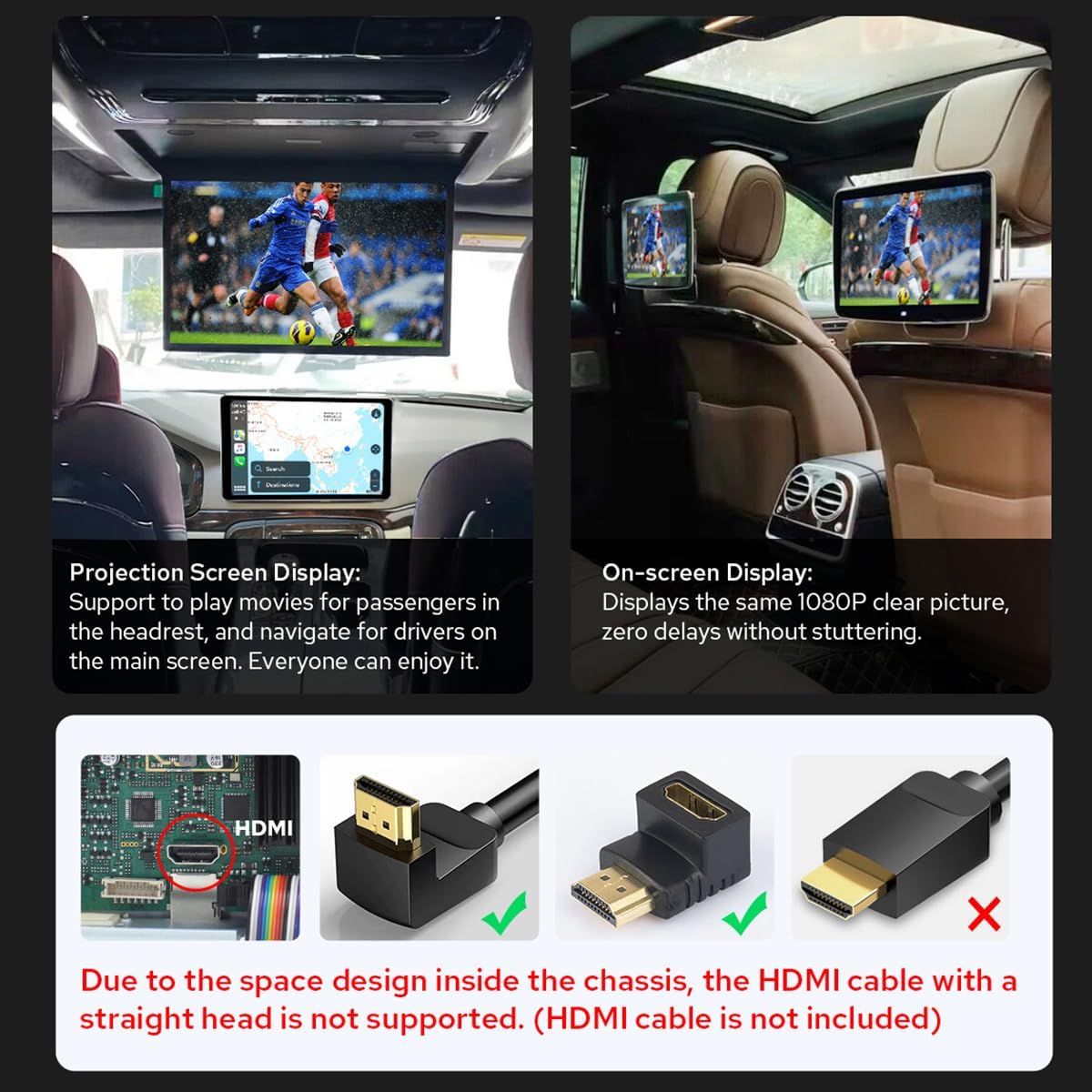
Image 7.4: HDMI output in use for passenger screens and compatible HDMI cable types.
8. Camera Integration
8.1 AR Camera Support
The unit supports Augmented Reality (AR) cameras, allowing you to switch between front and rear camera views while driving to observe your surroundings. For optimal performance, it is recommended to use JOYING's AR camera, which is optimized for compatibility and provides clearer, more stable images.

Image 8.1: Front and rear camera views from the AR camera.

Image 8.2: Recommended AR camera compatibility.
9. Spezifikationen
9.1 Allgemeine Parameter
| Besonderheit | Detail |
|---|---|
| Marke | FREUDE |
| Modellnummer | JY-UZS80N8 |
| Artikelgewicht | 4.29 Pfund |
| Verpackungsabmessungen | 9.25 x 6.5 x 5.12 Zoll |
| Datum der ersten Verfügbarkeit | 6. Juli 2023 |
9.2 Technische Parameter
| Kategorie | Parameter | Detail |
|---|---|---|
| Prozessor | CPU | QCM6125 Octa Core 64bit ARM (4x A73@2.0GHz, 4x A53@1.8GHz) |
| Grafikkarte | Adreno™ 610@950 MHz | |
| Fertigungstechnologie | 11 Nanometer | |
| Erinnerung | Speichertyp | LPDDR4X |
| RAM und ROM | 8 GB + 128 GB | |
| Multimedia-Display | Bildschirmauflösung | 1280 x 800 Pixel |
| Bildschirmdichte | 273 ppi | |
| Bildwiederholrate | 60 Hz | |
| DPI | 160 dpi (hdpi) | |
| Network & Connection | Positionierungssystem | GPS / GLONASS / Beidou |
| Netzwerk | 4G/3G/Bluetooth OBD (5.0) | |
| W-lan | Wi-Fi 5 (Up to 600 Mbps DL 802.11ac Wi-Fi X12 LTE modem) | |
| Audioausgang | Audioausgabemodus | Stereo |
| Surround-Sound | 5.1 Kanalkonfiguration | |
| Steckertyp | Koaxial, optisch | |
| Besonderheit | Integriertes Bluetooth, Touchscreen | |
| Video | Videokodierung | Supports AVI, MKV, MP4, WMV, RMVB, MPG |
| Gesamtzahl der HDMI-Anschlüsse | 1 |

Image 9.1: Core technical parameters.

Image 9.2: Multimedia and network parameters.

Image 9.3: Internal motherboard structure.
10. Fehlerbehebung
If you encounter issues with your JOYING JY-UZS80N8 car stereo, consider the following general troubleshooting steps:
- Kein Strom: Überprüfen Sie alle Stromanschlüsse und Sicherungen. Stellen Sie sicher, dass die Zündung des Fahrzeugs eingeschaltet ist.
- Kein Ton: Verify speaker connections, volume levels, and audio source selection. Check EQ and DSP settings.
- Touchscreen reagiert nicht: Versuchen Sie, das Gerät neu zu starten. Stellen Sie sicher, dass der Bildschirm sauber und frei von Schmutz ist.
- GPS-Signalprobleme: Stellen Sie sicher, dass die GPS-Antenne ordnungsgemäß installiert ist und eine freie Sicht hat. view des Himmels.
- Connectivity Problems (CarPlay/Android Auto/4G/WiFi): Check cable connections for wired CarPlay/Android Auto. For wireless connections, ensure Bluetooth/WiFi is enabled on both devices and the unit. Verify SIM card insertion and data plan for 4G.
- Systemverzögerung/Einfrieren: Close unnecessary applications. Perform a system reset if the issue persists.
For more specific issues or persistent problems, please refer to the online support resources or contact JOYING customer service.
11. Wartung
To ensure the longevity and optimal performance of your JOYING JY-UZS80N8 car stereo, follow these maintenance guidelines:
- Reinigen des Bildschirms: Verwenden Sie ein weiches, fusselfreies Tuch, um den Touchscreen vorsichtig abzuwischen. Bei hartnäckigen Flecken etwas nachhelfen.ampReinigen Sie das Tuch mit Wasser oder einem für Bildschirme geeigneten Reiniger. Vermeiden Sie aggressive Chemikalien oder Scheuermittel.
- Allgemeine Reinigung: Halten Sie das Gerät und die Umgebung frei von Staub und Schmutz. Reinigen Sie Lüftungsschlitze und Anschlüsse mit einer weichen Bürste oder Druckluft.
- Software-Updates: Periodically check for and install available software updates to ensure the unit has the latest features and bug fixes.
- Temperaturkontrolle: Vermeiden Sie es, das Gerät über längere Zeiträume extremen Temperaturen auszusetzen.
12. Garantie und Kundendienst
For warranty information, technical assistance, or customer support, please refer to the warranty card included with your product or visit the official JOYING website. You can also contact JOYING customer service directly through their provided channels for any inquiries regarding your JY-UZS80N8 car stereo.
Please have your product model number (JY-UZS80N8) and purchase details ready when contacting support.