
1. Produktüberschreitungview
The AZDOME M330 is a compact and feature-rich dash camera designed to record your journeys and provide surveillance for your vehicle. It features a 0.96-inch monitor, 1080P Full HD recording, WiFi connectivity, 24-hour parking surveillance, WDR technology, night vision, G-sensor, and loop recording, all powered by a durable supercapacitor.

Figure 1: AZDOME M330 Dash Cam mounted near a rearview mirror, highlighting its compact size and 0.96-inch monitor.
2. Packungsinhalt
Bitte prüfen Sie das Paket auf folgende Artikel:
- AZDOME M330 Dashcam
- Type-C Cigarette Lighter Power Cord
- Statischer Aufkleber
- Kabelklemmen
- Werkzeug zum Entfernen von Verkleidungen
- Benutzerhandbuch (Japanisch)

Figure 2: Layout of the AZDOME M330 Dash Cam package contents.
3. Einrichtung
3.1 Installation
- Reinigen Sie den Bereich der Windschutzscheibe, an dem Sie die Dashcam anbringen möchten.
- Attach the static sticker to the cleaned area on the windshield.
- Peel off the protective film from the adhesive mount and firmly press the dash cam onto the static sticker. Ensure the camera lens has a clear view der Straße.
- Adjust the camera angle. The M330 allows for 150-degree rotation to achieve the optimal recording angle.
3.2 Stromanschluss
- Connect the Type-C cigarette lighter power cord to the dash cam's power input.
- Stecken Sie das andere Ende des Stromkabels in die Zigarettenanzünderbuchse Ihres Fahrzeugs.
- Route the power cable neatly along the windshield and dashboard using the provided wiring clips and trim removal tool to avoid obstructing your view.
- Die Dashcam schaltet sich automatisch ein und beginnt mit der Aufnahme, sobald Ihr Fahrzeug gestartet wird.
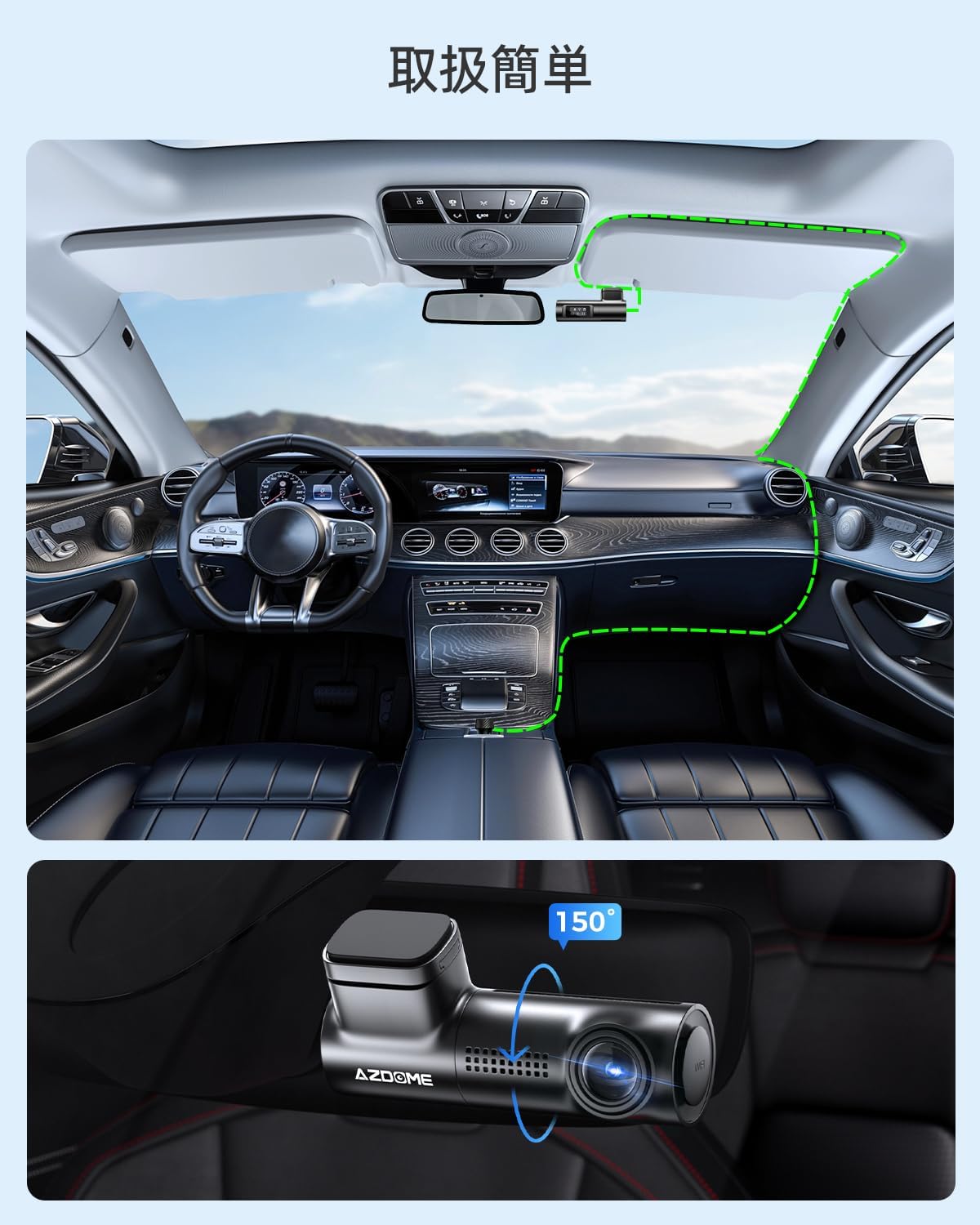
Figure 3: Recommended cable routing for AZDOME M330 Dash Cam installation. The inset shows the camera's 150-degree rotation capability.
4. Bedienungsanleitung
4.1 Grundlegende Bedienung
- Automatische Aufnahme: Die Dashcam startet die Aufnahme automatisch, sobald die Zündung des Fahrzeugs eingeschaltet wird, und stoppt, sobald die Zündung ausgeschaltet wird.
- 0.96-inch Monitor: The small monitor displays the current recording status and WiFi connection status.
- G-Sensor: In case of sudden impact or collision, the built-in G-sensor will automatically lock the current video file um ein Überschreiben zu verhindern.
- Loop-Aufnahme: Wenn die Speicherkarte voll ist, überschreibt die Dashcam automatisch das älteste entsperrte Video. files, um die Aufnahme fortzusetzen.
4.2 WLAN-Verbindung und App-Nutzung
The AZDOME M330 features built-in WiFi, allowing you to connect it to your smartphone via the dedicated AZDOME app for easy video management and settings adjustments.
- Download and install the AZDOME app from your smartphone's app store (available on App Store and Google Play).
- Turn on WiFi on your smartphone and connect to the dash cam's WiFi network (usually named 'AZDOME_M330_XXXX').
- Open the AZDOME app. You can view lebe footage, Wiedergabe von aufgezeichneten Videos, Herunterladen files to your phone, and adjust various settings.
- Ensure your smartphone is within 3 meters of the dash cam for a stable WiFi connection.

Figure 4: Using the AZDOME app to manage your dash cam via WiFi.
5. Funktionen
5.1 1080P Full HD Recording & Wide Angle
The M330 records in 1080P Full HD, capturing clear and detailed footage. Its ultra-wide-angle lens provides a broad field of view, wodurch tote Winkel minimiert und eine umfassende Abdeckung der Straße gewährleistet werden.

Abbildung 5: Bspample of 1080P Full HD recording quality, clearly capturing license plates.
5.2 WDR and Night Vision
Equipped with Wide Dynamic Range (WDR) technology and enhanced night vision capabilities, the M330 automatically balances exposure in varying light conditions, ensuring clear images even in low-light environments or when transitioning between bright and dark areas.

Figure 6: Illustration of Super Night Vision and WDR technology providing balanced exposure in challenging night conditions.
5.3 G-Sensor und Loop-Aufzeichnung
The high-sensitivity G-sensor detects sudden movements or impacts and automatically locks the current video file, preventing it from being overwritten. Loop recording ensures continuous recording by automatically deleting the oldest unlocked files wenn die Speicherkarte ihre Kapazität erreicht.

Figure 7: G-sensor automatically locks video files during impacts, while loop recording manages storage space.
5.4 24-Hour Parking Surveillance
The M330 offers 24-hour parking surveillance to protect your vehicle even when parked. This feature requires a separate Type-C step-down cable (not included) for continuous power supply.
- Impact Detection Parking Surveillance: The G-sensor detects impacts and automatically records a short video.
- Time-Lapse Parking Surveillance: Records footage at a low frame rate to save storage space while providing continuous monitoring.
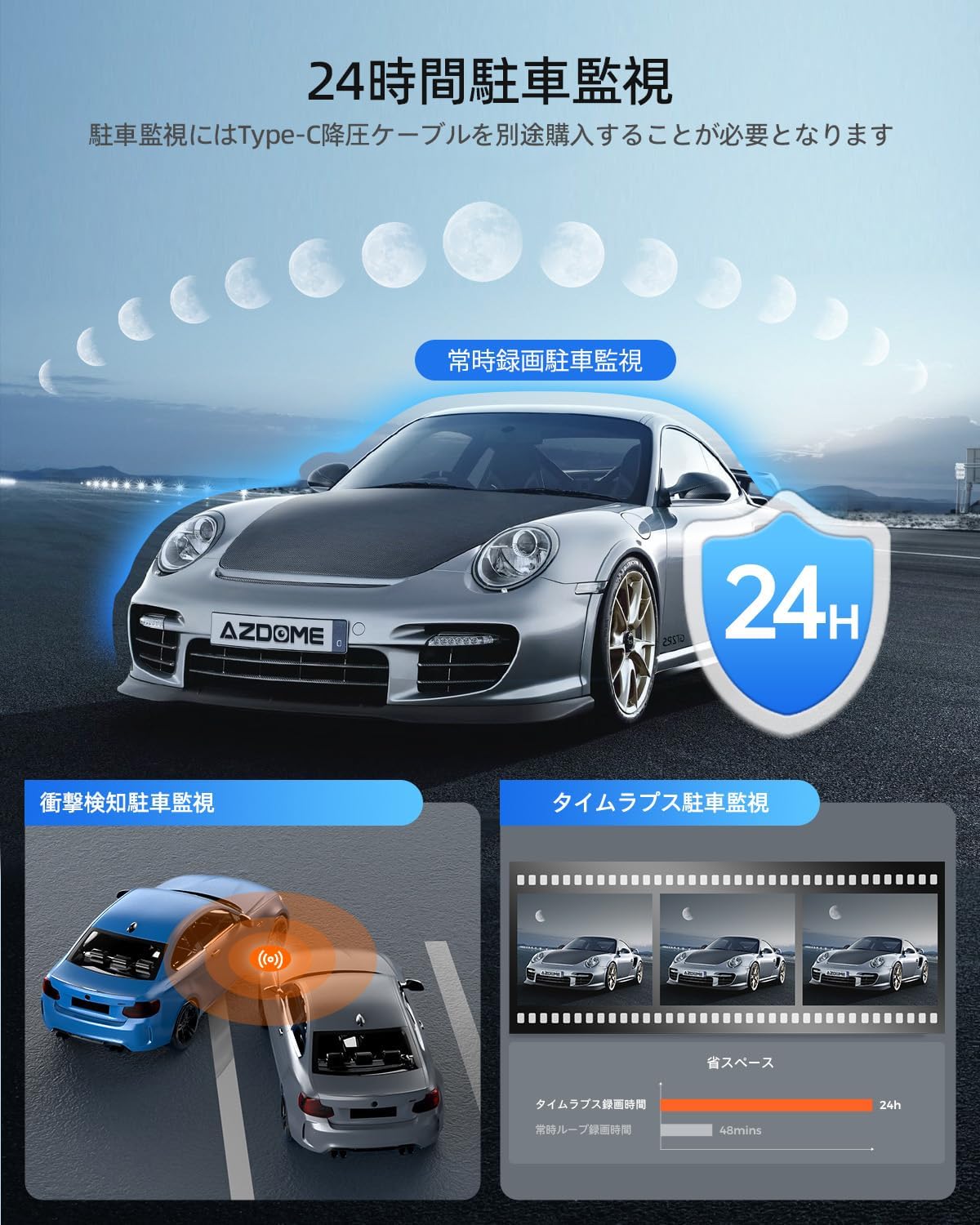
Figure 8: The M330 offers various parking surveillance modes for continuous vehicle protection.
5.5 Supercapacitor
The M330 uses a supercapacitor instead of a traditional lithium battery. This provides enhanced safety and durability, especially in extreme temperatures (-20°C to 70°C), eliminating concerns about battery leakage or explosion. Supercapacitors also offer a longer lifespan and faster charging capabilities.

Figure 9: Supercapacitor technology ensures long life, high temperature resistance, and environmental safety.
6. Wartung
6.1 SD-Kartenverwaltung
- The M330 supports Micro SD cards up to 128GB (Class 10, U3, A2 speed rating recommended). A memory card is not included with the product.
- Format the SD card regularly (e.g., once a month) using the AZDOME app or the dash cam's settings to ensure optimal performance and prevent data corruption.
- Use high-quality, reputable brand SD cards to avoid recording issues.
6.2 Reinigung
- Wipe the camera lens with a soft, lint-free cloth to ensure clear video quality.
- Reinigen Sie die Außenseite der Dashcam mit einem trockenen oder leicht feuchten Tuch.amp Tuch. Verwenden Sie keine aggressiven Chemikalien.
7. Fehlerbehebung
7.1 Dash Cam Not Powering On
- Check if the power cable is securely connected to both the dash cam and the vehicle's cigarette lighter socket.
- Ensure the vehicle's cigarette lighter socket is receiving power. Test with another device if possible.
- Verify that the power adapter provides 5V/2.5A output.
7.2 Recording Issues (e.g., no recording, corrupted files)
- Ensure a compatible Micro SD card (Class 10, U3, A2) is inserted correctly.
- Format the SD card using the AZDOME app or dash cam settings.
- If the issue persists, try a different, high-quality SD card.
- Check if loop recording is enabled and if the G-sensor sensitivity is set appropriately.
7.3 WiFi Connection Problems
- Stellen Sie sicher, dass das WLAN der Dashcam aktiviert ist.
- Confirm your smartphone is within 3 meters of the dash cam.
- Restart both the dash cam and your smartphone, then try connecting again.
- Ensure mobile data is turned off on your smartphone when connecting to the dash cam's WiFi.
8. Spezifikationen
| Marke | AZDOME |
| Modellnummer | M330 |
| Videoauflösung | 1080P Full HD |
| Monitorgröße | 0.96 Zoll |
| Viewing-Winkel | 170 Grad |
| Lagerung | Supports Micro SD card up to 128GB (Class 10, U3, A2 recommended) |
| Stromquelle | Superkondensator |
| Konnektivität | Integriertes WLAN |
| Besondere Merkmale | 24-hour Parking Surveillance, WDR, Night Vision, G-Sensor, Loop Recording |
| Kontrollmethode | App |
| Montagetyp | Klebstoff |
| Technische Daten | 10 cm (T) x 5 cm (B) x 5 cm (H) |
| Produktgewicht | 0.26 kg |
| Farbe | Schwarz |
9. Garantie und Support
Die AZDOME M330 Dashcam wird mit folgendem Zubehör geliefert: 1 Jahr Garantie Diese Garantie gilt ab Kaufdatum und deckt Herstellungsfehler ab. Sie gewährleistet den zuverlässigen Betrieb Ihres Geräts.
For any questions, concerns, or technical support regarding your product, please contact AZDOME customer service. Our team is dedicated to providing prompt assistance.
Please refer to your purchase documentation or the official AZDOME webFür detaillierte Kontaktdaten besuchen Sie bitte die Webseite.