
1. Einleitung
This manual provides essential information for the installation, operation, and maintenance of your Phillips MX7053 Digital Deadbolt PCD-360. Please read these instructions carefully before installation and use to ensure proper function and longevity of the product.
The Phillips MX7053 Digital Deadbolt is designed for interior wood or metal doors, offering secure keyless entry via a numeric keypad or traditional key access. It features a light indicator for status updates and supports up to 50 unique user codes.
2. Produktmerkmale
- Einfache Installation: Designed for straightforward installation using basic tools.
- Vielseitige Montage: Features an interior mounting plate that can be screwed or welded.
- Numerische Tastatur: Exterior keypad supports 4 to 10-digit codes for up to 50 users.
- Statusanzeige: Integrated light indicator shows lock/unlock status and alerts for incorrect code entries.
- Doppelter Zugriff: Keyless entry via keypad or traditional high-security key access.
- Batteriebetrieben: Requires 4 AA batteries (not included), eliminating the need for electrical wiring.
3. Packungsinhalt
Vergewissern Sie sich vor Beginn der Installation, dass alle Komponenten vorhanden sind:
- Phillips MX7053 Digital Deadbolt (Exterior Keypad Unit)
- Interior Thumb Turn Unit
- Montageplatte
- High-Security Keys (Quantity may vary)
- Montageschrauben und Befestigungsmaterial
- Bedienungsanleitung (Dieses Dokument)

Bild 3.1: Packaging of the Phillips MX7053 Digital Deadbolt, illustrating the included components and highlighting the 1-year warranty.
4. Spezifikationen
| Hersteller | Phillips |
| Modellnummer | MX7053 |
| Farbe | Schwarz |
| Beenden | Gebürstet |
| Material | Metall, Kunststoff |
| Sperrtyp | Riegel |
| Besondere Merkmale | Touch keypad, Keyless entry |
| Stromquelle | 4 AA-Batterien (nicht im Lieferumfang enthalten) |
| Gewicht | 1.12 Kilogramm |
| Abmessungen (L x B x H) | 21.01 x 11 x 23.01 cm |
5. Sicherheitshinweise
- Do not expose the lock to extreme temperatures or direct moisture.
- Verwenden Sie ausschließlich die angegebenen AA-Alkalibatterien. Mischen Sie keine alten und neuen Batterien oder verschiedene Batterietypen.
- Keep keys in a secure location away from the lock.
- Regularly check battery levels and replace batteries when indicated to prevent lock-out.
- Avoid using abrasive cleaners or solvents on the lock's surface.
6. Installation
The Phillips MX7053 Digital Deadbolt is designed for surface-mount installation on interior wood or metal doors. It is compatible with both left and right-opening doors.
6.1 Erforderliches Werkzeug
- Schraubendreher (Kreuzschlitz empfohlen)
- Bohren (falls neue Löcher erforderlich sind)
- Maßband oder Lineal
- Bleistift
6.2 Installationsschritte
- Bereiten Sie die Tür vor: Ensure the door is clean and free of obstructions. If replacing an existing lock, remove it.
- Einbau des Riegelschlosses: Insert the deadbolt latch into the door edge. Ensure the latch is oriented correctly for your door's handing (left or right).
- Mount the Exterior Keypad: Position the exterior keypad unit on the outside of the door, aligning it with the deadbolt latch.
- Montage der inneren Montageplatte: On the inside of the door, attach the interior mounting plate. Secure it with the provided screws. This plate can be screwed directly or welded for added security.
- Schließen Sie die Inneneinheit an: Connect the cable from the exterior keypad to the interior thumb turn unit. Carefully tuck any excess cable into the door cavity.
- Secure the Interior Unit: Attach the interior thumb turn unit to the mounting plate using the remaining screws. Ensure it is flush against the door.
- Testbetrieb: Before closing the door, test the deadbolt's operation using both the thumb turn and the key. Ensure the deadbolt extends and retracts smoothly.
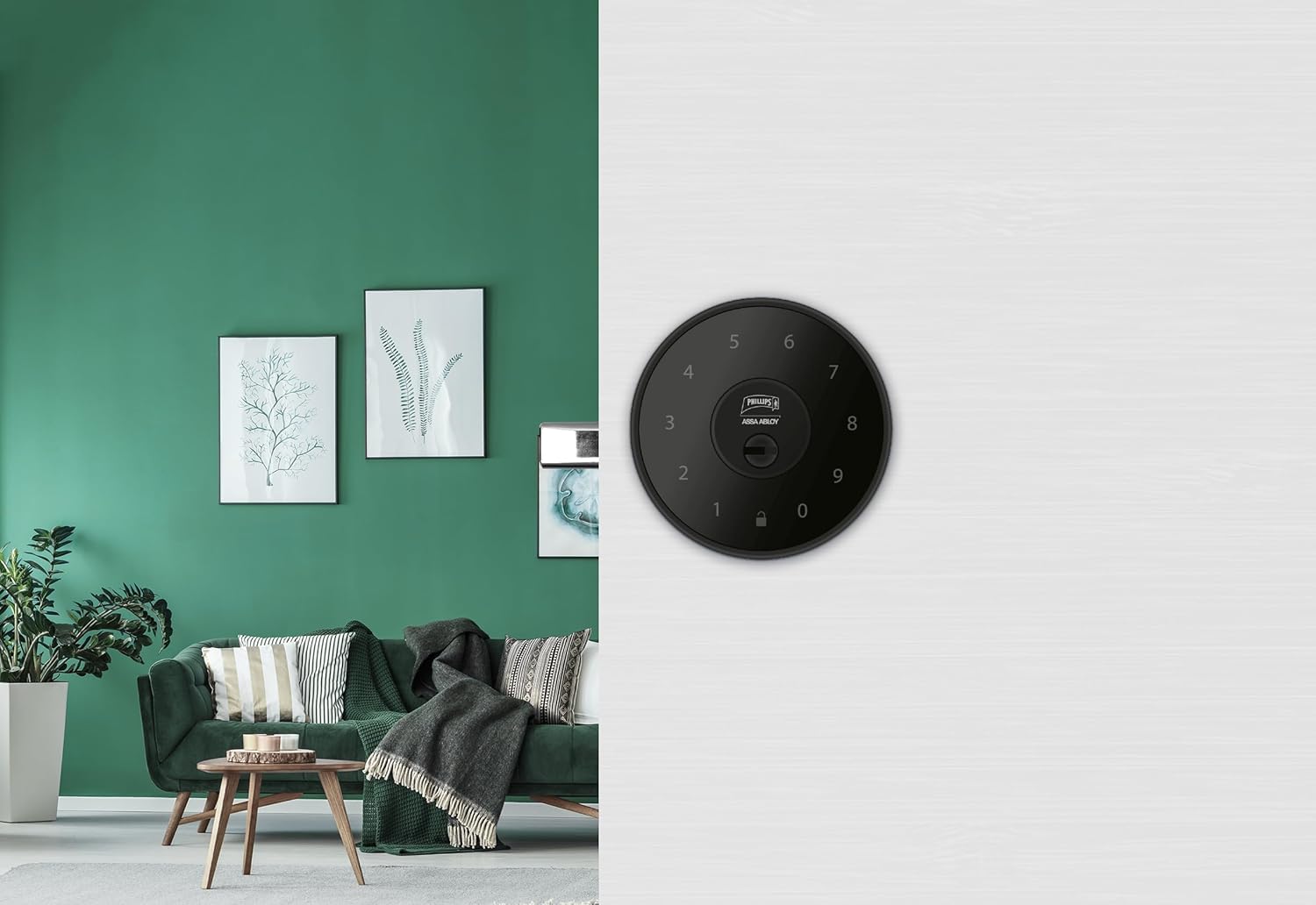
Bild 6.1: An installed Phillips MX7053 Digital Deadbolt, showcasing its exterior keypad on a door.

Bild 6.2: Nahaufnahme von vorn view of the exterior keypad, highlighting the numeric interface and keyhole.
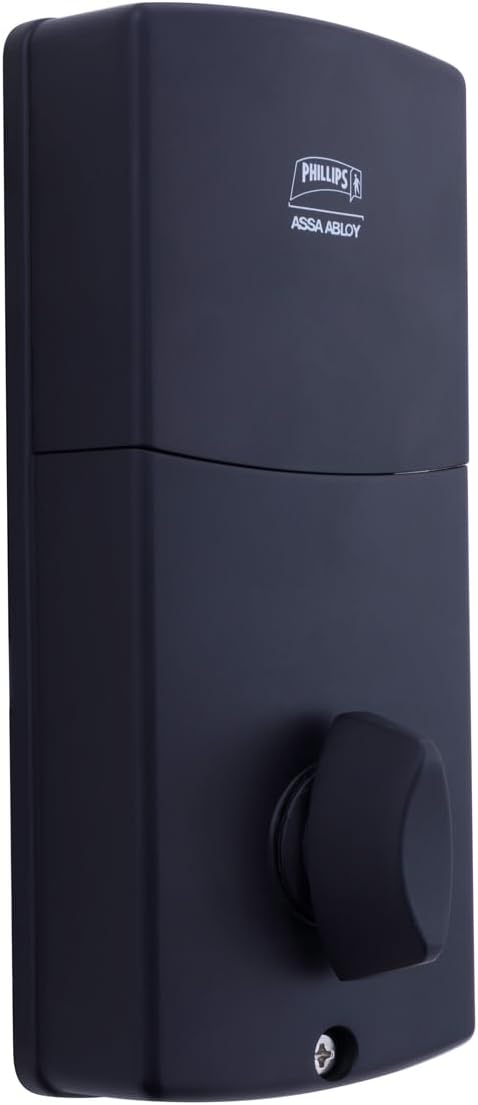
Bild 6.3: Hinteren view of the interior unit, which houses the battery compartment and the thumb turn for manual locking/unlocking.
7. Batterieinstallation und -austausch
The Phillips MX7053 Digital Deadbolt requires 4 AA alkaline batteries for operation. Batteries are not included.
- Zugang zum Batteriefach: Locate the battery cover on the interior thumb turn unit. Slide or unclip the cover to open the compartment.
- Batterien einlegen: Legen Sie 4 neue AA-Alkalibatterien ein und achten Sie dabei auf die richtige Polarität (+/-), wie im Batteriefach angegeben.
- Fach schließen: Replace the battery cover, ensuring it is securely closed.
- Prüfen: After installing batteries, the lock should emit a beep and the keypad lights may illuminate briefly, indicating power.
Notiz: Replace all four batteries simultaneously. Do not mix old and new batteries or different battery types. Low battery indication will typically be a series of beeps or a specific light pattern when operating the lock.
8. Bedienung
8.1 Tür aufschließen
- Verwendung eines Codes: Enter your 4 to 10-digit user code on the exterior keypad. The light indicator will confirm successful entry, and the deadbolt will retract.
- Verwendung des Schlüssels: Insert the high-security key into the keyhole on the exterior keypad and turn it to unlock the deadbolt.
- Von innen: Turn the thumb turn on the interior unit to retract the deadbolt.
8.2 Tür verriegeln
- Von außen: Press any key on the keypad or simply wait for the auto-lock feature (if enabled) to engage the deadbolt.
- Verwendung des Schlüssels: Insert the high-security key into the keyhole on the exterior keypad and turn it to extend the deadbolt.
- Von innen: Turn the thumb turn on the interior unit to extend the deadbolt.
9. Programmierung von Benutzercodes
The lock supports up to 50 unique user codes, each 4 to 10 digits long. Refer to the specific programming instructions included with your lock for detailed steps on adding, deleting, or modifying user codes. Generally, this involves entering a master code followed by a sequence of commands and the desired user code.
Wichtig: Keep your master code confidential and do not share it. It is essential for managing all other user codes.
10. Wartung
- Reinigung: Wischen Sie die Oberfläche des Schlosses mit einem weichen, fusselfreien Tuch ab.amp Tuch. Verwenden Sie keine scharfen Chemikalien oder Scheuermittel.
- Batterieprüfung: Tauschen Sie die Batterien umgehend aus, sobald die Anzeige für niedrigen Batteriestand erscheint.
- Mechanische Prüfung: Periodically check that all screws are tight and the lock operates smoothly. Lubricate the deadbolt mechanism with a silicone-based lubricant if necessary.
11. Fehlerbehebung
- Schloss reagiert nicht: Check battery installation and replace batteries if necessary. Ensure the keypad is clean and free of debris.
- Deadbolt Not Extending/Retracting: Verify that the door frame strike plate is properly aligned with the deadbolt. Check for any obstructions in the door jamb.
- Falsche Codeeingabe: If the light indicator flashes or beeps after entering a code, re-enter the code carefully. Ensure you are using a valid, programmed user code.
- Tastenfeld leuchtet nicht: This may indicate very low batteries or a power issue. Replace batteries.
12. Garantie und Support
The Phillips MX7053 Digital Deadbolt PCD-360 comes with a 1 Jahr Garantie Die Garantie deckt Herstellungsfehler ab Kaufdatum ab. Bitte bewahren Sie Ihren Kaufbeleg für Garantieansprüche auf.
For technical assistance, troubleshooting beyond this manual, or warranty inquiries, please contact Phillips customer support. Refer to the contact information provided on the product packaging or Phillips' official webWebsite.
Additional protection plans may be available from third-party providers for extended coverage.