
1. Einführung und Endeview
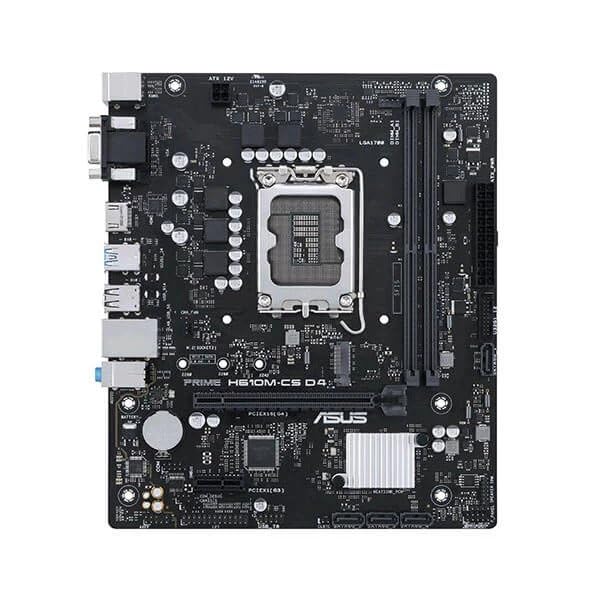
This manual provides detailed instructions for the installation, operation, and maintenance of your ASUS Prime H610M-CS D4 motherboard. Designed for Intel 12th Gen processors, this motherboard features an LGA1700 socket and supports DDR4 memory, offering a stable foundation for your personal computer build.
Hauptmerkmale:
- Intel LGA 1700 Sockel: Ready for 12th Gen Intel processors.
- Umfassende Kühlung: Features a PCH heatsink for efficient heat dissipation.
- Ultrafast connectivity: Includes a 32Gbps M.2 slot, Realtek 1 Gb Ethernet, and USB 3.2 Gen 1 ports.
- 5X Protection III: Multiple hardware safeguards ensure all-round protection and durability.
- Luminous anti-moisture coating: Protects key components from moisture and corrosion, enhancing longevity.
2. Einrichtung und Installation
Before beginning installation, ensure your system is powered off and unplugged from the wall outlet. Handle the motherboard by its edges to avoid static discharge.
2.1. CPU-Installation
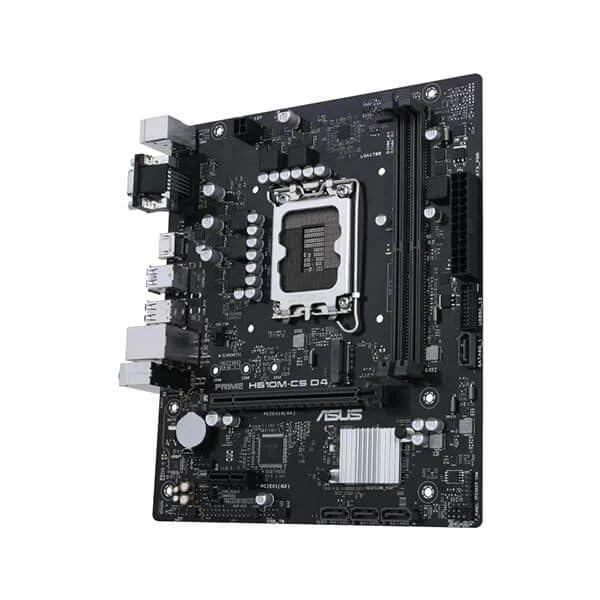
- Suchen Sie den LGA1700-Sockel auf dem Motherboard.
- Öffnen Sie den Hebel des CPU-Sockels und heben Sie die Ladeplatte an.
- Carefully align the Intel 12th Gen processor with the socket, ensuring the triangular mark on the CPU matches the mark on the socket. Do not force the CPU into the socket.
- Senken Sie die Lastplatte ab und sichern Sie sie mit dem Hebel.
2.2. Installation des Arbeitsspeichers (RAM)
- Öffnen Sie die Klemmen an beiden Enden der DDR4-Speichersteckplätze.
- Richten Sie die Kerbe am DDR4-Speichermodul an der Kerbe im DIMM-Steckplatz aus.
- Drücken Sie beide Enden des Speichermoduls fest nach unten, bis die Klammern einrasten.
2.3. Cooler and Graphics Card Installation
- Installieren Sie Ihren CPU-Kühler gemäß den Anweisungen des Herstellers.
- Insert your graphics card into the primary PCIe x16 slot, ensuring it is fully seated and secured with the retention clip.
2.4. Stromanschlüsse
- Verbinden Sie den 24-poligen ATX-Stromanschluss Ihres Netzteils mit dem Motherboard.
- Schließen Sie den 8-poligen (oder 4-poligen) ATX 12V-Stromanschluss an das Motherboard an.
2.5. Case Mounting and Front Panel Connections
- Mount the motherboard into your PC case using the appropriate standoffs and screws.
- Connect the front panel headers (power button, reset button, USB ports, audio jacks) to their respective pins on the motherboard. Refer to the motherboard's detailed diagram for exact pin locations.
3. Bedienungsanleitung
3.1. Erster Start und BIOS-Einrichtung
- Nachdem alle Komponenten installiert und angeschlossen sind, schalten Sie Ihr System ein.
- Drücken Sie die DEL or F2 Drücken Sie die Taste während des Startvorgangs wiederholt, um das BIOS/UEFI-Setup-Dienstprogramm aufzurufen.
- Konfigurieren Sie die Startreihenfolge, die Systemzeit und weitere erforderliche Einstellungen. Speichern Sie die Änderungen und beenden Sie das Programm.
3.2. Treiberinstallation
After installing your operating system, install the latest drivers for the motherboard chipset, audio, LAN, and any other integrated components. These can typically be found on the ASUS support webWebsite für Ihr spezifisches Motherboard-Modell.
3.3. Konnektivität
- M.2 Steckplatz: Utilize the 32Gbps M.2 slot for high-speed NVMe SSDs.
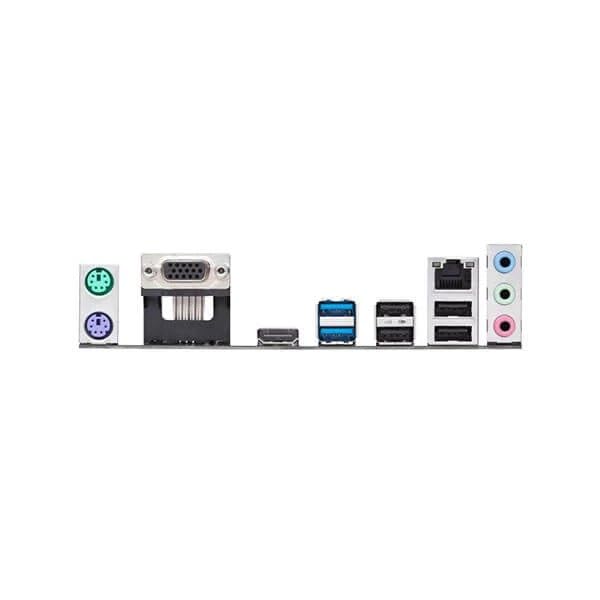
- Ethernet: Connect to your network using the Realtek 1 Gb Ethernet port.
- USB-Anschlüsse: Use the available USB 3.2 Gen 1 ports for high-speed peripheral connections.
4. Wartung
4.1. Reinigung
- Reinigen Sie Ihr PC-Gehäuse und die Komponenten des Motherboards regelmäßig mit Druckluft. Stellen Sie sicher, dass das System vor der Reinigung ausgeschaltet und vom Stromnetz getrennt ist.
- Avoid using liquid cleaners directly on motherboard components.
4.2. BIOS/UEFI-Updates
Überprüfen Sie regelmäßig den ASUS-Support. website for BIOS/UEFI updates. Updates can improve system stability, compatibility, and performance. Follow the instructions provided by ASUS carefully when performing a BIOS update.
4.3. Feuchtigkeitsschutz
The motherboard features a luminous anti-moisture coating designed to protect key components. While this coating provides enhanced durability, it is still recommended to operate the system in a dry, well-ventilated environment to prevent moisture buildup.
5. Fehlerbehebung
If you encounter issues with your motherboard, refer to the following common troubleshooting steps.
5.1. Kein Strom / Kein Startvorgang
- Ensure all power cables (24-pin ATX, 8-pin ATX 12V) are securely connected to the motherboard and power supply.
- Verify that the power supply switch is in the ON position.
- Überprüfen Sie die Verbindungen des Netzschalters an der Vorderseite mit dem Motherboard.
- Testen Sie es nach Möglichkeit mit einem anderen Netzteil.
5.2. Keine Displayausgabe
- Ensure your monitor is connected to the graphics card (if installed) or the motherboard's integrated graphics port (HDMI/VGA).
- Setzen Sie die Grafikkarte und die Speichermodule neu ein.
- Clear CMOS settings (refer to your motherboard's full manual for jumper location).
5.3. Komponente nicht erkannt
- Check that the component (e.g., M.2 SSD, RAM, PCIe card) is correctly installed and seated.
- Verify that the component is compatible with the motherboard.
- Aktualisieren Sie BIOS/UEFI auf die neueste Version.
6. Spezifikationen
| Besonderheit | Detail |
|---|---|
| Marke | ASUS |
| Serie | Prime |
| Modellnummer | Asus Prime H610M-Cs |
| CPU-Sockel | LGA1700 |
| Kompatible Prozessoren | Intel Core der 12. Generation |
| Speichertechnologie | DDR4 |
| Maximal unterstützter Speicher | 1 GB (Note: This value from source data may be a typo, typical motherboards support much higher RAM capacities.) |
| Speichertaktfrequenz | 1600 MHz (Note: This value from source data may be a typo or base speed, actual supported speeds are typically higher for DDR4.) |
| Grafikkartenschnittstelle | Integriert |
| Konnektivitätstyp | W-lan (Note: While "Wi-Fi" is listed, the feature bullets mention "Realtek 1 Gb Ethernet", implying wired LAN. Wi-Fi capability might require an add-in card or be an error in the source data.) |
| Anzahl der HDMI-Anschlüsse | 1 |
| Anzahl der Ethernet-Ports | 1 |
| Produktabmessungen (L x B x H) | 26.5 x 6 x 27 cm |
| Artikelgewicht | 770 g |
| Ursprungsland | China |
Note: Specifications are subject to change without notice. For the most up-to-date information, please refer to the official ASUS product page. Some values from the source data (e.g., Maximum Memory Supported, Memory Clock Speed, Connectivity Type) appear to be inconsistent with typical motherboard specifications and may be data entry errors.
7. Garantie und Support
7.1. Garantieinformationen
Your ASUS Prime H610M-CS D4 motherboard is covered by a limited warranty provided by ASUS. The specific terms and duration of the warranty may vary by region and retailer. Please retain your proof of purchase for warranty claims. For detailed warranty information, visit the official ASUS support webWebsite.
7.2. Technischer Support
Technische Unterstützung, Treiber-Downloads, BIOS-Updates und weitere Produktinformationen finden Sie auf der offiziellen ASUS-Supportseite. webWebsite: www.asus.com/support/. You may also contact ASUS customer service directly for personalized support.