
Einführung
This document serves as an instruction manual for the Generic Easytry20679 infrared replacement remote control. This remote is designed for use with Costzon FWAM-01989 and Sykik SP2091BT Bluetooth Portable PA Systems. Please note that as a replacement unit, its functionality may vary slightly from the original remote control.
Produkt überview
The Easytry20679 is an infrared (IR) remote control featuring a standard button layout for audio system operation. It allows for convenient control of compatible PA systems from a distance.
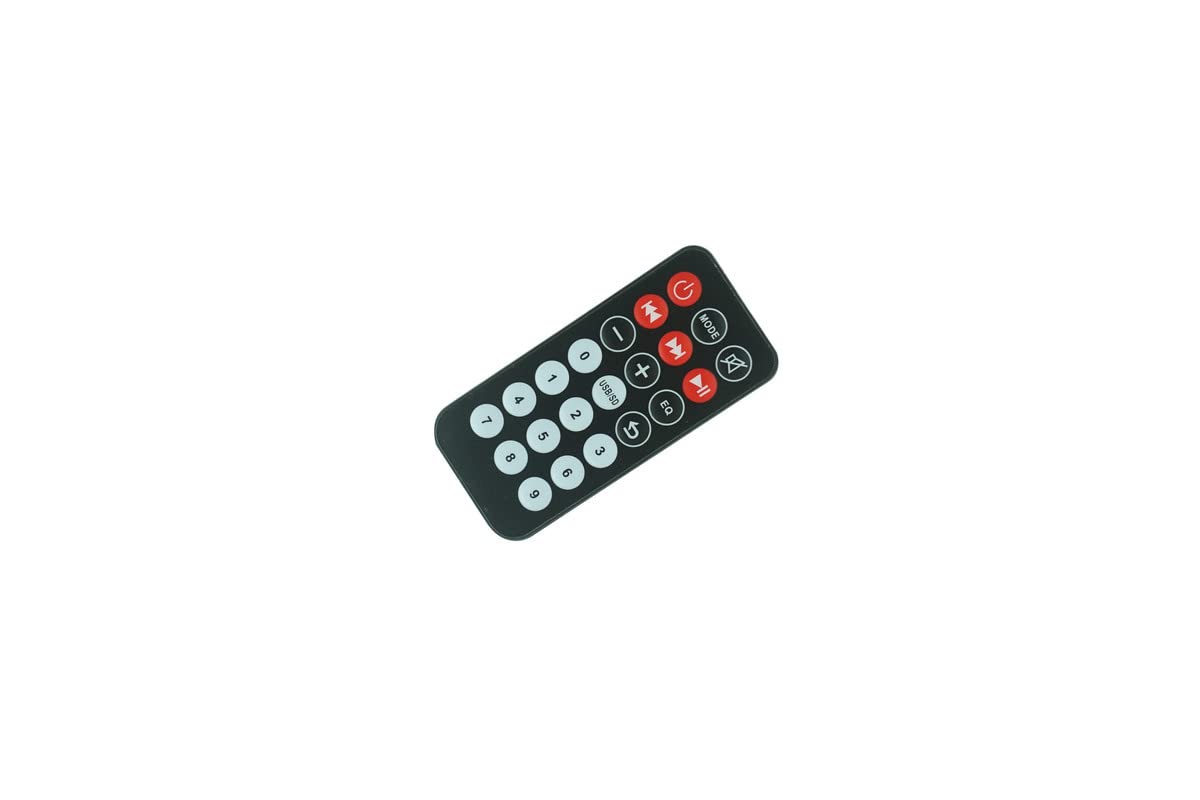
Abbildung 1: Front view der Fernbedienung, auf der alle Bedientasten angezeigt werden.

Abbildung 2: Zurück view der Fernbedienung, wobei das Batteriefach hervorgehoben wird.
Aufstellen
Einlegen der Batterie
The remote control requires two (2) CR2 batteries for operation. Batteries are not included with the remote control and must be purchased separately.
- Suchen Sie das Batteriefach auf der Rückseite der Fernbedienung (siehe Abbildung 2).
- Schieben Sie die Abdeckung des Batteriefachs nach unten oder in die durch einen Pfeil angegebene Richtung, um sie zu öffnen.
- Legen Sie zwei CR2-Batterien ein und achten Sie darauf, dass die positiven (+) und negativen (-) Pole mit den Markierungen im Inneren des Batteriefachs übereinstimmen.
- Schließen Sie den Batteriefachdeckel fest.
After installing the batteries, the remote control is ready for use.
Bedienungsanleitung
This remote control operates via infrared signals. Ensure there is a clear line of sight between the remote control and the IR receiver on your PA system for proper functionality.
Grundfunktionen
- Power-Taste (⏻): Press to turn the PA system on or off.
- MODE-Taste: Cycles through input modes (e.g., Bluetooth, USB, SD, AUX, FM).
- Stummschalttaste (🔇): Schaltet die Audioausgabe stumm oder hebt die Stummschaltung auf.
- Volume Control (- / +): Regelt die Lautstärke des Audiosignals.
- Gleissteuerung (⏮ / ⏭): Springt zum vorherigen oder nächsten Titel/Sender.
- Wiedergabe-/Pause-Taste (⏯): Startet oder pausiert die Medienwiedergabe.
- EQ-Taste: Durchläuft die Equalizer-Voreinstellungen.
- USB/SD-Taste: Selects USB or SD card input directly.
- Ziffernblock (0-9): Used for direct track selection or frequency input in FM mode.
Wichtiger Hinweis: As a replacement remote, some functions or buttons may not operate identically to your original remote or may not be supported by your specific PA system model. Full compatibility with all original functions cannot be guaranteed.
Wartung
Batteriewechsel
Replace batteries when the remote control's range decreases or it stops responding. Always replace both batteries simultaneously with new CR2 batteries. Do not mix old and new batteries or different battery types.
Reinigung
Reinigen Sie die Fernbedienung mit einem weichen, trockenen Tuch. Bei hartnäckigem Schmutz vorsichtig abwischen.ampen the cloth with water. Do not use abrasive cleaners, solvents, or chemical sprays, as these can damage the remote's surface or internal components.
Lagerung
Bewahren Sie die Fernbedienung an einem kühlen, trockenen Ort, geschützt vor direkter Sonneneinstrahlung und extremen Temperaturen, auf. Wenn die Fernbedienung längere Zeit nicht benutzt wird, empfiehlt es sich, die Batterien zu entfernen, um ein Auslaufen zu verhindern.
Fehlerbehebung
- Fernbedienung reagiert nicht:
- Prüfen Sie, ob die Batterien korrekt und mit der richtigen Polarität eingelegt sind.
- Replace the batteries with fresh CR2 batteries.
- Ensure there is a clear line of sight between the remote's IR emitter and the PA system's IR receiver. Obstructions can block the signal.
- Stellen Sie sicher, dass Sie sich innerhalb der effektiven Reichweite der Fernbedienung befinden.
- Einige Funktionen funktionieren nicht:
- This is a replacement remote. It may not support all functions of your original remote or your specific PA system model. Refer to your PA system's original manual for its remote control capabilities.
Technische Daten
| Marke | Generisch |
| Modellnummer | Easytry20679 |
| Kompatible Geräte | Costzon FWAM-01989, Sykik SP2091BT |
| Konnektivitätstechnologie | Infrarot (IR) |
| Controllertyp | Tastensteuerung |
| Akku-Typ | 2 x CR2 (nicht enthalten) |
| ASIN | B0CBQ2GGXV |
Garantieinformationen
This product comes with a 90-day warranty from the date of purchase. This warranty covers manufacturing defects. Please retain your proof of purchase for any warranty claims.
Unterstützung
For further assistance regarding the functionality of this replacement remote control, please refer to the instruction manual provided with your Costzon FWAM-01989 or Sykik SP2091BT Bluetooth Portable PA System. As this is a generic replacement, specific technical support for this remote may be limited.