
1. Einleitung
This manual provides detailed instructions for the installation, operation, maintenance, and troubleshooting of your XPG CORE Reactor II VE 650W Power Supply Unit (PSU). Please read this manual thoroughly before using the product to ensure proper functionality and safety.
2. Sicherheitshinweise
- Vor dem Einbau, Ausbau oder der Reinigung des Netzteils muss immer der Netzstecker aus der Steckdose gezogen werden.
- Öffnen Sie das Netzteil nicht.asing. Hohes Volumentages are present inside, which can cause electric shock. The warranty will be void if the casing ist geöffnet.
- Install the PSU in a well-ventilated area, away from heat sources, direct sunlight, and moisture.
- Ensure all cables are securely connected. Loose connections can cause damage to components.
- Use only the modular cables provided with this PSU. Using third-party cables may cause damage and void the warranty.
- Dieses Produkt ist ausschließlich für die Verwendung in Computersystemen bestimmt. Verwenden Sie es nicht für andere Zwecke.
3. Packungsinhalt
Bitte überprüfen Sie, ob alle unten aufgeführten Artikel in Ihrer Produktverpackung enthalten sind:
- XPG CORE Reactor II VE 650W Power Supply Unit
- Modular Cable Set (including 12V-2x6 cable)
- Netzkabel
- Befestigungsschrauben
- Kurzanleitung

Image: The XPG CORE Reactor II VE 650W power supply unit shown with its retail box, modular cables, AC power cord, and quick start guide.
4. Produktüberschreitungview
The XPG CORE Reactor II VE 650W is an 80 PLUS Gold certified power supply compliant with Intel's ATX 3.1 specifications. It features a fully modular design and an FDB (Fluid Dynamic Bearing) fan for efficient and quiet operation.

Abbildung: Vorderseite view of the XPG CORE Reactor II VE 650W power supply, showcasing its fan grille and XPG branding.

Image: The rear panel of the XPG CORE Reactor II VE 650W power supply, featuring the AC power inlet and the main power switch.

Image: A close-up of the modular cable connection panel on the XPG CORE Reactor II VE 650W PSU, showing labeled ports for Motherboard, CPU & VGA, 12V-2x6, and SATA & Molex connectors.
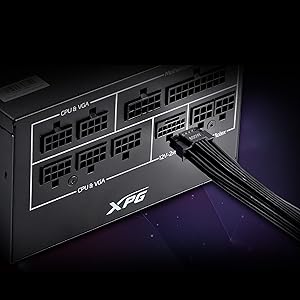
Bild: Eine detaillierte view of the 12V-2x6 connector port on the XPG CORE Reactor II VE 650W PSU, designed for next-generation graphics cards.
5. Einrichtung und Installation
Follow these steps to properly install your XPG CORE Reactor II VE 650W PSU into your computer system:
- Bereiten Sie Ihr System vor: Stellen Sie sicher, dass Ihr Computer vollständig ausgeschaltet und vom Stromnetz getrennt ist. Öffnen Sie das Computergehäuse.
- Altes Netzteil entfernen (falls zutreffend): Trennen Sie alle Kabel von Ihrem alten Netzteil und nehmen Sie es aus dem Gehäuse heraus.
- Das neue Netzteil einbauen: Insert the XPG CORE Reactor II VE 650W PSU into the designated PSU bay in your computer case. Secure it with the provided mounting screws.
- Wichtige Kabel anschließen:
- Schließen Sie das 24-polige ATX-Kabel an Ihr Motherboard an.
- Connect the 4+4-pin or 8-pin EPS/CPU cable(s) to your motherboard's CPU power connector(s).
- Connect the appropriate PCI-E (6+2-pin) or 12V-2x6 cable(s) to your graphics card(s).
- Schließen Sie SATA-Stromkabel an Ihre Speicherlaufwerke (HDDs, SSDs) und optischen Laufwerke an.
- Connect Molex cables to any peripherals requiring them.
Ensure all modular cables are firmly seated into both the PSU and the respective components.
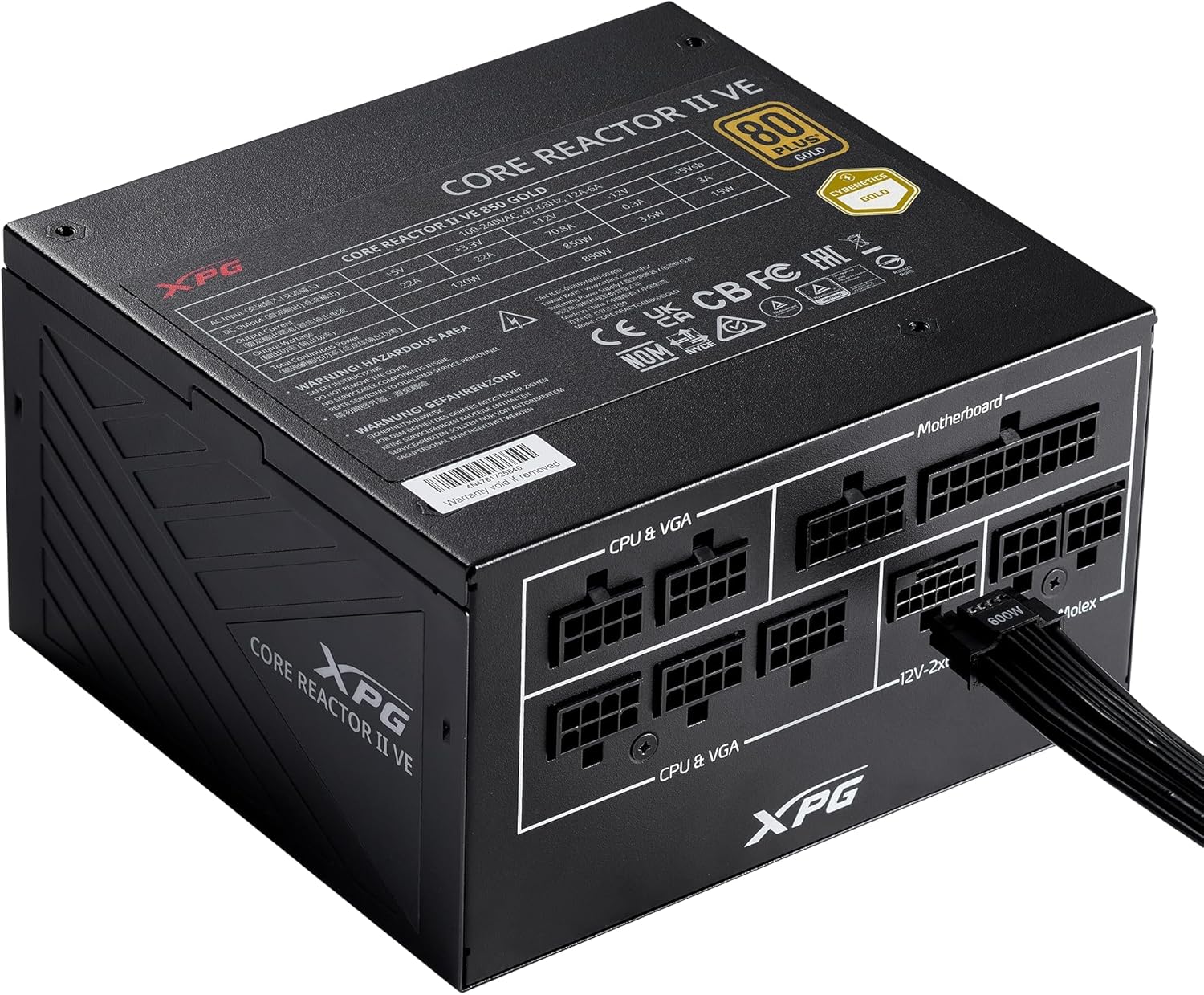
Image: The XPG CORE Reactor II VE 650W power supply with a 12V-2x6 cable connected to its modular port, illustrating a typical cable connection.
- Kabelmanagement: Verlegen Sie die Kabel ordentlich, um die Luftzirkulation und die Optik im Gehäuse zu verbessern.
- Gehäuse schließen und Strom anschließen: Close your computer case. Connect the AC power cord to the PSU's inlet and then to a wall outlet.
- Einschalten: Flip the power switch on the back of the PSU to the 'ON' position and power on your computer.
6. Bedienungsanleitung
The XPG CORE Reactor II VE 650W PSU operates automatically once installed and powered on. It features an FDB fan with intelligent fan control, which adjusts its speed based on the PSU's temperature and load to maintain optimal cooling and minimize noise.
The PSU is designed to provide stable and reliable power to your system. No user intervention is typically required during normal operation.
7. Wartung
To ensure the longevity and optimal performance of your XPG CORE Reactor II VE 650W PSU, consider the following maintenance tips:
- Staubentfernung: Periodically clean the fan grille and the interior of your computer case to prevent dust buildup. Dust can impede airflow and lead to overheating. Use compressed air for this purpose, ensuring the system is powered off and unplugged.
- Kabelprüfung: Occasionally check all modular cable connections to ensure they remain secure.
- Umfeld: Operate the PSU in a clean, dry, and well-ventilated environment.
8. Fehlerbehebung
If you encounter issues with your XPG CORE Reactor II VE 650W PSU, refer to the following common troubleshooting steps:
- Kein Strom:
- Stellen Sie sicher, dass das Netzkabel fest mit dem Netzteil und der Steckdose verbunden ist.
- Check that the power switch on the back of the PSU is in the 'ON' position.
- Überprüfen Sie die Funktionsfähigkeit der Wandsteckdose, indem Sie ein anderes Gerät anschließen.
- Confirm that the 24-pin ATX and 4+4-pin/8-pin EPS/CPU cables are correctly and firmly connected to the motherboard.
- Systeminstabilität/Zufällige Abschaltungen:
- Ensure all power cables to components (motherboard, CPU, GPU, drives) are securely connected.
- Check for proper ventilation within your computer case. Overheating can cause instability.
- If you have recently added new components, ensure the 650W output is sufficient for your total system load.
- Lüfter dreht sich nicht:
- The FDB fan features intelligent control and may not spin at low loads or temperatures. This is normal operation.
- If the fan does not spin under heavy load and the PSU feels excessively hot, contact support.
- Ungewöhnliche Geräusche:
- A slight coil whine can sometimes occur under specific loads; this is generally not indicative of a fault.
- If you hear grinding or scraping noises, power off the system immediately and contact support.
Sollten diese Schritte Ihr Problem nicht lösen, konsultieren Sie bitte den Abschnitt Garantie und Support für weitere Hilfe.
9. Spezifikationen
Key technical specifications for the XPG CORE Reactor II VE 650W PSU:
| Besonderheit | Spezifikation |
|---|---|
| Modellnummer | COREREACTORIIVE650G-BKCUS |
| Ausgang Wattage | 650 Watt |
| Effizienzzertifizierung | 80 PLUS Gold, CYBENETICS Gold |
| ATX-Standard | ATX 3.1 / EPS v2.92 |
| Formfaktor | ATX |
| Kühlmethode | Air (FDB 120mm Fan) |
| Stromversorgungsdesign | Vollständig modular |
| Produktabmessungen (L x B x H) | 5.86 x 5.9 x 3.38 Zoll (140 x 150 x 86 mm) |
| Artikelgewicht | 5.07 Pfund |
| Steckertypen | ATX, Molex, PCI Express, SATA, 12V-2x6 |
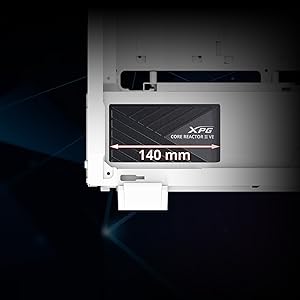
Image: A diagram illustrating the compact 140mm length of the XPG CORE Reactor II VE power supply, highlighting its compatibility with various PC cases.

Image: Visual representation of the multiple protection mechanisms integrated into the PSU, including OPP (Over Power Protection), OVP (Over Voltage Protection), SIP (Surge & Inrush Protection), SCP (Short Circuit Protection), UVP (Under Voltage Protection), OCP (Over Current Protection), OTP (Over Temperature Protection), and NLO (No Load Operation).
10. Garantie und Support
For warranty information, technical support, or service inquiries regarding your XPG CORE Reactor II VE 650W PSU, please visit the official XPG website or contact their customer support directly. Details can typically be found on the product packaging or the manufacturer's official support pages.
Bewahren Sie Ihren Kaufbeleg für Garantieansprüche auf.