
Einführung
Thank you for choosing the PETLIBRO 5L Automatic Pet Feeder with 1080P Camera. This device is designed to provide convenient and reliable feeding for your pets, ensuring they receive their meals on schedule while allowing you to monitor and interact with them remotely. This manual provides essential information for setting up, operating, and maintaining your feeder.

The PETLIBRO 5L Automatic Pet Feeder offers a range of features including a 1080p HD camera, night vision, two-way audio, remote feeding, in-app monitoring, and easy cleanup.
Sicherheitshinweise
- Lesen Sie vor der Benutzung des Futterautomaten alle Anweisungen sorgfältig durch.
- Dieses Gerät ist nur für den Gebrauch in Innenräumen bestimmt.
- Tauchen Sie das Hauptgerät nicht in Wasser oder andere Flüssigkeiten.
- Stellen Sie den Futterspender nicht in die Nähe von direkter Sonneneinstrahlung oder Wärmequellen.
- Ensure the power cord is not damaged and is placed where pets cannot chew on it.
- Verwenden Sie ausschließlich das mit dem Futterspender gelieferte Original-Netzteil.
- Always supervise children around the feeder.
- Verwenden Sie ausschließlich Trockenfutter für Haustiere mit einem Durchmesser zwischen 2 und 15 mm.
Packungsinhalt
Überprüfen Sie, ob alle Komponenten im Paket vorhanden sind:
- PETLIBRO Automatic Pet Feeder (Main Unit)
- Futternapf aus Edelstahl
- Netzteil
- Bedienungsanleitung
- Desiccant Bag (may be pre-installed)
Produkt überview
Familiarize yourself with the different parts of your PETLIBRO Automatic Pet Feeder.

The main unit of the feeder, featuring the food hopper, dispensing mechanism, 1080P camera, and control panel. A cat is shown eating from the stainless steel bowl, with a smartphone displaying the live camera feed.
- Food Hopper: Lagert Trockenfutter für Haustiere.
- Lid with Twist-Lock: Secures the food hopper and keeps food fresh.
- Bedienfeld: Buttons for manual feeding and settings.
- 1080P HD Kamera: Zur Live-Überwachung und Aufzeichnung.
- Infrarotsensor: Detects low food levels and blockages.
- Lautsprecher & Mikrofon: Für die bidirektionale Audiokommunikation.
- Gastronomiebetrieb: Dort, wo das Futter in den Napf gegeben wird.
- Edelstahlschüssel: Abnehmbar für einfache Reinigung.
- Stromanschluss: Zum Anschließen des Netzteils.
- Batteriefach: Für Ersatzbatterien (nicht im Lieferumfang enthalten).
Aufstellen
1. Auspacken und Zusammenbau
- Entnehmen Sie sämtliche Bauteile aus der Verpackung.
- Stellen Sie die Hauptzuführungseinheit auf eine ebene, stabile Oberfläche.
- Setzen Sie die Edelstahlschüssel in den dafür vorgesehenen Schlitz am Boden des Futterautomaten ein.
2. Stromversorgung
- Schließen Sie den Netzadapter an den Stromanschluss des Futterspenders an und stecken Sie ihn in eine Wandsteckdose.
- Für Machttage protection, install 3 D-cell alkaline batteries (not included) into the battery compartment at the bottom of the feeder. This ensures continuous operation during power interruptions.
3. Befüllen des Futterbehälters
- Open the Twist-Lock lid on top of the feeder.
- Pour dry pet food into the hopper. Ensure the food size is between 2-15mm.
- Den Deckel durch Drehen bis zum Einrasten sicher verschließen.
4. App-Installation und WLAN-Verbindung
- Laden Sie die PETLIBRO-App aus dem App Store (iOS) oder dem Google Play Store (Android) herunter.
- Erstellen Sie ein Konto und melden Sie sich an.
- Follow the in-app instructions to add your feeder. Ensure your smartphone is connected to a 2.4GHz or 5GHz Wi-Fi network. The feeder supports both for a more stable connection.
- The app will guide you through connecting the feeder to your home Wi-Fi network.
5. Kamera-Setup
- Once connected to Wi-Fi, the 1080P camera will automatically activate.
- For video recording, insert a Micro SD card (up to 256GB, not included) into the designated slot, usually located near the camera or at the bottom of the unit.
Bedienungsanleitung
1. Manuelle Zuführung
- Press the manual feed button on the feeder's control panel to dispense one portion of food instantly.
- Alternatively, use the 'Feed Now' option in the PETLIBRO app for immediate dispensing.
2. Mahlzeiten per App planen
The PETLIBRO app allows you to customize your pet's feeding schedule.

The PETLIBRO app provides an intuitive interface to set custom feeding times and amounts, and to review feeding logs.
- Öffne die PETLIBRO-App und wähle deinen Futterautomaten aus.
- Navigate to the 'Feeding Schedule' section.
- Set up to 10 meals per day. For each meal, specify the time and the number of portions (1-50 portions per meal).
- Speichern Sie Ihren Zeitplan. Der Futterautomat gibt das Futter automatisch zu den programmierten Zeiten aus.
- Du kannst view feeding logs within the app to track your pet's meal history.
3. Two-Way Audio & Voice Recording
Communicate with your pet remotely using the two-way audio feature.

The feeder allows two-way audio communication, enabling you to speak to your pet and hear their responses through the app.
- Live-Kommunikation: In der Live-Ansicht der App view, tap the microphone icon to speak to your pet. Your voice will be played through the feeder's speaker.
- Stimmaufnahme: Record a personalized voice message (up to 10 seconds) in the app. This message can be set to play at meal times (0-5 times per meal). A new recording will overwrite any previous one.
4. Monitoring with 1080P Camera and Night Vision
The integrated camera allows you to keep an eye on your pet at all times.

The 1080P camera provides clear vision, even at night, allowing you to monitor your pet's meals with high-definition infrared night vision.
- Access the live camera feed through the PETLIBRO app to view Ihr Haustier in Echtzeit.
- Das 145°-Weitwinkelobjektiv bietet ein breites Sichtfeld. view des Futterbereichs.
- Infrared night vision ensures clear visibility even in dark conditions.
- Videos can be stored on a Micro SD card (up to 256GB, not included).
5. Smart Alerts and Notifications
- Bewegungs- und Geräuscherkennung: The feeder automatically records pet activity and saves video clips (SD card required). You will receive notifications on your phone for detected motion or sounds.
- Low Food Level Alert: The infrared sensor monitors the food level in the hopper. You will receive an alert on your phone when the food supply is low, prompting you to refill.
- Blockage Detection: The sensor also detects potential food blockages in the dispensing mechanism and will send an alert if an issue occurs.
- Wi-Fi Disconnection Alert: If the feeder loses its Wi-Fi connection, you will be notified via the app.
Wartung
1. Reinigung des Futterautomaten
Regelmäßige Reinigung gewährleistet Hygiene und einwandfreie Funktion des Futterautomaten.
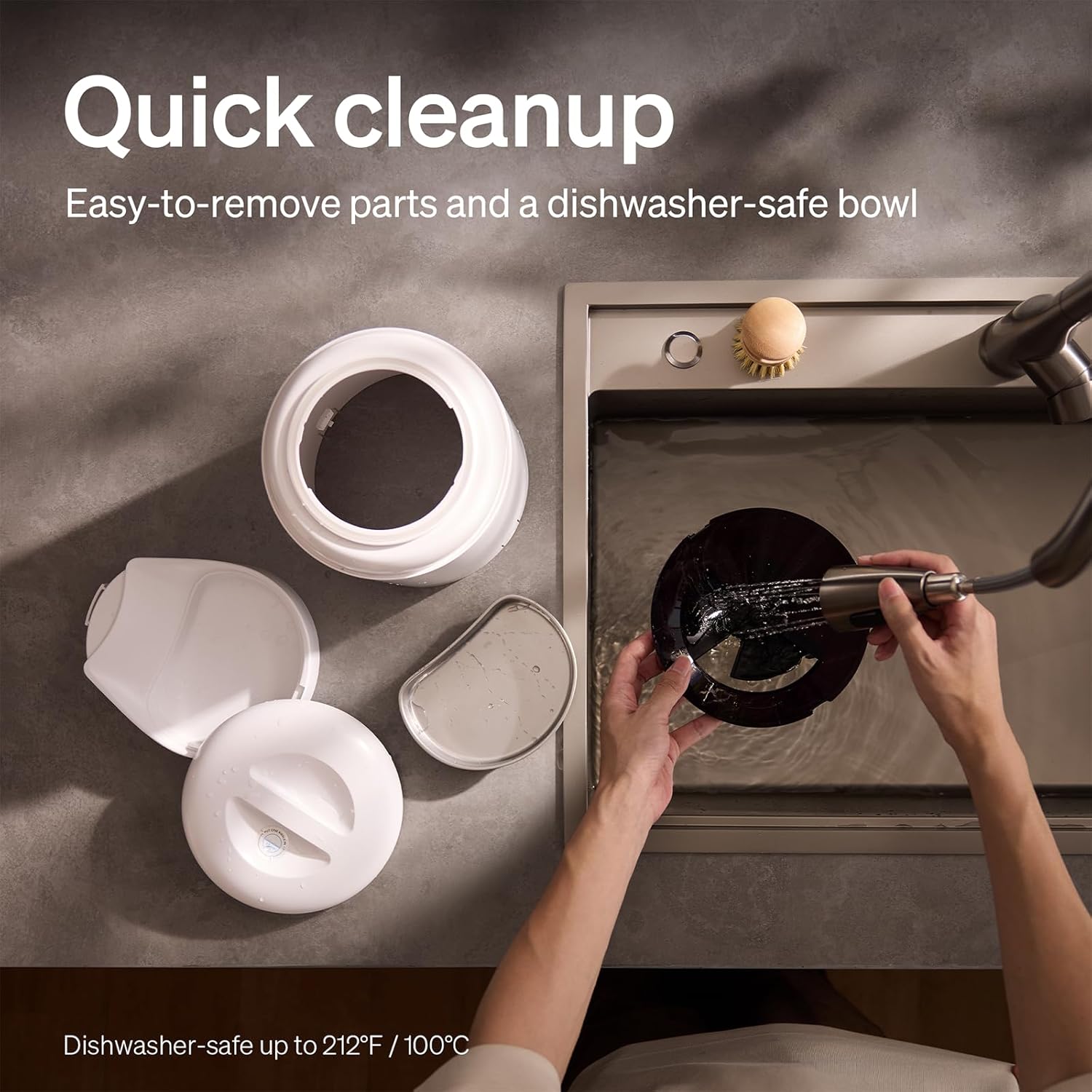
The feeder is designed for quick cleanup with easy-to-remove parts and a dishwasher-safe bowl.
- Stromversorgung trennen: Vor der Reinigung immer den Netzstecker des Futterautomaten ziehen.
- Lebensmittel entfernen: Leeren Sie den Trichter mit den restlichen Futterresten.
- Zerlegen: Remove the food bowl, lid, and food hopper.
- Waschbare Teile: The stainless steel bowl and food hopper are dishwasher-safe (up to 100°C / 212°F) or can be hand-washed with mild soap and water.
- Haupteinheit: Wischen Sie das Hauptgerät mit einem weichen, damp Stoff. Tauchen Sie es nicht in Wasser.
- Gründlich trocknen: Stellen Sie sicher, dass alle Teile vollständig trocken sind, bevor Sie sie wieder zusammenbauen und mit Lebensmitteln befüllen.
2. Trockenmittelersatz
- The desiccant bag helps keep the food fresh. It is recommended to replace it every 15 days.
- Locate the desiccant compartment, usually under the lid.
- Den alten Trockenmittelbeutel entfernen und einen neuen einsetzen.
Fehlerbehebung
| Problem | Mögliche Ursache | Lösung |
|---|---|---|
| Futterautomat gibt kein Futter aus. | Food blockage; empty hopper; dispensing mechanism issue. | Check for food blockages and clear them. Refill hopper if empty. Ensure food size is appropriate (2-15mm). |
| Wi-Fi-Trennung. | Weak Wi-Fi signal; router issues; incorrect password. | Ensure feeder is within Wi-Fi range. Restart your router. Reconnect the feeder to Wi-Fi via the app, verifying the password. |
| Camera not working or frequently disconnecting. | Poor Wi-Fi connection; app glitch; SD card issue. | Check Wi-Fi stability. Restart the feeder and the app. Ensure the SD card is properly inserted and not full. Consider a system reset if issues persist. |
| App shows "status unknown" or feeding errors. | Wi-Fi disconnection; app synchronization issue. | Verify Wi-Fi connection. Close and reopen the app. Restart the feeder. |
| Die Sprachaufnahme wird nicht abgespielt. | No recording saved; volume too low; incorrect schedule. | Ensure a voice message is recorded and saved in the app. Check the playback settings for meal times. |
Technische Daten
| Besonderheit | Detail |
|---|---|
| Modellnummer | AF203 |
| Abmessungen (L x B x H) | 12 x 10 x 27 cm |
| Gewicht | 2.15 kg |
| Material | Edelstahl (Schüssel) |
| Kapazität | 5 Liter |
| Zielspezies | Katze Hund |
| Empfohlene Verwendung | Automatic indoor dog/cat feeding |
| Besondere Merkmale | 1080P Camera, Smart App, Two-way Audio |
| Farbe | Weiß |
| Konnektivitätstechnologie | Wi-Fi (2.4 GHz & 5 GHz) |
| Betriebsmodus | Automatisch |
| Pflegehinweise | Dishwasher safe (bowl) |
| Batterien erforderlich | No (for primary operation), Yes (for backup, 3 D-cell, not included) |
Garantie und Support
PETLIBRO products come with a standard manufacturer's warranty. For detailed warranty information, please refer to the warranty card included in your package or visit the official PETLIBRO webWebsite.
If you encounter any issues or have questions regarding your PETLIBRO Automatic Pet Feeder, please contact PETLIBRO customer support through the following channels:
- E-Mail: Beachten Sie die Angaben auf Ihrer Produktverpackung oder im PETLIBRO. webDie Website enthält die aktuelle Support-E-Mail-Adresse.
- WebWebsite: Besuchen Sie die offizielle PETLIBRO-Website. webWebsite mit häufig gestellten Fragen, Anleitungen zur Fehlerbehebung und Kontaktformularen.
- In-App-Support: The PETLIBRO app may offer a support section for direct assistance.
Please have your model number (AF203) and purchase information ready when contacting support.