
1. Wichtige Sicherheitshinweise
Bitte lesen Sie vor der Benutzung dieses Geräts alle Anweisungen sorgfältig durch. Bewahren Sie diese Bedienungsanleitung zum späteren Nachschlagen auf.
- Dieses Gerät ist nur für den Hausgebrauch bestimmt.
- Tauchen Sie das Gerät nicht in Wasser oder andere Flüssigkeiten.
- Keep the appliance away from water sources, especially when charging.
- Do not use the appliance if the cord or plug is damaged. Contact customer support for repair.
- Always ensure the appliance is switched off before cleaning or performing maintenance.
- Außerhalb der Reichweite von Kindern aufbewahren. Dieses Gerät ist kein Spielzeug.
- Vermeiden Sie den Kontakt mit beweglichen Teilen.
- Verwenden Sie den Trimmer nicht auf gereizter Haut oder offenen Wunden.
- Only use the charging adapter supplied with the appliance.
2. Produktüberschreitungview
The HTC AT-206A is a rechargeable hair trimmer designed for precise grooming tasks such as edging, outlining, dry shaving, and light shaping around areas like the neck, ears, and sideburns.

Image 2.1: HTC AT-206A Trimmer and its retail packaging, showing the device and included accessories.
Komponenten:
- Trimmer Unit (HTC AT-206A)
- Ladekabel
- Reinigungsbürste
- Schmierölflasche
- Kammaufsatz
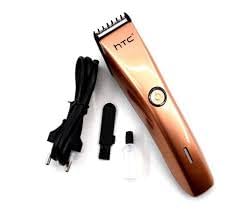
Image 2.2: The HTC AT-206A trimmer displayed with its charging cable, cleaning brush, oil bottle, and comb attachment.
3. Einrichten und Laden
3.1 Erstaufladung
- Before first use, fully charge the trimmer for approximately 8-10 hours.
- Stellen Sie sicher, dass der Trimmer ausgeschaltet ist.
- Schließen Sie das Ladekabel an den Ladeanschluss des Trimmers an.
- Stecken Sie den Adapter in eine geeignete Steckdose.
- Die Ladeanzeigeleuchte (sofern vorhanden) leuchtet auf, um anzuzeigen, dass der Ladevorgang läuft.
- Once fully charged, disconnect the charger from the outlet and the trimmer.
3.2 Attaching the Comb Attachment
- Stellen Sie sicher, dass der Trimmer ausgeschaltet ist.
- Align the comb attachment with the trimmer blade.
- Gently push the comb attachment onto the blade until it clicks into place.
- To remove, gently pull the comb attachment away from the blade.
4. Bedienungsanleitung
4.1 Grundlegende Bedienung
- Stellen Sie sicher, dass der Trimmer aufgeladen ist.
- Drücken Sie den Ein-/Ausschalter, um den Trimmer einzuschalten.
- Drücken Sie den Netzschalter erneut, um den Trimmer auszuschalten.
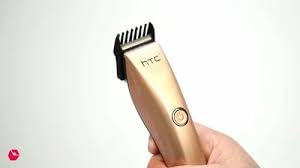
Image 4.1: The HTC AT-206A trimmer held in hand, demonstrating its ergonomic design for ease of use.
4.2 Trimmtechniken
- Für optimale Ergebnisse verwenden Sie den Trimmer auf sauberem, trockenem Haar.
- Halten Sie den Trimmer in einem leichten Winkel zur Haut.
- Bewegen Sie den Trimmer langsam und gleichmäßig entgegen der Haarwuchsrichtung.
- Use the comb attachment for longer hair lengths (0.5mm-13mm).
- For edging and outlining, use the trimmer without the comb attachment for a closer trim.
- Stretch the skin taut with your free hand to ensure a smooth surface for trimming.
5. Wartung und Reinigung
Regelmäßige Reinigung und Wartung gewährleisten optimale Leistung und verlängern die Lebensdauer Ihres Trimmers.
5.1 Reinigen der Klingen
- Ensure the trimmer is switched off and disconnected from the charger.
- Use the provided cleaning brush to remove any loose hairs from the blades.
- For a more thorough clean, you may carefully detach the blade head (refer to specific instructions if provided with your model for blade removal).
- Do not rinse the entire trimmer under water unless explicitly stated as waterproof.
5.2 Ölen der Klingen
- After cleaning, apply 1-2 drops of the provided lubricating oil onto the blades.
- Schalten Sie den Trimmer für ein paar Sekunden ein, damit sich das Öl gleichmäßig verteilen kann.
- Wischen Sie überschüssiges Öl mit einem weichen Tuch ab.
- Oiling the blades regularly (e.g., after every few uses) helps maintain cutting efficiency and prevents rust.
5.3 Speicherung
Store the trimmer in a cool, dry place, away from direct sunlight and moisture. Ensure it is fully charged before storing for extended periods.
6. Fehlerbehebung
If you encounter any issues with your trimmer, refer to the following common problems and solutions:
- Der Trimmer schaltet sich nicht ein:
Ensure the trimmer is fully charged. Check if the charging cable is properly connected and the power outlet is functional. - Poor trimming performance / pulling hair:
The blades may be dull or clogged with hair. Clean and oil the blades as described in the Maintenance section. Ensure the trimmer is adequately charged. - Batterie hält die Ladung nicht:
Ensure the trimmer is charged for the recommended duration. If the issue persists, the battery may need replacement. Contact customer support. - Übermäßiger Lärm oder Vibration:
The blades might be misaligned or require oiling. Clean and oil the blades. If the problem continues, discontinue use and contact customer support.
7. Spezifikationen
| Besonderheit | Spezifikation |
|---|---|
| Modellnummer | AT-206A (SA-144) |
| Stromquelle | Wiederaufladbarer Akku |
| Klingenmaterial | Stainless Steel (Metal) |
| Cutting Length Range | 0.5mm - 13mm (with comb attachment) |
| Abmessungen (L x B x H) | 18.7 x 4.9 x 11.2 cm |
| Empfohlene Verwendung | Dry Shaving, Edging, Light Shaping, Outlining (Neck, Ears, Sideburns, Face) |
| Farbe | Schwarz |
| Hersteller | CHINA |
8. Garantie und Support
This product is covered by a standard manufacturer's warranty. Please refer to the product packaging or contact your retailer for specific warranty terms and conditions.
Bei technischen Problemen, Fragen zur Fehlerbehebung oder Garantieansprüchen wenden Sie sich bitte direkt an den Händler oder Hersteller. Bewahren Sie Ihren Kaufbeleg für eventuelle Garantieanfragen auf.