
1. Einführung und Endeview
This Docooler Wireless Digital Thermometer provides simultaneous display of indoor and outdoor temperatures, along with the current time. It utilizes wireless technology for convenient outdoor temperature monitoring from an indoor receiver. The device records maximum and minimum indoor/outdoor temperatures and offers selectable temperature units (Celsius/Fahrenheit) and time formats (12H/24H).

Image 1.1: Docooler Wireless Digital Thermometer main unit and outdoor transmitter.
2. Produktkomponenten
Das Paket enthält die folgenden Artikel:
- Main Temperature Unit (Receiver)
- Drahtloser Außensender
- Benutzerhandbuch (dieses Dokument)
Notiz: 2x AA 1.5V batteries for the transmitter and 2x AAA 1.5V batteries for the main unit are nicht enthalten und muss separat erworben werden.

Abbildung 2.1: Vorder- und Rückseite view of the main temperature unit.
3. Einrichtung
3.1 Einlegen der Batterie
- For the Main Temperature Unit: Open the battery compartment cover on the back of the main unit. Insert 2x AAA 1.5V batteries, ensuring correct polarity (+/-). Close the cover.
- For the Wireless Outdoor Transmitter: Open the battery compartment cover on the back of the transmitter. Insert 2x AA 1.5V batteries, ensuring correct polarity (+/-). Close the cover.

Image 3.1: Battery compartment of the main temperature unit.

Image 3.2: Battery compartment of the wireless outdoor transmitter.
3.2 Platzierung
- Main Temperature Unit: Place the main unit indoors on a flat surface using its integrated kickstand or mount it on a wall using the hanging hole. Ensure it is away from direct sunlight or heat sources that could affect indoor temperature readings.
- Wireless Outdoor Transmitter: Place the outdoor transmitter in a sheltered location outdoors, protected from direct rain and sunlight. For optimal wireless signal, ensure it is within 100 meters (unobstructed) of the main unit. Avoid placing it near large metal objects or electrical appliances that may cause interference.

Image 3.3: Diagram illustrating wireless data transmission.
4. Bedienungsanleitung
The main unit features an LCD screen displaying indoor temperature, outdoor temperature, and current time. Control buttons are located below the display.

Image 4.1: Main unit display and control buttons.
4.1 Anzeigefunktionen
- DRAUSSEN: Displays the temperature measured by the wireless outdoor transmitter.
- INDOOR: Zeigt die vom internen Sensor des Hauptgeräts gemessene Temperatur an.
- ZEIT: Zeigt die aktuelle Uhrzeit an.
4.2 Tastenfunktionen
The main unit has several buttons for control:
- SET / ℃/℉: Press to switch between Celsius (℃) and Fahrenheit (℉). Press and hold to enter time setting mode.
- ▲ / MAX/MIN: Drücken Sie zum view maximum and minimum recorded temperatures. Press and hold to clear MAX/MIN records. In time setting mode, press to increase value.
- ▼ / 12/24: Press to switch between 12-hour and 24-hour time format. In time setting mode, press to decrease value.
4.3 Uhrzeit einstellen
- Halten Sie die SET / ℃/℉ button for approximately 3 seconds until the hour digits begin to flash.
- Verwenden Sie die ▲ / MAX/MIN Und ▼ / 12/24 Tasten zum Einstellen der Stunde.
- Drücken Sie die SET / ℃/℉ button again to confirm the hour and move to setting the minutes.
- Verwenden Sie die ▲ / MAX/MIN Und ▼ / 12/24 Tasten zum Einstellen der Minuten.
- Drücken Sie die SET / ℃/℉ button one last time to confirm the minutes and exit time setting mode.
5. Wartung
5.1 Batteriewechsel
When the display becomes dim or readings are inconsistent, it is time to replace the batteries in both the main unit and the outdoor transmitter. Follow the battery installation steps in Section 3.1.
5.2 Reinigung
Wischen Sie das Gerät mit einem weichen, damp cloth. Do not use abrasive cleaners or immerse the unit in water. Ensure the device is completely dry before re-inserting batteries or operating.
5.3 Speicherung
Wenn das Gerät längere Zeit nicht benutzt wird, entfernen Sie alle Batterien, um ein Auslaufen zu verhindern, und lagern Sie es an einem kühlen, trockenen Ort.
6. Fehlerbehebung
- No outdoor temperature reading or '---' displayed:
- Check if the outdoor transmitter batteries are correctly installed and not depleted.
- Ensure the outdoor transmitter is within the 100m wireless range and there are no major obstructions (e.g., thick walls, large metal objects) between the transmitter and the main unit.
- Try repositioning both units closer to each other.
- Ungenaue Temperaturmesswerte:
- Ensure both units are not exposed to direct sunlight, heat sources, or extreme drafts.
- Tauschen Sie die Batterien in beiden Geräten aus.
- Die Zeitangabe ist falsch:
- Follow the time setting instructions in Section 4.3 to reset the time.
- Das Display ist dunkel oder leer:
- Tauschen Sie die Batterien im Hauptgerät aus.
7. Spezifikationen
| Besonderheit | Spezifikation |
|---|---|
| Material | ABS (Acrylnitril-Butadien-Styrol) |
| LCD Bildschirmgröße | 94 x 54 mm |
| Innentemperaturbereich | 0 ℃ ~ 50 ℃ / 32 ℉ ~ 122 ℉ |
| Außentemperaturbereich | -20 ℃ ~ 70 ℃ / -4 ℉ ~ 158 ℉ |
| Temperaturgenauigkeit | ± 1 ℃ |
| Indoor Temp. Detection Period | 30x alle XNUMX Sekunden |
| Outdoor Temp. Detection Period | 57x alle XNUMX Sekunden |
| Stromversorgung des Senders | 2x 1.5V AA Batteries (not included) |
| Stromversorgung der Haupteinheit | 2 x 1.5V AAA-Batterien (nicht im Lieferumfang enthalten) |
| Senderabmessungen | 130 x 40 x 22 mm |
| Abmessungen der Haupteinheit | 150 x 86 x 23 mm |
| Drahtlose Übertragungsreichweite | Bis zu 100m (ohne Hindernisse) |
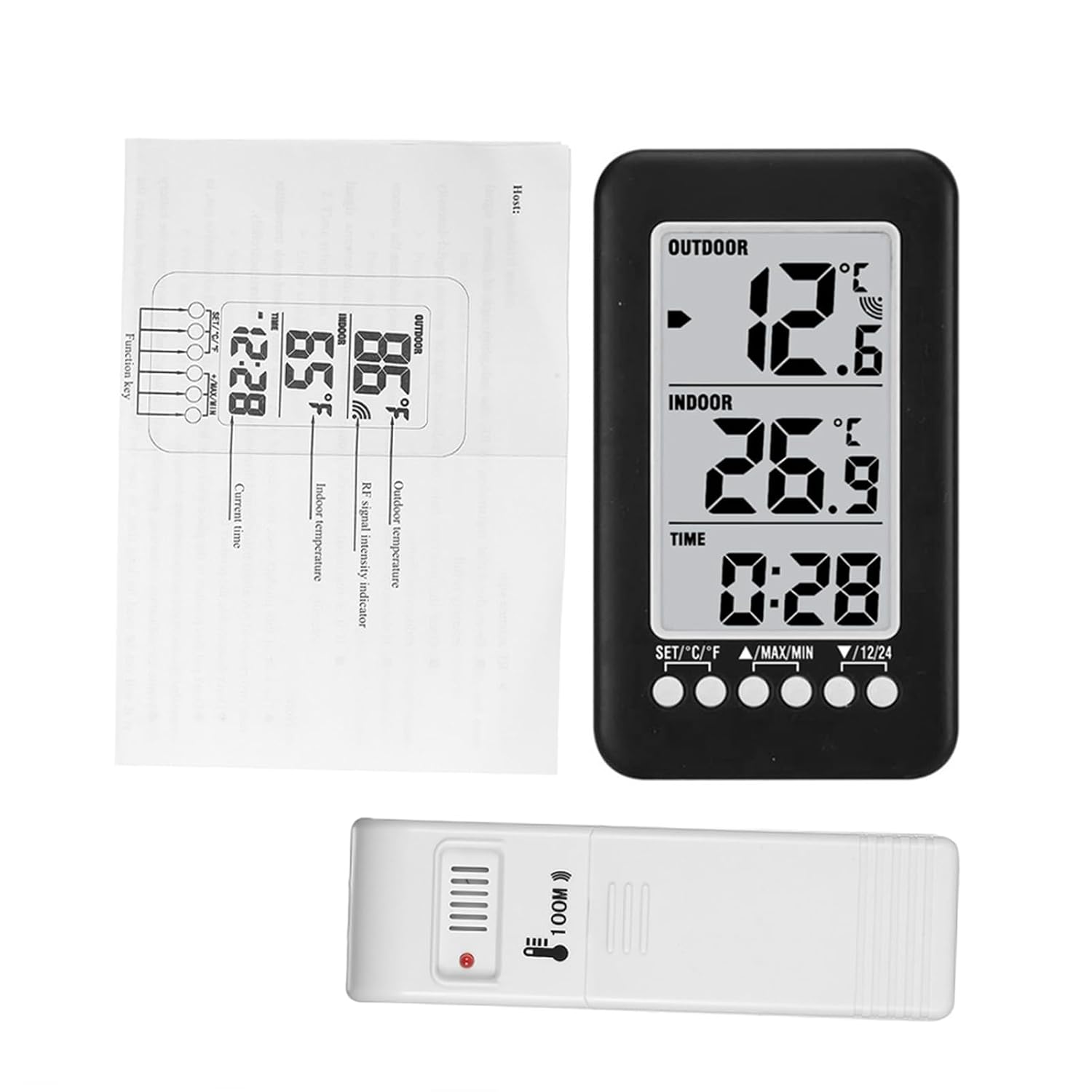
Image 7.1: Dimensions of the main unit and outdoor transmitter.
8. Sicherheitshinweise
- Setzen Sie das Gerät keinen extremen Temperaturen, direkter Sonneneinstrahlung oder hoher Luftfeuchtigkeit aus.
- Lassen Sie das Gerät nicht fallen und setzen Sie es keinen starken Stößen aus.
- Do not attempt to disassemble or modify the device. This will void any potential warranty.
- Entsorgen Sie gebrauchte Batterien verantwortungsvoll gemäß den örtlichen Vorschriften.
9. Garantie und Support
For warranty information or technical support, please refer to the retailer where the product was purchased or visit the official Docooler website. Please have your product model number (36ea5cd0-0bae-43c6-b51b-88b35e12f8b8) available when contacting support.