
docooler V8 Finder 2
docooler V8 Finder 2 TV Signal Finder Meter Benutzerhandbuch
Modell: V8 Finder 2
1. Einleitung
The docooler V8 Finder 2 is a professional digital satellite signal finder meter designed for efficient and accurate installation and adjustment of satellite dishes. It features a high-definition LCD display, supports various DVB standards, and includes advanced functions like spectrum analysis and automatic angle calculation. This manual provides comprehensive instructions for operating and maintaining your device.
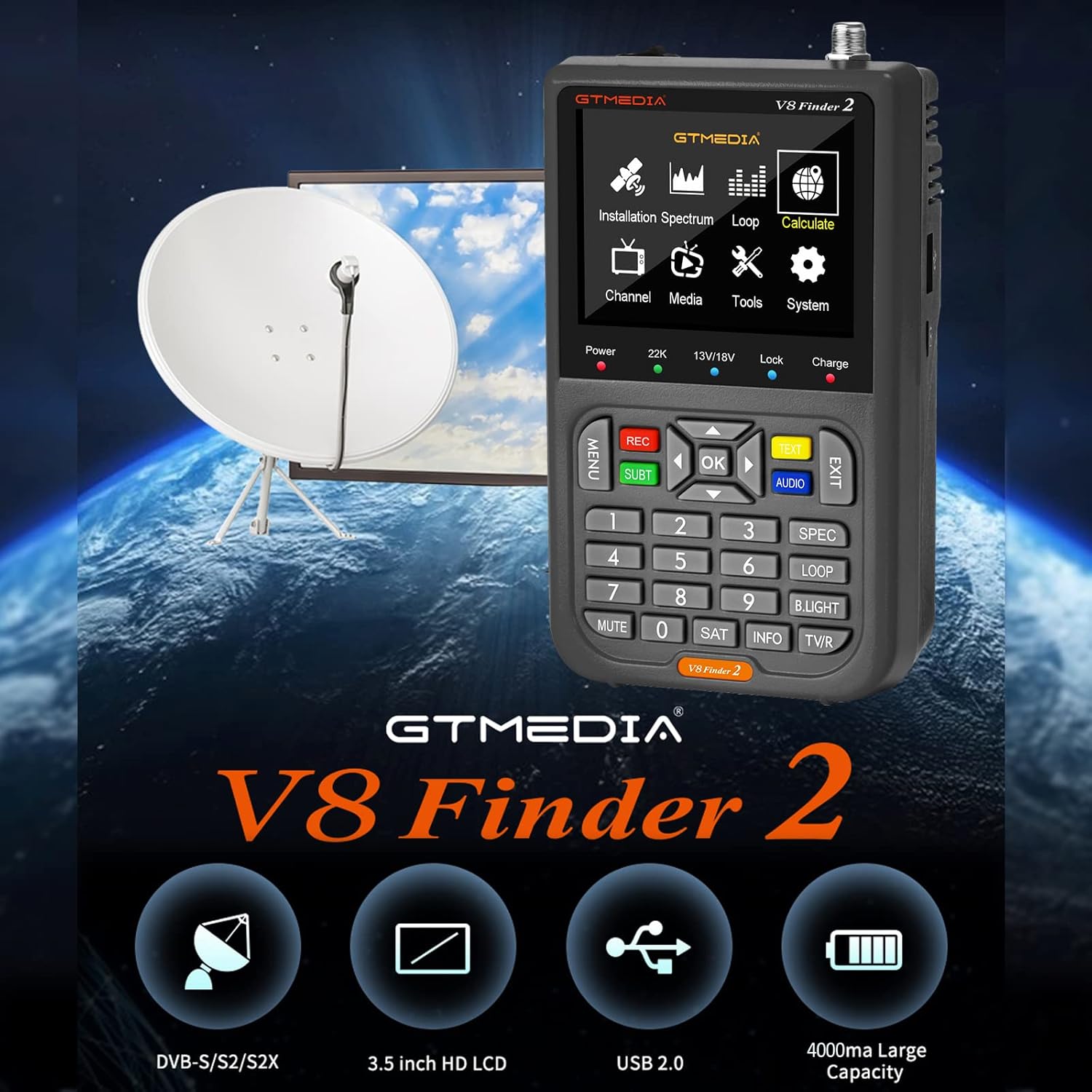
Figure 1: docooler V8 Finder 2 in use with a satellite dish, highlighting its core function.
2. Sicherheitshinweise
Bitte lesen Sie vor der Verwendung dieses Produkts alle Sicherheitshinweise und Anweisungen sorgfältig durch, um einen sicheren Betrieb zu gewährleisten und Schäden zu vermeiden.
- Setzen Sie das Gerät weder Regen noch Feuchtigkeit aus.
- Vermeiden Sie extreme Temperaturen. Betreiben Sie das Gerät innerhalb der empfohlenen Umgebungsbedingungen.
- Das Gerät darf nicht selbst zerlegt oder repariert werden. Alle Wartungsarbeiten dürfen nur von qualifiziertem Fachpersonal durchgeführt werden.
- Verwenden Sie ausschließlich das mitgelieferte oder empfohlene Ladezubehör.
- Sorgen Sie beim Betrieb des Geräts für ausreichende Belüftung.
- Halten Sie das Gerät von starken Magnetfeldern fern.
3. Produktüberschreitungview
The V8 Finder 2 is a compact and powerful tool for satellite signal detection. Familiarize yourself with its components and features.
3.1 Geräteaufbau

Abbildung 2: Vorderseite view of the V8 Finder 2, showing the LCD display and control panel.
The front panel features a 3.5-inch high-definition LCD screen for displaying signal information, menus, and media. Below the screen are navigation buttons, numeric keypad, and function keys for various operations.
3.2 Anschlüsse und Verbindungen
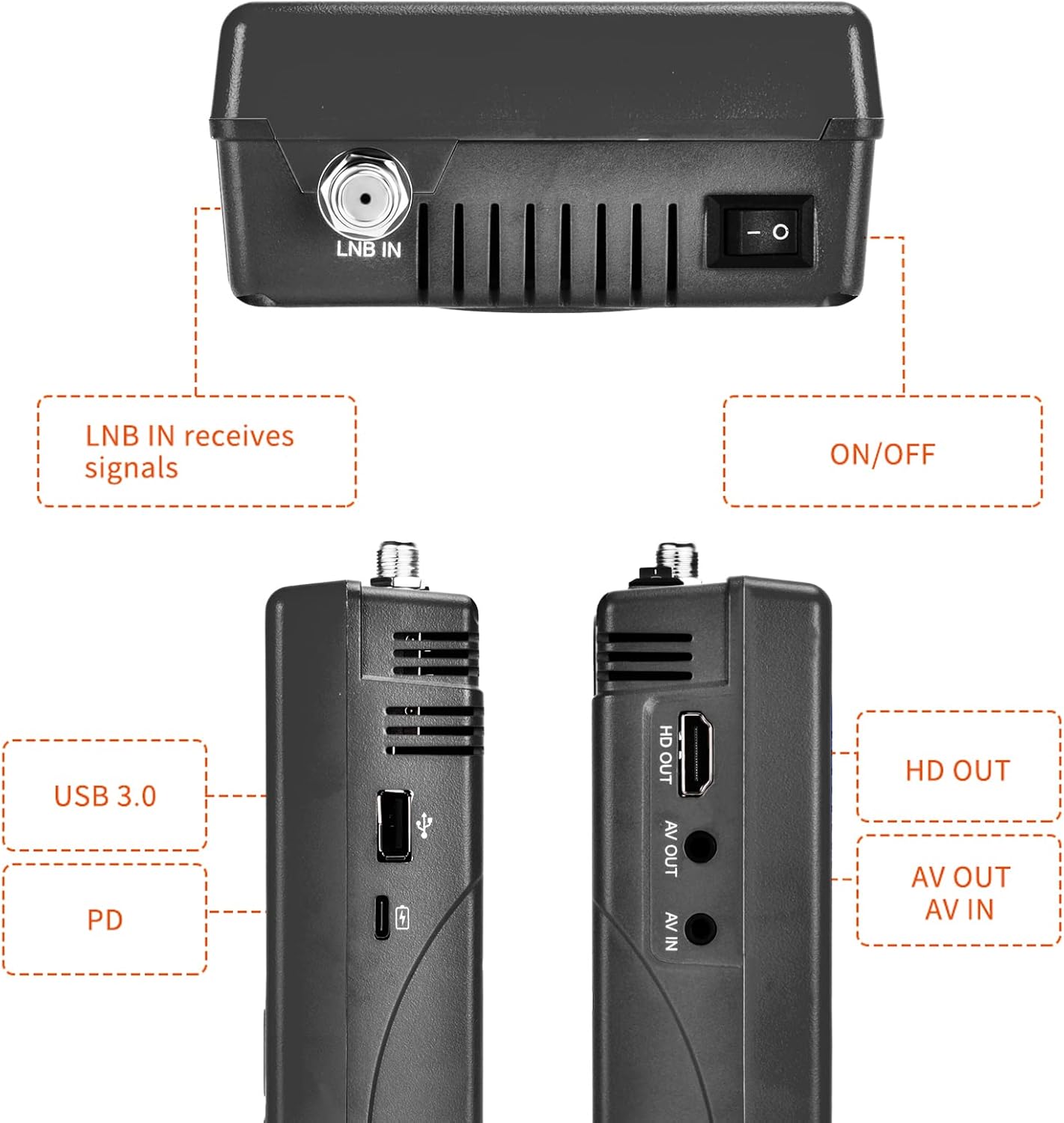
Abbildung 3: Seiten- und Draufsicht views illustrating the various input and output ports.
- LNB-EINGANG: Connects to the LNB of your satellite dish for signal reception.
- Ein / Aus Schalter: Schaltet das Gerät ein oder aus.
- USB-Anschluss (USB 3.0): For software updates and connecting a 2.4G USB Wi-Fi dongle for YouTube functionality.
- PD (Power Delivery) / Type-C Charging Port: For charging the device and supports reverse charging.
- HD-Ausgang: High-Definition Multimedia Interface output for connecting to an external display.
- AV-AUSGANG: Analog Video output for connecting to older displays.
- AV-IN: Analog Video input for connecting external video sources.
3.3 Hauptmerkmale
- 3.5-inch High-Definition LCD Display.
- Full compatibility with DVB-S2X/S2/S, MPEG-2/MPEG-4.
- H.264 (8-bit) hardware decoding support.
- Digital measurement for signal strength and quality.
- Spectrum Analyzer and Loop Search functions.
- Supports Auto, Blind, Manual, or NIT scanning.
- Audible tone for signal lock.
- Automatic calculation of AZ, EL angles.
- DISEQC 1.0/1.1/1.2, Unicable, 0/22kHz tone support.
- Eingebauter Lautsprecher.
- 7.4V/4000mAh Li-ion battery with Type-C fast charging and reverse charging.
- Software-Upgrade über USB-Anschluss.

Figure 4: Visual representation of the V8 Finder 2's main features.
4. Einrichtung
Before first use, ensure the device is fully charged and familiarize yourself with the package contents.
4.1 Packungsinhalt

Figure 5: Items included in the V8 Finder 2 product package.
Prüfen Sie, ob alle Artikel vorhanden sind:
- docooler V8 Finder 2 Device
- Bedienungsanleitung
- USB-Kabel (Typ C)
- Power Adapter (if included, not explicitly listed in JSON but implied by charging)
- F-connector adapter (if included)
4.2 Aufladen des Geräts
The device is equipped with a 7.4V/4000mAh Li-ion battery. For optimal performance, fully charge the device before first use.
- Connect the provided USB Type-C cable to the PD/Type-C charging port on the device.
- Connect the other end of the USB cable to a compatible USB power adapter (not explicitly listed as included, but standard for Type-C charging) or a powered USB port.
- The charging indicator on the device will illuminate. Charging is complete when the indicator changes color or turns off (refer to device screen for battery status).
The device supports multi-protocol fast charging and Type-C reverse charging, allowing it to act as a power bank for other devices.
5. Bedienungsanleitung
This section details the steps for using the V8 Finder 2 to locate and optimize satellite signals.
5.1 Ein-/Ausschalten
- To power on, slide the ON/OFF switch located on the top of the device to the 'ON' position.
- Zum Ausschalten schieben Sie den EIN/AUS-Schalter in die Position „AUS“.
5.2 Anschluss an eine Satellitenschüssel
- Ensure the V8 Finder 2 is powered off.
- Connect the coaxial cable from your satellite dish's LNB (Low Noise Block) to the LNB-Eingang port on the V8 Finder 2.
- If connecting to a receiver or TV, use the HD OUT or AV OUT Häfen.
5.3 Signal Finding and Optimization
The V8 Finder 2 provides various modes for signal acquisition and analysis.
- Satellit auswählen: From the main menu, navigate to the "Installation" or "Satellite Setup" section. Select the desired satellite from the pre-programmed list or add a new one.
- Satellitenschüssel einstellen: Slowly adjust the azimuth (horizontal) and elevation (vertical) of your satellite dish. Observe the signal strength and quality indicators on the V8 Finder 2's display. The device will emit an audible tone when a signal is locked.
- Spektrumanalysator: Use the "Spectrum" function to visualize the signal spectrum, which can help identify interference or weak signals.
- Winkelberechnung: The device can automatically calculate the AZ (Azimuth) and EL (Elevation) angles for your location, assisting in precise dish alignment.
- Kanalsuchlauf: Once a strong signal is acquired, perform an "Auto Scan," "Blind Scan," "Manual Scan," or "NIT Scan" to find available channels.

Figure 6: The V8 Finder 2 display showing signal decoding capabilities.
5.4 Media Playback and Other Functions
- Medien: The device supports media playback. Connect a USB drive to the USB port to access compatible audio or video files.
- YouTube (via Wi-Fi): Connect a 2.4G USB Wi-Fi dongle to the USB port to enable YouTube functionality.
- AV IN/OUT: Use the AV IN port to display video from an external source on the V8 Finder 2 screen. Use AV OUT or HD OUT to display the V8 Finder 2's screen on an external monitor or TV.

Figure 7: Illustration of AV IN and AV OUT functionality, connecting the device to a television.
6. Wartung
Eine ordnungsgemäße Wartung gewährleistet die Langlebigkeit und optimale Leistung Ihres V8 Finder 2.
- Reinigung: Reinigen Sie das Gerät mit einem weichen, trockenen Tuch. Verwenden Sie keine flüssigen Reiniger oder Sprays.
- Lagerung: Bewahren Sie das Gerät an einem kühlen, trockenen Ort fern von direkter Sonneneinstrahlung und extremen Temperaturen auf.
- Batteriepflege: To preserve battery life, avoid fully discharging the battery frequently. If storing for extended periods, charge the battery to about 50% every few months.
- Software-Updates: Prüfen Sie regelmäßig, ob auf der Website des Herstellers Software-Updates verfügbar sind. website. Updates can improve performance and add new features. Use the USB port for software upgrades.
7. Fehlerbehebung
If you encounter issues with your V8 Finder 2, refer to the following common problems and solutions.
| Problem | Mögliche Ursache | Lösung |
|---|---|---|
| Gerät lässt sich nicht einschalten. | Niedriger Batteriestand; Netzschalter ausgeschaltet. | Laden Sie das Gerät vollständig auf. Stellen Sie sicher, dass sich der Ein-/Ausschalter in der Position „EIN“ befindet. |
| Kein Signal gefunden. | Incorrect LNB connection; Dish misalignment; Incorrect satellite selected. | Check LNB cable connection. Re-align the satellite dish. Verify the correct satellite is selected in the device settings. |
| Weak or unstable signal. | Fine-tuning needed; Obstruction; LNB issue. | Make small adjustments to the dish. Check for any physical obstructions. Inspect LNB for damage. |
| Es kann keine Verbindung zum WLAN hergestellt werden. | No 2.4G USB Wi-Fi dongle connected; Incorrect Wi-Fi settings. | Ensure a compatible 2.4G USB Wi-Fi dongle is inserted. Verify Wi-Fi network settings and password. |
| Display issues. | Software glitch; Hardware fault. | Restart the device. If the problem persists, consider a software update or contact support. |
8. Spezifikationen
Technical specifications for the docooler V8 Finder 2.
- Anzeige: 3.5-Zoll-HD-LCD
- Kompatibilität: DVB-S2X/S2/S, MPEG-2/MPEG-4
- Video-Decodierung: H.264 (8-bit)
- Batterie: 7.4 V / 4000 mAh Li-Ion
- Ladeanschluss: Type-C (supports fast charging, reverse charging)
- Konnektivität: USB (for software update, 2.4G Wi-Fi dongle), HD OUT, AV OUT, AV IN
- Abmessungen: Ungefähr 155 mm x 95 mm x 45 mm
- Gewicht: 530g
- DISEQC-Unterstützung: 1.0/1.1/1.2, Unicable
- Tone Support: 0/22 kHz
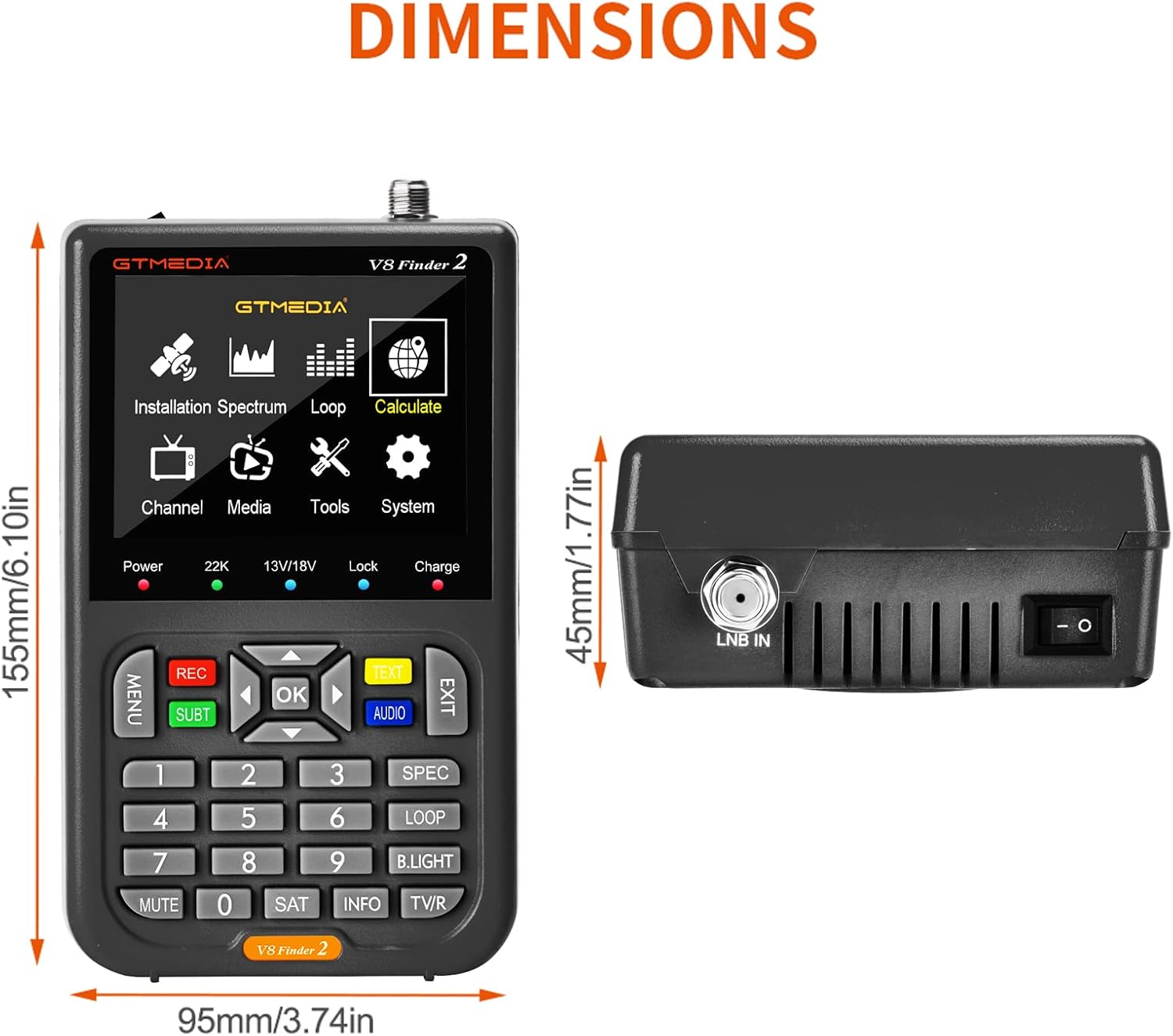
Figure 8: Physical dimensions of the V8 Finder 2.
9. Garantie und Support
For warranty information and technical support, please refer to the product warranty card included in your package or visit the official docooler webBewahren Sie Ihren Kaufbeleg als Kaufnachweis für Garantieansprüche auf.
Hersteller: Docooler
Marke: Dokühler
For further assistance, please contact docooler customer service.
Ask a question about this manual
Ask about setup, troubleshooting, compatibility, parts, safety, or missing instructions. Manuals+ will review the question and use this page’s manual context to help answer it.