
1. Einleitung
The AOPUTTRIVER AP-189A is a high-precision digital manometer designed for measuring differential, positive, and negative pressure. It is widely used in various applications including flow measurement, air quality monitoring, level measurement, gas temperature measurement, and HVAC system control. This manual provides detailed instructions for the safe and effective use of your device.
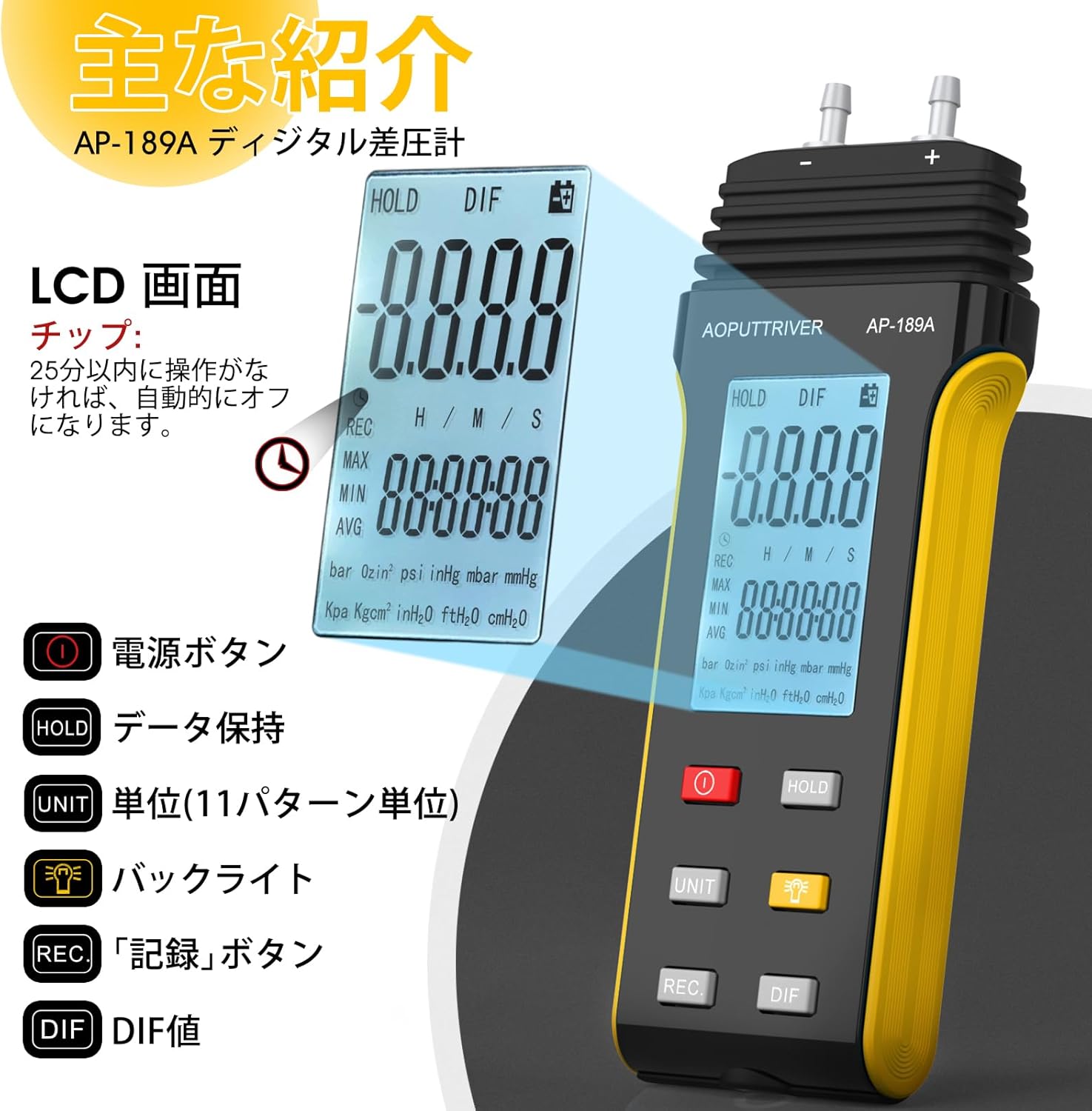
The device features a large LCD with backlight, data hold function, automatic power-off, and the ability to record maximum, minimum, and average values, as well as differential pressure (DIF). It supports 11 selectable pressure units for versatility in professional applications.
2. Produktmerkmale
- Hohe Präzision: Measurement range of ±2.000psi with an accuracy of ±0.3%FSO (at 25°C).
- Mehrere Einheiten: Easily switch between 11 pressure units: Psi, kPa, Kgfcm2, ozin2, Bar, mbar, inHg, mmHg, inH2O, ftH2O, cmH2O.
- Datenaufzeichnung: Records MAX/MIN/AVG values for easy data analysis.
- Nullstellung: Allows for precise zero calibration before measurements.
- Multifunktionsdisplay: Large LCD with backlight for clear readings.
- Energieverwaltung: Low battery indicator and automatic power-off after 25 minutes of inactivity to conserve battery life.
- DIF Function: Measures differential pressure.

Bild: Überview of the AP-189A Digital Manometer's key features and specifications, including accuracy, repeatability, maximum pressure, and various functions like data hold, auto-off, and unit selection.
3. Packungsinhalt
Prüfen Sie beim Öffnen der Verpackung, ob alle Artikel vorhanden und in einwandfreiem Zustand sind:
- 1 x AP-189A Digital Manometer
- 1 x Schutztasche
- 1 x kleiner Schraubendreher
- 2 x 1.5 V AAA-Batterien
- 1 x Benutzerhandbuch (Japanisch)

Image: The complete package contents of the AP-189A Digital Manometer, showing the device, a protective carrying bag, a small screwdriver, two AAA batteries, and the user manual.
4. Einrichtung
4.1 Einlegen der Batterie
- Suchen Sie die Abdeckung des Batteriefachs auf der Rückseite des Geräts.
- Use the provided small screwdriver to open the battery compartment.
- Legen Sie zwei 1.5V AAA-Batterien ein und achten Sie dabei auf die richtige Polarität (+/-).
- Bringen Sie die Batteriefachabdeckung wieder an und sichern Sie sie mit der Schraube.
4.2 Anschlussschläuche
The AP-189A features dual ports for differential pressure measurement. Connect the hoses to the appropriate ports (+ and -) based on your measurement requirements. Ensure a secure connection to prevent leaks.

Bild: Eine detaillierte view of the AP-189A Digital Manometer, highlighting its dimensions and the dual port connections at the top for pressure hoses.
5. Bedienungsanleitung
5.1 Ein-/Ausschalten
- Drücken Sie die Netzschalter (
 ) um das Gerät EINzuschalten.
 - Halten Sie die Netzschalter for a few seconds to turn the device OFF.
5.2 Nullpunkteinstellung
Before taking any measurements, it is crucial to perform a zero setting to ensure accuracy. Disconnect all pressure hoses from the device before performing this step.
- Ensure the device is powered on and no pressure is applied to the ports.
- Halten Sie die HALTEN -Taste ca. 5 Sekunden gedrückt halten.
- The display will show "----" indicating that the zero setting is complete.

Image: Visual guide demonstrating how to perform a zero setting on the manometer by long-pressing the HOLD button until the display shows dashes.
5.3 Einheitenauswahl
Drücken Sie die EINHEIT button to cycle through the 11 available pressure units (Psi, kPa, Kgfcm2, ozin2, Bar, mbar, inHg, mmHg, inH2O, ftH2O, cmH2O) until your desired unit is displayed.
5.4 Hintergrundbeleuchtungsfunktion
Drücken Sie die Taste für Hintergrundbeleuchtung () to turn the LCD backlight ON or OFF for improved visibility in low-light conditions.
5.5 Datenhaltung
Drücken Sie die HALTEN button briefly to freeze the current reading on the display. Press it again to release the hold function and resume live readings.
5.6 MAX/MIN/AVG/DIF Recording
Drücken Sie die AUFNAHME button to enter recording mode. In this mode, the device will track the maximum, minimum, and average pressure values. Press AUFNAHME repeatedly to cycle through MAX, MIN, AVG, and DIF displays. To exit recording mode, press and hold the AUFNAHME Taste.
5.7 Automatische Abschaltung
The device will automatically power off after 25 minutes of inactivity to save battery life. This feature can typically be disabled or adjusted by pressing and holding specific buttons during power-on, as detailed in the full manual.
Image: A close-up of the AP-189A's LCD screen and control buttons, illustrating the functions of the Power, Hold, Unit, Backlight, Record, and DIF buttons.
6. Wartung
- Reinigung: Reinigen Sie das Gerät mit einem weichen, trockenen Tuch. Verwenden Sie keine Scheuermittel oder Lösungsmittel.
- Lagerung: Store the manometer in its protective bag in a cool, dry place when not in use. Remove batteries if storing for extended periods to prevent leakage.
- Kalibrierung: Regular calibration by a qualified technician is recommended to maintain measurement accuracy, especially for critical applications.
- Batteriewechsel: Replace batteries promptly when the low battery indicator appears to ensure continuous operation and prevent data loss.
7. Fehlerbehebung
| Problem | Mögliche Ursache | Lösung |
|---|---|---|
| Gerät lässt sich nicht einschalten | Leere oder falsch eingelegte Batterien | Batteriepolarität prüfen; Batterien austauschen. |
| Ungenaue Messwerte | No zero setting performed; sensor obstruction; device not calibrated | Perform zero setting; ensure ports are clear; consider professional calibration. |
| Display shows "OL" or "Err" | Overload (pressure exceeds maximum limit) | Remove pressure immediately. Ensure pressure does not exceed 6 Psi. |
| Hintergrundbeleuchtung funktioniert nicht | Backlight function off; low battery | Press the backlight button; replace batteries. |
8. Spezifikationen
- Messbereich: ±2.000psi
- Genauigkeit: ±0.3 % FSO (bei 25 °C)
- Wiederholbarkeit: ±0.25 % FSO
- Linearity/Hysteresis: ±0.1 % FSO
- Limited Maximum Pressure: 6 Psi
- Einheit: Psi, kPa, Kgfcm2, ozin2, Bar, mbar, inHg, mmHg, inH2O, ftH2O, cmH2O
- Funktionen: Backlight, Data Hold, Auto Power Off (25 min), MAX/MIN/AVG/DIF, Zero Setting
- Stromversorgung: 2 x 1.5 V AAA-Batterien
- Abmessungen: Ungefähr 166 mm x 62 mm x 31 mm (6.29 Zoll x 2.44 Zoll x 1.22 Zoll)
- Gewicht: Ca. 250g
Image: A diagram illustrating the physical dimensions of the AP-189A Digital Manometer, including length, width, and thickness.
9. Garantie und Support
The AOPUTTRIVER AP-189A Digital Manometer comes with a 365-day warranty and lifetime technical support. If you encounter any quality issues with the product, please contact our customer support team. We are committed to resolving any problems as quickly as possible.
For support, please refer to the contact information provided in your product packaging or visit the official AOPUTTRIVER webWebsite.