
Einführung
This manual provides essential information for the safe and efficient use of your SANSUI JSW50GSUHD 50-inch 4K Ultra HD Smart Google LED TV. Please read these instructions thoroughly before operating the television and retain them for future reference.

Bild: Vorderseite view of the SANSUI JSW50GSUHD 50-inch 4K Ultra HD Smart Google LED TV.
Sicherheitshinweise
Always follow basic safety precautions when using this television to reduce the risk of fire, electric shock, and injury. Keep the TV away from water and moisture. Do not block ventilation openings. Use only attachments/accessories specified by the manufacturer. Refer all servicing to qualified service personnel.
Lieferumfang
Packen Sie den Karton vorsichtig aus und vergewissern Sie sich, dass alle Artikel vorhanden sind:
- 1 x SANSUI JSW50GSUHD 50-inch TV
- 1 x Fernbedienung
- 1 pair x AAA Batteries (for remote)
- 1 set x Base Stand
- 2 pairs x Screws (for stand)
- 1 set x Wall Mounting Kit (if included)
- 1 x Benutzerhandbuch und Garantiekarte
- 1 x Stromkabel
- 1 x Mini AV cable
Aufstellen
1. TV-Platzierung
Place the TV on a stable, flat surface using the provided base stand, or mount it on a wall using a compatible VESA 100 x 100 mm wall mount (sold separately). Ensure adequate ventilation around the TV.

Image: The SANSUI JSW50GSUHD TV placed on a media console with its stand.
2. Anschließen externer Geräte
Your SANSUI TV offers various connectivity options:
- HDMI-Anschlüsse (3): Schließen Sie Blu-ray-Player, Spielekonsolen, Set-Top-Boxen usw. an.
- USB-Anschlüsse (2): Schließen Sie USB-Laufwerke zur Medienwiedergabe an.
- AV (Mini) Port: Für ältere Geräte mit Composite-Video und Stereo-Audio.
- Ethernet (LAN)-Anschluss: Für eine kabelgebundene Internetverbindung.
- Antenna/RF Input: Zum Anschluss einer Antenne oder eines Kabelfernsehers.
- Optischer Audioausgang: Zum Anschluss an externe Audiosysteme.
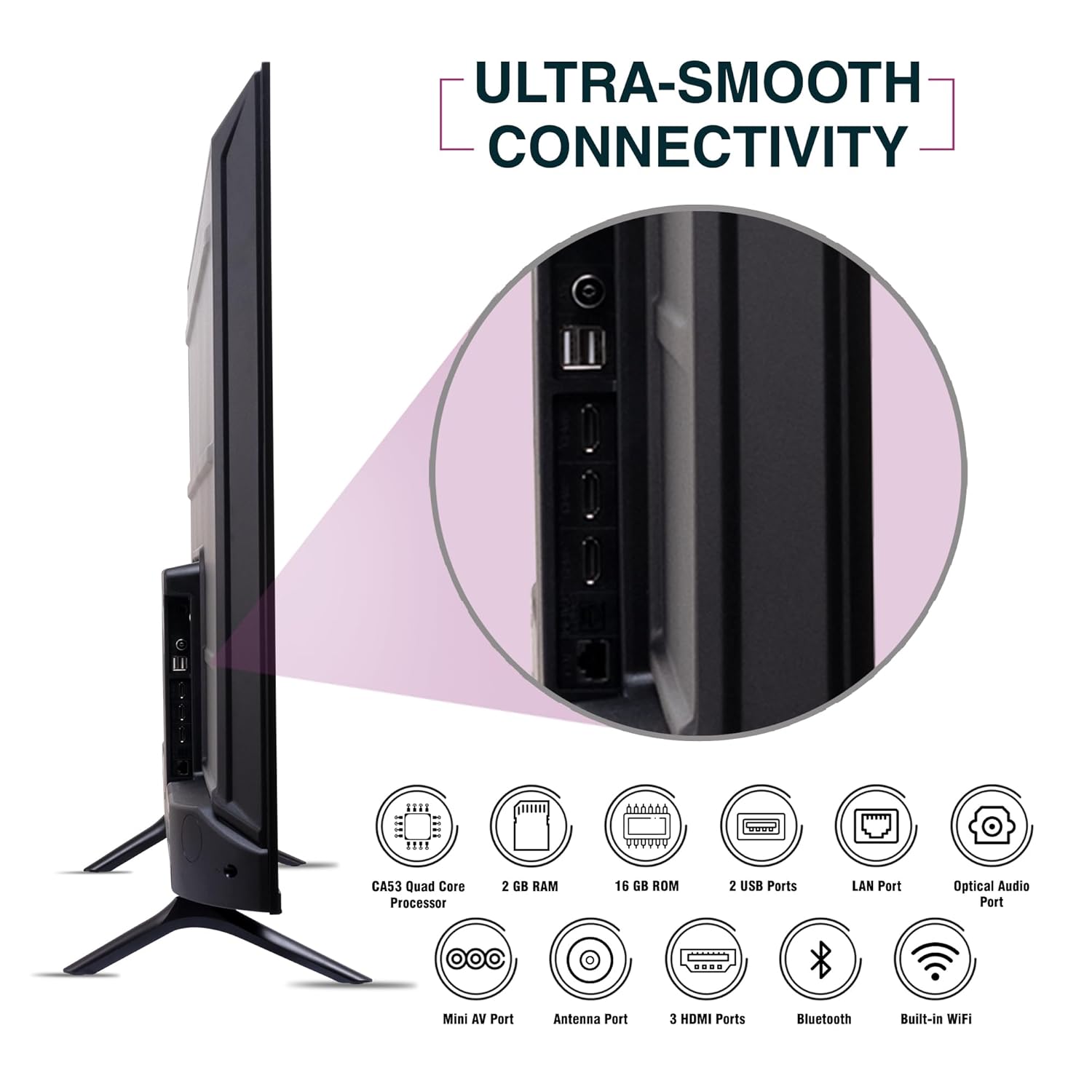
Abbildung: Seite view of the SANSUI JSW50GSUHD TV highlighting the various input and output ports.
3. Stromanschluss
Connect the power cable to the TV's power input and then to a wall outlet. The TV supports 100-240 VAC, 50-60 Hz.
4. Einrichtung der Fernbedienung
Legen Sie die beiden AAA-Batterien unter Beachtung der richtigen Polarität in die Fernbedienung ein.
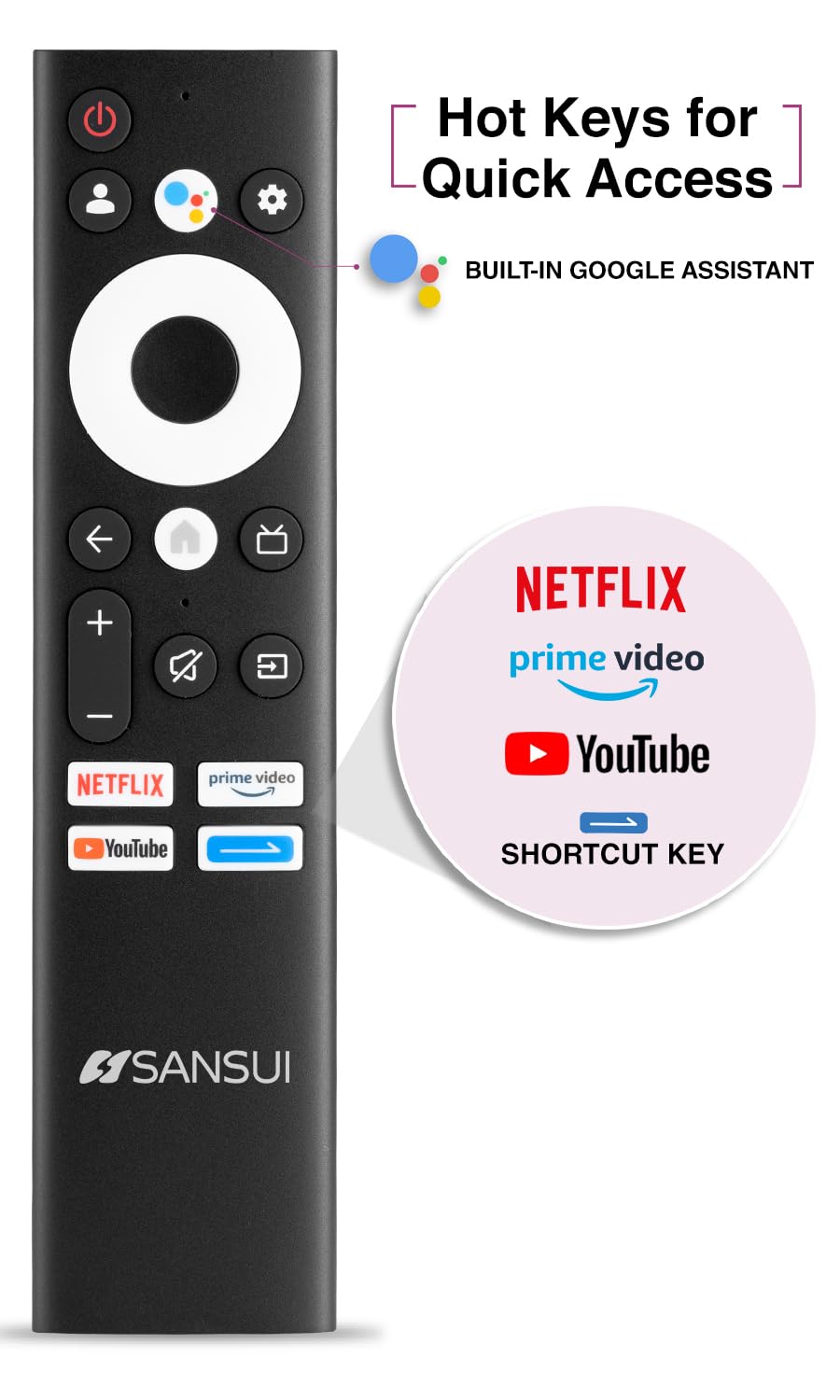
Image: The SANSUI JSW50GSUHD remote control, showing button layout and hot keys.
5. Ersteinrichtung (Google TV)
Upon first power-on, the TV will guide you through the initial setup process. This includes selecting your language, connecting to Wi-Fi, signing in with your Google account, and configuring Google TV settings. Follow the on-screen prompts.
Bedienung Ihres Fernsehers
1. Grundfunktionen
- Leistung: Drücken Sie die Ein-/Aus-Taste auf der Fernbedienung, um den Fernseher ein- oder auszuschalten.
- Volumen: Verwenden Sie die Lautstärketasten (Lauter/Leiser), um die Lautstärke anzupassen.
- Eingabequelle: Press the Source button to select between HDMI, AV, TV, and other inputs.
- Navigation: Verwenden Sie das Steuerkreuz und die OK-Taste, um durch die Menüs zu navigieren.
2. Smart-TV-Funktionen (Google TV)
Your TV runs on Google TV, providing access to a wide range of streaming services and smart features.
- Google Assistant: Use the dedicated button on your remote for voice commands to search for content, control smart home devices, and get information.
- Integrierter Chromecast: Übertragen Sie Inhalte von Ihrem kompatiblen Smartphone, Tablet oder Computer direkt auf Ihren Fernseher.
- Apps: Access popular streaming apps like Netflix, Prime Video, Disney+ Hotstar, and YouTube directly from the Google TV interface. Download more apps from the Google Play Store.
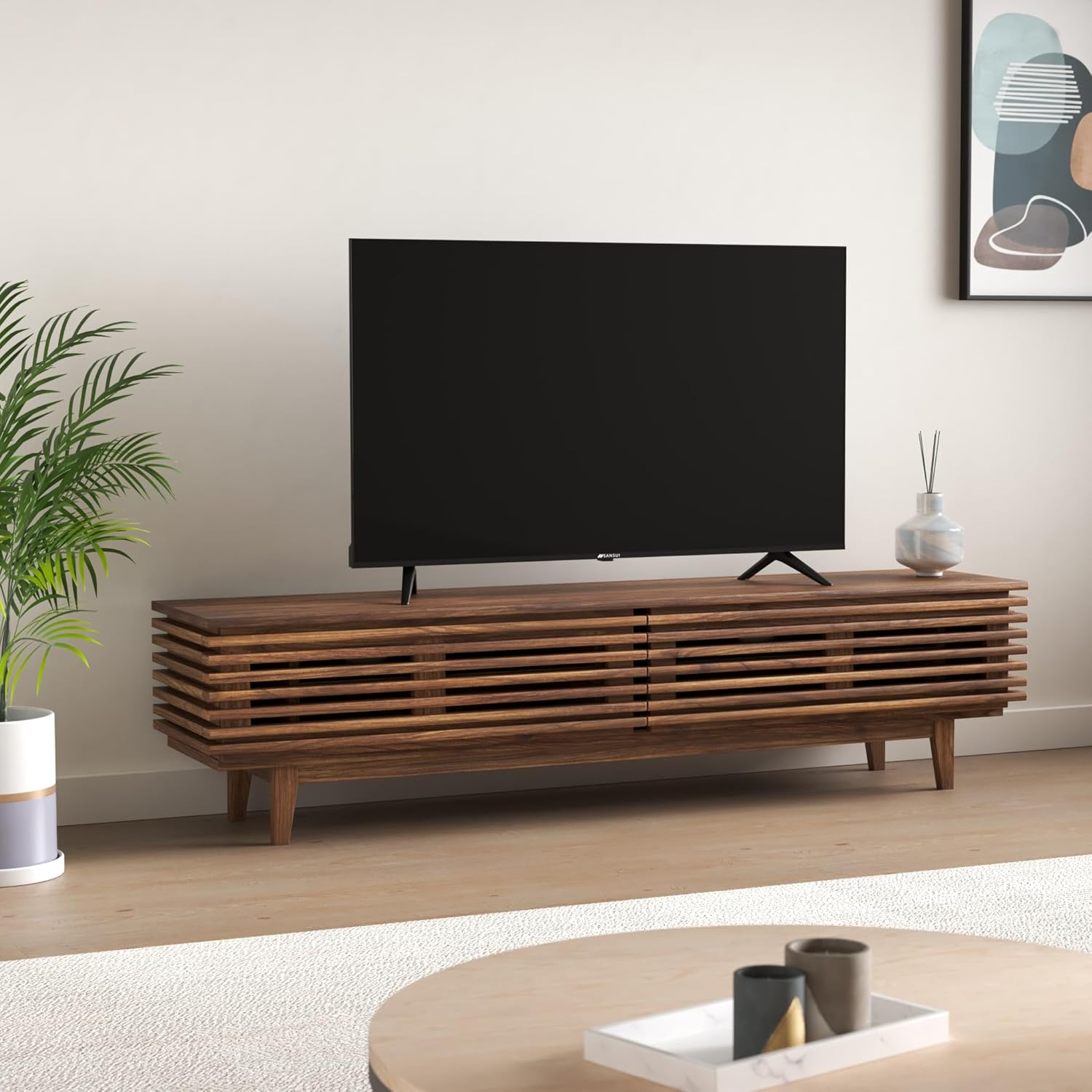
Image: The Google TV home screen displaying various streaming applications and content suggestions.
3. Display and Audio Enhancements
- 4K Ultra HD: Enjoy stunning clarity and detail with 3840x2160 resolution.
- HDR10: Experience enhanced contrast and a wider range of colors with HDR10 content.
- Zen Panel: The A+ Zen panel dynamically enhances visual content with uniform light dispersal for improved picture quality.
- Rahmenloses Design: Maximiert die Bildschirmfläche für ein immersives Erlebnis viewErfahrung.
- Dolby Audio & DTS Studio Sound: Delivers rich, clear, and immersive audio with 20W output.

Bild: Nahaufnahme view of the SANSUI JSW50GSUHD TV showcasing its bezel-less design with a vibrant nature scene.

Image: An illustration demonstrating the advanced light dispersal technology of the Zen Panel for enhanced hues.
Wartung
1. Reinigung
Um den Bildschirm zu reinigen, wischen Sie ihn vorsichtig mit einem weichen, fusselfreien Tuch ab. Bei hartnäckigen Flecken leicht andrücken.ampen the cloth with water or a screen cleaner specifically designed for TVs. Do not spray liquid directly onto the screen. Clean the TV body with a soft, dry cloth.
2. Software-Updates
Your Google TV may receive automatic software updates. Ensure your TV is connected to the internet to receive these updates, which can improve performance and add new features.
Fehlerbehebung
Sollten Sie Probleme mit Ihrem Fernseher haben, beachten Sie bitte die folgenden gängigen Lösungsansätze:
| Problem | Mögliche Lösung |
|---|---|
| Kein Strom | Prüfen Sie, ob das Netzkabel fest mit dem Fernseher und der Steckdose verbunden ist. Stellen Sie sicher, dass die Steckdose funktioniert. |
| Kein Bild/Ton | Verify the correct input source is selected. Check cable connections to external devices. Try a different HDMI port. |
| Fernbedienung funktioniert nicht | Batterien prüfen und gegebenenfalls austauschen. Sicherstellen, dass sich keine Hindernisse zwischen der Fernbedienung und dem Infrarotsensor des Fernsehers befinden. |
| Probleme mit der WLAN-Verbindung | Restart your router and modem. Reconnect the TV to the Wi-Fi network in the settings. Ensure the TV is within range of your router. |
| Probleme mit der Bildqualität | Passen Sie die Bildeinstellungen (Helligkeit, Kontrast, Farbe) im TV-Menü an. Stellen Sie sicher, dass die Inhaltsquelle eine hohe Qualität aufweist. |
If problems persist, perform a factory reset via the TV settings menu (Settings > System > About > Reset). Note that a factory reset will erase all personal data and settings.
Technische Daten
Detailed technical specifications for the SANSUI JSW50GSUHD TV:
- Bildschirmgröße: 127 Centimetres (50 Inches)
- Anzeigetechnologie: LED
- Auflösung: 4K Ultra HD (3840x2160)
- Aktualisierungsrate: 60 Hz
- Besondere Merkmale: Bezel-Less Design, Browser, Chromecast, Parental Controls, Sleep Timer, Google TV, Google Assistant, Voice Search Smart Remote
- Konnektivität: 3 HDMI ports, 2 USB ports, 1 AV (mini), Bluetooth, Wi-Fi, Ethernet (LAN), Optical Audio
- Audioausgang: 20W with Dolby Audio and DTS Studio Sound
- Prozessor: CA53 Quad core Processor
- Erinnerung: RAM 2GB, ROM 16GB (FLASH)
- Betriebssystem: Google TV
- Produktabmessungen (T x B x H): 9 cm (T) x 111 cm (B) x 71.7 cm (H)
- Artikelgewicht: 9300 Gramm
- Energieverbrauch: 130 Watt
- VESA-Halterungsstandard: 100 x 100 mm
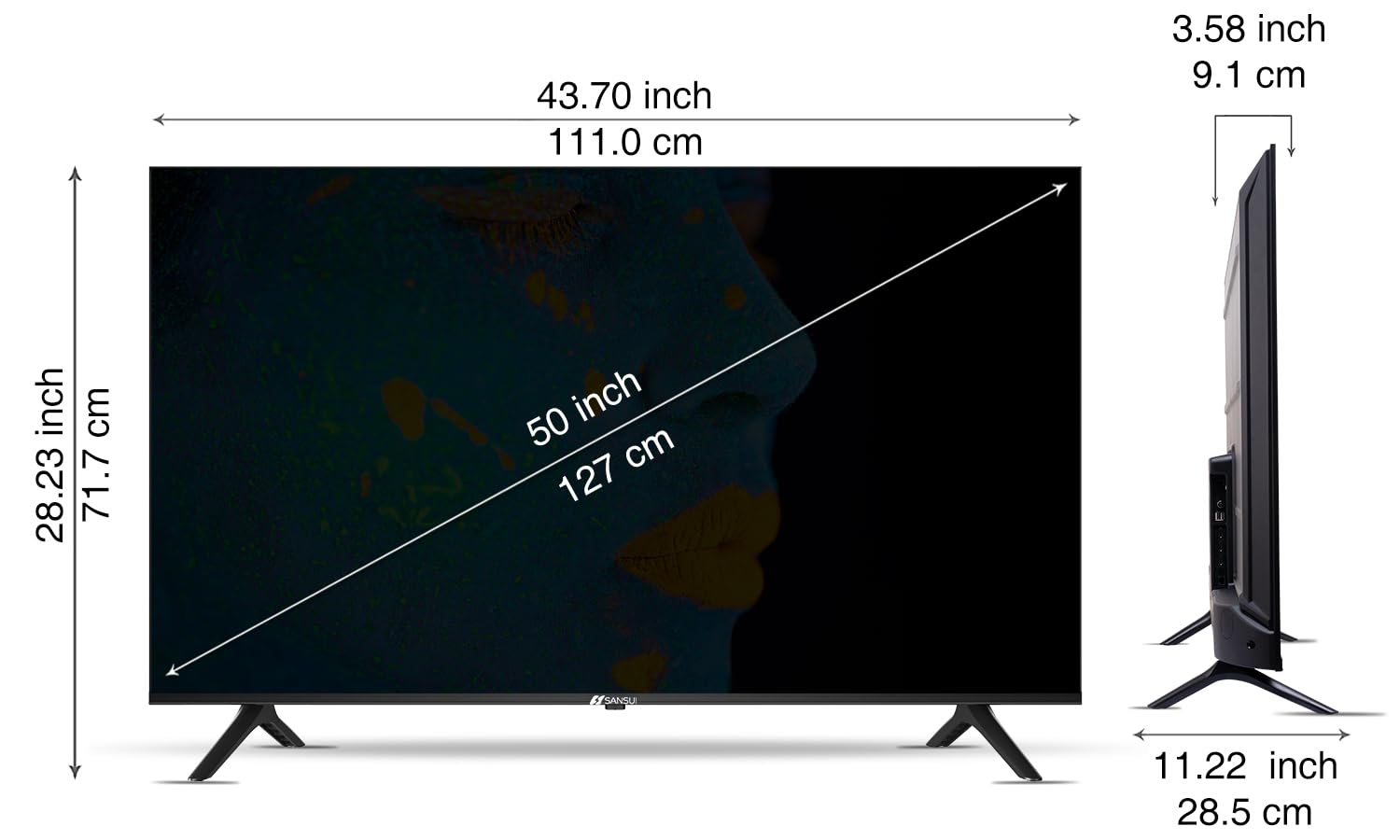
Image: Diagram illustrating the dimensions of the SANSUI JSW50GSUHD 50-inch TV.
Garantie und Support
Your SANSUI JSW50GSUHD TV comes with a 1-year comprehensive warranty, plus an additional 1-year warranty on the panel, provided by the brand from the date of purchase.
For warranty support or any technical assistance, please contact SANSUI customer care:
- Gebührenfreie Telefonnummer: 1800 419 3777
- E-Mail: sansuicare@jainaindia.com
Manufacturer: PG Electroplast Limited
Importer: Jaina India Pvt Ltd.


