
symcode USA-6709DA-Green
Symcode Wireless Bluetooth Barcode Scanner User Manual
Model: USA-6709DA-Green
1. Einleitung
This user manual provides comprehensive instructions for the Symcode Wireless Bluetooth Barcode Scanner, Model USA-6709DA-Green. This device is designed for accurate and efficient data capture, supporting various 1D and 2D barcode types. It offers versatile connectivity options including Bluetooth, 2.4G wireless, and USB wired connections, making it suitable for a wide range of business applications.

Image 1: Symcode Wireless Bluetooth Barcode Scanner and accessories.
2. Packungsinhalt
Bitte überprüfen Sie, ob alle Artikel in Ihrem Paket vorhanden sind:
- Symcode Barcode Scanner (Model: USA-6706DA-Green)
- USB-Ladekabel
- 2.4G-USB-Dongle
- Bedienungsanleitung

Image 2: Components included with the Symcode Barcode Scanner.
3. Produktmerkmale
- Fortschrittliche Scan-Technologie: CMOS optical imaging for quick and precise scanning of 1D and 2D barcodes (QR, DataMatrix, PDF417, Aztec, Hanxin, etc.) even on damaged or poorly printed labels.
- Dreifache Verbindungsmodi: Supports Bluetooth, 2.4G wireless, and USB wired connections for maximum flexibility.
- Erweiterte Funkreichweite: Up to 200m in open environments and 30m indoors with the 2.4G USB dongle.
- Lange Akkulaufzeit: 2000mAh battery provides up to 30 hours of continuous scanning, with a full recharge in approximately 2 hours.
- Vielseitige Konfiguration: Features include hands-free intelligent sensor mode, trigger scan mode, vibration/buzzer settings, data storage/instant upload modes, multiple keyboard languages, and customizable prefix/suffix options.
- Überlegene Haltbarkeit: Constructed with strong ABS material, designed to withstand drops of up to 2.4 meters (8 ft) and features an integrated dustproof housing (IP67 rated).
4. Einrichtung und Verbindung
The scanner offers three primary connection methods:
4.1. 2.4 G Wireless-Verbindung
- Stecken Sie den 2.4-GHz-USB-Dongle in einen freien USB-Anschluss Ihres Computers.
- Turn on the scanner. It will automatically pair with the dongle.
- A successful connection is indicated by a specific beep sound and LED indicator.
4.2. Bluetooth-Verbindung
- Ensure your device (smartphone, tablet, computer) has Bluetooth enabled.
- Scan the Bluetooth pairing barcode (usually found in the user manual or on a setup card).
- On your device, search for Bluetooth devices and select "Symcode Scanner" (or similar name).
- Bestätigen Sie die Kopplung.
4.3. Kabelgebundene USB-Verbindung
- Verbinden Sie den Scanner mit dem mitgelieferten USB-Kabel mit Ihrem Computer.
- Der Scanner funktioniert sowohl als kabelgebundenes Gerät als auch als Ladestation.

Image 3: Connectivity options for the Symcode Barcode Scanner.

Abbildung 4: Betriebssystemkompatibilität.
5. Bedienungsanleitung
5.1. Grundlegender Scanvorgang
To scan a barcode, point the scanner's window at the barcode and press the trigger button. A successful scan will be indicated by a beep and/or vibration, and the data will be transmitted to your connected device.
5.2. Datenübertragungsmodi
Der Scanner unterstützt zwei Daten-Upload-Modi:
- Sofort-Upload-Modus: Data is transmitted to the connected device immediately after each scan. This is the default mode.
- Offline-Speichermodus: Scanned data is stored in the scanner's internal memory (up to 10,000 codes). To upload stored data, scan the specific setup code for 'Upload Data' found in your detailed user manual.

Image 5: Instant Upload Mode vs. Offline Storage Mode.
5.3. Decoding Capabilities
The scanner can decode a wide array of barcode types, including:
- 1D-Barcodes: UPC/EAN, Code 39, Code 128, Codabar, Interleaved 2 of 5, Code 93, MSI, Code 11, RSS variants, etc.
- 2D-Barcodes: QR Code, Data Matrix, PDF417, Aztec, Hanxin.
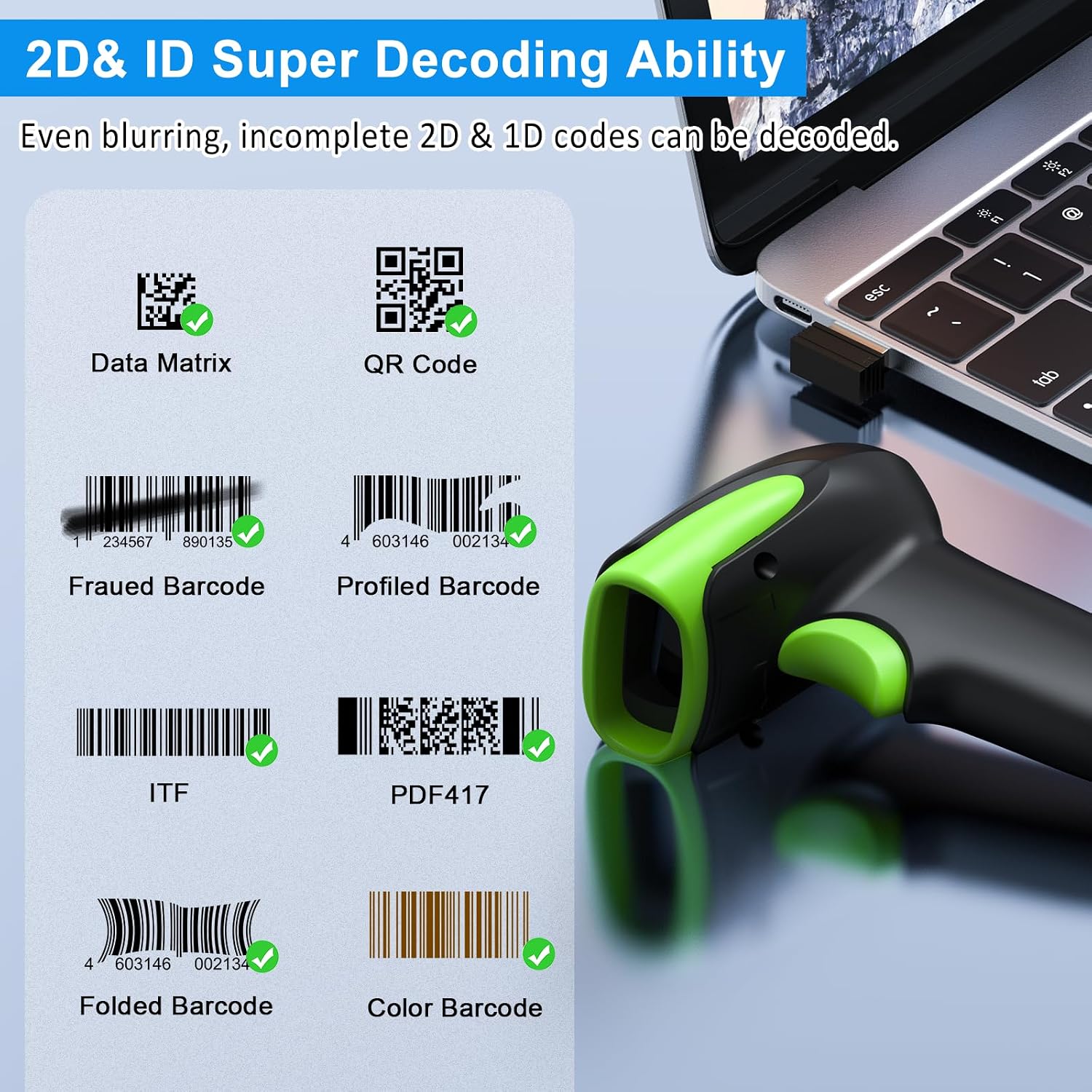
Abbildung 6: Beispielamples of decodable 1D and 2D barcodes.
6. Wartung
To ensure optimal performance and longevity of your scanner:
- Reinigung: Reinigen Sie das Gehäuse des Scanners mit einem weichen, trockenen Tuch. Verwenden Sie für das Scanfenster ein Linsenreinigungstuch, um Kratzer zu vermeiden. Verwenden Sie keine Scheuermittel oder Lösungsmittel.
- Laden: Recharge the battery using the provided USB cable. Avoid overcharging or completely draining the battery for extended periods.
- Lagerung: Bewahren Sie den Scanner an einem kühlen, trockenen Ort fern von direkter Sonneneinstrahlung und extremen Temperaturen auf.
- Haltbarkeit: While rugged, avoid intentional drops or impacts. The scanner is designed to withstand accidental drops up to 2.4 meters.

Image 7: The scanner's rugged design and drop resistance.
7. Fehlerbehebung
Sollten Sie Probleme mit Ihrem Scanner haben, beachten Sie bitte die folgenden häufig auftretenden Probleme und Lösungen:
- Scanner verbindet sich nicht:
- Stellen Sie sicher, dass der Scanner aufgeladen ist.
- Verify the correct connection mode (Bluetooth, 2.4G, USB) is selected and properly set up.
- For 2.4G, ensure the dongle is securely plugged in. For Bluetooth, ensure your device's Bluetooth is on and the scanner is paired.
- Versuchen Sie, sowohl den Scanner als auch das Host-Gerät neu zu starten.
- Scanner liest keine Barcodes:
- Ensure the barcode is not excessively damaged, smudged, or poorly printed.
- Check the distance and angle of the scanner to the barcode.
- Verify that the barcode type is supported by the scanner.
- Reinigen Sie das Scanfenster, falls es verschmutzt ist.
- Datenübertragung fehlgeschlagen:
- Confirm the scanner is successfully connected to your device.
- Check if the scanner is in 'Offline Storage Mode' and needs to be manually uploaded.
- Ensure the application on your device is ready to receive input.
For further assistance, please refer to the comprehensive troubleshooting section in the full user manual or contact Symcode customer support.
8. Spezifikationen
| Besonderheit | Spezifikation |
|---|---|
| Modellnummer | USA-6709DA-Green |
| Eingangslautstärketage | DC5V±0.25v |
| Current (Work/Instantaneous) | 25 mA / 95 mA |
| Decoding Speed | 100 mal / sek |
| Drahtlose Reichweite (2.4 GHz) | Up to 200m (open air), 30m (indoors) |
| Ladezeit | Ca. 2.5 Stunden |
| Akkulaufzeit | Up to 30 Hours (continuous scanning) |
| Akku-Typ | 1 Lithium-Polymer-Akku (im Lieferumfang enthalten) |
| Konnektivität | Bluetooth 6.1, Wireless 2.4G, USB Cable |
| Kompatible Geräte | Desktop, Laptop, Smartphone, POS systems |
| Betriebssysteme | Windows 11/10/8/7/XP, Mac OS, iOS, Android, Linux |
| Artikelgewicht | 10.2 Unzen |
| Verpackungsabmessungen | 6.89 x 4.49 x 3.31 Zoll |

Image 8: Wireless transmission range.
9. Garantie und Support
This Symcode product is manufactured by USA Scanner. For any product inquiries, technical support, or warranty claims, please contact USA Scanner directly. Refer to the contact information provided in your product packaging or visit the official Symcode brand store on Amazon for support resources.
Besuchen Sie die Symcode Store für weitere Informationen.
Ask a question about this manual
Ask about setup, troubleshooting, compatibility, parts, safety, or missing instructions. Manuals+ will review the question and use this page’s manual context to help answer it.