
JTEMAN JT-L36
JTEMAN Cell Phone Stand with Wireless Bluetooth Speaker and Alarm Clock - User Manual
Model: JT-L36
Einführung
Vielen Dank für Ihren Einkauf.asing the JTEMAN Cell Phone Stand with Wireless Bluetooth Speaker and Alarm Clock. This multi-functional device is designed to enhance your daily routine by combining essential features into one compact and stylish unit. It serves as a high-quality Bluetooth speaker, a reliable alarm clock with a clear display, and a stable, adjustable stand for your mobile devices. Please read this manual carefully to ensure proper use and optimal performance.
Sicherheitshinweise
- Setzen Sie das Gerät keinen extremen Temperaturen, direkter Sonneneinstrahlung oder hoher Luftfeuchtigkeit aus.
- Lassen Sie das Gerät nicht fallen und setzen Sie es keinen starken Stößen aus.
- Keep away from water and other liquids. If the device comes into contact with liquid, disconnect it immediately and allow it to dry completely before reuse.
- Versuchen Sie nicht, das Gerät selbst zu zerlegen, zu reparieren oder zu modifizieren. Überlassen Sie alle Wartungsarbeiten qualifiziertem Fachpersonal.
- Verwenden Sie ausschließlich das mitgelieferte Ladekabel oder ein zertifiziertes gleichwertiges Kabel.
- Außerhalb der Reichweite von Kindern aufbewahren.
Packungsinhalt
- JTEMAN Cell Phone Stand with Wireless Bluetooth Speaker and Alarm Clock (Model: JT-L36)
- Typ C Ladekabel
- Bedienungsanleitung
Produkt überview
Familiarize yourself with the components and controls of your JTEMAN device:
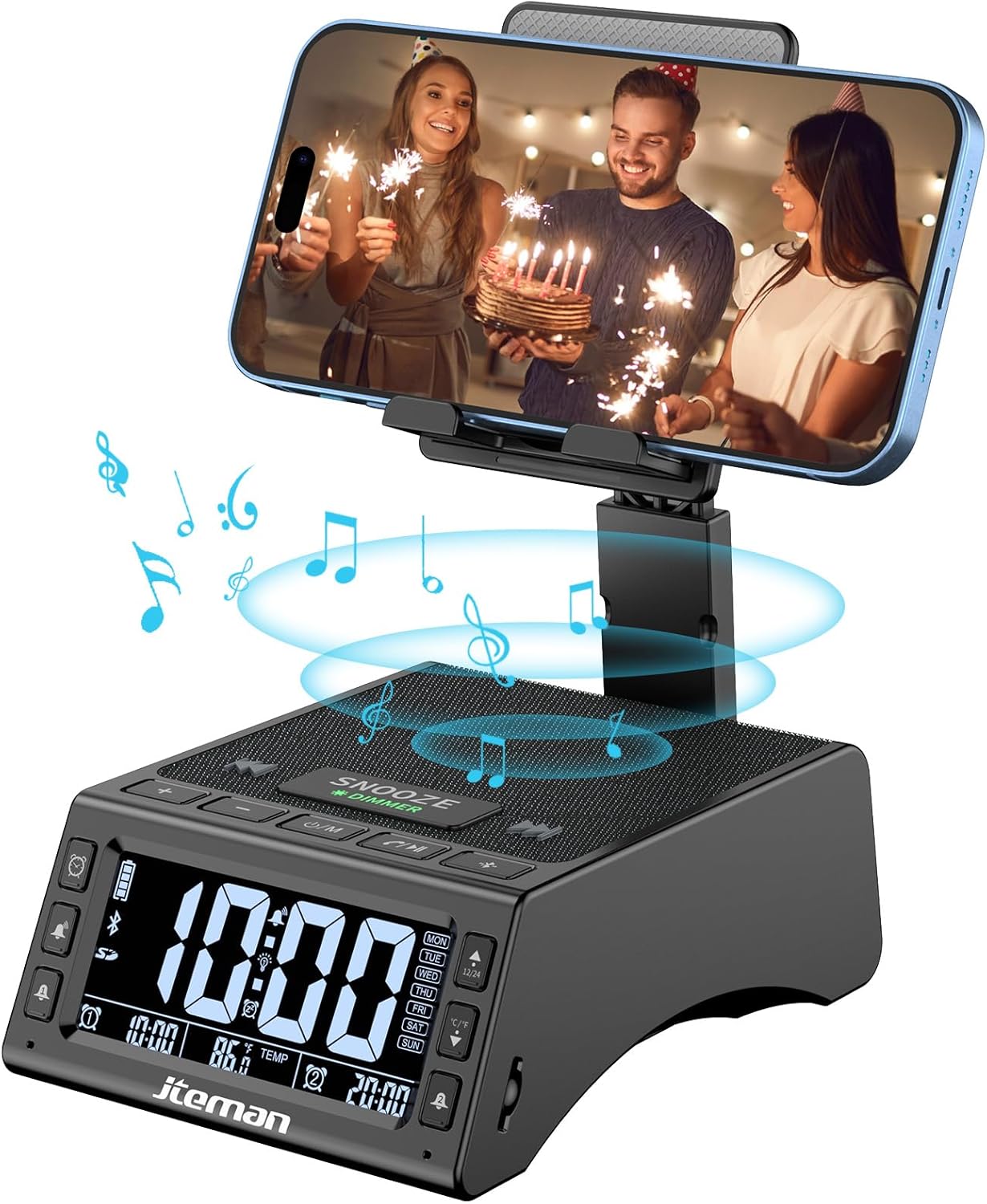
Abbildung 1: Vorderseite view of the JTEMAN device with a smartphone on the adjustable stand, displaying the time and temperature.

Abbildung 2: Überview highlighting the multi-functional aspects including Bluetooth speaker, 12/24H time display, temperature display, foldable phone stand, TF card support, microphone, charging station, dual alarm clocks, and 9 ringtones.
Bedienelemente und Anschlüsse:
- Bildschirm: Shows time, temperature, day of the week, and alarm indicators.
- Schlummer-/Dimmertaste: Press to snooze an active alarm (5 minutes); long press to adjust display brightness (4 levels).
- Power On/Off/Mode Button: Long press to power on/off; short press to cycle through modes (Bluetooth, TF Card).
- Play/Pause/Answer Button: Controls music playback; answers/ends calls.
- Lautstärke erhöhen/Nächster Titel-Taste: Increases volume; short press for next track.
- Lautstärke verringern/Vorheriger Titel-Taste: Decreases volume; short press for previous track.
- Bluetooth-Pairing-Taste: Aktiviert den Bluetooth-Kopplungsmodus.
- Alarm 1 & Alarm 2 Buttons: For setting and managing dual alarms.
- Mikrofon: Für Freisprechanrufe.
- Typ-C-Eingangsanschluss: Zum Aufladen des Gerätes.
- Typ-C-Ausgangsanschluss: Zum Laden externer Geräte.
- TF-Karten-Slot: Zum direkten Abspielen von Musik von einer TF-Karte.
- Verstellbarer Handyhalter: Foldable and extendable for various viewing angles. Features anti-slip pads and base for stability.
Aufstellen
1. Erstes Aufladen
- Schließen Sie das mitgelieferte Typ-C-Ladekabel an den/die/das an Typ-C-Eingangsport auf dem Gerät.
- Verbinden Sie das andere Ende des Kabels mit einem kompatiblen USB-Netzteil (nicht im Lieferumfang enthalten) und stecken Sie dieses in eine Steckdose.
- The display will indicate charging status. Fully charge the device before first use.

Figure 3: The device connected via Type-C for charging itself and an external phone.
2. Uhrzeit und Datum einstellen
- Upon powering on, the device should automatically synchronize the current time.
- If manual adjustment is needed, refer to the detailed instructions in the full user manual (included in the package).
- To switch between 12/24 hour format or °F/°C temperature display, use the dedicated buttons or refer to the full manual.

Figure 4: The HD display showing time, temperature, and alarm settings with brightness adjustment levels.
Bedienungsanleitung
1. Verwendung des Telefonständers
- The integrated phone stand can be pulled up from the back of the unit.
- Passen Sie die Höhe und den Winkel des Ständers nach Wunsch an viewing position. The stand is designed to be stable and strong, accommodating devices from 4.0 to 13 inches.
- When not in use, the stand can be folded back into the unit for a compact form factor.

Figure 5: Demonstrates the adjustable height and angle of the phone stand, along with its anti-slip features and foldable design.
2. Bluetooth-Lautsprecherfunktion
- Einschalten: Long press the Power On/Off/Mode button. The device will enter Bluetooth pairing mode, indicated by a flashing Bluetooth icon on the display.
- Paarung: On your smartphone or other Bluetooth-enabled device, search for “JT-L36” in the Bluetooth settings and select it to pair. A confirmation sound will indicate successful pairing.
- Musikwiedergabe: Once paired, you can play audio from your device through the JTEMAN speaker. Use the Play/Pause, Volume Up/Next Track, and Volume Down/Previous Track buttons to control playback.
3. TF-Kartenwiedergabe
- Insert a TF card (not included) with audio files in den TF-Kartensteckplatz.
- The device will automatically switch to TF Card mode and begin playing music. If not, short press the Mode button to select TF Card mode.
4. Alarm Clock Features
- Alarme einstellen: Use the Alarm 1 and Alarm 2 buttons to set up to two independent alarms. Follow the on-screen prompts to set the time and alarm frequency (e.g., Mon-Fri, Sat-Sun, Mon-Sun).
- Schlummerfunktion: When an alarm sounds, press the large SNOOZE button on top to activate a 5-minute snooze.
- Helligkeitsanpassung: Long press the SNOOZE/DIMMER button to cycle through four levels of display brightness, including an off setting for minimal light disturbance.
5. Freisprechen
- When a call comes in while your phone is connected via Bluetooth, press the Play/Pause/Answer button to answer the call.
- Nutzen Sie das eingebaute Mikrofon für eine klare Kommunikation.
- Press the Play/Pause/Answer button again to end the call.
6. Laden externer Geräte
- Connect your external device (e.g., smartphone, tablet) to the Typ-C-Ausgangsport on the JTEMAN unit using a compatible charging cable.
- The JTEMAN device will provide power to charge your external device.
Wartung
- Reinigen Sie das Gerät mit einem weichen, trockenen Tuch. Verwenden Sie keine Scheuermittel oder Lösungsmittel.
- Stellen Sie sicher, dass alle Anschlüsse frei von Staub und Schmutz sind.
- Bewahren Sie das Gerät an einem kühlen, trockenen Ort auf, wenn es längere Zeit nicht benutzt wird.
Fehlerbehebung
| Problem | Mögliche Ursache | Lösung |
|---|---|---|
| Gerät lässt sich nicht einschalten. | Low battery; power adapter/cable issue. | Charge the device fully. Check power adapter and cable connections. |
| Aus dem Lautsprecher kommt kein Ton. | Volume too low; not paired correctly; wrong mode. | Increase volume on both device and connected phone. Re-pair Bluetooth. Ensure correct mode (Bluetooth/TF Card). |
| Die Bluetooth-Kopplung schlägt fehl. | Device too far; pairing mode not active; interference. | Ensure device is in pairing mode and within 10 meters. Turn off other Bluetooth devices. Try restarting both devices. |
| Der Alarm ertönt nicht. | Alarm not set; alarm volume too low; alarm disabled. | Verify alarm settings and ensure it's enabled. Increase alarm volume. |
| Phone not charging via output port. | Cable issue; device battery low; incompatible device. | Ensure the JTEMAN device is charged. Try a different charging cable. Confirm your phone is compatible with Type-C charging. |
Technische Daten
| Marke | JTEMAN |
| Modellnummer | JT-L36 |
| Technische Daten | 6.1 x 4.3 x 2.1 Zoll |
| Artikelgewicht | 1.26 Pfund |
| Farbe | Schwarz |
| Hardware-Schnittstelle | USB 2.0 |
| Anzahl USB-Anschlüsse | 2 (Type-C Input, Type-C Output) |
| Kompatibilität | 4.0-13 inch devices |
Garantie und Support
JTEMAN products are manufactured with high standards of quality. For specific warranty information, please refer to the warranty card included in your product packaging or visit the official JTEMAN website. If you encounter any issues or have questions not covered in this manual, please contact JTEMAN customer support through the contact information provided on the product packaging or webWebsite.
Bitte bewahren Sie Ihren Kaufbeleg für Garantieansprüche auf.
Ask a question about this manual
Ask about setup, troubleshooting, compatibility, parts, safety, or missing instructions. Manuals+ will review the question and use this page’s manual context to help answer it.