
Einführung
Thank you for choosing the Sensei Phase 61 Pro Electronic Keyboard. This manual provides essential information for the safe and effective use of your instrument. Please read it thoroughly before operation and retain it for future reference.
Sicherheitshinweise
- Stellen Sie sicher, dass die Stromquelle mit der Lautstärke übereinstimmttage requirements specified for the keyboard.
- Do not expose the keyboard to water, moisture, or extreme temperatures.
- Vermeiden Sie es, schwere Gegenstände auf die Tastatur zu stellen.
- Keep the instrument away from direct sunlight and heat sources.
- Disconnect the power cable during thunderstorms or when not in use for extended periods.
- Versuchen Sie nicht, die Tastatur zu zerlegen oder zu verändern. Überlassen Sie alle Wartungsarbeiten qualifiziertem Fachpersonal.
Packungsinhalt
Überprüfen Sie, ob alle Artikel im Paket vorhanden sind:
- Sensei Phase 61 Pro Electronic Keyboard
- Tastaturständer
- Hocker
- Kopfhörer
- USB Charger Line
- Musik Rest
Produkt überview
The Sensei Phase 61 Pro is a 61-key touch-sensitive electronic keyboard designed for a comprehensive musical experience. It features an LCD display, various control buttons, built-in speakers, and multiple connectivity options.

Abbildung 1: Sensei Phase 61 Pro Electronic Keyboard complete set, including the keyboard, adjustable stand, padded stool, and headphones.
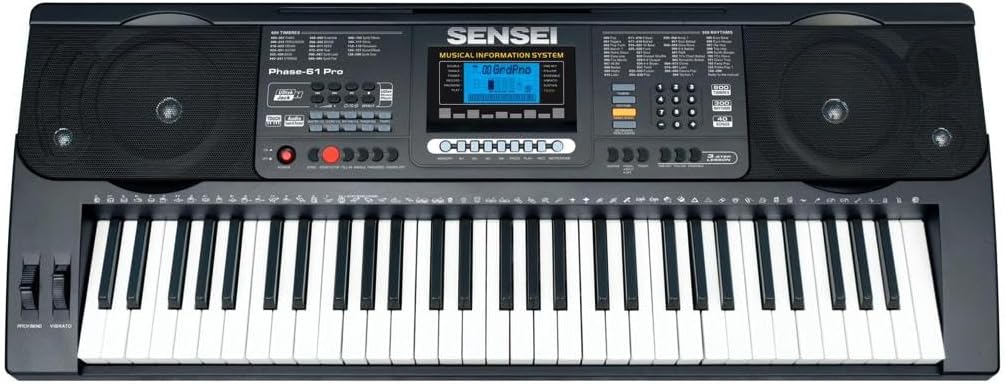
Abbildung 2: Detaillierte view of the Sensei Phase 61 Pro keyboard's control panel, LCD display, speakers, and 61 touch-sensitive keys.
Aufstellen
1. Montage des Tastaturständers
Unfold the keyboard stand and adjust it to a comfortable playing height. Ensure all locking mechanisms are securely fastened to prevent wobbling.
2. Stool Assembly
Unfold the stool and ensure its legs are stable. The stool provides a comfortable seating option for playing.

Abbildung 3: The included foldable stool, designed for stability and portability.
3. Stromanschluss
Connect the provided USB charger line to the keyboard's power input port and then to a suitable USB power adapter (not included) or a powered USB port. The keyboard is USB powered.
4. Anschlusszubehör
- Kopfhörer: Plug the headphones into the 3.5mm Phone/Output Jack for private practice.
- USB Flash Speicher: Insert a USB flash disk (not included) into the Udisk Jack to use the music player function.
- Mikrofon: Connect a microphone to the MIC Jack for vocal input.
- Audioeingang: Use the Audio Input Jack to connect external audio sources.

Abbildung 4: The included over-ear headphones for silent practice.
Bedienungsanleitung
1. Ein-/Ausschalten und Lautstärke
- Drücken Sie die LEISTUNG Taste zum Ein- und Ausschalten der Tastatur.
- Passen Sie den Gesamtschallpegel mit dem/der/dem Gesamtlautstärke Kontrolle.
- Separate volume controls are available for Chord Volume Und Rhythmuslautstärke.
2. Timbres and Rhythms
- The keyboard features 600 Timbres (instrument sounds) and 300 Rhythmen (accompaniment styles).
- Use the dedicated buttons or number pad to select desired Timbres and Rhythms. The LCD display will show the current selection.
3. Demonstration Songs and Percussion
- Zugang 40 Demonstrationslieder for listening or practice.
- Engagieren Keyboard-Percussion mode to assign drum sounds to the keys.
4. Advanced Key Features
- Touch-Funktion: The keys are touch-sensitive, meaning the volume changes based on how hard you press them, mimicking an acoustic piano.
- Transpose Control: Verändern Sie die Tonhöhe der gesamten Tastatur in Halbtonschritten nach oben oder unten.
- Dual-Modus: Layer two different Timbres to play simultaneously with each key press.
- Tastaturteilung: Divide the keyboard into two sections, each with a different Timbre, allowing two different sounds to be played at once.
- Akkordfunktionen:
- Einfingerakkord: Akkorde werden durch Drücken einer einzelnen Taste im unteren Bereich der Tastatur gespielt.
- Fingered Akkord: Play chords by pressing the appropriate chord notes in the lower section.
- Akkord aus: Disables the auto-accompaniment chord function.
5. Rhythm Control
- Start/Stopp: Begin or end the selected rhythm.
- Synchronisieren: Start the rhythm automatically when you play a key or chord.
- Ausfüllen: Add a short drum fill to the rhythm.
- Metronom: Activate a click track for timing practice.
- Tempokontrolle: Adjust the speed of the rhythm and metronome.
6. Lernmodi
- One-key: Practice a song by pressing any key to advance the melody.
- Folgen: Die Tastatur wartet, bis Sie die richtige Note spielen, bevor sie fortfährt.
- Zusammen: Play along with the melody, and the keyboard will provide accompaniment.
7. Aufnahme und Wiedergabe
- Verwenden Sie die Rhythmus-Programmierfunktion to create and store your own rhythm patterns.
- Der Aufnahme & Wiedergabe function allows you to record your performances and listen back to them.
8. Speicherfunktionen
Store your preferred settings (Timbre, Rhythm, Tempo, etc.) into Memory banks M1, M2, M3, M4 zum schnellen Nachdenken.
9. Ausdrucksstarke Steuerelemente
- Tonhöhenbeugung: Use the pitch bend wheel to smoothly raise or lower the pitch of notes.
- Vibrato: Add a slight, rapid fluctuation in pitch to notes for expressive effect.
- Aufrechterhalten: Extend the decay of notes, similar to a piano's sustain pedal.
Wartung
- Reinigung: Wischen Sie die Tastaturoberfläche mit einem weichen, trockenen Tuch ab. Bei hartnäckigem Schmutz verwenden Sie ein leicht dämpfendes Tuch.amp Mit einem Tuch abwischen und anschließend gründlich trocknen lassen. Scheuermittel und Lösungsmittel vermeiden.
- Lagerung: When not in use, store the keyboard in a clean, dry place, away from direct sunlight and extreme temperatures. If possible, cover it to protect against dust.
- Handhabung: Behandeln Sie die Tastatur stets vorsichtig. Vermeiden Sie es, sie fallen zu lassen oder starken Stößen auszusetzen.
Fehlerbehebung
| Problem | Mögliche Ursache | Lösung |
|---|---|---|
| Kein Strom | Power cable not connected; USB power source faulty. | Ensure USB cable is securely connected. Try a different USB power adapter or port. |
| Kein Ton | Volume too low; headphones connected; Timbre not selected. | Increase Master Volume. Disconnect headphones. Select a Timbre. |
| Tasten reagieren nicht | Keyboard in a specific mode (e.g., learning mode waiting for input). | Check current mode settings. Power cycle the keyboard. |
| Rhythmus spielt nicht | Rhythm not selected; Tempo set to zero; Start/Stop not pressed. | Select a rhythm. Adjust Tempo. Press Start/Stop. |
Technische Daten
| Besonderheit | Detail |
|---|---|
| Modellname | PHASE-61 PRO |
| Anzahl der Schlüssel | 61 Touch Sensitive Keys |
| Klangfarben | 600 |
| Rhythmen | 300 |
| Demonstrationslieder | 40 |
| Stromquelle | Stromversorgung über USB |
| Kopfhöreranschluss | 3.5-mm-Buchse |
| Konnektivitätstechnologie | USB |
| Artikelgewicht | 8.1 kg |
| Technische Daten | 16 x 16.8 x 41 cm |
| UPC | 810015319994 |
Garantie und Support
For warranty information, please refer to the documentation provided at the time of purchase or contact your retailer. For technical support or service inquiries, please reach out to the manufacturer, SENSEI, through their official support channels.