
1. Produktüberschreitungview
The GOLOZA LA-C337 is a versatile digital alarm clock featuring a 180° rotatable projection, a large curved LED display, and a convenient USB charging port. It is designed for clear time display and easy operation.

Image 1.1: The GOLOZA Digital Projection Alarm Clock, showcasing its curved display and compact design, placed on a nightstand.
2. Packungsinhalt
Bitte prüfen Sie das Paket auf folgende Artikel:
- GOLOZA Digital Projection Alarm Clock (LA-C337)
- Micro-USB-Kabel
- Netzteil
- Bedienungsanleitung
3. Produktmerkmale
- Curved LED Display: Large, clear digital time display with adjustable brightness.
- 180°-Projektion: Projects time onto a wall or ceiling with adjustable brightness and rotation.
- Doppelalarme: Set two independent alarms with progressive volume.
- Schlummerfunktion: Ermöglicht zusätzliche Schlafzeit nach dem Weckerklingeln.
- USB Ladeanschluss: Laden Sie Ihre Mobilgeräte bequem auf.
- Speicherbatterie: Built-in button battery maintains time settings during power outages.
Bild 3.1: Eine Nahaufnahme view of the GOLOZA Digital Projection Alarm Clock's clear, blue LED display, showing the time.
4. Ersteinrichtung
4.1 Stromanschluss
- Connect the Micro USB cable to the power input port on the back of the alarm clock.
- Stecken Sie das andere Ende des USB-Kabels in den mitgelieferten Netzadapter.
- Insert the power adapter into a standard electrical outlet. The clock display will light up.
Notiz: The built-in button battery serves as a backup for time and alarm settings during a power interruption. It does not power the main display or projection.
4.2 Uhrzeit und Datum einstellen
Specific button names are not provided, but typically these clocks have 'TIME SET', 'MODE', or similar buttons. Refer to the physical unit for exact button labels.
- Halten Sie die Zeiteinstellung Drücken Sie die entsprechende Taste (oder eine ähnliche), um in den Zeiteinstellungsmodus zu gelangen. Die Stundenziffern blinken.
- Verwenden Sie die +/- or Hoch/Runter Tasten zum Einstellen der Stunde.
- Drücken Sie die Zeiteinstellung Drücken Sie die Taste erneut, um die Stunde zu bestätigen und zur Minuteneinstellung zu wechseln. Die Minutenziffern blinken.
- Verwenden Sie die +/- or Hoch/Runter Tasten zum Einstellen der Minuten.
- Drücken Sie die Zeiteinstellung button again to confirm minutes and exit time setting mode.
- Follow similar steps to set the date if your model supports it (usually by pressing the Time Set button multiple times to cycle through year, month, day).
5. Bedienungsanleitung
5.1 Alarme einstellen
Die Uhr unterstützt zwei unabhängige Alarme (Alarm 1 und Alarm 2).
- Halten Sie die 1-Alarm button (or similar) to enter Alarm 1 setting mode. The alarm hour digits will flash.
- Verwenden Sie die +/- or Hoch/Runter Tasten, um die Weckstunde einzustellen.
- Drücken Sie die 1-Alarm Drücken Sie die Taste erneut, um die Stunde zu bestätigen und zur Minuteneinstellung zu wechseln. Die Minutenanzeige des Alarms blinkt.
- Verwenden Sie die +/- or Hoch/Runter Tasten zum Einstellen der Alarmminuten.
- Drücken Sie die 1-Alarm button again to confirm minutes and select the alarm sound (e.g., Beep, Chord, Bird Song).
- Drücken Sie die 1-Alarm button one more time to activate/deactivate Alarm 1 and exit setting mode. An alarm icon will appear on the display when active.
- Wiederholen Sie den Vorgang für 2-Alarm durch Verwendung der entsprechenden Schaltfläche.
5.2 Einstellen der Displayhelligkeit
The main LED display typically has multiple brightness levels.
- Drücken Sie die Helligkeit button (or a dedicated dimmer button) repeatedly to cycle through the available brightness levels (e.g., High, Medium, Low, Off).
5.3 Using Projection Feature
Die Projektionsfunktion ermöglicht Ihnen view the time on a wall or ceiling.
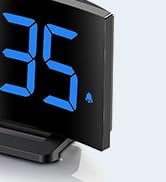
Image 5.1: The GOLOZA Digital Projection Alarm Clock actively projecting the time onto a surface, demonstrating its projection capability.
- Projektion aktivieren/deaktivieren: Drücken Sie die Projektor button (or similar) to turn the projection on or off.
- Anpassen der Projektionshelligkeit: While the projector is on, press the Projektorhelligkeit button (or the same Projector button repeatedly) to cycle through brightness levels (e.g., High, Medium, Low).
- Rotierende Projektion: The projector lens can be physically rotated 180° to adjust the projection angle. Some models may also have a button to flip the projected image.
5.4 USB Charging Port Usage
The integrated USB port allows you to charge external devices.
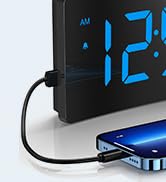
Image 5.2: The GOLOZA Digital Projection Alarm Clock with a smartphone connected to its USB charging port, illustrating its charging capability.
- Connect your device's USB charging cable to the USB output port on the alarm clock.
- Stellen Sie sicher, dass der Wecker eingeschaltet ist.
- The clock's USB port provides power to charge your device.
5.5 Schlummerfunktion
Wenn ein Alarm ertönt, drücken Sie die Taste Schlummern button (often a large button on top) to temporarily silence the alarm. The alarm will sound again after a preset interval (e.g., 9 minutes).
5.6 Lautstärkeregelung für Alarme
The alarm volume is progressive, meaning it starts soft and gradually increases. Some models may offer adjustable volume levels.
- Falls verfügbar, drücken Sie die Taste Volumen button (or a dedicated switch) to adjust the alarm volume to your preferred level.
6. Wartung
- Reinigung: Reinigen Sie die Uhr mit einem weichen, trockenen Tuch. Verwenden Sie keine Scheuermittel oder Lösungsmittel.
- Platzierung: Stellen Sie die Uhr auf eine stabile, ebene Fläche, fern von direkter Sonneneinstrahlung, Wärmequellen und Feuchtigkeit.
- Batterie: The internal button battery is for memory backup. If the clock consistently loses settings after a power outage) Die Batterie muss möglicherweise von einem qualifizierten Techniker ausgetauscht werden.
7. Fehlerbehebung
| Problem | Mögliche Ursache | Lösung |
|---|---|---|
| Die Uhranzeige ist aus. | Kein Stromanschluss. | Stellen Sie sicher, dass der Netzadapter fest mit der Uhr und einer funktionierenden Steckdose verbunden ist. |
| Die Projektion ist schwach oder undeutlich. | Incorrect brightness setting; dirty lens; too much ambient light. | Adjust projection brightness. Clean the projector lens with a soft cloth. Reduce ambient light in the room. |
| Der Alarm ertönt nicht. | Alarm is not activated; alarm volume is too low. | Ensure the alarm icon is visible on the display. Check and adjust alarm volume. |
| Die Zeiteinstellungen gehen nach einem Stromausfall verloren.tage. | Internal backup battery is depleted or faulty. | The internal button battery may need replacement. Contact customer support. |
| USB-Ladefunktion funktioniert nicht. | Clock not powered; faulty USB cable; device not compatible. | Ensure the clock is powered. Try a different USB cable. Check device compatibility. |
8. Spezifikationen
| Besonderheit | Detail |
|---|---|
| Modellnummer | LA-C337 |
| Abmessungen (L x B x H) | 17.7 x 3.81 x 7.8 cm |
| Gewicht | 310 Gramm |
| Marke | GOLOZA |
| Farbe | Blau |
| Stil | Modern/Elegant/Minimalist |
| Besondere Merkmale | Integrated Design, Built-in Button Battery (for memory), USB Charging Port, Super Clear Projection, Progressive Volume, Curved Display |
| Stromquelle | Electrical (USB Powered) |
| Form | Rectangular, Curved Screen |
| Batterien im Lieferumfang enthalten | No (Internal button battery for memory backup is pre-installed but not user-replaceable) |
| UPC/GTIN | 647697054284 |
9. Garantie und Support
GOLOZA is committed to providing quality products and customer satisfaction.
- Rückgaberecht: 6 Months Return period.
- Garantie: 24 Monate Garantie ab Kaufdatum.
- Unterstützung: Lifetime Support is provided for this product.
For any questions, technical assistance, or warranty claims, please contact GOLOZA customer service through your purchase platform or the official GOLOZA webWebsite.