
Mibro XPAW015
Mibro Watch A2 Benutzerhandbuch
Modell: XPAW015
1. Produktüberschreitungview
The Mibro Watch A2 is a versatile smartwatch designed to enhance your daily life with advanced features and robust performance. It integrates a dual-core 2-in-1 Bluetooth chip for seamless connectivity, allowing for direct Bluetooth calls from your wrist. Featuring a vibrant 1.39-inch HD display, it offers clear visuals and intuitive navigation. The watch is equipped with an updated 4 PD heart rate monitor for comprehensive health tracking, including SpO2 measurement and sleep monitoring. With 70 dedicated sport modes and 2 ATM water resistance, it is suitable for various activities. The long-lasting battery provides up to 10 days of usage on a single charge.
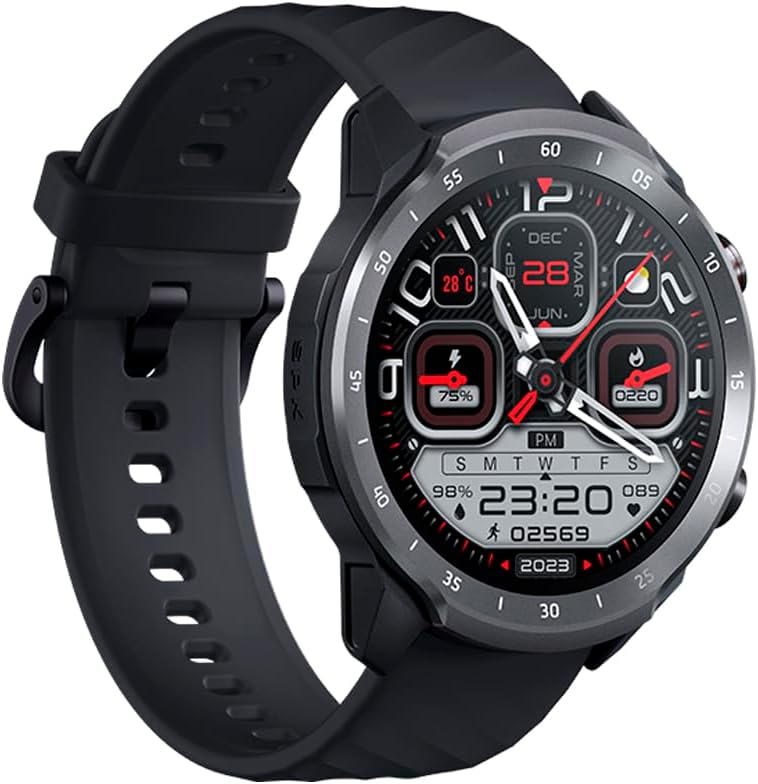
Figure 1.1: Mibro Watch A2, showcasing its design and strap.
2. Sicherheitshinweise
- Versuchen Sie nicht, das Gerät zu zerlegen, zu reparieren oder zu verändern. Dies kann zu Schäden, Brand oder Stromschlag führen.
- Keep the device away from extreme temperatures (hot or cold), direct sunlight, and moisture.
- Setzen Sie das Gerät keinen starken Stößen oder Vibrationen aus.
- Use only the provided charging cable and adapter. Using unauthorized accessories may damage the device or pose safety risks.
- Consult a medical professional before starting any new exercise regimen or if you have pre-existing health conditions, especially if relying on the watch for health monitoring.
- The device is 2 ATM water-resistant, suitable for splashes and brief immersion. Do not use it for diving, hot showers, or high-speed water sports.
3. Packungsinhalt
Bitte überprüfen Sie den Packungsinhalt nach dem Auspacken:
- Mibro Watch A2 Smartwatch
- Magnetisches Ladekabel
- Bedienungsanleitung
4. Produktlayout und Komponenten
Familiarize yourself with the main components of your Mibro Watch A2:

Abbildung 4.1: Vorderseite view of the Mibro Watch A2 display and physical buttons.
- Anzeige: 1.39-inch HD touchscreen for interaction and information display.
- Seitentasten: Typically used for power on/off, screen wake-up, and navigating menus.
- Herzfrequenzsensor: Located on the back of the watch, used for heart rate and SpO2 monitoring.
- Ladekontakte: Magnetische Kontakte auf der Rückseite zum Anschluss des Ladekabels.
- Gurt: Adjustable and replaceable strap for comfortable wear.
5. Installationsanleitung
5.1. Aufladen des Geräts
Before first use, fully charge your Mibro Watch A2.
- Connect the magnetic charging cable to the charging contacts on the back of the watch. Ensure the cable is securely attached.
- Stecken Sie das USB-Ende des Ladekabels in ein Standard-USB-Netzteil (5V/1A empfohlen) oder in einen USB-Anschluss Ihres Computers.
- The watch display will show the charging progress. A full charge typically takes approximately 2 hours.
5.2. App-Installation und -Kopplung
To unlock the full potential of your Mibro Watch A2, download and install the official Mibro Fit application on your smartphone.
- Laden Sie die App herunter: Suchen nach "Mibro Fit" in the Apple App Store (for iOS) or Google Play Store (for Android) and install it.
- Registrieren/Anmelden: Open the Mibro Fit app and follow the on-screen instructions to register a new account or log in if you already have one.
- Bluetooth aktivieren: Stellen Sie sicher, dass Bluetooth auf Ihrem Smartphone aktiviert ist.
- Koppeln Sie das Gerät: In the Mibro Fit app, navigate to the "Device" or "Add Device" section. Select "Mibro Watch A2" from the list of available devices.
- Kopplung bestätigen: Sowohl auf Ihrer Uhr als auch auf Ihrem Smartphone wird eine Kopplungsanfrage angezeigt. Bestätigen Sie die Kopplung auf beiden Geräten.
- Komplette Einrichtung: Follow any remaining prompts in the app to complete the initial setup, including personal information and notification permissions.
6. Bedienungsanleitung
6.1. Grundlegende Navigation
- Bildschirm aktivieren: Drücken Sie den seitlichen Knopf oder heben Sie Ihr Handgelenk an.
- Nach oben/unten wischen: Durch Menüs und Benachrichtigungen scrollen.
- Nach links/rechts wischen: Greifen Sie schnell auf Funktionen oder verschiedene Datenbildschirme zu (z. B. Herzfrequenz, Wetter).
- Klopfen: Wählen Sie ein Element aus oder bestätigen Sie eine Aktion.
- Seitlichen Knopf drücken: Kehren Sie zum Zifferblatt zurück oder rufen Sie die App-Liste auf.
6.2. Bluetooth-Anrufe
The Mibro Watch A2 supports Bluetooth calling directly from your wrist.

Figure 6.1: Using the Mibro Watch A2 for Bluetooth calls.
- Stellen Sie sicher, dass Ihre Uhr erfolgreich per Bluetooth mit Ihrem Smartphone gekoppelt ist.
- Anrufe tätigen: Um einen Anruf zu starten, rufen Sie das Tastenfeld oder die Kontaktliste Ihrer Uhr auf.
- Anrufe entgegennehmen: Wenn ein Anruf eingeht, können Sie ihn direkt über den Bildschirm Ihrer Uhr annehmen oder ablehnen.
6.3. Gesundheitsüberwachung
Die Uhr bietet Funktionen zur kontinuierlichen Gesundheitsüberwachung.
- Herzfrequenz: Swipe to the heart rate interface or select the heart rate app to view your current heart rate. The watch supports 24/7 heart rate monitoring.
- SpO2 (Blutsauerstoff): Access the SpO2 measurement function to check your blood oxygen saturation. Ensure the watch is snug on your wrist for accurate readings.
- Schlafüberwachung: Tragen Sie die Uhr im Bett, und sie zeichnet automatisch Ihre Schlafmuster auf, einschließlich Tiefschlaf, Leichtschlaf und Wachphasen. View detailed sleep data in the Mibro Fit app.

Figure 6.2: Blood oxygen measurement in progress on the Mibro Watch A2.
6.4. Sportmodi
The Mibro Watch A2 offers 70 sport modes to track your workouts.
- From the watch face, navigate to the "Workout" or "Sport" app.
- Select your desired sport mode (e.g., Running, Cycling, Walking).
- Tap to start the activity. The watch will begin recording data such as duration, calories burned, and heart rate.
- To pause or end an activity, swipe or press the side button as prompted on the screen.

Figure 6.3: Mibro Watch A2 tracking an outdoor activity.
6.5. Benachrichtigungen und weitere Funktionen
- Intelligente Benachrichtigung: Receive call, message, and app notifications directly on your watch. Configure notification settings in the Mibro Fit app.
- Gesichter ansehen: Customize your watch face from a variety of options available in the Mibro Fit app or directly on the watch.
- Musiksteuerung: Steuern Sie die Musikwiedergabe auf Ihrem Smartphone von Ihrer Uhr aus.
- Wetter: View Wetterinformationen in Echtzeit.
- Alarme & Timer: Set alarms and use timer/stopwatch functions.
7. Wartung
- Reinigung: Reinigen Sie Uhr und Armband regelmäßig mit einem weichen, fusselfreien Tuch.amp Tuch. Vermeiden Sie die Verwendung aggressiver Chemikalien oder scheuernder Materialien.
- Wasserbeständigkeit: The Mibro Watch A2 is 2 ATM water-resistant. This means it can withstand splashes, rain, and brief immersion in shallow water. It is not suitable for swimming, diving, hot showers, or saunas. Always dry the watch thoroughly after exposure to water.
- Batteriepflege: Um die Batterielebensdauer zu verlängern, vermeiden Sie häufiges vollständiges Entladen. Laden Sie die Uhr auf, sobald der Batteriestand niedrig ist. Bewahren Sie die Uhr an einem kühlen, trockenen Ort auf, wenn Sie sie längere Zeit nicht tragen.
- Software-Updates: Regularly check for and install software updates via the Mibro Fit app to ensure optimal performance and access to new features.
8. Fehlerbehebung
| Problem | Mögliche Ursache/Lösung |
|---|---|
| Die Uhr lässt sich nicht einschalten. | Battery might be depleted. Connect the watch to the charger and allow it to charge for at least 10 minutes before attempting to turn it on. |
| Kopplung mit Smartphone nicht möglich. |
|
| Ungenaue Herzfrequenz-/SpO2-Messwerte. |
|
| Benachrichtigungen werden nicht angezeigt. |
|
9. Spezifikationen
| Besonderheit | Beschreibung |
|---|---|
| Modellname | Mibro Uhr A2 |
| Modellnummer | XPAW015 |
| Marke | Mibro |
| Anzeigegröße | 1.39 Zoll |
| Konnektivität | Bluetooth |
| Besondere Merkmale | Software available in 26 languages, Bluetooth Calling, Heart Rate Monitoring, SpO2 Measurement, Sleep Tracking, 70 Sport Modes |
| Kompatible Geräte | Bluetooth-enabled smartphones, tablets, PCs, laptops |
| Batteriezusammensetzung | Lithium-Ionen |
| Akkulaufzeit | Bis zu 10 Tage (bei typischer Verwendung) |
| Wasserbeständigkeit | 2 Geldautomaten |
| GPS | GPS über Smartphone |
| Speicherkapazität | 1 GB |
10. Garantie und Support
Mibro products typically come with a limited warranty. Please refer to the warranty card included in your product packaging or visit the official Mibro webAuf der Website finden Sie detaillierte Garantiebedingungen speziell für Ihre Region.
For technical support, troubleshooting assistance, or service inquiries, please contact Mibro customer support through their official website or the contact information provided in the Mibro Fit application.
Official Mibro Store: Visit Mibro Store on Amazon
Ask a question about this manual
Ask about setup, troubleshooting, compatibility, parts, safety, or missing instructions. Manuals+ will review the question and use this page’s manual context to help answer it.