
IPASON G-SLIM
IPASON G-SLIM Desktop PC User Manual
Model: G-SLIM | Brand: IPASON
1. Einleitung
Vielen Dank für Ihren Einkauf.asing the IPASON G-SLIM Desktop PC. This compact and powerful system is designed for both business and personal use, offering stable performance and a space-saving design. This manual provides essential information for setting up, operating, maintaining, and troubleshooting your new computer.
2. Sicherheitshinweise
Please read the following safety guidelines carefully before using your IPASON G-SLIM Desktop PC to ensure safe operation and prevent damage.
- Stromversorgung: Use only the provided power cable and connect to a grounded outlet. Do not overload power strips.
- Belüftung: Ensure proper airflow around the PC. Do not block ventilation openings. Maintain at least 10cm clearance on all sides.
- Umfeld: Operate the PC in a dry, stable environment away from direct sunlight, heat sources, and excessive dust or moisture.
- Handhabung: Avoid dropping or subjecting the PC to strong impacts.
- Wartung: Do not attempt to open or repair the PC yourself. Refer all servicing to qualified personnel.

Figure 2.1: The IPASON G-SLIM Desktop PC undergoes rigorous testing to ensure reliability and stability, including 3C certification, drop tests, and temperature/noise control tests.
3. Packungsinhalt
Überprüfen Sie, ob alle Artikel im Paket vorhanden sind:
- IPASON G-SLIM Desktop PC
- Stromkabel
- Benutzerhandbuch (dieses Dokument)
- WPS Office License Key (if applicable)
4. Produktüberschreitungview
The IPASON G-SLIM is a compact tower PC designed for efficiency and performance. Its slim profile allows it to fit into various workspaces.

Abbildung 4.1: Vorderseite view of the IPASON G-SLIM Desktop PC, highlighting its sleek design and accessible front ports.
4.1 Frontplatte
- Netzschalter: Zum Ein- und Ausschalten des PCs.
- USB-Anschlüsse: Convenient access for connecting USB devices.
- Audiobuchsen: Für Kopfhörer und Mikrofon.
4.2 Rückseite
The rear panel contains various ports for connecting your monitor, network, and other peripherals.

Figure 4.2: Dimensions and various views of the IPASON G-SLIM Desktop PC, including the rear panel with its array of connectivity ports.
- Videoausgänge: (e.g., HDMI, DisplayPort, VGA) for connecting monitors.
- USB-Anschlüsse: Additional USB 2.0 and USB 3.0 ports for peripherals.
- LAN-Anschluss: Für kabelgebundene Netzwerkverbindung.
- Audioanschlüsse: Line-in, line-out, and microphone jacks.
- Leistungsaufnahme: Zum Anschluss des Netzkabels.
5. Einrichtung
5.1 Anschließen von Peripheriegeräten
- Monitor: Connect your monitor to one of the video output ports on the rear panel (e.g., HDMI, DisplayPort).
- Tastatur und Maus: Connect your keyboard and mouse to any available USB ports.
- Netzwerk: For a wired connection, connect an Ethernet cable from your router/modem to the LAN port on the rear panel.
- Audio: Connect speakers or headphones to the appropriate audio jacks.
5.2 Stromanschluss
- Insert the provided power cable into the power input port on the rear of the PC.
- Stecken Sie das andere Ende des Stromkabels in eine geerdete Steckdose.
5.3 Erster Startvorgang
- Press the power button on the front panel of the PC.
- The system will boot up and guide you through the initial Windows 11 setup process. Follow the on-screen instructions to configure your language, region, network, and user account.
6. Operating System (Windows 11)
Your IPASON G-SLIM Desktop PC comes pre-installed with Windows 11, offering a modern and intuitive user experience.
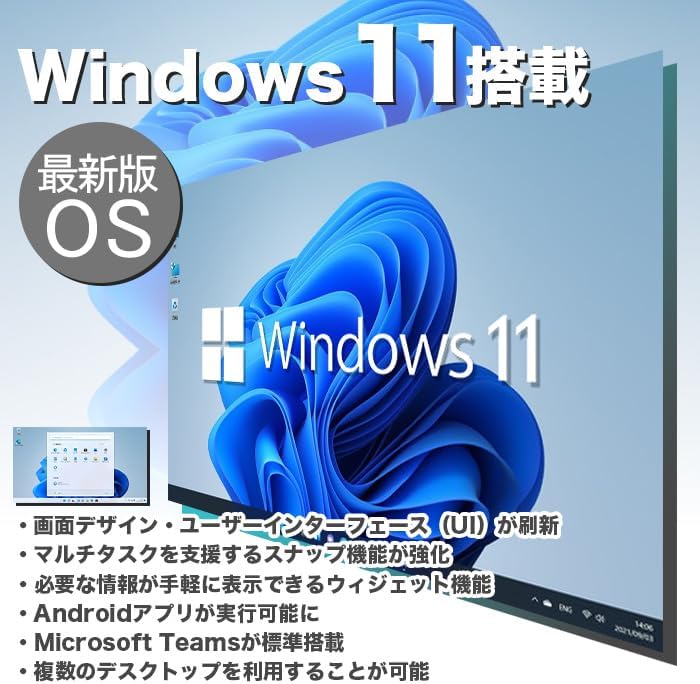
Figure 6.1: Windows 11 interface, showcasing its new design and features.
6.1 Key Features of Windows 11
- Redesigned User Interface (UI): A fresh, clean design with a centered Start menu and taskbar.
- Verbessertes Multitasking: Snap Layouts and Snap Groups make organizing windows easier.
- Widgets: A personalized feed for quick access to information.
- Android App Support: Run Android applications directly on your PC (requires Amazon Appstore).
- Microsoft Teams-Integration: Built-in chat and video conferencing.
- Multiple Desktops: Organize your workspace with virtual desktops.
6.2 WPS-Büro
Your PC includes WPS Office, a Microsoft-certified office suite with high compatibility with Microsoft Office documents. You can use it for word processing, spreadsheets, and presentations.
7. Leistungsmerkmale
The IPASON G-SLIM is equipped with components chosen for a balance of performance and cost-effectiveness, making it suitable for various tasks, including business applications and light gaming.
7.1 Processor (CPU)
Features a 12th Generation Intel Core i3 processor, offering improved performance over previous generations for everyday computing and multitasking.
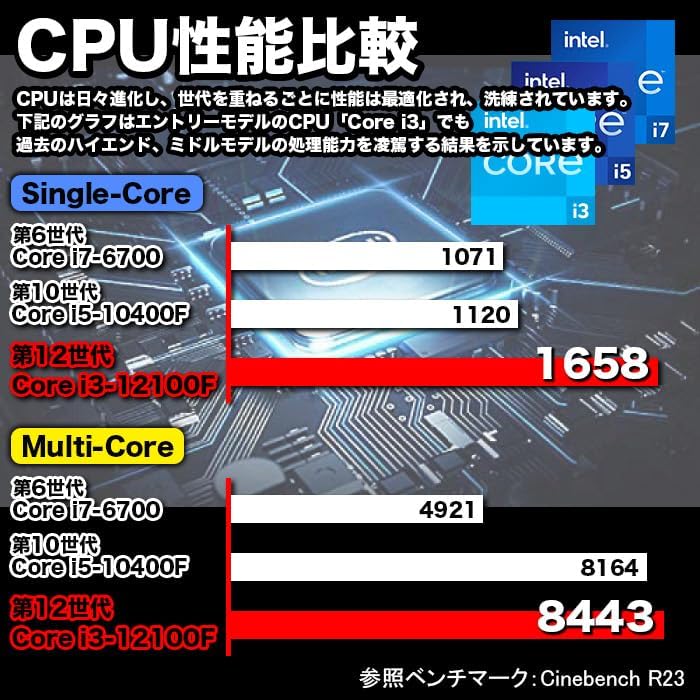
Figure 7.1: CPU Performance Comparison, demonstrating the significant performance improvements of the 12th Gen Intel Core i3.
7.2 Arbeitsspeicher (RAM)
Equipped with 8GB of DDR4-3200 RAM, enabling smooth multitasking and efficient handling of multiple applications simultaneously.
7.3 Speicher (SSD)
Utilizes a 256GB NVMe M.2 SSD, providing significantly faster data transfer speeds compared to traditional SATA SSDs (approximately 7 times faster), resulting in quicker boot times and application loading.

Figure 7.2: The IPASON G-SLIM Desktop PC is designed for stable high performance, suitable for various business scenarios.
8. Wartung
8.1 Reinigung
- Exterieur: Verwenden Sie ein weiches,amp cloth to wipe the exterior of the PC. Avoid abrasive cleaners or solvents.
- Belüftung: Periodically use compressed air to clear dust from the ventilation openings to ensure optimal cooling.
8.2 Softwareaktualisierungen
- Regularly check for and install Windows updates to ensure system stability, security, and performance.
- Keep your drivers updated for optimal hardware performance. You can usually find driver updates on the IPASON support weboder über Windows Update.
9. Fehlerbehebung
This section addresses common issues you might encounter with your IPASON G-SLIM Desktop PC.
| Problem | Mögliche Ursache | Lösung |
|---|---|---|
| Der PC lässt sich nicht einschalten. | Stromkabel nicht richtig angeschlossen; Problem mit der Steckdose. | Ensure power cable is securely connected to both PC and outlet. Try a different outlet. |
| Kein Bild auf dem Monitor. | Monitorkabel locker; falsche Eingangsquelle am Monitor. | Check monitor cable connections. Select correct input source on your monitor. |
| Langsame Leistung. | Too many programs running; System not updated. | Close unnecessary applications. Check for and install Windows updates. |
| Keine Internetverbindung. | Ethernet cable loose; Router/modem issue. | Check Ethernet cable connection. Restart your router/modem. |
Sollten Sie auf Probleme stoßen, die hier nicht aufgeführt sind, oder sollten die vorgeschlagenen Lösungen das Problem nicht beheben, wenden Sie sich bitte an den Kundendienst.
10. Spezifikationen
Detailed technical specifications for the IPASON G-SLIM Desktop PC (Model: G-SLIM, ASIN: B0CDKLF6X6).
| Besonderheit | Spezifikation |
|---|---|
| Marke | IPAS |
| Modellnummer | G-SLIM |
| Formfaktor | Small Form Factor Tower |
| Abmessungen (B×T×H) | 100 mm × 336 mm × 350 mm |
| Gewicht | 3 kg |
| Betriebssystem | Windows 11 |
| CPU-Marke | Intel |
| CPU Typ | Intel Core i12 der 3. Generation |
| CPU-Geschwindigkeit | 3.3 GHz |
| Prozessorsockel | LGA 1700 |
| RAM-Kapazität | 8 GB |
| Speichertyp | DDR4-3200-SDRAM |
| Maximale Speicherkapazität | 16 GB |
| Speicherkapazität | 256 GB |
| Speichertyp | NVMe-M.2-SSD |
| Grafikkarten | Intel UHD Graphics 620 (integriert) |
| VRAM-Kapazität | 4 GB (gemeinsam genutzt) |
| USB 2.0-Anschlüsse | 3 |
| USB 3.0-Anschlüsse | 5 |
| Stromversorgung | 300 W Soundeffekte |
| Optisches Laufwerk | Nicht enthalten |
| Kabelgebundener LAN-Anschluss | Ja |
| Vorinstallierte Software | WPS-Büro |
11. Garantie und Support
IPASON is committed to providing high-quality products and reliable customer support.
11.1 Produktgarantie
Your IPASON G-SLIM Desktop PC comes with a 1 Jahr Garantie against manufacturing defects. This warranty covers hardware malfunctions under normal use conditions. Please retain your proof of purchase for warranty claims.
11.2 Kundendienst
For technical assistance, troubleshooting, or warranty inquiries, please contact the seller, Pasoul Store, through the Amazon platform. They are the authorized reseller and can provide direct support.
You can also visit the official IPASON brand store on Amazon for more information and product updates: IPASON Brand Store
Ask a question about this manual
Ask about setup, troubleshooting, compatibility, parts, safety, or missing instructions. Manuals+ will review the question and use this page’s manual context to help answer it.