
Einführung
The Liectroux G7 is an advanced 4-in-1 robot vacuum cleaner designed to simplify your home cleaning routine. It features vacuuming, sweeping, mopping, and an automatic self-emptying base. Equipped with intelligent laser navigation, app control, and compatibility with voice assistants like Alexa and Google Assistant, the G7 offers a comprehensive and hands-free cleaning experience. This manual provides detailed instructions for setup, operation, maintenance, and troubleshooting to ensure optimal performance of your device.
Sicherheitshinweise
Bitte lesen Sie vor der Benutzung des Geräts alle Sicherheitshinweise sorgfältig durch und bewahren Sie diese Bedienungsanleitung zum späteren Nachschlagen auf.
- Do not allow children or pets to play with the robot. Supervise children when the robot is operating.
- Verwenden Sie ausschließlich das vom Hersteller mitgelieferte Original-Netzteil und die Original-Ladestation.
- Do not use the robot in environments with open flames, flammable or explosive materials.
- Ensure the robot is not exposed to water or other liquids. Do not use it in wet environments.
- Vor der Reinigung sollten lose Kabel, kleine Gegenstände oder zerbrechliche Dinge vom Boden entfernt werden, um ein Verheddern oder Beschädigen zu vermeiden.
- Do not use the robot to clean sharp objects, large debris, or liquids.
- Schalten Sie den Roboter aus und trennen Sie die Ladestation vom Stromnetz, bevor Sie Wartungs- oder Reinigungsarbeiten durchführen.
- Versuchen Sie nicht, den Roboter selbst zu reparieren oder zu modifizieren. Wenden Sie sich an autorisiertes Servicepersonal, um Unterstützung zu erhalten.
Packungsinhalt
Prüfen Sie beim Auspacken, ob alle Artikel vorhanden und in gutem Zustand sind:
- Liectroux G7 Robot Vacuum Cleaner
- Self-Emptying Charging Base
- Netzkabel
- Seitenbürsten (2 Paar)
- Mop Cloth (2 units)
- Disposable Dust Bags (2 units, 1 pre-installed in base)
- Reinigungswerkzeug
- Fernbedienung
- Benutzerhandbuch (dieses Dokument)
Produktkomponenten
Roboterstaubsauger
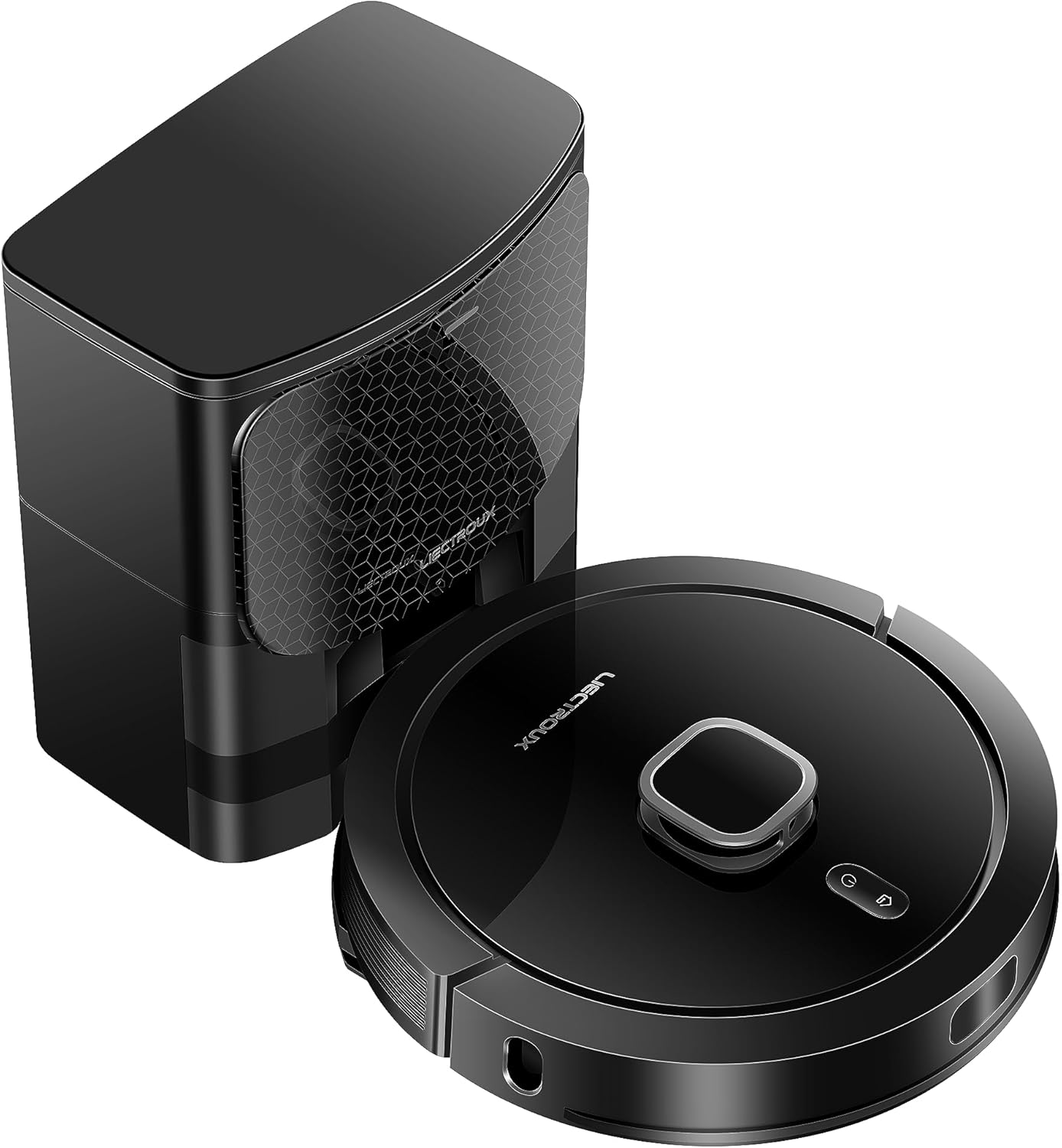
The Liectroux G7 robot vacuum features a sleek, round design with a top-mounted LiDAR sensor for precise navigation. It includes a main brush underneath for deep cleaning, two side brushes for edge and corner cleaning, and a water tank for mopping. Various sensors around its perimeter help detect obstacles and prevent falls. The charging contacts on the bottom allow it to connect with the self-emptying base.
Selbstentleerende Basis

The self-emptying base serves as both a charging station and an automatic dust collection unit. After each cleaning cycle, the robot returns to the base, and the collected dust and debris are automatically transferred from the robot's internal dustbin into a high-capacity disposable dust bag located within the base. This significantly reduces the frequency of manual dustbin emptying.
Aufstellen
1. Auspacken
Carefully remove all components from the packaging. Remove any protective films or packing materials from the robot and the charging base.
2. Platzierung der Ladestation
Place the self-emptying charging base against a wall in an open area, ensuring there is at least 0.5 meters of clear space on both sides and 1.5 meters in front. Avoid placing it near stairs or in areas with direct sunlight. Plug the power cord into the base and then into a wall outlet.
3. Anfangsgebühr
Place the robot onto the charging base, ensuring the charging contacts align. The robot will begin charging automatically. For the first use, allow the robot to fully charge, which may take several hours.
4. Installing Side Brushes and Mop Cloth
- Turn the robot over. Snap the side brushes into their designated slots.
- Fill the water tank with clean water. Attach the mop cloth securely to the water tank. Slide the water tank into the back of the robot until it clicks into place.
5. App-Verbindung (WLAN)
Download the Liectroux app from your smartphone's app store. Follow the in-app instructions to connect your robot to your home Wi-Fi network. This will enable smart features like mapping, remote control, and scheduling.
Bedienungsanleitung
Reinigungsmodi
- Automatische Reinigung: The robot intelligently maps your home and cleans systematically.
- Fleckenreinigung: Weist den Roboter an, einen bestimmten kleinen Bereich intensiv zu reinigen.
- Zone Clean: Ermöglicht es Ihnen, bestimmte Bereiche auf der Karte zu definieren, die der Roboter reinigen soll.
- Geplante Reinigung: Set specific times and days for the robot to automatically start cleaning.
Verwenden der App

The Liectroux app provides full control over your G7 robot. You can view real-time cleaning maps, set virtual walls or no-go zones, select specific rooms or areas to clean, adjust suction power (4 levels), and control water flow for mopping (3 levels). The app also allows you to schedule cleaning tasks and monitor the robot's status and maintenance alerts.
Sprachsteuerung (Alexa/Google Assistant)
The Liectroux G7 is compatible with Amazon Alexa and Google Assistant. Once connected through the app, you can use voice commands to start, stop, or send the robot back to its charging base. Refer to the app's integration guide for specific voice commands.
Carpet Boost Feature

The G7 is equipped with an ultrasonic carpet recognition system. When the robot detects a carpet, it automatically increases its suction power to a maximum level (turbo mode) to ensure a deeper clean. Once it moves off the carpet, the suction power returns to its previous setting.
Wartung
Regular maintenance ensures the longevity and optimal performance of your Liectroux G7.
1. Emptying the Dustbin/Self-Emptying Base

The self-emptying base automatically transfers dust from the robot's internal bin to a disposable dust bag. These bags have a capacity of up to 60 days of debris. Replace the dust bag in the base when indicated by the app or when full. The robot's internal dustbin should also be checked and cleaned periodically, especially if the self-emptying function is not used or if large debris is collected.
2. Cleaning Main Brush

Remove the main brush cover and the main brush. Use the provided cleaning tool to remove hair and debris tangled around the brush. Clean the brush bearings. Reinstall the main brush and cover.
3. Seitenbürsten reinigen
Periodically check the side brushes for wear or entanglement. Remove any hair or debris. If brushes are worn, replace them with new ones.
4. Filter reinigen
Remove the dustbin from the robot and separate the filter assembly. Tap the HEPA filter gently to remove dust. The primary filter can be rinsed with water, but ensure it is completely dry before reinstallation.
5. Reinigung der Sensoren und Ladekontakte
Wipe all sensors (cliff sensors, wall sensor, LiDAR sensor window) and the charging contacts on both the robot and the base with a clean, dry cloth. Dust and debris can interfere with navigation and charging.
6. Mop Cloth Care
After each mopping session, remove the mop cloth and rinse it thoroughly with water. Allow it to air dry completely before reattaching. Do not use strong detergents or bleach on the mop cloth.
Fehlerbehebung
If you encounter issues with your Liectroux G7, refer to the table below for common problems and solutions.
| Problem | Mögliche Ursache | Lösung |
|---|---|---|
| Roboter lässt sich nicht einschalten. | Niedriger Batteriestand; Netzschalter ausgeschaltet. | Place robot on charging base; Ensure power switch is ON. |
| Der Roboter kann die Ladestation nicht finden. | Base obstructed; Base unplugged; Robot too far. | Clear area around base; Plug in base; Manually place robot closer. |
| Mangelhafte Reinigungsleistung. | Mülleimer voll; Bürsten verheddert; Filter verstopft. | Empty dustbin/replace dust bag; Clean main/side brushes; Clean/replace filter. |
| Der Roboter bleibt häufig stecken. | Hindernisse auf dem Boden; Sensoren verschmutzt. | Clear floor of cables/small items; Clean all sensors. |
| Probleme mit der App-Verbindung. | Falsches WLAN-Passwort; Router zu weit entfernt; 5-GHz-WLAN. | Passwort überprüfen; Roboter näher an den Router heranführen; Sicherstellen, dass 2.4-GHz-WLAN verwendet wird. |
| Das Aufwischen hinterlässt Streifen oder ist wirkungslos. | Mop cloth dirty/dry; Water tank empty; Incorrect water flow setting. | Clean/wet mop cloth; Refill water tank; Adjust water flow in app. |
Technische Daten
| Besonderheit | Detail |
|---|---|
| Modell | G7 |
| Marke | LIECTROUX |
| Abmessungen (Roboter) | Approx. 36.5 x 36.5 x 9.8 cm (Diameter x Height) |
| Gewicht | Approx. 9.93 kg (Robot + Base) |
| Akku-Typ | Lithium-Ionen |
| Durchschnittliche Akkulaufzeit | 2 Stunden |
| Bandtage | 220V (This specific model) |
| Navigationstyp | Lasernavigation |
| Kartierungsfähigkeit | Saves up to 5 maps |
| Staubbeutelkapazität (Basis) | Approx. 3L (up to 60 days) |
| Besondere Merkmale | 4-in-1 (Vacuum, Sweep, Mop, Self-Empty), Smart Mapping, Carpet Recognition, App Control, Voice Control (Alexa, Google Assistant) |
Garantie und Support
The Liectroux G7 Robot Vacuum Cleaner comes with a standard manufacturer's warranty. Please refer to your purchase documentation for specific warranty terms and duration. Typically, a 1-year warranty against manufacturing defects is provided.
For technical support, troubleshooting assistance beyond this manual, or to inquire about replacement parts, please contact the official Liectroux Brasil seller or visit their authorized service channels. Keep your purchase receipt as proof of purchase for warranty claims.