
Einführung
The zelotes T30 Wired Vertical Mouse is designed to enhance comfort and reduce wrist strain during prolonged computer use. Its ergonomic vertical design promotes a natural hand and wrist posture. This manual provides essential information for setting up, operating, maintaining, and troubleshooting your new mouse.

Abbildung 1: Vorne links view of the zelotes T30 Wired Vertical Mouse.

Abbildung 2: Verschiedene Seiten views illustrating the vertical design of the mouse.
Aufstellen
The zelotes T30 Vertical Mouse is designed for simple plug-and-play operation, requiring no driver installation.
Anschließen der Maus
- Locate an available USB port on your computer (Laptop, PC, Mac).
- Insert the USB connector of the zelotes T30 mouse into the USB port.
- The mouse will be automatically recognized by your operating system (Win11, Win10, Win8, Win7, Mac OS, Linux) and ready for use.
Attaching the Detachable Palm Rest
The mouse comes with a detachable palm rest for enhanced comfort. To attach it:
- Align the palm rest with the designated slots on the bottom of the mouse.
- Gently slide the palm rest into place until it clicks securely.
- Ensure the palm rest is firmly attached before use.

Figure 3: Illustration of the detachable palm rest and its attachment points.
Bedienungsanleitung
Ergonomisches Design und Griff
The vertical design of the T30 mouse positions your hand in a natural handshake posture, reducing pronation of the forearm and wrist. This design aims to alleviate discomfort associated with traditional mouse use.

Figure 4: Proper hand placement on the ergonomic vertical mouse.

Abbildung 5: Ausführlich view of the humanized grip design, ensuring comfortable finger placement.
DPI-Empfindlichkeit anpassen
The mouse features 4 adjustable DPI settings: 1200, 1600, 2400, and 3200 DPI. To change the sensitivity:
- Locate the DPI button on the mouse. This button is typically positioned near the scroll wheel or thumb area.
- Press the DPI button to cycle through the available sensitivity settings. Each press will switch to the next DPI level.
- The LED illumination on the mouse may change color or pattern to indicate the current DPI setting.
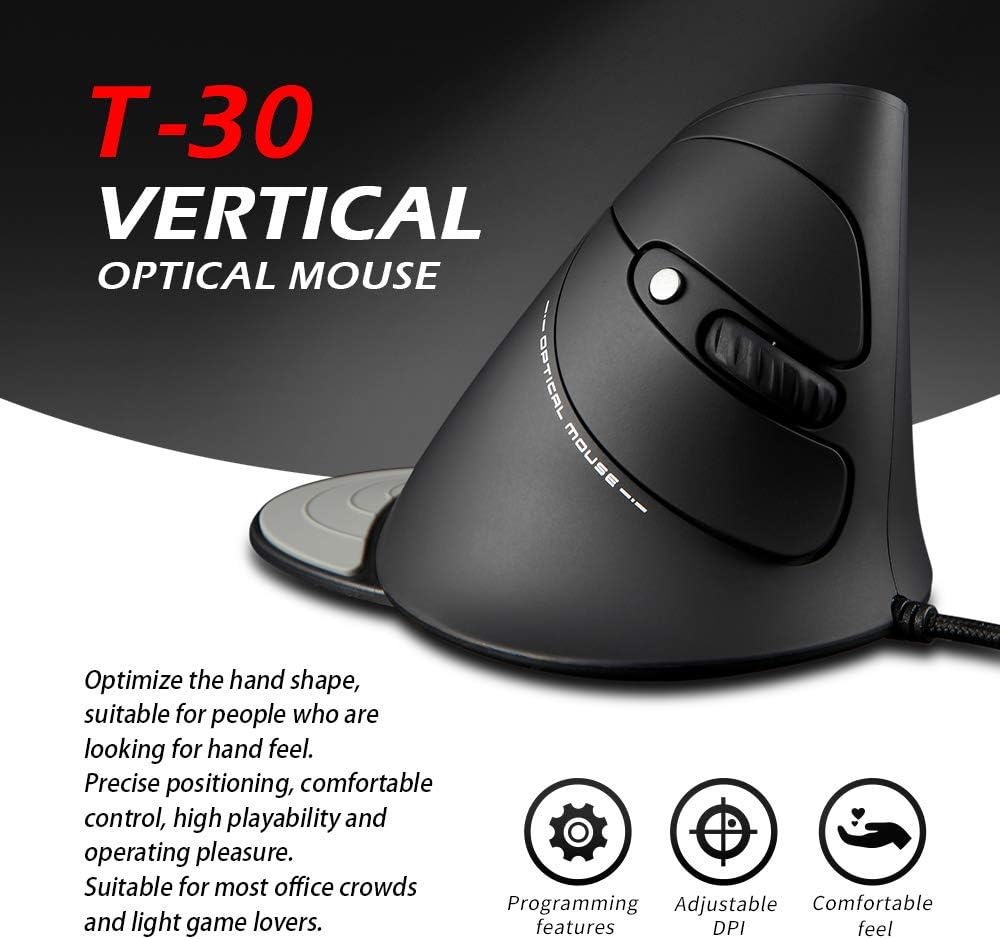
Figure 6: The T30 mouse with an emphasis on its adjustable DPI feature.
Tastenfunktionen
The zelotes T30 mouse is equipped with 6 buttons for various functions:
- Linksklick-Taste: Standardmäßige primäre Klickfunktion.
- Rechtsklick-Schaltfläche: Standardmäßige Sekundärklickfunktion.
- Scrollrad: Zum vertikalen Scrollen. Kann auch für die Mittelklick-Funktion gedrückt werden.
- DPI-Taste: Passt die Mausempfindlichkeit (DPI) an.
- Vorwärts-Taste: Navigiert vorwärts in web Browser bzw file Entdecker.
- Zurück-Schaltfläche: Navigiert rückwärts in web Browser bzw file Entdecker.
Video 1: Demonstration of the zelotes T30 Ergonomic Vertical Mouse features and usage.
Wartung
To ensure the longevity and optimal performance of your zelotes T30 mouse, follow these maintenance guidelines:
- Reinigung: Wischen Sie die Oberfläche der Maus mit einem weichen, trockenen Tuch ab. Bei hartnäckigem Schmutz verwenden Sie ein leicht feuchtes Tuch.amp cloth can be used, but ensure no liquid enters the mouse. Avoid harsh chemicals or abrasive cleaners.
- Lagerung: Bewahren Sie die Maus bei Nichtgebrauch an einem sauberen, trockenen Ort fern von extremen Temperaturen und direkter Sonneneinstrahlung auf.
- Kabelpflege: Vermeiden Sie es, das USB-Kabel übermäßig zu biegen oder zu verdrehen, da dies die internen Drähte beschädigen kann.
Fehlerbehebung
If you encounter issues with your zelotes T30 mouse, refer to the following common problems and solutions:
| Problem | Mögliche Ursache | Lösung |
|---|---|---|
| Maus reagiert nicht | Wackelkontakt am USB-Anschluss, defekter USB-Anschluss, Problem mit dem Betriebssystem. |
|
| Die Cursorbewegung ist unregelmäßig oder sprunghaft. | Verschmutzter optischer Sensor, ungeeignete Mauspadoberfläche. |
|
| DPI-Anpassung funktioniert nicht | Fehlfunktion des Knopfes, vorübergehender Softwarefehler. |
|
Technische Daten
| Besonderheit | Detail |
|---|---|
| Marke | Zeloten |
| Modellnummer | T-30 |
| Technische Daten | 4.33 x 3.15 x 3.27 Zoll |
| Artikelgewicht | 4.2 Unzen |
| Konnektivitätstechnologie | USB verkabelt |
| Bewegungserkennungstechnologie | Optisch |
| DPI-Einstellungen | 1200 / 1600 / 2400 / 3200 DPI |
| Anzahl der Tasten | 6 |
| Besonderheit | Ergonomic Design, Detachable Wrist Rest, LED Illumination |
| Kompatibilität | Win11, Win10, Win8, Win7, Mac OS, Linux |

Figure 7: Detailed dimensions of the zelotes T30 Vertical Mouse.
Garantie und Support
For warranty information and technical support, please refer to the official zelotes webBesuchen Sie die Website oder kontaktieren Sie direkt den Kundenservice. Bewahren Sie Ihren Kaufbeleg für Garantieansprüche auf.
Hersteller: Zeloten


