
1. Einleitung
This manual provides detailed instructions for the installation, operation, and maintenance of the CYSSJF Bathroom Pull Cord Alarm Kit, Model SJ-4L-W1P 1+1. This system is designed to provide a reliable emergency call solution for individuals requiring assistance in bathrooms or other critical areas, particularly for the elderly, disabled, and handicapped in various settings such as homes, hospitals, and nursing facilities.
2. Produktüberschreitungview und Komponenten
The CYSSJF Bathroom Pull Cord Alarm Kit consists of an alarm receiver and an alarm transmitter with a pull cord. It also includes additional call buttons for versatile use.
2.1 Hauptmerkmale:
- Emergency Assistance Alarm: Designed for disabled individuals in public and residential toilets.
- Barrierefreies Design: Features a red pull cord for easy activation.
- LED Emergency Siren: Built-in rechargeable backup battery for power outages (30-40 minutes continuous power).
- Anpassbare Warnungen: Five call tones, four mutable volume levels, and three light colors (red, blue, green) for visual alerts.
- Adjustable Siren Duration: 30 seconds, 300 seconds, or continuous until manually canceled.
- Abbruchfunktion: A dedicated "Cancel" key to stop the alarm after assistance is provided.
- Einfache Installation: Suitable for disabled toilets, changing rooms, solariums, interview rooms, reception areas, homes, hotels, shopping malls, schools, hospitals, and nursing homes.
2.2 Packungsinhalt:
- 1 x Alarm Receiver (plug-in power required, built-in emergency backup battery)
- 1 x Assistance Call Button (with 1.5m pull cord, built-in battery)
- 1 x doppelseitige Klebebänder
- 1 x englisches Handbuch

Bild: Überview of the CYSSJF Bathroom Pull Cord Alarm Kit components, including the receiver, call button with pull cord, and other accessories.

Image: Close-up of the call button, showing the "Cancel" button, the "Pull cord to call" instruction, and the flashing lantern indicator.
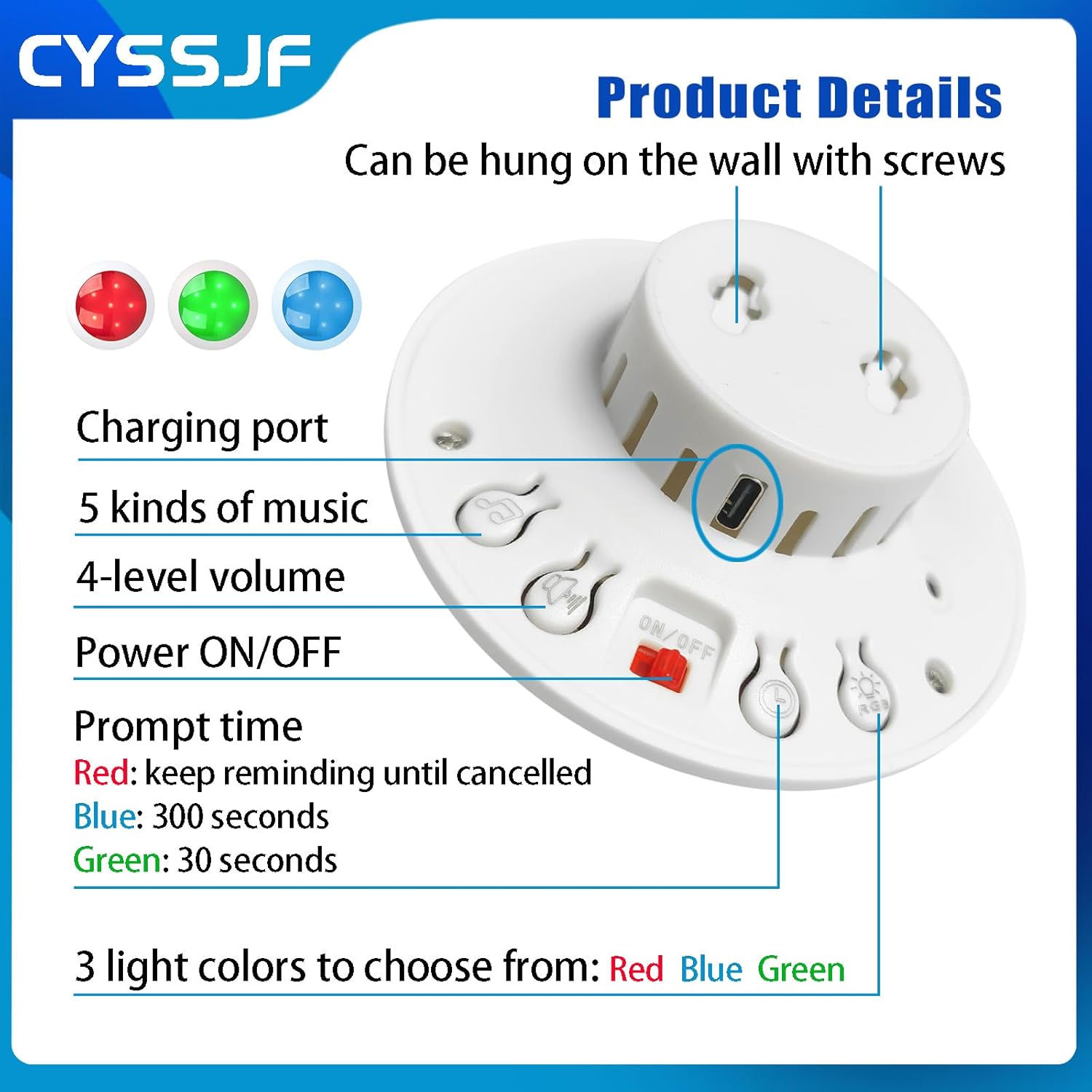
Bild: Detailliert view of the alarm receiver's underside, highlighting the charging port, music selection, volume control, power switch, prompt time settings, and light color options.
3. Einrichtung und Installation
Follow these steps to set up your CYSSJF Bathroom Pull Cord Alarm Kit:
- Komponenten auspacken: Carefully remove all items from the packaging. Ensure all listed components in Section 2.2 are present.
- Einschalten des Empfängers: Locate the ON/OFF switch on the back of the alarm receiver and slide it to the "ON" position. The receiver will emit a sound and cycle through red, green, and blue lights.
- Mount the Call Button: The assistance call button can be mounted on a wall using the provided double-sided tapes or screws. Choose a location easily accessible to the user, such as near a toilet or bed. Ensure the pull cord hangs freely.
- Schließen Sie den Empfänger an: Connect the alarm receiver to a standard power outlet. The built-in backup battery will activate automatically during power outages.
Video: Demonstrates the unboxing and initial setup of the Bathroom Wireless SOS Bell for Elderly, showing how to locate the switch and place the button.
Video: Instructions on how to register the call button with the receiver, ensuring proper communication between devices.
4. Bedienungsanleitung
4.1 Activating the Alarm:
- To activate the alarm, pull the red cord on the assistance call button.
- Alternatively, press the red button on the call transmitter (if included in your kit).
- The receiver will emit an audible alert and flash its lights to indicate an emergency.
4.2 Canceling the Alarm:
- After assistance has been provided, press the "Cancel" button on the call button unit to stop the alarm.
4.3 Customizing Settings:
- Klingelton ändern: On the receiver, press and hold the music note button until you hear a "Di~" sound. Continue pressing the music note button to cycle through the 5 available ringtones.
- Lautstärke anpassen: Use the volume control buttons on the receiver to select one of the four mutable volume levels.
- Selecting Light Color: Use the light control buttons on the receiver to choose between red, blue, or green light alerts.
- Setting Siren Duration: Adjust the siren duration to 30 seconds, 300 seconds, or continuous sounding until manually canceled using the dedicated button on the receiver.
Video: Demonstrates how to change the ringtone on the alarm receiver.
Video: Shows the ease of use of the alarm system, including activating and canceling calls.
5. Wartung
- Reinigung: Wipe the surfaces of the receiver and call button with a soft, damp Reinigen Sie die Geräte mit einem Tuch. Verwenden Sie keine Scheuermittel und tauchen Sie die Geräte nicht in Wasser.
- Batterieprüfung: The call button has a built-in battery. The receiver has a built-in emergency backup battery that provides 30-40 minutes of continuous power during outages. Ensure the receiver is regularly plugged in to keep its backup battery charged.
- Funktionstest: Periodically test the alarm system by activating the call button and ensuring the receiver responds with sound and light.
6. Fehlerbehebung
If you encounter issues with your alarm system, refer to the following common problems and solutions:
| Problem | Mögliche Ursache | Lösung |
|---|---|---|
| Receiver does not sound/light up when button is pressed. |
|
|
| Alarm sounds randomly. |
|
|
| Cannot change ringtone/volume. |
|
|
Video: Guide on how to restore the alarm system to factory settings, which can resolve various operational issues.
7. Spezifikationen
| Besonderheit | Detail |
|---|---|
| Marke | CYSSJF |
| Modell | SJ-4L-W1P 1+1 |
| Stromquelle | Battery Powered (Receiver requires plug-in power with backup battery) |
| Akku-Typ | Alkaline (for call button), Built-in rechargeable (for receiver backup) |
| Anzahl Batterien | 1 nicht standardmäßige Batterie (im Lieferumfang enthalten) |
| Bandtage | 12 Volt |
| Kontrollmethode | Berühren |
| Hörbares Geräusch | 60 Dezibel |
| Montagetyp | Wandhalterung |
| Maximale Reichweite | 150 Meter |
| Sensor Technology | Kontaktsensor |
8. Garantie und Support
For warranty information and technical support, please refer to the contact details provided with your product packaging or visit the official CYSSJF webWebsite. Bewahren Sie Ihren Kaufbeleg für Garantieansprüche auf.