
Einführung
This manual provides detailed instructions for the installation, operation, and maintenance of your Cooler Master MasterLiquid Atmos 360 Black CPU Liquid Cooler. This all-in-one (AIO) water cooling system is designed to deliver efficient thermal performance for your CPU, featuring a dual-chamber pump, pre-installed SickleFlow 120 Edge fans, and Addressable Gen 2 RGB lighting.
The MasterLiquid Atmos 360 is compatible with a wide range of Intel LGA (1700/1200/1151/1150/1155/1156) and AMD (AM5/AM4) sockets.

Image: The Cooler Master MasterLiquid Atmos 360 Black CPU Liquid Cooler, showcasing its radiator, three RGB fans, and illuminated pump head.
Packungsinhalt
Bitte überprüfen Sie vor Beginn der Installation, ob alle Komponenten im Paket vorhanden sind:
- 360mm Radiator with pre-installed SickleFlow 120 Edge Fans
- CPU Water Block/Pump Unit
- Mounting Hardware for Intel LGA 1700/1200/115x sockets
- Montagehardware für AMD AM5/AM4-Sockel
- Wärmeleitpaste
- ARGB Gen 2 Controller (if included)
- Various Cables (PWM fan cables, ARGB cables)
- Bedienungsanleitung

Abbildung: Eine umfassende view of all included components for the MasterLiquid Atmos 360, including the radiator, fans, pump, mounting brackets, and accessories.
Setup und Installation
Follow these steps carefully to install your liquid cooler. Refer to your motherboard and PC case manuals for specific guidance on component placement and cable routing.
1. Prepare the CPU Socket
- Ermitteln Sie Ihren CPU-Sockeltyp (Intel LGA oder AMD AM).
- Install the appropriate backplate (for Intel) or retention clips (for AMD) as per the included hardware guide.
- Reinigen Sie die CPU-Oberfläche mit Isopropylalkohol, um eventuelle Rückstände zu entfernen.
2. Wärmeleitpaste auftragen
- Apply a small, pea-sized amount of the included thermal paste to the center of your CPU's integrated heat spreader (IHS).
- Do not spread the paste manually; the pressure from the cold plate will distribute it evenly.
3. Kühler und Lüfter einbauen.
- Ermitteln Sie den optimalen Montageort für den 360-mm-Radiator in Ihrem PC-Gehäuse (typischerweise oben oder vorne).
- Secure the radiator to the case using the provided screws. The SickleFlow Edge fans are pre-installed on the radiator for convenience.
4. Pumpe/Kühlplatte montieren
- Attach the correct mounting brackets to the pump unit for your CPU socket.
- Platzieren Sie die Pumpen-/Kühlplattenbaugruppe vorsichtig auf der CPU und achten Sie dabei auf die Ausrichtung der Befestigungslöcher.
- Secure the pump unit with the appropriate screws, tightening them in a diagonal pattern until snug. Do not overtighten.
5. Kabel anschließen
- Connect the pump's 3-pin power cable to an available CPU_FAN or AIO_PUMP header on your motherboard.
- Connect the PWM fan cables from the SickleFlow Edge fans to the CPU_FAN or other available fan headers on your motherboard. It is recommended to connect them to a single header using a splitter if necessary, to ensure synchronized fan speed control.
- Connect the ARGB cables from the pump and fans to an Addressable Gen 2 RGB header on your motherboard (5V-D-G) or to the included ARGB controller.

Image: The assembled MasterLiquid Atmos 360, showing the radiator, fans, and pump unit connected by tubing.
Bedienungsanleitung
Erstes Einschalten
After installation, power on your system. The pump and fans should begin operating. Monitor your CPU temperatures using system monitoring software to ensure proper function.
RGB-Beleuchtungssteuerung
The MasterLiquid Atmos 360 features Addressable Gen 2 RGB lighting on both the pump and fans. You can control the lighting effects through several methods:
- Motherboard-Synchronisierung: If connected to a compatible ARGB motherboard header, use your motherboard's RGB software (e.g., ASUS Aura Sync, MSI Mystic Light, Gigabyte RGB Fusion, ASRock Polychrome Sync) to customize lighting.
- Included ARGB Controller: If an ARGB controller is included, use its physical buttons to cycle through pre-set lighting modes and colors.
- Cooler Master MasterCTRL/MasterPlus Software: Download and install Cooler Master's MasterCTRL or MasterPlus software for advanced customization of lighting effects and device performance.
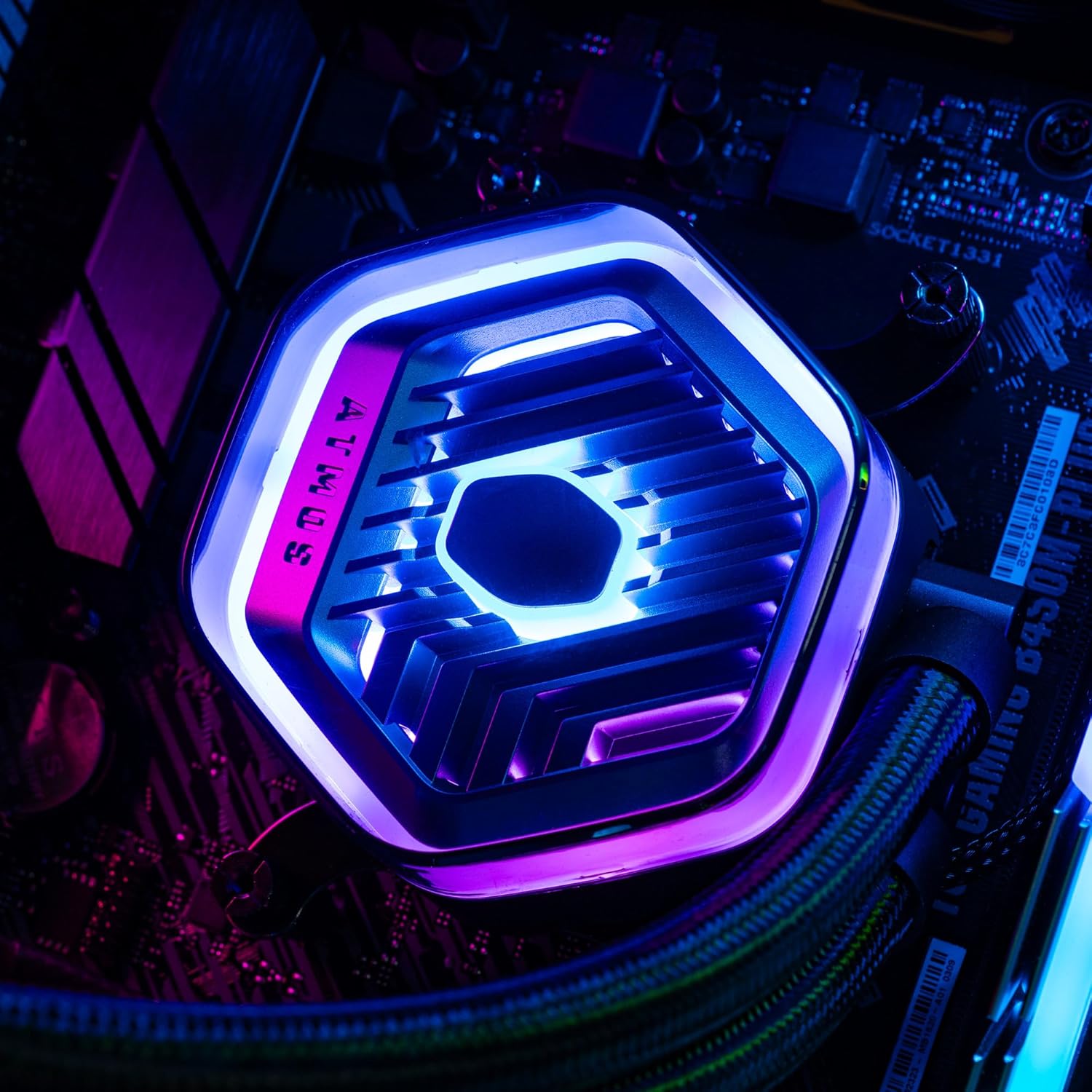
Bild: Eine detaillierte view of the MasterLiquid Atmos pump head, showcasing its unique design and customizable RGB illumination.
Lüfterdrehzahlregelung
The SickleFlow Edge fans are PWM (Pulse Width Modulation) controlled. Their speed can be managed via your motherboard's BIOS/UEFI settings or through motherboard-specific software. Adjust fan curves to balance cooling performance and noise levels according to your preferences.
Wartung
Regelmäßige Wartung trägt dazu bei, die optimale Leistung und Langlebigkeit Ihres Flüssigkeitskühlers zu gewährleisten.
- Staubreinigung: Reinigen Sie die Kühlrippen und Lüfterflügel des Kühlers regelmäßig mit Druckluft oder einer weichen Bürste von Staub. Stellen Sie sicher, dass das System vor der Reinigung ausgeschaltet ist.
- Sichtprüfung: Überprüfen Sie gelegentlich die Schläuche und Anschlüsse auf Anzeichen von Undichtigkeiten oder Beschädigungen. Obwohl AIO-Kühler geschlossene Systeme sind, kann eine kurze Sichtprüfung potenziellen Problemen vorbeugen.
- Software-Updates: Keep your Cooler Master MasterCTRL/MasterPlus software and motherboard BIOS/UEFI updated to ensure compatibility and access to the latest features and performance optimizations.
Fehlerbehebung
If you encounter issues with your MasterLiquid Atmos 360, refer to the following common troubleshooting steps:
Hohe CPU-Temperaturen
- Pumpenanschluss prüfen: Ensure the pump's power cable is securely connected to the correct motherboard header (CPU_FAN or AIO_PUMP) and receiving power.
- Überprüfen Sie den Lüfterbetrieb: Confirm that all radiator fans are spinning. Check their connections to the motherboard or fan controller.
- Wärmeleitpaste: Ensure thermal paste was applied correctly and the cold plate has good contact with the CPU. Re-apply if necessary.
- Luftstrom: Check your PC case's overall airflow. Ensure radiator fans are oriented correctly for intake or exhaust as desired.
RGB-Beleuchtung funktioniert nicht
- ARGB-Anschluss: Verify that the ARGB cables are correctly connected to a 5V-D-G header on your motherboard or the ARGB controller. Ensure it is not connected to a 12V RGB header, which can damage the LEDs.
- Software: Check your motherboard's RGB software or Cooler Master's MasterCTRL/MasterPlus software for lighting settings. Ensure the lighting is enabled and configured.
- Controllerleistung: If using an external ARGB controller, ensure it is receiving power (usually via SATA power connector).
Ungewöhnliches Pumpengeräusch
- Luftblasen: New AIOs may have some air bubbles that can cause gurgling noises initially. These usually dissipate within a few hours of operation. Gently tilt your PC case to help move air bubbles to the radiator.
- Montage: Stellen Sie sicher, dass die Pumpe fest montiert ist und nicht gegen andere Bauteile vibriert.
If problems persist, please contact Cooler Master customer support.
Technische Daten
| Besonderheit | Spezifikation |
|---|---|
| Modellnummer | MLX-D36M-A25PZ-R1 |
| Produktabmessungen (L x B x H) | 15.51" x 4.71" x 1.07" (394 x 119.6 x 27.2 mm) |
| Kühlmethode | Flüssig (All-in-One) |
| Kompatible Geräte | Desktop, Server |
| Kompatible Sockel | Intel LGA 1700/1200/1151/1150/1155/1156, AMD AM5/AM4 |
| Geräuschpegel | 27.2 Decibels (Fan) |
| Maximum Rotational Speed (Fan) | 2500 U/min |
| Air Flow Capacity (Fan) | 70.7 CFM |
| Material | Aluminium (Kühler) |
| Typ des Stromanschlusses | 3-Pin (Pump), 4-Pin PWM (Fans) |
| Bandtage | 12 Volt |
| Wastage | 3.6 Watt |
| Artikelgewicht | 1.42 Kilogramm |
Garantieinformationen
The Cooler Master MasterLiquid Atmos 360 Black CPU Liquid Cooler comes with a 5 Jahr Garantie ab Kaufdatum. Diese Garantie deckt Material- und Verarbeitungsfehler bei normalem Gebrauch ab.
For warranty claims or detailed terms and conditions, please retain your proof of purchase and visit the official Cooler Master webWebsite oder wenden Sie sich an den Kundendienst.
Unterstützung
For further assistance, technical support, or to download the latest software and drivers, please visit the official Cooler Master webWebsite:
You may also find helpful resources, FAQs, and community forums on their support pages.