
CAT DX29
CAT DX29 1750W Demolition Hammer Instruction Manual
Model: DX29 | Brand: CAT
1. Wichtige Sicherheitshinweise
Lesen und verstehen Sie stets alle Sicherheitshinweise, Anweisungen, Abbildungen und technischen Daten, die diesem Elektrowerkzeug beiliegen. Die Nichtbeachtung der unten aufgeführten Anweisungen kann zu Stromschlag, Brand und/oder schweren Verletzungen führen.
1.1 Allgemeine Sicherheitshinweise für Elektrowerkzeuge
- Sicherheit am Arbeitsplatz: Halten Sie Ihren Arbeitsbereich sauber und gut beleuchtet. Unordnung oder Dunkelheit erhöhen die Unfallgefahr. Betreiben Sie Elektrowerkzeuge nicht in explosionsgefährdeten Bereichen, z. B. in der Nähe von brennbaren Flüssigkeiten, Gasen oder Stäuben.
- Elektrische Sicherheit: Der Stecker des Elektrowerkzeugs muss in die Steckdose passen. Der Stecker darf in keiner Weise verändert werden. Verwenden Sie keine Adapterstecker gemeinsam mit geerdeten Elektrowerkzeugen. Unveränderte Stecker und passende Steckdosen verringern das Risiko eines elektrischen Schlages.
- Persönliche Sicherheit: Stay alert, watch what you are doing and use common sense when operating a power tool. Do not use a power tool while you are tired or under the influence of drugs, alcohol or medication. Always wear appropriate personal protective equipment, including eye protection, hearing protection, dust mask, and heavy-duty gloves.
1.2 Demolition Hammer Specific Safety Warnings
- Halten Sie das Elektrowerkzeug an den isolierten Griffflächen, wenn Sie einen Vorgang ausführen, bei dem das Schneidzubehör verborgene Kabel oder sein eigenes Kabel berühren kann.
- Wear ear protectors when operating. Exposure to noise can cause hearing loss.
- Verwenden Sie die mit dem Werkzeug gelieferten Zusatzgriffe. Kontrollverlust kann zu Verletzungen führen.
- Always ensure the chisel is securely locked in the chuck before operation.
2. Produktüberschreitungview
The CAT DX29 is a powerful 1750W demolition hammer designed for heavy-duty breaking and chiseling tasks. It features a robust construction and user-friendly design for efficient operation.
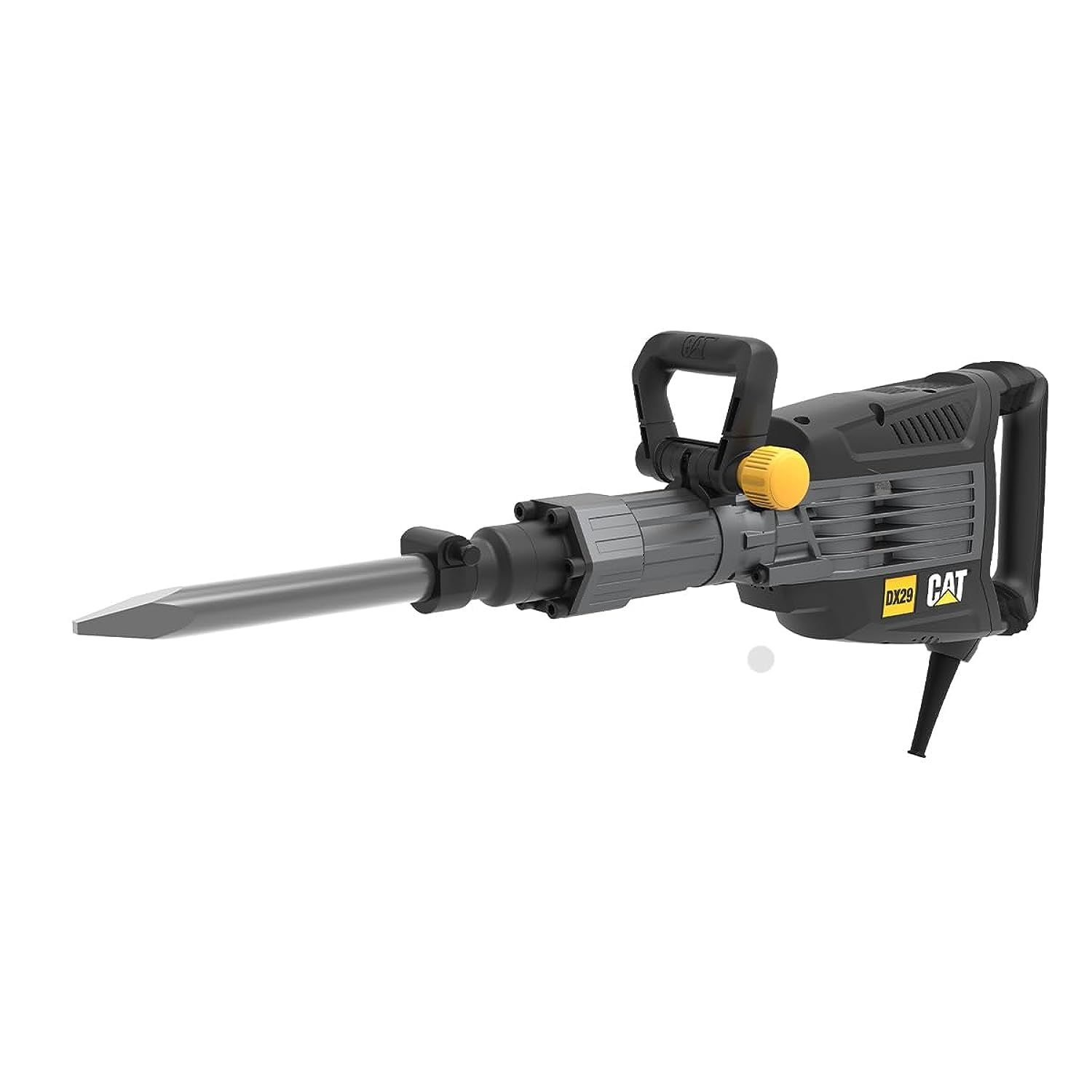
Figure 2.1: CAT DX29 Demolition Hammer with pointed chisel attachment.
2.1 Hauptmerkmale
- Excellent impact force for efficient material removal.
- Constant speed control to prolong motor life and maintain performance under load.
- Carbon brushes with an auto-stop feature for motor protection and extended tool lifespan.
- Hex chuck with a wide soft grip for enhanced user comfort and reduced fatigue.
- Arretierschalter für Dauerbetrieb.
- Anti-vibration triple magnesium gear box for maximum comfort during prolonged use.
2.2 Enthaltene Komponenten
- CAT DX29 Demolition Hammer Unit
- Zusatzgriff (x1)
- Point Chisel (x1)
- Flachmeißel (x1)
- Wischtuch (x1)
- Grease Tube (x1)
3. Einrichtung
3.1 Auspacken
Carefully remove the demolition hammer and all accessories from the packaging. Inspect the tool for any signs of damage. Do not operate the tool if any damage is observed. Keep packaging materials for future storage or transport.
3.2 Anbringen des Hilfsgriffs
- Lösen Sie den Hilfsgriff clamp durch Drehen gegen den Uhrzeigersinn.
- Slide the auxiliary handle onto the front barrel of the demolition hammer.
- Adjust the handle to a comfortable and secure position for your work.
- Ziehen Sie die Klammer fest.amp durch Drehen im Uhrzeigersinn, bis der Griff fest sitzt.
3.3 Installing/Removing Chisels
The DX29 uses a hex chuck system for quick and secure chisel changes.
- So installieren Sie: Pull back the chuck sleeve, insert the chisel shank into the chuck until it clicks into place. Release the sleeve. Pull on the chisel to ensure it is securely locked.
- So entfernen Sie: Pull back the chuck sleeve and pull the chisel out.

Figure 3.1: Proper handling of the demolition hammer during operation.
3.4 Stromanschluss
Ensure the power switch is in the "OFF" position before plugging the tool into a suitable power outlet. The tool requires a 1750W power supply. Use an extension cord rated for the tool's power requirements if necessary.
4. Bedienungsanleitung
4.1 Starten und Stoppen
- Anfangen: Press the ON/OFF trigger switch.
- Für den Dauerbetrieb: Press the ON/OFF trigger switch and then press the lock-on button.
- Zum Anhalten (des kontinuierlichen Betriebs): Press the ON/OFF trigger switch again.
4.2 Abbruchtechniken
- Always hold the tool firmly with both hands using the main handle and the auxiliary handle.
- Position the chisel tip against the material to be broken.
- Apply moderate pressure. Do not force the tool; allow the hammer action to do the work.
- For optimal performance, work at an angle to the material, allowing the chisel to chip away rather than drill straight down.
- Take breaks during extended use to prevent overheating and reduce user fatigue.

Figure 4.1: The DX29 delivering powerful impact for demolition tasks.
5. Wartung
Regular maintenance ensures the longevity and safe operation of your CAT DX29 Demolition Hammer. Always disconnect the tool from the power supply before performing any maintenance.
5.1 Reinigung
- After each use, clean the tool's ventilation openings and housing with a soft brush or compressed air.
- Use the provided wiping cloth to clean the exterior surfaces. Do not use harsh chemicals or abrasive cleaners.
- Keep the chuck free from dust and debris to ensure proper chisel insertion and removal.
5.2 Schmierung
The gear mechanism requires periodic lubrication. Use the provided grease tube or a suitable high-quality grease for demolition hammers. Refer to the tool's service diagram (not provided here, typically in a full manual) for grease points. Generally, apply a small amount of grease to the chisel shank before insertion into the chuck to reduce wear.
5.3 Kohlebürstenwechsel
The carbon brushes are designed to stop the motor automatically when they are worn out, protecting the motor from damage. When the tool stops, the carbon brushes need to be replaced. This procedure should ideally be performed by a qualified service technician to ensure proper installation and tool function.
5.4 Speicherung
Store the demolition hammer in a clean, dry place, out of reach of children. If storing for extended periods, ensure it is clean and lightly lubricated.
6. Fehlerbehebung
| Problem | Mögliche Ursache | Lösung |
|---|---|---|
| Werkzeug startet nicht. | Keine Stromversorgung; Defekter Schalter; Abgenutzte Kohlebürsten. | Check power connection; Contact service for switch replacement; Replace carbon brushes. |
| Reduzierte Aufprallkraft. | Insufficient lubrication; Worn chisel; Internal wear. | Apply grease; Replace chisel; Contact service. |
| Übermäßige Vibrationen. | Loose chisel; Internal component issue. | Ensure chisel is locked; Contact service. |
| Werkzeug stoppt während des Betriebs. | Overload protection activated; Worn carbon brushes. | Allow tool to cool; Replace carbon brushes. |
7. Spezifikationen
| Besonderheit | Wert |
|---|---|
| Modellnummer | DX29 |
| Marke | KATZE |
| Nennleistung | 1750 Watt |
| Aufprallrate (Max.) | 1620 Schläge pro Minute |
| Aufprallenergie | 50 Joule |
| Chuck Größe | 30 mm |
| Werkzeuggewicht | 14.9 kg |
| Stromquelle | Kabelgebundene Elektrik |
| Material | Metall |
| Farbe | Schwarz und Orange |
| Besonderheit | Variable Geschwindigkeit |
| Technische Daten | 90 x 21.5 x 40 cm |
8. Garantie und Support
This CAT DX29 Demolition Hammer comes with a standard manufacturer's warranty. For specific warranty terms and conditions, please refer to the warranty card included with your product or visit the official CAT power tools website. For technical support, service, or spare parts, please contact your authorized CAT service center or the retailer where the product was purchased.
Notiz: Nicht autorisierte Reparaturen oder Modifikationen können zum Erlöschen der Produktgarantie führen.
Ask a question about this manual
Ask about setup, troubleshooting, compatibility, parts, safety, or missing instructions. Manuals+ will review the question and use this page’s manual context to help answer it.