
Von 192928054231
DELLA Smart WiFi Portable AC
Modell: 192928054231
8000 BTU, Heats & Cools Up To 150 Sq. Ft.
Einführung
This manual provides detailed instructions for the safe and efficient operation of your DELLA 8,000 BTU Portable Air Conditioner. This versatile unit offers year-round climate control with cooling, heating, dehumidification, and ventilation modes. It features a self-evaporating system, a powerful dehumidifier, a 24-hour timer, and convenient control via the Della app or remote.
Bitte lesen Sie diese Anleitung vor der Installation und Inbetriebnahme sorgfältig durch und bewahren Sie sie zum späteren Nachschlagen auf.
Setup und Installation
The DELLA Portable AC is designed for easy, tool-less setup. Ensure the unit is placed on a flat, stable surface near a window and a power outlet.
Installation des Fenstersatzes
The adjustable window kit is compatible with both horizontal and vertical windows, simplifying the exhaust hose installation without requiring drilling.

Image: Illustration of the adjustable window kit for both horizontal and vertical window installations.
Abgasschlauchanschluss
Connect the exhaust hose to the unit and then to the window kit. Ensure a secure fit to prevent air leakage, which can reduce efficiency.
Video: Demonstrates the quick and tool-less setup, including connecting the exhaust hose to the unit and the window kit.
Platzierung
Position the unit to allow for adequate airflow around it. The built-in caster wheels and side handles facilitate easy movement and placement within your space.

Image: The portable AC unit shown with its remote control and a smartphone displaying the control app, highlighting its mobility and control options.
Bedienungsanleitung
Your DELLA Portable AC offers multiple operating modes and convenient control options.
Bedienfeld und Modi
The unit features an intuitive LED display with soft-touch controls on the top panel. Available modes include Cooling, Heating, Dehumidification, Ventilation, and Sleep mode. You can adjust the temperature, fan speed (3 speeds available), and set the 24-hour timer directly from the control panel.
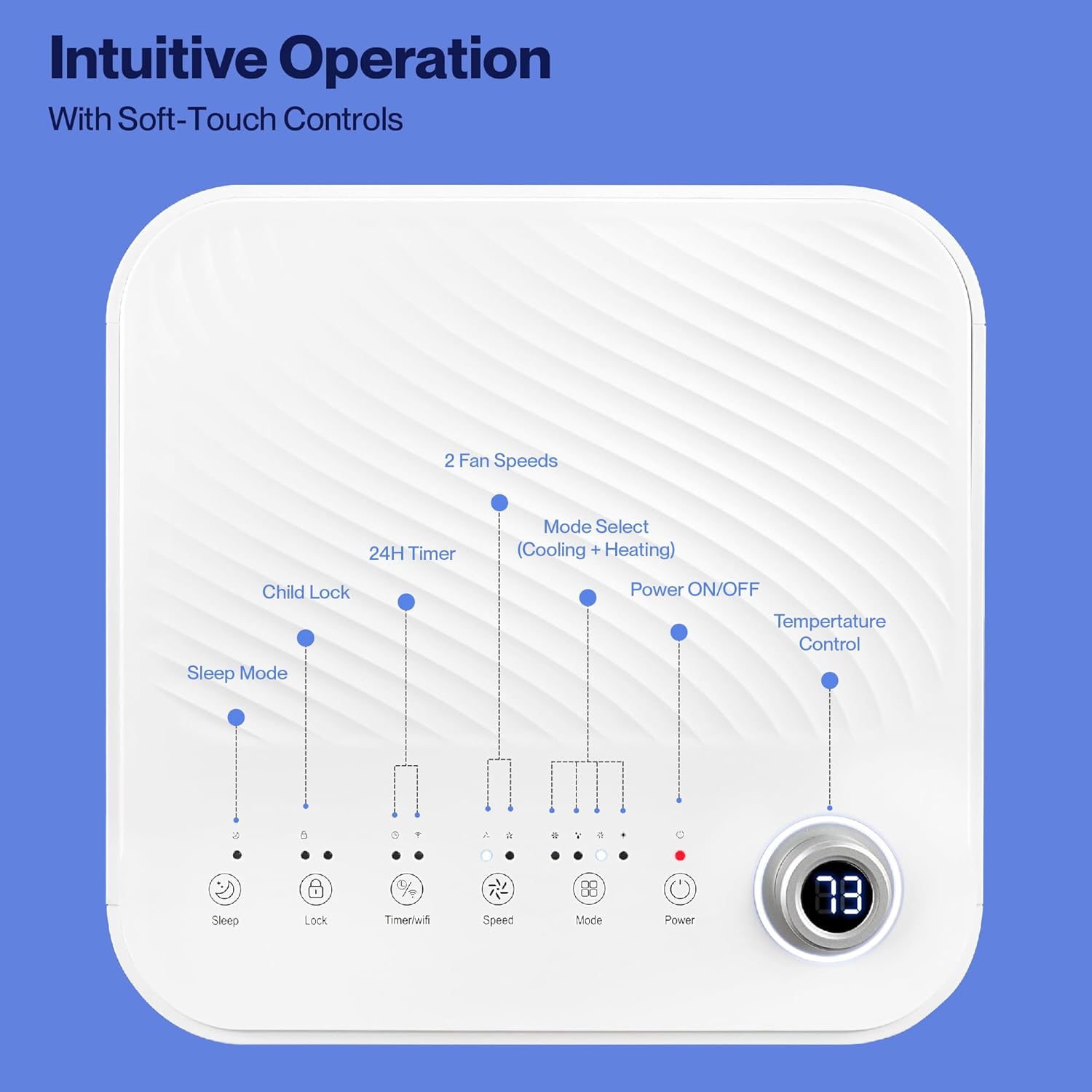
Image: Close-up of the unit's top control panel, illustrating the soft-touch buttons for various functions like mode selection, fan speed, timer, and temperature control.
Fern- und App-Steuerung
For added convenience, the unit can be controlled using the included remote control or the free Della+ app on your smartphone. The app allows for control anytime, anywhere, and supports smart features like Geo Location to automatically adjust settings based on your proximity.

Image: A user interacting with the Della+ app on a smartphone to control the portable AC, demonstrating smart app and device control capabilities, including compatibility with Google Assistant and Alexa.

Image: Illustrates the Smart Geo Location feature, showing a smartphone with a map and a notification indicating the AC unit can turn on automatically as the user approaches home.
Verstellbare Belüftungsöffnungen
The unit features adjustable vents to direct airflow as needed for optimal comfort.
Wartung
Regelmäßige Wartung gewährleistet optimale Leistung und lange Lebensdauer Ihres mobilen Klimageräts.
Filterreinigung
The unit is equipped with a washable filter for clean air. It is recommended to clean the filter regularly to maintain air quality and unit efficiency. Simply remove the filter, wash it with water, and ensure it is completely dry before reinserting.
Video: Demonstrates the easy removal and cleaning of the reusable air filter, highlighting effortless maintenance.
Wasserableitung
The unit features a self-evaporating system, which typically handles most condensate. However, during periods of high humidity or in dehumidification mode, the water-full indicator may illuminate. In such cases, drain the accumulated water from the drainage port at the back of the unit.
Video: Shows the process of draining water from the unit, an important step for maintenance when the water-full indicator is active.
Fehlerbehebung
Bevor Sie sich an den Kundendienst wenden, beachten Sie bitte die folgenden häufig auftretenden Probleme und Lösungen:
| Problem | Mögliche Ursache | Lösung |
|---|---|---|
| Gerät lässt sich nicht einschalten. | Kein Strom, Netzkabel nicht angeschlossen, Sicherung ausgelöst. | Stellen Sie sicher, dass das Gerät an eine funktionierende Steckdose angeschlossen ist. Überprüfen Sie den Sicherungsautomaten. |
| Das Gerät kühlt/heizt nicht effektiv. | Verschmutzter Luftfilter, blockierte Lufteinlass-/Abluftöffnungen, zu großer Raum, Fenster/Türen offen. | Clean air filter. Ensure no obstructions. Close windows/doors. Verify room size is within specified range (up to 350 sq. ft.). |
| Water-full indicator is on. | Wassertank ist voll. | Drain the water from the drainage port. |
| Das Gerät ist laut. | Das Gerät steht nicht auf ebener Fläche, die internen Bauteile vibrieren. | Ensure unit is on a flat, stable surface. Noise from GMCC compressor is normal. |
Technische Daten
| Besonderheit | Detail |
|---|---|
| Marke | Della |
| Modellnummer | 192928054231 |
| Kühlleistung | 8000 British Thermal Units (BTU) |
| Kapazität | 0.6 Tonnen |
| Bodenflächenabdeckung | Bis zu 350 Quadratmeter |
| Modi | Cooling, Heating, Dehumidification, Ventilation, Sleep mode |
| Kompressor | GMCC compressor (for lower noise levels) |
| Kontrollmethode | App, Remote, LED display with soft-touch controls |
| Lüftergeschwindigkeiten | 3 |
| Timer | 24 Stunden |
| Entfeuchtungskapazität | Up to 68 pints daily |
| Materialtyp | ABS Frosted plastic |
| Kältemittel | R 410A |
| Besondere Merkmale | Portable, Remote Controlled, Built-in Handles, Water-full indicator, Child lock function, WiFi function |
| Abmessungen (ca.) | 12.2 Zoll (B) x 12.2 Zoll (T) x 27.6 Zoll (H) |

Image: Diagram showing the approximate dimensions of the portable AC unit.
Garantie und Support
Your DELLA Portable AC comes with a 1 Jahr Garantie. For any technical assistance or product inquiries, our customer support team is available 24/7. You can speak to our technicians M-F PST or access product support 24/7 with live chat.
Weitere Hilfe finden Sie unter Della Store auf Amazon or refer to the official User Manual PDF linked on the product page.
Ask a question about this manual
Ask about setup, troubleshooting, compatibility, parts, safety, or missing instructions. Manuals+ will review the question and use this page’s manual context to help answer it.