
Mibro sol-me3
Mibro 3 True Wireless Bluetooth-Ohrhörer – Benutzerhandbuch
Model: sol-me3 | Brand: Mibro
Einführung
This manual provides comprehensive instructions for the Mibro 3 True Wireless Bluetooth Earbuds. It covers essential information regarding setup, operation, maintenance, troubleshooting, and product specifications to ensure optimal performance and longevity of your device. The Mibro 3 earbuds offer a perfect blend of style and functionality, featuring an attractive design, long battery life, an LED display, and impressive sound quality.
Produkt überview
Familiarize yourself with the components of your Mibro 3 True Wireless Bluetooth Earbuds.
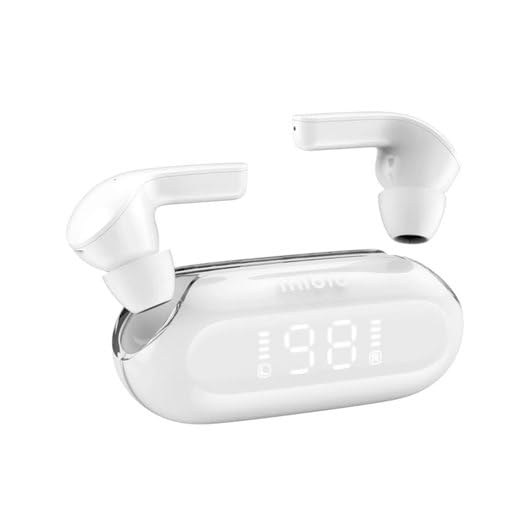
Abbildung 1: Mibro 3 True Wireless Bluetooth Earbuds and Charging Case. This image displays the white earbuds, one removed from the charging case and one partially visible, alongside the sleek white charging case which features a clear lid and an LED display showing '98', indicating battery percentage.
Komponenten:
- Ohrhörer: Left and Right True Wireless Earbuds.
- Ladekoffer: Portable case for charging and storing earbuds, with an integrated LED display.
- Ladekabel: (Typically USB-C, though not specified) For charging the case.
- Ohrstöpsel: (Various sizes, though not specified) For comfortable fit.
Aufstellen
1. Erstes Aufladen
- Legen Sie beide Ohrhörer in das Ladeetui.
- Connect the charging cable (not included in product details, but standard) to the charging port on the case and a power source.
- Die LED-Anzeige am Ladecase zeigt den Ladestatus an. Stellen Sie sicher, dass Case und Ohrhörer vor der ersten Verwendung vollständig aufgeladen sind.
2. Koppeln mit einem Gerät
- Open the charging case. The earbuds will automatically enter pairing mode (indicated by a flashing light on the earbuds, if applicable).
- Aktivieren Sie Bluetooth auf Ihrem Gerät (Smartphone, Tablet, Computer).
- Suchen nach "Mibro 3" or a similar name in the list of available Bluetooth devices.
- Select "Mibro 3" to connect. Once connected, a voice prompt or indicator light will confirm successful pairing.
- Falls die Kopplung fehlschlägt, legen Sie die Ohrhörer zurück in das Ladecase, schließen Sie den Deckel, warten Sie einige Sekunden und wiederholen Sie dann die Schritte.
Bedienungsanleitung
Ein-/Ausschalten
- Einschalten: Open the charging case, and the earbuds will automatically power on and connect to the last paired device. Alternatively, press and hold the touch control area on both earbuds for 2-3 seconds.
- Ausschalten: Legen Sie die Ohrhörer zurück in das Ladecase und schließen Sie den Deckel. Sie werden automatisch getrennt und ausgeschaltet. Alternativ können Sie die Touch-Bedienelemente an beiden Ohrhörern 5 Sekunden lang gedrückt halten.
Touch Controls (Typical Functions)
The Mibro 3 earbuds feature intuitive touch controls. Specific functions may vary slightly, but common operations include:
- Abspielen/Pause: Tippen Sie einmal auf einen der Ohrhörer.
- Nächster Titel: Doppeltippen Sie auf den rechten Ohrhörer.
- Vorheriges Lied: Doppeltippen Sie auf den linken Ohrhörer.
- Anruf annehmen/beenden: Einmaliges Tippen auf einen der Ohrhörer während eines eingehenden Anrufs.
- Anruf ablehnen: Drücken und halten Sie während eines eingehenden Anrufs einen der Ohrhörer 2 Sekunden lang.
- Sprachassistenten aktivieren: Dreimaliges Tippen auf einen der Ohrhörer.
- Lautstärkeregelung: (If supported) Tap and hold on the right earbud to increase volume, tap and hold on the left earbud to decrease volume.
Tragen der Ohrhörer
Gently insert the earbuds into your ear canal. Rotate them slightly until they fit snugly and comfortably. Ensure the microphone is pointing towards your mouth for optimal call quality.
Wartung
Reinigung
- Verwenden Sie ein weiches, trockenes, fusselfreies Tuch, um die Ohrhörer und das Ladecase abzuwischen.
- Bei hartnäckigen Verschmutzungen leicht dampReinigen Sie das Tuch mit Wasser oder einem milden, nicht scheuernden Reinigungsmittel.
- Verwenden Sie keine aggressiven Chemikalien, Alkohol oder Scheuermittel.
- Regularly clean the eartips and the mesh covers to prevent wax buildup, which can affect sound quality.
Lagerung
- Bewahren Sie die Ohrhörer immer im Ladecase auf, wenn Sie sie nicht benutzen, um sie zu schützen und geladen zu halten.
- Lagern Sie das Gerät an einem kühlen, trockenen Ort, fern von direkter Sonneneinstrahlung, extremen Temperaturen und hoher Luftfeuchtigkeit.
Batteriepflege
- Vermeiden Sie häufiges vollständiges Entladen des Akkus.
- Laden Sie das Gerät regelmäßig auf, auch wenn Sie es nicht häufig benutzen, um die Batterieleistung zu erhalten.
- Setzen Sie das Gerät keiner extremen Hitze oder Kälte aus, da dies die Batterieleistung beeinträchtigen kann.
Fehlerbehebung
If you encounter issues with your Mibro 3 earbuds, try the following solutions:
| Problem | Mögliche Lösung |
|---|---|
| Die Ohrhörer lassen sich nicht mit dem Gerät koppeln. |
|
| Nur ein Ohrhörer funktioniert. |
|
| Kein Ton oder geringe Lautstärke. |
|
| Ladecase lädt nicht. |
|
Technische Daten
Key technical specifications for the Mibro 3 True Wireless Bluetooth Earbuds:
| Besonderheit | Detail |
|---|---|
| Modellnummer | sol-me3 |
| Marke | Mibro |
| Konnektivitätstechnologie | Kabellos (Bluetooth) |
| Formfaktor | In-Ear |
| Farbe | Weiß |
| Material | Plastik |
| Artikelgewicht | 100 Gramm |
| Besondere Merkmale | Leicht |
| Wiederaufladbarer Akku | Ja |
| Steuerungstyp | Volume Control (and touch controls for playback/calls) |
Garantie und Support
Garantieinformationen
The Mibro 3 True Wireless Bluetooth Earbuds are covered by a standard manufacturer's warranty. Please refer to the warranty card included with your purchase or visit the official Mibro webAuf der Webseite finden Sie die detaillierten Garantiebedingungen und deren Dauer.
Kundenservice
For technical assistance, product inquiries, or warranty claims, please contact Mibro customer support. Contact information can typically be found on the official Mibro website or within the product packaging. When contacting support, please have your product model number (sol-me3) and purchase details ready.
Ask a question about this manual
Ask about setup, troubleshooting, compatibility, parts, safety, or missing instructions. Manuals+ will review the question and use this page’s manual context to help answer it.