
YoumiAi Zigbee Version
YoumiAi 3-Phase Zigbee Smart Energy Meter User Manual
Model: Zigbee Version
1. Einleitung
The YoumiAi 3-Phase Zigbee Smart Energy Meter is designed for accurate real-time monitoring of electricity consumption in three-phase electrical systems. This Zigbee version integrates seamlessly with your smart home system via a Tuya Zigbee Hub, providing comprehensive data on voltage, current, power, and energy usage. It supports two-way metering, allowing it to measure both consumption and solar energy production, and features an unbalanced-load alarm for enhanced safety.
Hauptmerkmale:
- Real-Time Energy Monitoring: Track electricity consumption and usage patterns.
- Zigbee Connectivity: Requires a Tuya Zigbee Hub for integration with smart home systems.
- Three-Phase Compatibility: Designed for 208V to 405V three-phase installations.
- Two-Way Metering: Measures both home electricity consumption and solar energy production.
- Alarm Messages: Provides alerts for abnormal temperature, over/under voltage, over current, and unbalanced load.
- High-Precision Measurement: Energy measurement within 1% tolerance.

Abbildung 1.1: Produkt überview. This diagram illustrates the various components of the YoumiAi Smart Energy Meter, including through-hole inputs (X, Y, Z), reset button, indicator light, and connection points for N, Z, Y, X wires. It also shows the direction of energy flow.
2. Sicherheitshinweise
Please read all safety warnings and instructions carefully before installing or operating this device. Failure to follow these instructions may result in electric shock, fire, or serious injury.
- Die Installation sollte nur von einem qualifizierten Elektriker durchgeführt werden.
- Vor Beginn jeglicher Installations- oder Verkabelungsarbeiten muss unbedingt die Hauptstromversorgung unterbrochen werden.
- Das Gerät darf nicht in Betrieb genommen werden, wenn es beschädigt ist oder Feuchtigkeit ausgesetzt war.
- Beachten Sie alle örtlichen Elektrovorschriften und -bestimmungen.
- Das Gerät ist nur für den Innenbereich bestimmt.
3. Installation und Einrichtung
3.1. Checkliste vor der Installation
- YoumiAi 3-Phase Zigbee Smart Energy Meter.
- Tuya Zigbee Hub (required for Zigbee version).
- Appropriate wiring tools (wire strippers, screwdriver).
- Ensure power is OFF at the main breaker.
3.2. Schaltplan
The YoumiAi Smart Energy Meter is designed for easy installation on an electrical power distribution board. Refer to the diagram below for proper wiring connections for a 3-phase system.
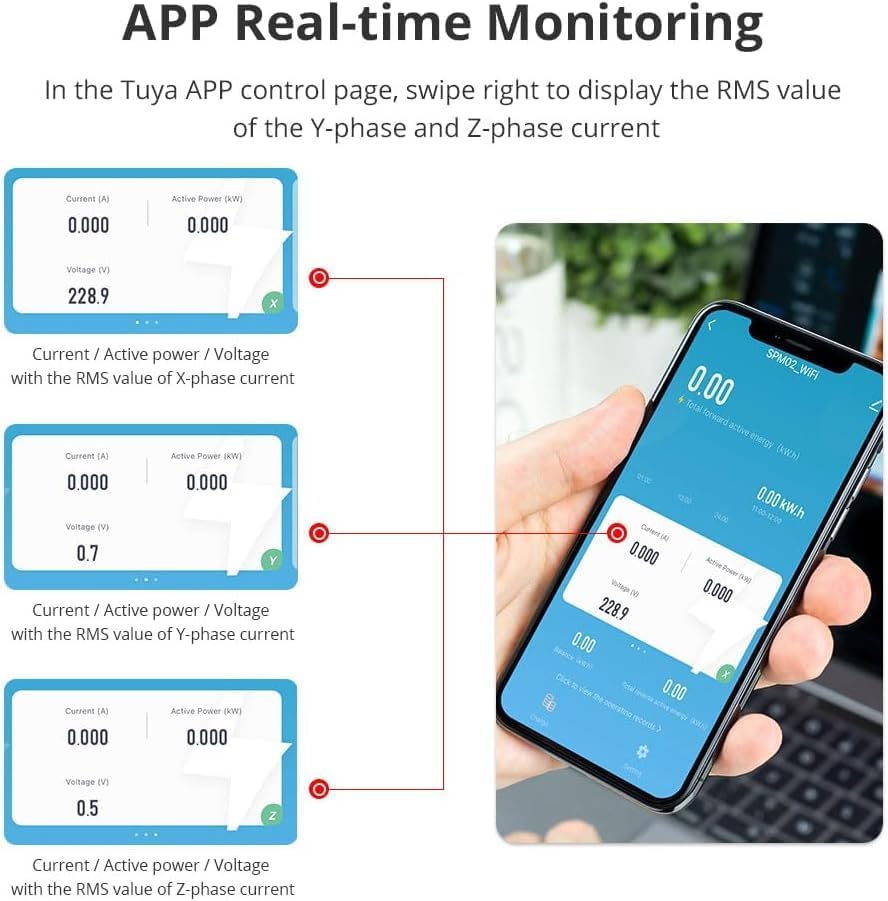
Figure 3.1: Wiring Connections. This image shows the connection points for the three phases (X, Y, Z) and the neutral (N) wire, along with the indicator light and reset button. The red wires represent the main power lines, and the colored wires on the right are for control/data.
Verbindungsschritte:
- Stromversorgung trennen: Before starting, ensure the main power supply to your electrical panel is completely turned off.
- Mount the Meter: Install the meter securely within your electrical distribution board. Its compact size (53mm width, 21mm height) allows for space-saving installation.
- Connect Phase Wires: Connect the three phase wires (L1, L2, L3) to the corresponding X, Y, and Z terminals on the meter.
- Neutralleiter anschließen: Schließen Sie den Neutralleiter an die N-Klemme an.
- Steuerkabel anschließen: Connect the control wires (typically for communication with the Zigbee hub) as per the diagram, ensuring correct polarity.
- Überprüfen Sie die Verbindungen: Überprüfen Sie alle Verbindungen sorgfältig, um sicherzustellen, dass sie sicher und korrekt verkabelt sind.
- Strom wiederherstellen: Once all connections are verified, restore power to the electrical panel.
3.3. App Pairing (Tuya SmartLife App)
To utilize the smart features, you need to pair the meter with the Tuya SmartLife App via your Tuya Zigbee Hub.
- Laden Sie die Tuya Smart or Intelligentes Leben App aus Ihrem mobilen App Store (iOS oder Android).
- Registrieren Sie sich oder melden Sie sich in Ihrem Konto an.
- Ensure your Tuya Zigbee Hub is powered on and connected to the app.
- Tippen Sie in der App auf „Gerät hinzufügen“ oder auf das „+“-Symbol.
- Select "Electrical" or "Energy Meter" from the device list, or use the auto-scan feature.
- Follow the on-screen instructions to put the energy meter into pairing mode (usually by pressing and holding the reset button until the indicator light blinks).
- Once detected, add the device and assign it to a room or group.
4. Bedienung
4.1. Echtzeitüberwachung
Once connected, the Tuya SmartLife app provides real-time data on your energy consumption. You can monitor key electrical parameters such as voltage, current, and power for each phase.

Figure 4.1: Accurate Measuring. This image shows a smartphone displaying the Tuya app interface, which provides real-time monitoring of electrical parameters like current, active power, and voltage, with high precision.

Figure 4.2: APP Real-time Monitoring. The app allows users to swipe to view RMS values for current, active power, and voltage across X, Y, and Z phases, providing a detailed breakdown of energy usage.
4.2. Two-Way Metering
The meter supports two-way metering, which is crucial for homes with solar power systems. It can accurately measure both the electricity consumed from the grid and the amount of solar energy produced and potentially fed back into the grid.

Figure 4.3: Two Way Metering. This diagram visually represents how the meter tracks energy from different sources (grid, solar, non-fossil) and measures both consumption and production, providing a comprehensive energy distribution overview.
4.3. Data Logging and Reporting
The app automatically logs historical energy data, allowing you to view daily, weekly, and monthly consumption reports. This helps in identifying energy usage trends and optimizing consumption.
5. Fehlerbehebung
This section provides solutions to common issues you might encounter with your YoumiAi Smart Energy Meter.
5.1. Alarm Messages
The meter is equipped with an alarm system that sends notifications to your Tuya app when measurement data exceeds predefined warning values. These alarms help in proactive identification of potential electrical issues.
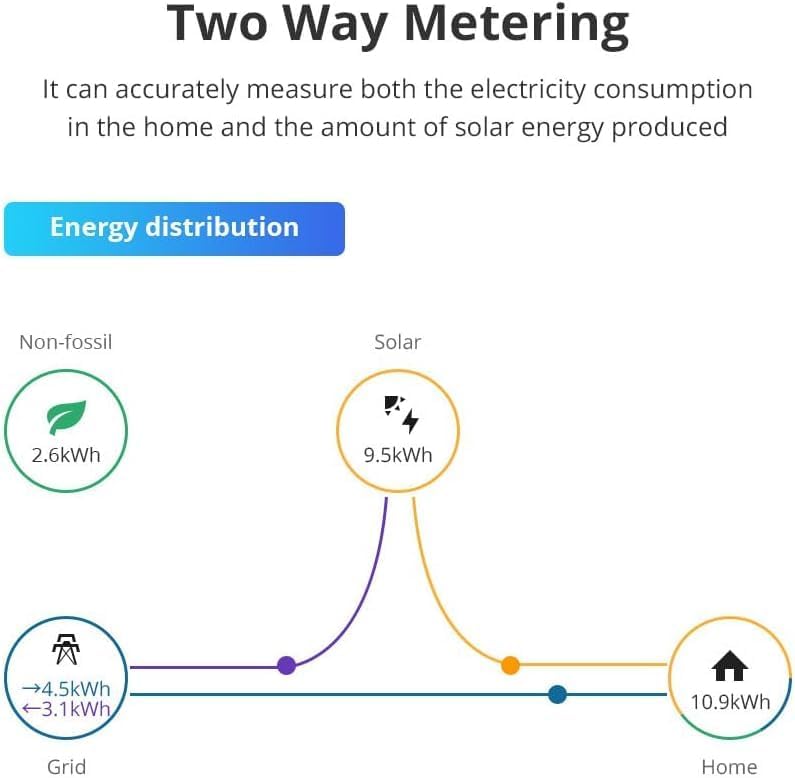
Figure 5.1: Alarm Messages. This image shows various alarm types that the meter can trigger, including abnormal temperature, over current, unbalanced load, over voltage, und unter voltage, alerting users to potential issues.
- Abnormal Temperature Alarm: Indicates the device or surrounding environment is overheating. Check ventilation and load.
- Überstromalarm: Current draw exceeds safe limits. Check connected appliances for faults or overload.
- Unbalanced-load Alarm: Significant imbalance in current across phases. This requires immediate attention from a qualified electrician to prevent damage or short circuits.
- Über Voltage-Alarm: Eingangsvolumentage ist zu hoch.
- Unter Voltage-Alarm: Eingangsvolumentage ist zu niedrig.
5.2. Häufige Probleme und Lösungen
| Problem | Mögliche Ursache | Lösung |
|---|---|---|
| Meter not powering on. | Keine Stromversorgung; falsche Verkabelung. | Check main power breaker. Verify all wiring connections as per Section 3.2. |
| Cannot pair with Tuya app. | Zigbee hub not connected; meter not in pairing mode; interference. | Ensure Zigbee hub is online. Put meter into pairing mode (refer to app instructions). Reduce distance between meter and hub. |
| Ungenaue Messwerte. | Incorrect wiring; faulty device. | Double-check wiring. If issue persists, contact customer support. |
| No data in app. | No power to meter; app not connected to meter; network issue. | Verify meter power and app connection. Check internet connection for hub. |
6. Wartung
The YoumiAi Smart Energy Meter requires minimal maintenance. Follow these guidelines to ensure its longevity and optimal performance:
- Reinigung: Gently wipe the exterior of the device with a soft, dry cloth. Do not use abrasive cleaners, solvents, or wet cloths, as this may damage the device or cause electric shock.
- Umfeld: Ensure the installation environment remains within the specified operating temperature and humidity ranges. Avoid exposure to direct sunlight, excessive heat, or moisture.
- Firmware-Updates: Periodically check the Tuya SmartLife app for any available firmware updates for your device. Keeping the firmware updated ensures you have the latest features and bug fixes.
- Professionelle Inspektion: For any internal issues or complex wiring concerns, always consult a qualified electrician. Do not attempt to open or repair the device yourself.
7. Spezifikationen
Detailed technical specifications for the YoumiAi 3-Phase Zigbee Smart Energy Meter.
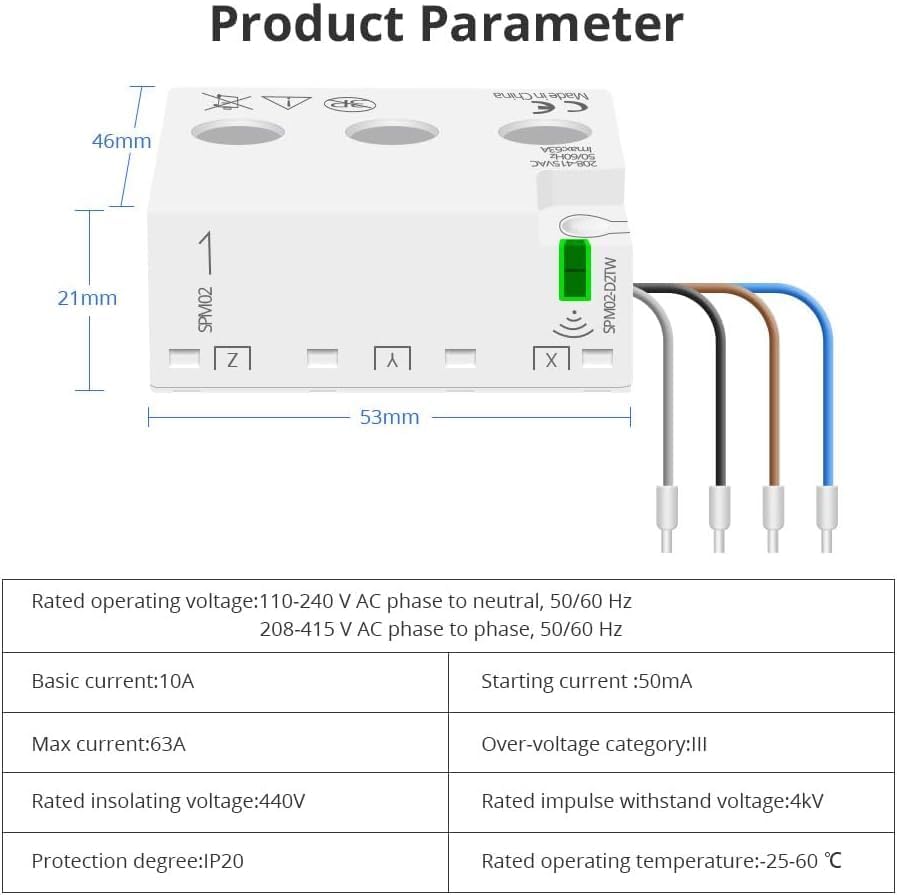
Figure 7.1: Product Parameters. This image provides a visual representation of the meter's dimensions (46mm depth, 21mm height, 53mm width) and a table detailing its electrical specifications.
| Parameter | Wert |
|---|---|
| Nennbetriebsvoltage | 110-240 V AC phase to neutral, 50/60 Hz; 208-415 V AC phase to phase, 50/60 Hz |
| Basic Current | 10 A |
| Anlaufstrom | 50 mA |
| Max Current | 63 A |
| Überlautstärketage Kategorie | Drittes Kapitel |
| Rated Insulating Voltage | 440 V |
| Nennstoßfestigkeit Voltage | 4 kV |
| Schutzgrad | IP20 |
| Nennbetriebstemperatur | -25 - 60 °C |
| Abmessungen (ca.) | 53mm (B) x 21mm (H) x 46mm (T) |
8. Garantie und Support
YoumiAi products are designed for reliability and performance. For warranty information and technical support, please refer to the following:
- Garantie: This product typically comes with a manufacturer's warranty. Please refer to your purchase documentation or the product listing on Amazon for specific warranty terms and duration. Extended warranty options may also be available (e.g., 2-Year Extended Warranty by Salama Care).
- Technische Unterstützung: For technical assistance, troubleshooting, or inquiries regarding your YoumiAi Smart Energy Meter, please contact the seller, YoumiAi, directly through the Amazon platform or via their official support channels if provided.
- Online-Ressourcen: Visit the YoumiAi brand page on Amazon or their official webWebsite mit häufig gestellten Fragen, aktualisierten Handbüchern und weiteren Produktinformationen.
Always provide your product model number (Zigbee Version) and purchase details when seeking support.