
1. Einleitung
Thank you for choosing the FLEXISPOT L-Shaped Electric Standing Desk. This manual provides essential information for the safe assembly, operation, and maintenance of your new desk. Please read these instructions carefully before use and retain them for future reference. This desk is designed to provide a versatile and ergonomic workspace, allowing seamless transitions between sitting and standing positions.
2. Sicherheitshinweise
Um einen sicheren Betrieb zu gewährleisten und Verletzungen oder Schäden zu vermeiden, beachten Sie bitte die folgenden Sicherheitsrichtlinien:
- Vergewissern Sie sich vor der Verwendung, dass alle Komponenten sicher befestigt sind.
- Halten Sie Kinder und Haustiere während des Betriebs vom Schreibtisch fern.
- Do not place hands or other body parts near moving parts of the desk frame.
- Avoid overloading the desk. The maximum load capacity is 80 kg.
- Setzen oder stellen Sie sich nicht auf den Schreibtisch.
- Only use the desk indoors in a dry environment.
- Trennen Sie die Stromversorgung vor der Reinigung oder Wartung.
- If any parts are damaged or missing, contact customer support immediately. Do not attempt to repair the desk yourself.
3. Packungsinhalt
Please verify that all parts are present and undamaged before beginning assembly. Refer to the assembly diagram for a complete list of components.
- L-Shaped Desktop (2 parts)
- 4-Leg Frame (Dual Motor Mechanism)
- Intelligentes Bedienfeld
- Netzteil und Kabel
- Montagezubehör (Schrauben, Werkzeuge usw.)
- Bedienungsanleitung
4. Aufbau und Montage
Für die Montage werden in der Regel zwei Personen benötigt. Befolgen Sie diese Schritte sorgfältig:
- Komponenten auspacken: Nehmen Sie alle Teile vorsichtig aus der Verpackung und legen Sie sie auf eine weiche, saubere Oberfläche, um Kratzer zu vermeiden.
- Assemble the 4-Leg Frame: Connect the frame components according to the included diagram. Ensure all bolts are tightened securely. The 4-leg design provides enhanced stability.
- Install Dual Motor Mechanism: The dual motor system is integrated into the frame. Ensure all motor connections are secure. This mechanism allows for smooth and precise height adjustments.
- Desktop-Panels anbringen: Carefully place the two desktop panels onto the assembled frame. Align the pre-drilled holes and secure the desktop to the frame using the provided screws. The L-shaped design offers ample workspace.
- Bedienfeld montieren: Attach the intelligent control panel to the underside of the desktop in an easily accessible location. Connect the control panel cable to the main control box.
- Strom anschließen: Stecken Sie den Netzadapter in die Steuereinheit und stecken Sie dann das Netzkabel in eine normale Steckdose.
- Erster Reset: After connecting power, perform an initial reset. Press and hold the 'Reset' button (usually marked with a circular arrow) until the desk reaches its lowest position and then slightly rises. This calibrates the desk.
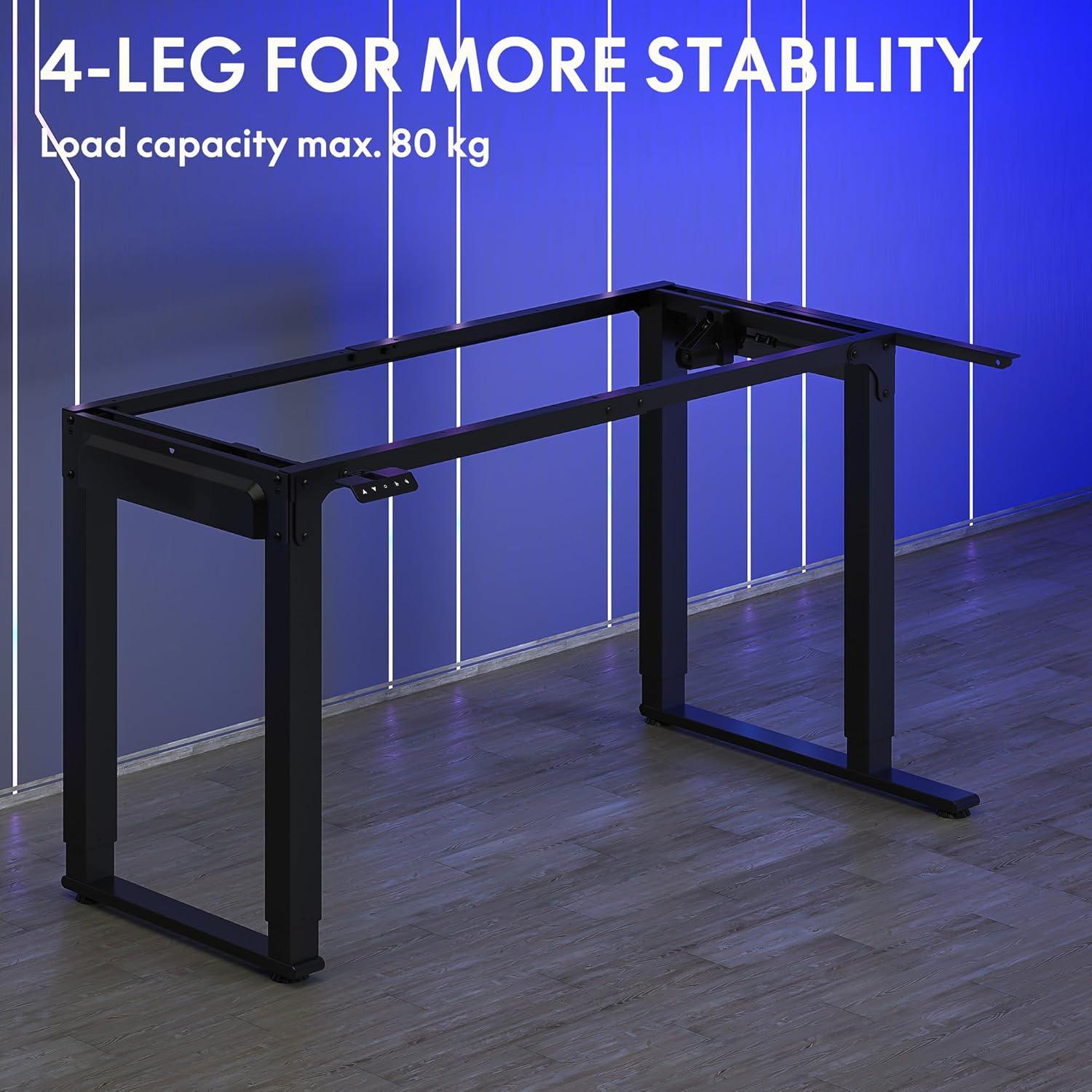
Image: The robust 4-leg frame provides superior stability for the L-shaped standing desk.

Image: Detail of the dual-motor mechanism, ensuring accurate and smooth height positioning.
5. Bedienungsanleitung
Your FLEXISPOT L-Shaped Electric Standing Desk features an intelligent control panel for easy height adjustment and memory presets.
5.1 Funktionen des Bedienfelds

Image: The intelligent control panel with clearly labeled buttons for desk operation.
- Auf-/Ab-Tasten (▲ / ▼): Drücken und halten Sie die Taste, um die Schreibtischhöhe stufenlos nach oben oder unten zu verstellen. Lassen Sie die Taste los, um die gewünschte Höhe zu erreichen.
- Reset Button (↺): Used for initial calibration or to reset the desk if an error occurs. Press and hold until the desk moves to its lowest point and slightly rises.
- Sitting Preset Button (👭): Press to automatically move the desk to your programmed sitting height.
- Standing Preset Button (👭 with upward arrow): Press to automatically move the desk to your programmed standing height.
5.2 Einstellen von Speichervoreinstellungen
To save your preferred sitting or standing height:
- Stellen Sie den Schreibtisch mithilfe der Auf-/Ab-Tasten auf die gewünschte Höhe ein.
- Press and hold the desired preset button (Sitting or Standing) for approximately 3-5 seconds until you hear a beep or see the display flash. This indicates the height has been saved.

Image: The desk can be adjusted from a minimum height of 72cm to a maximum of 117cm.

Image: The spacious L-shaped desktop (180cm x 110cm) provides ample room for multiple computers and accessories.
6. Wartung
Regelmäßige Wartung gewährleistet die Langlebigkeit und optimale Leistung Ihres Schreibtisches.
- Reinigung: Wischen Sie die Tischplatte und den Rahmen mit einem weichen, fusselfreien Tuch ab.amp Tuch. Vermeiden Sie aggressive Chemikalien oder Scheuermittel.
- Inspektion: Überprüfen Sie regelmäßig alle Schrauben und Verbindungen auf festen Sitz. Ziehen Sie sie gegebenenfalls nach.
- Kabelmanagement: Ensure power cables and other device cables are properly managed to prevent entanglement or damage during height adjustments.
- Motorpflege: The dual motors are designed for durability. Avoid obstructing the desk's movement or exceeding the weight limit to prevent strain on the motors.

Image: The desk features safe and stylish rounded corners.
7. Fehlerbehebung
Sollten Sie Probleme mit Ihrem Schreibtisch haben, beachten Sie bitte die folgenden häufig auftretenden Probleme und Lösungen:
| Problem | Mögliche Ursache | Lösung |
|---|---|---|
| Der Schreibtisch bewegt sich nicht. | Power cable disconnected; Control panel cable loose; Overload protection activated. | Check power connections; Ensure control panel cable is secure; Reduce weight on desk and perform a reset. |
| Der Schreibtisch wackelt ungleichmäßig oder macht ungewöhnliche Geräusche. | Unbalanced load; Loose connections; Obstruction. | Distribute weight evenly; Check and tighten all frame connections; Remove any obstructions. Perform a reset. |
| Die Höhenvoreinstellungen funktionieren nicht. | Voreinstellungen wurden nicht korrekt gespeichert. | Die gewünschte Höhe kann durch Gedrückthalten der Voreinstellungstaste bis zur Bestätigung erneut gespeichert werden. |
| Der Schreibtisch stoppt mitten in der Bewegung. | Overload protection; Overheating protection. | Reduce weight on the desk. Allow the desk to cool down for 20-30 minutes if it has been used continuously. |
If the problem persists after attempting these solutions, please contact FLEXISPOT customer support.
8. Spezifikationen
| Besonderheit | Detail |
|---|---|
| Modellnummer | QS2LB-1811 |
| Marke | FLEXISPOT |
| Schreibtischtyp | L-förmiger elektrischer Stehpult |
| Motortyp | Doppelmotor |
| Rahmentyp | 4-Leg Frame |
| Höhenverstellbereich | 72 cm bis 117 cm |
| Abmessungen der Tischplatte (L x B) | 180 cm x 110 cm |
| Maximale Tragfähigkeit | 80 kg |
| Geräuschpegel | < 50 dB |
| Material | Alloy Steel (Frame) |
| Farbe | Schwarz |
| Artikelgewicht | 30 Kilogramm |
9. Garantie und Support
FLEXISPOT products are designed for quality and durability. For specific warranty information, please refer to the warranty card included with your purchase or visit the official FLEXISPOT website. If you require technical assistance, have questions about assembly, or need to report a missing/damaged part, please contact FLEXISPOT customer support directly. Ensure you have your model number (QS2LB-1811) and purchase details available when contacting support.
Kontaktinformationen: Please refer to the contact details provided on the FLEXISPOT official webDie aktuellsten Supportkanäle finden Sie auf der Website oder in Ihrer Kaufdokumentation.