
Einführung
This manual provides detailed instructions for the proper setup, operation, and maintenance of your Cuifati Caller ID Corded Phone. Please read this manual thoroughly before using the product to ensure optimal performance and longevity. This phone is designed for reliable communication in both home and office environments, featuring a clear caller ID display, convenient call storage, and adjustable volume controls.

The Cuifati Caller ID Corded Phone, featuring a clear display and large buttons, designed for reliable communication.
Aufstellen
1. Connecting the Phone Line
Locate the telephone line input port on the back of the phone. Connect one end of the provided telephone line cord to this port and the other end to your wall telephone jack.

The back of the phone includes the telephone line input and slots for optional wall mounting.
2. Anschließen des Mobilteils
Connect the coiled handset cord to the designated port on the side of the phone base and to the handset itself. Ensure both connections are secure.

The phone comes with a standard coiled cord for the handset, providing flexibility during calls.
3. Wandmontage (optional)
The phone can be wall-mounted using the integrated slots on the back. Securely attach the phone to a wall using appropriate hardware (not included).
This video showcases the phone's design and demonstrates its wall-mounting capability.
Bedienungsanleitung
1. Einen Anruf tätigen
- Nehmen Sie den Hörer ab.
- Warten Sie auf ein Freizeichen.
- Wählen Sie die gewünschte Telefonnummer über die Tastatur.
- Sobald das Gespräch beendet ist, legen Sie den Hörer wieder auf.
2. Einen Anruf entgegennehmen
- Wenn das Telefon klingelt, heben Sie den Hörer ab, um den Anruf anzunehmen.
- Sobald das Gespräch beendet ist, legen Sie den Hörer wieder auf.
3. Caller ID Function
The phone's display will show the incoming caller's number (if available) before you answer. This feature supports DTMF standard caller ID.

The phone's display clearly shows caller ID information, including call number and time, for easy identification.

The large display and clear caller ID make the phone convenient for both home and office use.
4. Call Number Storage and Inquiry
The phone stores up to 30 groups of incoming call numbers. You can long-press the 'CALL IN' button to quickly review stored call information. It also has a built-in 5-group call number and call time query function, supporting callback and one-key replay.
5. Lautstärkeregelung
Adjust the ringer volume using the two-level volume control switch located on the side of the phone base.
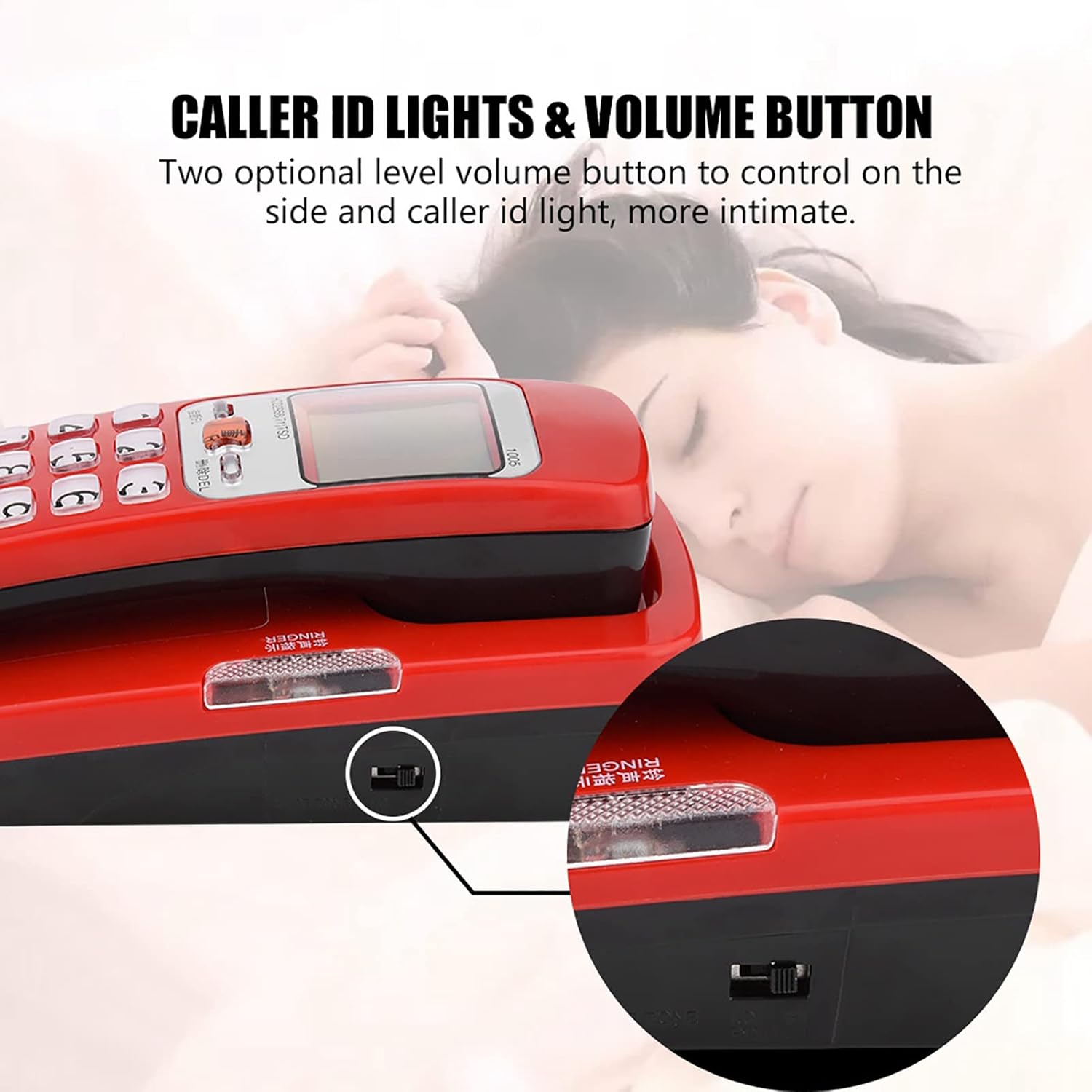
Adjust the ringer volume using the two-level volume control switch located on the side of the phone.
6. Anti-Jamming Function
The phone is equipped with an anti-jamming function to ensure clear and uninterrupted communication.
This video provides a visual guide to the features and operation of a corded phone, including FSK/DTMF caller ID functionality and the ease of use provided by large number buttons.
Wartung
To maintain your Cuifati Caller ID Corded Phone in good condition:
- Wischen Sie die Oberfläche des Telefons mit einem weichen, damp Tuch. Vermeiden Sie die Verwendung aggressiver Chemikalien oder Scheuermittel.
- Keep the phone away from direct sunlight, excessive heat, and moisture.
- Ensure the phone is placed on a stable surface or securely wall-mounted to prevent accidental falls.
- Überprüfen Sie regelmäßig alle Kabelverbindungen, um sicherzustellen, dass sie fest sitzen.
Fehlerbehebung
Kein Wählton
- Prüfen Sie, ob das Telefonkabel fest mit dem Telefon und der Wanddose verbunden ist.
- Testen Sie die Wanddose mit einem anderen funktionierenden Telefon, um sicherzustellen, dass die Leitung aktiv ist.
- Stellen Sie sicher, dass das Mobilteilkabel ordnungsgemäß angeschlossen ist.
Caller ID Not Displaying
- Verify that your telephone service provider offers Caller ID service.
- Ensure the phone is correctly connected to the telephone line.
- Some calls, especially international or private numbers, may not display Caller ID.
Ringer Not Working
- Check the volume control switch on the side of the phone and ensure it is not set to the lowest level or 'Off'.
- Ensure the phone line is active and receiving calls.
Technische Daten
| Markenname | Cuifati |
| Artikelgewicht | 10.2 Unzen |
| Verpackungsabmessungen | 7.48 x 3.27 x 3.15 Zoll |
| Artikelmodellnummer | CUIFATIvyt497cxe2-01 |
| ASIN | B0CH3L3WRL |
| Datum der ersten Verfügbarkeit | 1. September 2023 |

Physical dimensions of the phone are 18cm (7.09 inches) in length, 7.5cm (2.95 inches) in width, and 6.5cm (2.56 inches) in height.
Garantie und Support
For warranty information or technical support, please refer to the product packaging or contact your retailer. Keep your purchase receipt as proof of purchase for any warranty claims.