Einführung
Thank you for choosing the Auromie Corner Desk. This manual provides detailed instructions for assembly, operation, maintenance, and troubleshooting to ensure safe and efficient use of your new desk. This desk is designed to optimize corner spaces, featuring a monitor stand, keyboard tray, storage shelves, a built-in charging station, and LED lighting.

Image: The Auromie Corner Desk, showcasing its design and features in a home office setting.
Wichtige Sicherheitsinformationen
Bitte lesen und verstehen Sie alle Sicherheitshinweise vor der Montage und Verwendung. Die Nichtbeachtung dieser Hinweise kann zu Verletzungen oder Schäden am Produkt führen.
- Always ensure the desk is properly assembled and anchored to the floor to prevent tipping.
- Do not overload the desk. The maximum weight recommendation is 82.62 pounds (37.48 kg).
- Exercise caution when using the charging station to prevent electrical hazards. Ensure all devices are compatible with the power output.
- Beachten Sie stets die Anweisungen des Herstellers für Montage, Verwendung und Wartung.
- Halten Sie Kleinteile und Verpackungsmaterialien von Kindern fern, um Erstickungsgefahr zu vermeiden.
Packungsinhalt
Prüfen Sie vor Beginn der Montage, ob alle unten aufgeführten Komponenten vorhanden und unbeschädigt sind. Sollten Teile fehlen oder beschädigt sein, wenden Sie sich bitte an den Kundendienst.

Abbildung: Explosionszeichnung view diagram of the desk components, including metal frames, wooden panels, and hardware.
Komponenten:
- Wooden Panels (various sizes for desktop, monitor stand, shelves, keyboard tray)
- Metal Frame Supports (legs, crossbars, brackets)
- Ladestation (2 AC-Steckdosen, 2 USB-Anschlüsse)
- LED-Lichtleiste mit Controller
- Montagezubehör (Schrauben, Bolzen, Inbusschlüssel)
- Verstellbare Fußpolster
Montageanleitung
Follow these steps carefully to assemble your Auromie Corner Desk. It is recommended to assemble the desk on a soft, clean surface to prevent scratches.
Montage-Videoanleitung:
Video: Detailed installation guide for the Auromie Corner Desk, demonstrating each step of the assembly process.
Schritt-für-Schritt-Montage:
- Montieren Sie die Seitenrahmen: Attach the adjustable foot pads to the bottom of the metal leg frames. Secure the horizontal support bars between the vertical leg frames using the provided screws.
- Seitliche Regale anbringen: Fasten the wooden side shelves to the assembled side frames. Ensure they are oriented correctly and securely tightened.
- Connect the Corner Base: Place the triangular base panel on the floor. Attach the two assembled side shelf units to the base panel using the appropriate screws.
- Tastaturablageschienen montieren: Secure the metal rails for the keyboard tray to the underside of the main desktop panel.
- Hauptdesktop anbinden: Carefully place the main desktop panel onto the assembled frame, aligning the screw holes. Secure it with screws.
- Monitorständer installieren: Attach the metal brackets to the monitor stand panels, then secure the monitor stand to the main desktop using the designated screws.
- Mount-Ladestation: Insert the charging station unit into the pre-cut opening on the desktop. Secure it with screws.
- LED-Lichtstreifen anbringen: Clean the underside of the monitor stand. Peel the adhesive backing from the LED light strip and firmly press it into place along the edge. Connect the LED strip to its controller and power source.
Bedienungsanleitung
Verwendung der Ladestation:
The desk includes a built-in charging station with 2 AC outlets and 2 USB ports. To use, simply plug the desk's power cord into a wall outlet. You can then plug your devices directly into the outlets or USB ports for charging.

Image: The integrated charging station with AC and USB ports.
Controlling the LED Light Strip:
The LED light strip can be controlled via a button controller or a mobile application. Refer to the separate LED light strip manual for detailed instructions on app pairing and advanced features.
- Tastensteuerung: Use the inline button controller to cycle through colors, adjust brightness, and select dynamic modes.
- App-Steuerung: Download the recommended app (details in LED strip manual) to access over 60,000 colors, music sync mode, timing functions, and hundreds of dynamic modes.
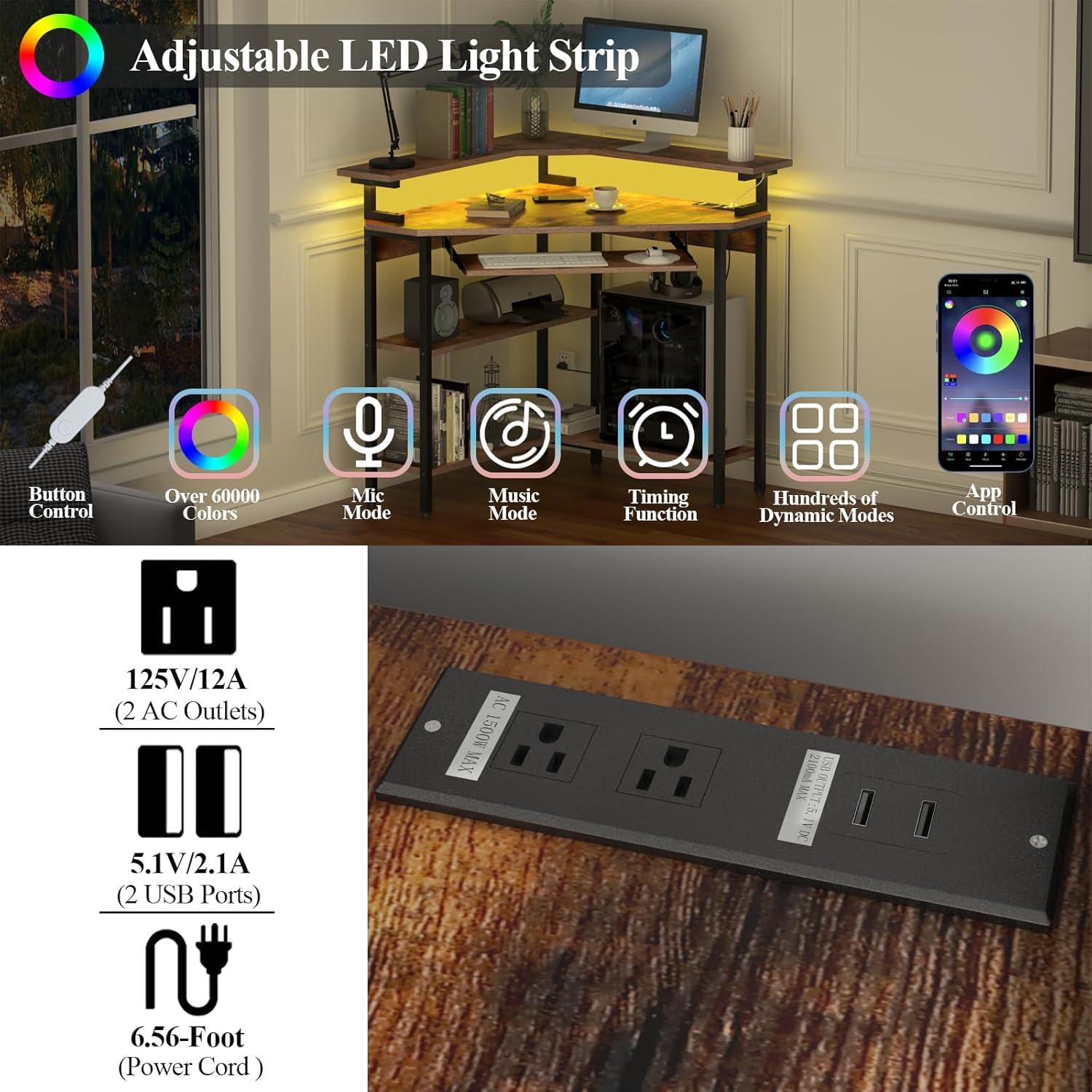
Image: Features of the adjustable LED light strip, including control options and color variety.
Wartung
Regelmäßige Pflege trägt dazu bei, die Lebensdauer und das Aussehen Ihres Schreibtisches zu verlängern.
- Reinigung: Wischen Sie Oberflächen mit einem weichen, damp Tuch. Vermeiden Sie aggressive Chemikalien oder Scheuermittel.
- Verschüttungen: Promptly wipe up any spills to prevent water damage to the engineered wood. The desk surface offers some water resistance.
- Hardware: Überprüfen Sie regelmäßig alle Schrauben und Bolzen auf festen Sitz. Ziehen Sie sie gegebenenfalls nach.
- Verstellbare Füße: Use the adjustable foot pads to level the desk on uneven floors and prevent wobbling.

Image: Water droplets on the desk surface, illustrating its water-resistant finish.

Image: Adjustable foot pad for leveling the desk.
Fehlerbehebung
Sollten Sie Probleme mit Ihrem Schreibtisch haben, beachten Sie bitte die folgenden gängigen Lösungsansätze:
- Schreibtisch wackelt: Ensure all screws are securely tightened. Adjust the foot pads on each leg to stabilize the desk on uneven surfaces.
- LED-Leuchten funktionieren nicht: Check if the LED strip is properly connected to its controller and power source. Ensure the desk's main power cord is plugged into a functional outlet. Refer to the LED light strip's specific manual for further troubleshooting.
- Ladestation funktioniert nicht: Verify the desk's power cord is securely plugged in. Test the outlet with another device. Ensure your devices are properly connected to the charging station's ports.
- Tastaturablage-Sticks: Check for any obstructions in the tray's sliding mechanism. Ensure the rails are clean and free of debris.
Technische Daten
| Besonderheit | Detail |
|---|---|
| Marke | Auromie |
| Modellnummer | G000808A2 |
| Form | Dreieckig |
| Produktabmessungen (T x B x H) | 33.86"T x 33.86"B x 35.43"H (86 cm x 86 cm x 90 cm) |
| Artikelgewicht | 41.3 Pfund (18.73 kg) |
| Maximalgewichtsempfehlung | 82.62 Pfund (37.48 kg) |
| Material | Holzwerkstoff (Tischplatte), Metall (Gestell) |
| Farbe | Rustikales Braun |
| Besondere Merkmale | Built-in Charging Station (2 AC, 2 USB), LED Light Strip, Monitor Stand, Keyboard Tray, 3-Tier Storage Shelves |
| Länge des Netzkabels | 6.56 Fuß (2 Meter) |
| Montage erforderlich | Ja (Werkzeug inklusive) |
Garantie und Support
The Auromie Corner Desk comes with a limited warranty. For specific warranty details, please refer to the documentation included with your purchase or contact Auromie customer service.
If you have any questions, require assistance with assembly, or need to report missing/damaged parts, please contact Auromie customer support. Contact information can typically be found on the product packaging or the official Auromie webWebsite.