
OriPure OA-H05
OriPure 5W All Tube Guitar Amplifier Head OA-H05 User Manual
Model: OA-H05 | Brand: OriPure
Einführung
Thank you for choosing the OriPure 5W All Tube Guitar Amplifier Head OA-H05. This amplifier head is designed to deliver versatile and high-quality tube tones for guitarists. Please read this manual thoroughly to understand the features, setup, and operation of your new ampschwerer.

Image: The OriPure 5W All Tube Guitar Amplifier Head OA-H05, showcasing its compact design and tube layout.
Hauptmerkmale
- Vielseitiger Klang: Zwei voramp stages with GAIN/VOLUME controls, BRIGHT/WARM switch, and high/medium/low EQ for diverse tonal options.
- Handcrafted Output Transformer: Features paper insulation and Grain-Oriented Silicon Steel (35Z155-0.35) for improved high-frequency response and low-frequency performance.
- Single-Ended Output Stage: Provides a clean, stable, and moderately powered sound.
- Langlebige Konstruktion: Housed in a sturdy and stylish cast-aluminum casing.
- Intuitive Steuerung: Single channel with Volume, Gain, High, Middle, Low knobs, and 8Ω/16Ω output jacks.
Installationsanweisungen
1. Auspacken und Inspektion
Entfernen Sie vorsichtig die amplifier head from its packaging. Inspect the unit for any signs of damage that may have occurred during shipping. Retain the packaging for future transport or storage.

Bild: Das amplifier's packaging box, showing its dimensions (315mm x 195mm x 135mm).
2. Tube Overview
The OA-H05 amplifier head utilizes three types of tubes for its operation:
- Voramp Rohr: 1 x 12AX7 (ECC83)
- Leistungsröhre: 1 x EL84
- Gleichrichterröhre: 1 x 6Z4

Image: Labeled diagram of the amplifier's tubes: Rectifier Tube (6Z4), Power Tube (EL84), and Preamp Tube (12AX7).
3. Anschluss an ein Lautsprechergehäuse
Vor dem Einschalten des amplifier, ensure it is connected to a suitable speaker cabinet. The OA-H05 provides two output jacks:
- 8Ω (8 Ohm) Output: For speaker cabinets with an 8 Ohm impedance.
- 16Ω (16 Ohm) Output: For speaker cabinets with a 16 Ohm impedance.
Wichtig: Verbinden Sie immer die amplifier to a speaker cabinet with the correct impedance before turning it on. Operating a tube amplifier without a load can cause severe damage to the output transformer.

Abbildung: Rückseite des amplifier, highlighting the 8 Ohm and 16 Ohm speaker output jacks and the MAINS SELECT switch.
4. Power Connection and Voltage Auswahl
Connect the provided power cable to the MAINS input on the rear panel and then to a suitable power outlet. Ensure the MAINS SELECT switch is set to the correct voltage für Ihre Region (110 V oder 220 V).
Image: Detail of the amplifier's rear panel, showing the MAINS SELECT switch for 110V or 220V power voltage Auswahl.
5. Gitarreneingang
Verbinde deine Gitarre mit dem IN input jack on the front panel using a standard 6.35mm instrument cable. This is a 1-megohm high-impedance input.

Image: Front panel of the amplifier, illustrating the 6.35mm input jack and a connected guitar cable.
Bedienungsanleitung
1. Powering On and Standby
- Ensure all connections (speaker, power, guitar) are secure.
- Drehen Sie den ON switch to the 'ON' position. The power indicator light will illuminate.
- Legen Sie die STANDBY switch to 'OFF'. This allows the tubes to warm up with only the filaments heated and no high voltage applied. Wait for approximately 30-60 seconds for the tubes to reach operating temperature.
- After the warm-up period, flip the STANDBY switch to 'ON' for normal operation.
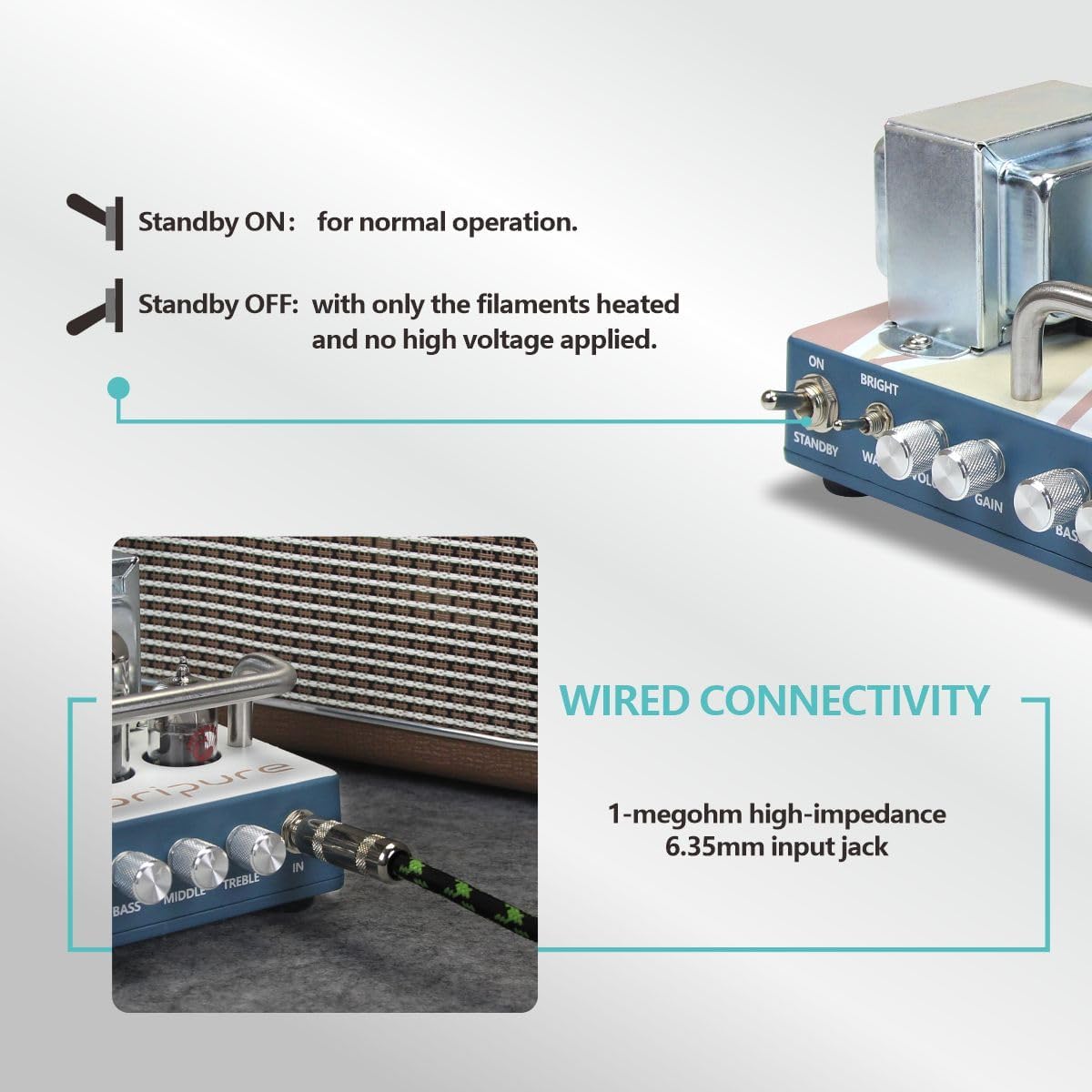
Image: Detail of the amplifier's front panel, showing the ON and STANDBY switches.
2. Kontrollen überview
The OA-H05 features a single channel with the following controls:
- BRIGHT/WARM Switch: Toggles between a brighter, more articulate tone and a warmer, fuller tone.
- VOLUMEN: Steuert den Gesamtausgangspegel des ampschwerer.
- DAZUGEWINNEN: Stellt die Pre-Menge einamp distortion and sustain. Higher gain settings produce more overdrive.
- BASS: Steuert das Niederfrequenzverhalten.
- MITTE: Steuert den Mittelfrequenzgang.
- VERDREIFACHEN: Steuert den Hochfrequenzgang.
3. Klangformung
Experiment with the GAIN and VOLUME knobs to achieve various tones, from clean to overdriven. The BRIGHT/WARM switch and the 3-band EQ (BASS, MIDDLE, TREBLE) allow for extensive tonal customization to suit different musical styles and preferences.
Der amplifier's single-ended output stage provides a distinct tonal character, often praised for its rich harmonics and dynamic response, especially when pushed into natural tube overdrive.

Image: A schematic comparing the signal path of a Single Ended amplifier (like the OA-H05) versus a Push-Pull amplifier, showing how the single power tube processes the entire sine wave.
Wartung
1. Reinigung
Wischen Sie die amplifier's exterior with a soft, dry cloth. Avoid using abrasive cleaners or solvents, as these can damage the finish. Ensure the ampDer Verstärker wird vor der Reinigung vom Stromnetz getrennt.
2. Schlauchwechsel
Tubes have a finite lifespan and may need replacement over time. If you experience a decrease in performance, excessive noise, or inconsistent sound, it may be time to replace one or more tubes. Consult a qualified technician for tube replacement to ensure proper handling and biasing.
When replacing tubes, ensure the amplifier is completely powered off and unplugged, and allow sufficient time for the tubes to cool down. Handle new tubes carefully, avoiding touching the glass with bare hands, as oils can create hot spots and reduce tube life.
Fehlerbehebung
Kein Ton
- Check all power connections and ensure the amplifier is plugged into a working outlet.
- Überprüfen Sie, ob die ON Und STANDBY switches are in the correct positions.
- Ensure the speaker cable is securely connected to both the amplifier and the speaker cabinet, and that the speaker impedance matches the ampAusgang des Verstärkers.
- Check your guitar cable and guitar's volume knob.
- Allow adequate warm-up time for the tubes.
Weak or Distorted Sound (Unintended)
- Passen Sie die GEWINNEN Und VOLUMEN controls. High gain settings will naturally produce distortion.
- Check the condition of your tubes. Worn-out tubes can cause weak or muddy sound.
- Ensure the speaker cabinet is functioning correctly.
- Review the Gain Spectrum Schematic to understand how tube amplifiers handle signal clipping compared to solid-state amplifizierer.

Image: A schematic illustrating the difference in signal clipping characteristics between tube amplifiers (soft symmetric clipping) and solid-state amplifiers (hard symmetric clipping).
Übermäßiges Rauschen oder Brummen
- Stellen Sie sicher, dass alle Kabel ordnungsgemäß abgeschirmt und in gutem Zustand sind.
- Versuchen Sie, die amplifier into a different power outlet or a power conditioner.
- Bewegen Sie den ampHalten Sie den Verstärker von anderen elektronischen Geräten fern, die Störungen verursachen könnten.
- Faulty tubes can also introduce noise; consider having them checked.
Technische Daten
| Besonderheit | Detail |
|---|---|
| Produktnummer | OA-H05 |
| Leistungsabgabe | 5 Watt |
| Vor-AMP Rohr | 1 x 12AX7 (ECC83) |
| Leistung-AMP Rohr | 1 x EL84 |
| Gleichrichterröhre | 1 x 6Z4 |
| Tonschalter | Bright / Warm |
| Kanäle | Einzelkanal |
| Bedienelemente | Volume, Gain, Treble, Middle, Bass |
| Ausgangsbuchsen | 8 Ω / 16 Ω |
| Artikelgewicht | 6.47 Pfund (2.93 kg) |
| Technische Daten | 5.31 x 7.48 x 4.09 Zoll (13.5 x 19 x 10.4 cm) |
| Material | Metal (Cast-aluminum casing) |
| Stromquelle | Kabelgebundene Elektrik |

Abbildung: Eine visuelle Darstellung der amplifier's key specifications, including tube types and controls.
Produktvideo-Demonstration
Watch this official video for a demonstration of the OriPure 5W All Tube Guitar Amplifier Head OA-H05, showcasing seine Funktionen und seinen Klang.
Video: Official demonstration of the OriPure 5W Tube Guitar Amplifier Head, highlighting its design and sound capabilities. The background music is a live amplifier demo recording using the OriPure OA-H05 head, an OriPure OA-112 speaker, and a Jerryking electric guitar.
Garantie und Support
For warranty information, technical support, or service inquiries, please contact OriPure customer service. Refer to your purchase documentation for specific warranty terms and contact details.
You can also visit the official OriPure store on Amazon for more information and support: OriPure Store