
Einführung
This manual provides essential information for the safe and efficient use of your Logicom ILOA 150 Fixed Wireless Phone. Please read these instructions carefully before using the device and keep them for future reference.
The Logicom ILOA 150 is a cordless DECT phone designed for home and office use, offering clear communication and essential features without an integrated answering machine. It is compatible with internet boxes, VoIP, PSTN, and ISDN systems.
Packungsinhalt
Stellen Sie sicher, dass alle Artikel in der Box vorhanden sind:
- 1 x Logicom ILOA 150 Handset
- 1 x Basiseinheit
- 1 x RJ11 Kabel
- 1 x Netzteil für die Basiseinheit
- 2 x AAA NiMH-Akkus
- 1 x Benutzerhandbuch (dieses Dokument)
Produkt überview
Machen Sie sich mit den Komponenten Ihres Logicom ILOA 150-Telefons vertraut.
Mobilteil
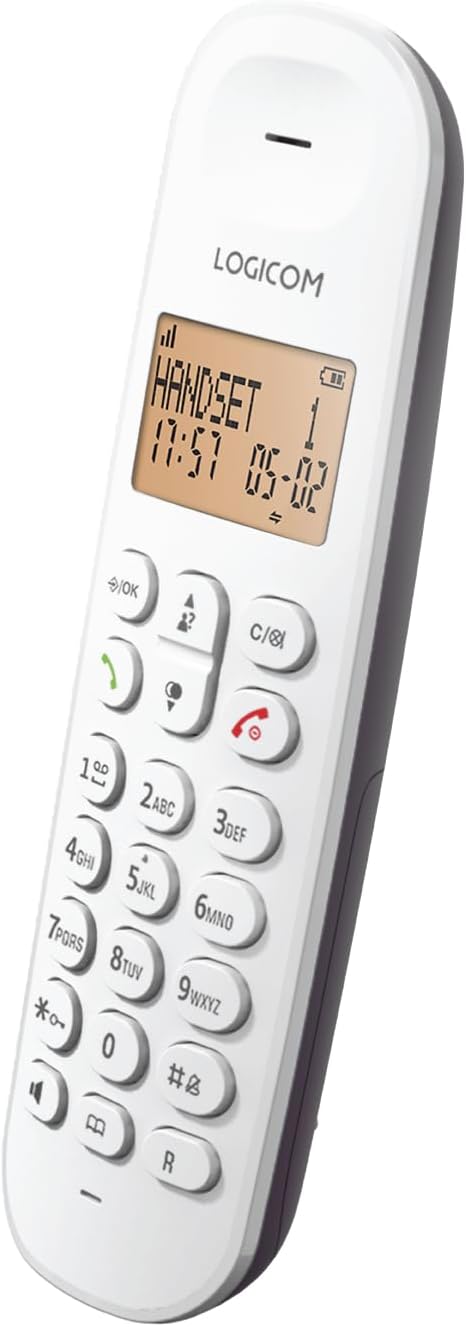
Bild: Vorderseite view of the Logicom ILOA 150 handset, showing the display, keypad, and function buttons.
- Anzeige: Large 4-line screen (1 dot matrix, 1 alphanumeric, 2 icon lines) for caller ID, menu navigation, and status indicators.
- Tastenfeld: Standard numeric keypad for dialing and text input.
- Navigationstasten: For menu navigation and volume control.
- Anruf-/Auflegetasten: To initiate or end calls.
- Freisprechfunktion: To activate speakerphone mode.
Basiseinheit

Bild: Draufsicht view of the Logicom ILOA 150 base unit, showing the charging cradle.
- Ladestation: Place the handset here to charge its batteries.
- Anschlüsse: Power adapter port and RJ11 telephone line port (located on the back or bottom).
Hauptmerkmale

Image: Visual representation of the Logicom ILOA 150's key features, including large screen, caller ID, redial, adjustable volume, and battery specifications.
- Caller ID display (names and numbers).
- Large 4-line display.
- Redial for the last 5 numbers.
- Adjustable ringer volume (5 levels) and 10 ringtones.
- Freisprechfunktion.
- Energiesparmodus.
- Compatible with internet boxes.
Aufstellen
1. Einlegen der Batterien
- Öffnen Sie die Abdeckung des Batteriefachs auf der Rückseite des Mobilteils.
- Insert the 2 AAA NiMH rechargeable batteries, observing the correct polarity (+/-).
- Schließen Sie den Batteriefachdeckel fest.
2. Anschließen der Basiseinheit
- Connect one end of the RJ11 telephone cable to the telephone line port on the base unit.
- Connect the other end of the RJ11 cable to your telephone wall socket or internet box.
- Connect the power adapter to the power port on the base unit.
- Stecken Sie den Netzadapter in eine Steckdose.
3. Laden des Mobilteils
Place the handset on the base unit's charging cradle. The handset will begin charging. For optimal battery performance, charge the handset for at least 16 hours before its first use.
4. Initial Configuration (Language, Date & Time)
Upon first use or after a power reset, you may need to set the language, date, and time. Follow the on-screen prompts or navigate through the menu:
- Drücken Sie die Menü/OK Taste.
- Use the navigation keys to scroll to Einstellungen or Ersteinrichtung.
- Wählen Sprache and choose from French, English, Spanish, or Dutch.
- Stellen Sie den aktuellen Wert ein Datum Und Zeit.
Bedienungsanleitung
This section details the daily use of your Logicom ILOA 150 phone.

Image: Visual representation of the Logicom ILOA 150's functions, including call transfer, intercom, mute, keypad lock, and alarm.
Anrufe tätigen und empfangen
- Anrufen: Wählen Sie die Nummer und drücken Sie die Anruf Taste (grünes Hörersymbol).
- So erhalten Sie einen Anruf: Wenn das Telefon klingelt, drücken Sie die Taste Anruf Taste.
- So beenden Sie einen Anruf: Drücken Sie die Ende button (red handset icon) or place the handset back on the base.
- Wahlwiederholung: Drücken Sie die Wahlwiederholung button (often the Call button or a dedicated button) to access the last 5 dialed numbers.
Freisprechfunktion
Drücken Sie während eines Anrufs die Taste Freisprechfunktion button (speaker icon) to activate the speakerphone. Press it again to switch back to handset mode.
Phonebook (50 Contacts)
- Drücken Sie die Menü/OK Taste.
- Navigieren Sie zu Telefonbuch.
- Wählen Neuen Eintrag hinzufügen to store a name and number.
- To call from the phonebook, navigate to the desired contact and press the Anruf Taste.
Call Log (10 Numbers)
The phone stores the last 10 incoming call numbers. Press the Anrufprotokoll button (often an arrow key) to view the list. You can call back a number directly from this list.
Tastensperre
To prevent accidental dialing, you can lock the keypad. Typically, press and hold the # key or a dedicated lock key. Repeat the action to unlock.
Ringer Volume and Ringtones
You can adjust the ringer volume (5 levels) and choose from 10 available ringtones via the phone's menu settings.
Intercom and Call Transfer (for multiple handsets)
If you have multiple ILOA handsets registered to the same base (up to 5), you can use intercom and call transfer functions:
- Gegensprechanlage: Um ein anderes Mobilteil anzurufen, drücken Sie die Taste Gegensprechanlage button (often a dedicated button or accessed via menu) and select the desired handset.
- Anrufweiterleitung: Drücken Sie während eines externen Anrufs die Taste Überweisen button (or menu option), select the internal handset, and then hang up once the other handset answers.
Stummschaltung
Drücken Sie während eines Anrufs die Taste Stumm button (often a microphone icon) to temporarily disable your microphone. The other party will not hear you. Press again to unmute.
Alarmfunktion
You can set an alarm via the phone's menu. Navigate to Alarm in the settings and configure the time.
Wartung
Reinigung
Wischen Sie Mobilteil und Basisstation mit einem weichen, fusselfreien Tuch ab.amp Mit einem Tuch abwischen. Keine Scheuermittel oder Lösungsmittel verwenden. Sicherstellen, dass keine Flüssigkeit in die Geräteöffnungen eindringt.
Batteriepflege
- Verwenden Sie ausschließlich die mitgelieferten wiederaufladbaren NiMH-AAA-Batterien.
- Verwenden Sie keine nicht wiederaufladbaren Batterien.
- Wenn das Telefon längere Zeit nicht benutzt wird, sollten die Batterien entfernt werden, um ein Auslaufen zu verhindern.
- Entsorgen Sie alte Batterien ordnungsgemäß entsprechend den örtlichen Vorschriften.
Fehlerbehebung
| Problem | Mögliche Ursache | Lösung |
|---|---|---|
| Kein Wählton | Base unit not connected or powered. | Check all cable connections (telephone line, power adapter). Ensure the power outlet is active. |
| Handy lädt nicht | Mobilteil nicht korrekt auf der Basisstation platziert; Ladekontakte verschmutzt; Batterien defekt. | Ensure handset is properly seated. Clean charging contacts on both handset and base with a dry cloth. Replace batteries if old. |
| Schlechte Gesprächsqualität / Rauschen | Außerhalb der Reichweite; Störungen; schwacher Akku. | Move closer to the base unit. Avoid placing the base near other electronic devices (Wi-Fi routers, microwaves). Charge the handset. |
| Anrufe können nicht getätigt/empfangen werden. | Telephone line issue; handset not registered. | Check if other phones on the same line work. Re-register the handset to the base (refer to the full manual for registration steps if needed). |
| Tastatur gesperrt | Tastensperre aktiviert. | Halten Sie die # key or dedicated lock key to unlock. |
Technische Daten

Image: Dimensions of the Logicom ILOA 150 handset (163 mm height) and base unit (90 mm width).
| Besonderheit | Detail |
|---|---|
| Marke | LOGICOM |
| Modellnummer | ILOA 150 |
| Telefontyp | Schnurloses DECT-Telefon |
| Anrufbeantworter | No integrated answering machine |
| Anzeige | 4-line (1 dot matrix, 1 alphanumeric, 2 icon lines) |
| Telefonbuchkapazität | 50 Kontakte |
| Anrufprotokollkapazität | 10 Zahlen |
| Anrufer-ID | Ja |
| Freisprechfunktion | Ja |
| Klingeltöne | 10 melodies, 5 volume levels |
| Batterien | 2 x wiederaufladbare AAA NiMH-Akkus (im Lieferumfang enthalten) |
| Gesprächszeit | Bis zu 7 Stunden |
| Standby-Zeit | Bis zu 100 Stunden |
| Indoor-Bereich | Bis zu 50 Meter |
| Outdoor-Bereich | Bis zu 300 Meter |
| Unterstützung mehrerer Mobilteile | Bis zu 5 Mobilteile |
| Kompatible Geräte | Internet Box, VoIP, PSTN, ISDN |
| Material | Plastik |
| Ursprungsland | China |
Garantie und Support
LOGICOM products are designed for reliability and performance. In case you encounter any issues or are not satisfied with your product, please do not hesitate to contact our After-Sales Service.
For warranty claims or technical support, please refer to the contact information provided on the LOGICOM official website or your purchase documentation. Our team is dedicated to finding an appropriate solution for you.
Bitte bewahren Sie Ihren Kaufbeleg für Garantiezwecke auf.