
1. Wichtige Sicherheitshinweise
Please read all safety and operating instructions carefully before using your television. Keep these instructions for future reference.
- Energiequelle: Schließen Sie den Fernseher nur an die auf dem Typenschild angegebene Stromquelle an.
- Belüftung: Sorgen Sie für ausreichende Belüftung. Blockieren Sie keine Belüftungsöffnungen.
- Wasser und Feuchtigkeit: Setzen Sie das Fernsehgerät weder Regen noch Feuchtigkeit aus. Verwenden Sie es nicht in der Nähe von Wasser.
- Reinigung: Unplug the TV from the wall outlet before cleaning. Use a soft, dry cloth. Do not use liquid or aerosol cleaners.
- Platzierung: Stellen Sie den Fernseher auf eine stabile, ebene Fläche. Vermeiden Sie direkte Sonneneinstrahlung und die Nähe zu Wärmequellen.
- Blitz: Ziehen Sie bei Gewittern oder längerer Nichtbenutzung den Netzstecker des Fernsehers.
2. Packungsinhalt
Bitte überprüfen Sie, ob alle unten aufgeführten Artikel in Ihrem TV-Paket enthalten sind:
- coocaa ROKU 50R5G 50-inch UHD Smart LED TV
- Fernbedienung mit Batterien
- TV-Ständer (2-teilig)
- Standschrauben
- Stromkabel
- Kurzanleitung (dieses Handbuch)
3. Einrichtung
3.1 Auspacken und Ständeraufbau
Carefully remove the TV from its packaging. It is recommended to have two people for this process. Place the TV face down on a soft, clean surface to prevent screen damage.
So montieren Sie den TV-Ständer:
- Richten Sie jedes Standfußteil an den entsprechenden Schlitzen an der Unterseite des Fernsehers aus.
- Befestigen Sie die Ständer mit den mitgelieferten Schrauben. Achten Sie darauf, dass diese fest angezogen sind.
Alternatively, for wall mounting, consult a professional installer and use a VESA-compatible wall mount (not included).

This image illustrates the coocaa Roku TV seamlessly integrated into a modern living room environment, mounted on a light blue wall. The TV is positioned above a minimalist wooden TV cabinet, demonstrating a typical installation scenario.
3.2 Stromanschluss und Ersteinrichtung
- Verbinden Sie das Netzkabel mit dem Stromeingang des Fernsehers und anschließend mit einer Wandsteckdose.
- Drücken Sie den Ein-/Ausschalter auf der Fernbedienung oder am Fernseher.
- Follow the on-screen instructions to complete the initial Roku OS setup, including language selection, country, and channel scanning for the triple tuner (satellite, cable, or antenna).
3.3 Netzwerkverbindung
To access Smart TV features and streaming services, connect your TV to the internet:
- W-lan: During initial setup or via the Settings menu, select 'Network' and then 'Wireless'. Choose your Wi-Fi network from the list and enter the password.
- LAN (Ethernet): Connect an Ethernet cable from your router to the LAN port on the back of the TV. The TV will automatically detect the wired connection.
4. Bedienung Ihres Fernsehgeräts
4.1 Roku OS Home Screen
The Roku OS home screen provides quick access to all your entertainment. It combines linear TV and streaming services into one intuitive interface.

This image shows the coocaa Roku TV from the front, powered on and displaying its intuitive home screen. The screen features icons for popular streaming services like Netflix, Disney+, Apple TV, and live TV options, alongside inputs for cable box and game console. A '2023 Heimkino Innovation Award' badge is visible on the bottom left bezel.
- Streaming-Kanäle: Access popular apps like Netflix, Disney+, and Apple TV.
- Live-TV: Watch broadcast television via the integrated triple tuner.
- Eingänge: Easily switch between connected devices (e.g., game console, cable box).
- Suchen: Use the cross-channel search to find content by title, actor, or genre.
4.2 Verwenden der Fernbedienung
The user-friendly remote control provides all necessary functions:
- Navigationspad: Use the arrow buttons to navigate menus and select items.
- OK-Taste: Auswahl bestätigen.
- Home "Button: Return to the Roku OS home screen.
- Zurück-Schaltfläche: Gehen Sie zurück zum vorherigen Bildschirm.
- Sofortige Wiedergabe: Spielen Sie die letzten paar Sekunden des Videos erneut ab.
- Schnellzugriffstasten: Spezielle Tasten für gängige Streaming-Dienste.
- Sprachsuche: Use the voice search feature for hands-free control (if supported by remote model).
4.3 Eingangsquellen
Schließen Sie externe Geräte über die verfügbaren Anschlüsse an Ihren Fernseher an:
- HDMI: The TV features three HDMI inputs for connecting devices like Blu-ray players, game consoles, or set-top boxes.
- USB: One USB port is available for media playback or Timeshift functions.
- Digitaler Audioausgang: Zum Anschluss an externe Audiosysteme.
4.4 Smart-TV-Funktionen
Your coocaa Roku TV offers a wide range of smart features:
- Streaming-Dienste: Access pre-installed apps like Netflix, Disney+, Apple TV, and more.
- Sprachassistent-Unterstützung: Compatible with Apple AirPlay, Apple Home, Alexa, and Google Home for integrated smart home control.
- Roku Mobile App: Control your TV, use voice search, and listen to audio via headphones using the free Roku app for iOS and Android devices.
4.5 Audio- und Videoeinstellungen
Optimieren Sie Ihre viewErfahrung:
- Bildmodi: Select from various picture modes (e.g., Standard, Movie, Sport) or customize brightness, contrast, and color settings.
- HDR-Unterstützung: Enjoy enhanced contrast and color with HDR10 and HLG content.
- Klangmodi: Choose sound modes (e.g., Standard, Music, Speech) or adjust equalizer settings for optimal audio.
5. Wartung
5.1 Reinigen Ihres Fernsehgeräts
Um das Aussehen und die Leistung des Fernsehers zu erhalten:
- Trennen Sie den Fernseher vor der Reinigung vom Netz.
- Verwenden Sie ein weiches, trockenes, fusselfreies Tuch, um den Bildschirm und das Gehäuse abzuwischen.
- Bei hartnäckigen Flecken leicht andrücken.ampBefeuchten Sie das Tuch mit Wasser. Sprühen Sie Reinigungsmittel niemals direkt auf den Fernseher.
- Vermeiden Sie die Verwendung von Scheuermitteln, Wachsen oder Lösungsmitteln.
5.2 Softwareaktualisierungen
Your Roku TV automatically checks for and installs software updates when connected to the internet. These updates provide new features, performance improvements, and bug fixes. Ensure your TV remains connected to the internet for timely updates.
6. Fehlerbehebung
Sollten Sie Probleme mit Ihrem Fernseher haben, beachten Sie bitte die folgenden gängigen Lösungsansätze:
| Problem | Mögliche Lösung |
|---|---|
| Kein Strom | Prüfen Sie, ob das Netzkabel fest mit dem Fernseher und der Steckdose verbunden ist. Versuchen Sie es mit einer anderen Steckdose. |
| Kein Bild, aber Ton ist vorhanden | Stellen Sie sicher, dass die richtige Eingangsquelle ausgewählt ist. Überprüfen Sie die Kabelverbindungen zu externen Geräten. |
| Kein Ton, aber ein Bild ist vorhanden. | Check the volume level and mute status. Ensure external audio systems are correctly connected and powered on. |
| Verbindung zum WLAN nicht möglich | Verify your Wi-Fi password. Restart your router and modem. Move the TV closer to the router or use a wired connection. |
| Fernbedienung funktioniert nicht | Tauschen Sie die Batterien aus. Stellen Sie sicher, dass sich keine Hindernisse zwischen Fernbedienung und Fernseher befinden. |
7. Spezifikationen
Detailed technical specifications for the coocaa ROKU 50R5G TV:

This image displays the official product data sheet (Produktdatenblatt) for the coocaa 50R5G television. It provides comprehensive technical specifications, including energy efficiency class, power consumption, screen resolution, panel technology, and guaranteed software/spare parts availability, as per EU regulations.
| Parameter | Wert |
|---|---|
| Marke | Coocaa |
| Model Name / Item Model Number | 1000R50G |
| Betriebssystem | Roku-Betriebssystem |
| Bildschirmgröße | 50 Zoll (126 cm) |
| Display-Technologie | LCD LED |
| Auflösung | 3840 x 2160 Pixel (4K UHD) |
| Seitenverhältnis | 16:9 |
| Refresh Rate (Standard) | 50 Hz |
| Konnektivität | Wi-Fi, LAN (Ethernet), 3x HDMI, 1x USB |
| Besondere Merkmale | Integrated Speaker, HDR10, HLG, Triple Tuner |
| Unterstützte Internetdienste | Netflix, Disney+, Apple TV, Prime Video, RTL+ |
| Produktabmessungen (B x H x T) | 110 cm x 65 cm x 9 cm (ca.) |
| Energieeffizienzklasse (SDR) | G |
| Stromverbrauch (SDR) | 70.0 W / 70 kWh/1000 h |
| Energieeffizienzklasse (HDR) | G |
| Stromverbrauch (HDR) | 103 W / 103 kWh/1000 h |
| Garantierte Software-/Firmware-Updates | 8 years (from end of market placement) |
| Garantierte Verfügbarkeit von Ersatzteilen | 7 years (from end of market placement) |
| Garantierter Produktsupport | 7 Jahre |
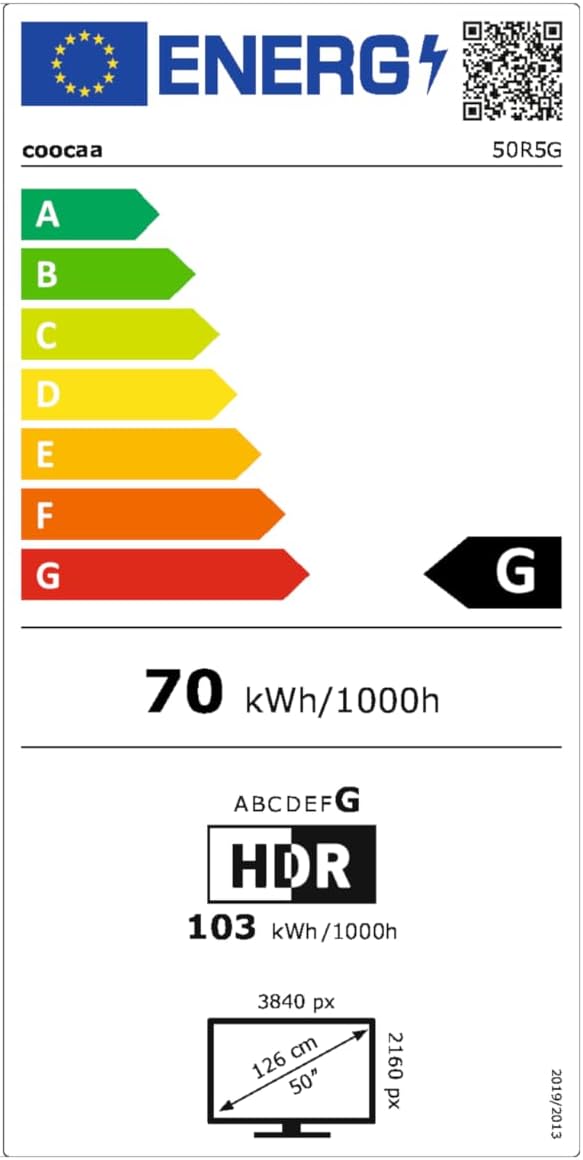
This image presents the EU Energy Label for the coocaa 50R5G TV. It indicates an energy efficiency class of 'G' for both Standard Dynamic Range (SDR) and High Dynamic Range (HDR) content, with power consumption values of 70 kWh/1000h for SDR and 103 kWh/1000h for HDR. The label also shows the screen size of 50 inches (126 cm) and resolution of 3840x2160 pixels. A QR code is included for accessing the EPREL database: EPREL-Datenbanklink
8. Garantie und Support
Your coocaa ROKU 50R5G TV comes with a manufacturer's warranty. Please refer to the official product documentation for specific terms and conditions.
- General Warranty Period: 2 Jahre ab Kaufdatum.
- Produktsupport: Guaranteed for 7 years.
- Ersatzteile: Guaranteed availability for 7 years after the product is no longer placed on the market.
- Software-Updates: Guaranteed for 8 years after the product is no longer placed on the market.
For technical assistance or warranty claims, please contact coocaa customer support through their official webWebsite oder den Händler, bei dem das Produkt gekauft wurde.