
1. Einleitung
This manual provides detailed instructions for the assembly, operation, and maintenance of your FLEXISPOT Electric Standing Desk. Please read this manual thoroughly before use to ensure proper function and safety. Keep this manual for future reference.
2. Sicherheitshinweise
Wichtige Sicherheitsvorkehrungen:
- Always keep the desk area clear of obstructions to prevent collisions during height adjustments.
- Do not use the desk at its maximum height without proper anchoring to prevent tip-overs.
- Follow the assembly instructions carefully to ensure the desk is properly set up and stable.
- Ensure all cables are managed to avoid entanglement during movement.
- Halten Sie Kinder und Haustiere während des Betriebs vom Schreibtisch fern.
3. Packungsinhalt
Bitte prüfen Sie vor Beginn der Montage, ob alle Komponenten vorhanden sind. Sollten Teile fehlen oder beschädigt sein, wenden Sie sich bitte an den Kundendienst.
- Desktop (Natural Desktop + White Frame, 48 inch)
- Desk Legs/Frame (Alloy Steel)
- Control Panel with USB Ports
- Pull-out Storage Drawer
- Montagezubehör (Schrauben, Werkzeuge)
- Netzteil
- Bedienungsanleitung
4. Aufbau und Montage
The FLEXISPOT Electric Standing Desk is designed for quick assembly. All necessary tools are included.
- Step 1: Attach Desk Legs to Desktop
Carefully place the desktop upside down on a soft, clean surface to prevent scratches. Attach the desk legs to the designated mounting points on the underside of the desktop using the provided screws. Ensure all connections are secure.
Image: Fully assembled FLEXISPOT Electric Standing Desk, showcasing the natural desktop, white frame, integrated drawer, and control panel with USB ports.
- Step 2: Install Control Panel and Drawer
Mount the control panel to the front edge of the desktop as indicated in the diagrams. Connect the motor and power cables to the control panel. Slide the pull-out storage drawer into its designated slot beneath the desktop.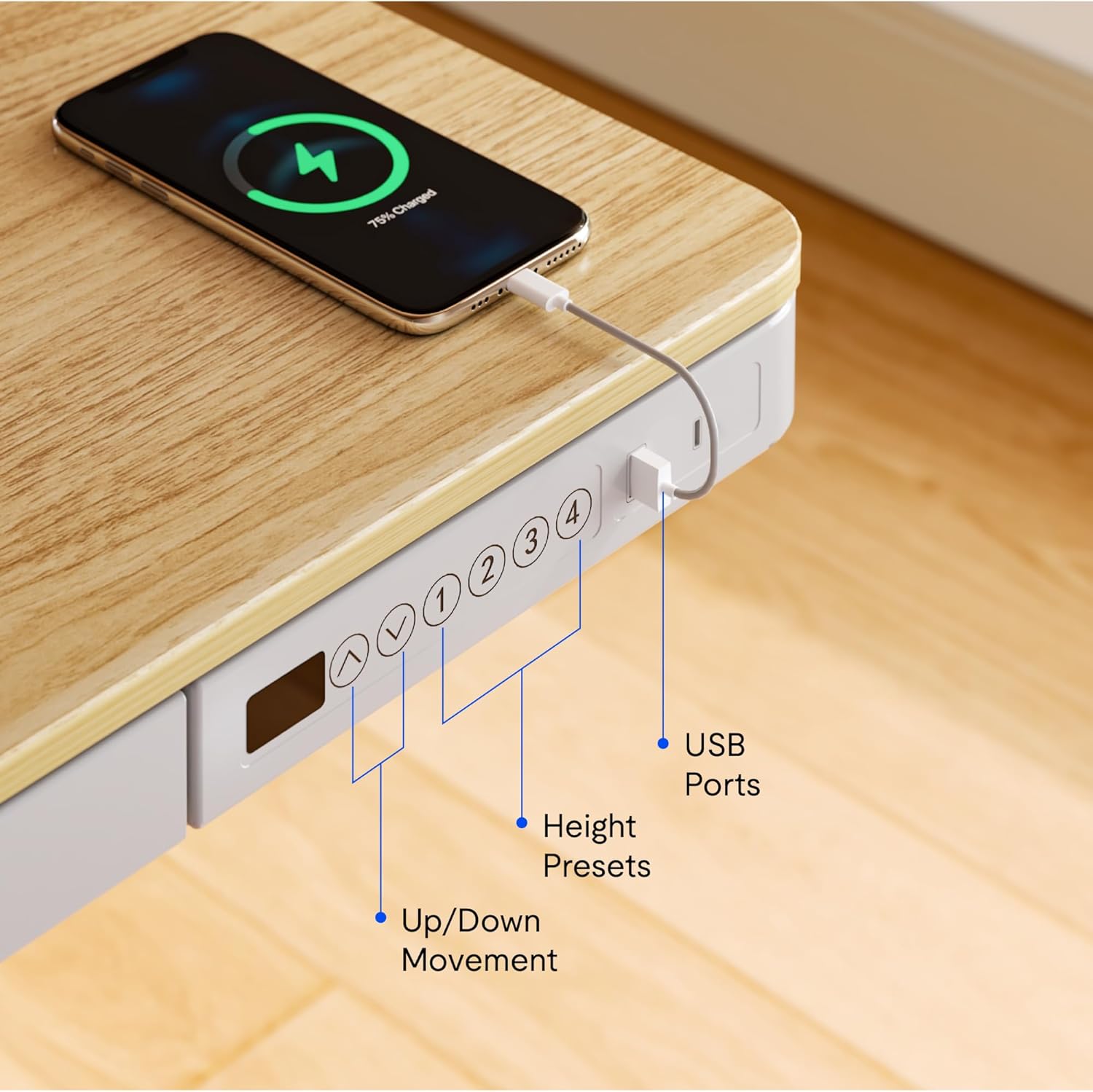
Bild: Nahaufnahme view of the desk's control panel, highlighting the up/down movement buttons, four height preset buttons, and the integrated USB charging ports.
- Step 3: Connect Power and Cable Management
Connect the power adapter to the control panel and then to a power outlet. Organize cables using the provided cable management solutions to ensure they do not interfere with desk movement.
Image: The desk frame from below, showing the crossbar and anti-collision system designed to enhance stability and safety during height adjustments.
5. Bedienungsanleitung
Your FLEXISPOT Electric Standing Desk offers convenient features for adjusting height and charging devices.
5.1 Höhenverstellung
- Auf-/Abwärtsbewegung: Verwenden Sie die Up Und Runter arrow buttons on the control panel to manually adjust the desk height. The desk can transition smoothly between 28.3 inches and 47.6 inches.
- Height Presets: The control panel features four programmable memory presets. To save a desired height, adjust the desk to the preferred level, then press and hold one of the numbered preset buttons (1, 2, 3, or 4) until the display flashes or a beep is heard. To recall a saved height, simply press the corresponding preset button.
- Antikollisionssystem: The desk is equipped with an anti-collision system that automatically stops movement if an obstruction is detected, preventing damage to the desk or objects.
5.2 USB-Ladeanschlüsse
The integrated control panel includes USB charging ports. Connect your electronic devices to these ports for convenient charging directly from your desk.
5.3 Kindersicherungsfunktion
To activate the child lock, press and hold the "Lock" button (often represented by a padlock icon) on the control panel for a few seconds until the display indicates it is locked. Repeat the process to unlock.
5.4 Integrated Storage Drawer
Utilize the pull-out storage drawer for organizing office supplies and keeping your workspace tidy. The drawer is designed to blend seamlessly with the desk's aesthetic.

Bild: Detailliert view of the integrated pull-out drawer, showing its dimensions (approximately 23.6 inches wide, 11.2 inches deep, and 2 inches high) and its capacity for storing various office items.
6. Wartung
- Reinigung: Wischen Sie die Tischplatte und den Rahmen mit einem weichen, fusselfreien Tuch ab.amp Tuch. Vermeiden Sie Scheuermittel oder aggressive Chemikalien.
- Kabelmanagement: Periodically check and reorganize cables to prevent tangling and ensure smooth operation.
- Inspektion: Überprüfen Sie regelmäßig alle Schrauben und Verbindungen, um sicherzustellen, dass sie fest und sicher sitzen.
7. Fehlerbehebung
Sollten Sie Probleme mit Ihrem Schreibtisch haben, beachten Sie bitte die folgenden gängigen Lösungsansätze:
- Schreibtisch bewegt sich nicht:
- Prüfen Sie, ob das Netzkabel sowohl am Schreibtisch als auch an der Steckdose fest angeschlossen ist.
- Stellen Sie sicher, dass die Kindersicherung nicht aktiviert ist.
- Reset the desk by unplugging it for 30 seconds and then plugging it back in.
- Ungleichmäßige Bewegung oder Geräusche:
- Vergewissern Sie sich, dass der Schreibtisch auf einer ebenen Fläche steht.
- Check for any obstructions beneath or around the desk legs.
- Stellen Sie sicher, dass alle Montageschrauben fest angezogen sind.
- USB-Anschlüsse laden nicht:
- Confirm the desk is powered on.
- Um auszuschließen, dass ein Zubehörteil defekt ist, versuchen Sie es mit einem anderen USB-Kabel oder -Gerät.
If problems persist, please contact FLEXISPOT customer support.
8. Spezifikationen
| Besonderheit | Detail |
|---|---|
| Marke | FLEXISPOT |
| Modellnummer | B0CKW2Q436 |
| Desktop Surface Dimensions (W x D) | 47.4 Zoll B x 23.8 Zoll T |
| Gesamtproduktabmessungen (T x B x H) | 48"D x 48"W x 28.3"H (Note: Desktop surface is 47.4"W x 23.8"D) |
| Farbe | Natur/Weiß |
| Grundmaterial | Legierter Stahl |
| Top-Materialtyp | Bambus |
| Artikelgewicht | 74 Pfund |
| Mindesthöhe | 28.3 Zoll |
| Maximale Höhe | 47.6 Zoll |
| Tischplattendicke | 2.6 Zoll |
| Maximalgewichtsempfehlung | 110 Pfund |
| Im Lieferumfang enthaltene Komponenten | Pull-out storage drawer, USB ports |
| Erforderliche Montage | Ja (einschließlich aller Montagewerkzeuge) |

Image: Summary of key specifications including desktop size (47.4"x23.8"), height range (28.3"-48"), max loading capacity (100 lbs), and 5-year warranty.
9. Garantie und Support
9.1 Garantieinformationen
The FLEXISPOT Electric Standing Desk typically comes with a 5-year warranty, covering manufacturing defects and motor functionality. For specific warranty terms and conditions, please refer to the documentation included with your product or contact FLEXISPOT customer service.
9.2 Kundendienst
For technical assistance, warranty claims, or any questions regarding your FLEXISPOT product, please contact FLEXISPOT customer support. Contact information can usually be found on the manufacturer's webauf der Website oder auf der Verpackung.
You may also refer to the seller, FlexiSpot, for support inquiries. They offer 30-day easy returns.


