
1. Einleitung
Thank you for choosing the techno line WT2600 Digital Calendar. This device provides accurate time, date, indoor temperature, and humidity readings, along with alarm functions. This manual will guide you through the setup, operation, and maintenance of your new digital calendar.
2. Sicherheitshinweise
- Setzen Sie das Gerät keinen extremen Temperaturen, direkter Sonneneinstrahlung oder hoher Luftfeuchtigkeit aus.
- Vermeiden Sie es, das Gerät fallen zu lassen oder starken Stößen auszusetzen.
- Versuchen Sie nicht, das Gerät selbst zu zerlegen oder zu reparieren. Wenden Sie sich an qualifiziertes Servicepersonal.
- Entsorgen Sie gebrauchte Batterien verantwortungsvoll gemäß den örtlichen Vorschriften.
- Bewahren Sie das Gerät außerhalb der Reichweite von Kindern auf.
3. Packungsinhalt
Bitte überprüfen Sie, ob alle Artikel in Ihrem Paket vorhanden sind:
- techno line WT2600 Digital Calendar Unit
- Benutzerhandbuch (dieses Dokument)
- Batteries (may be included depending on region)
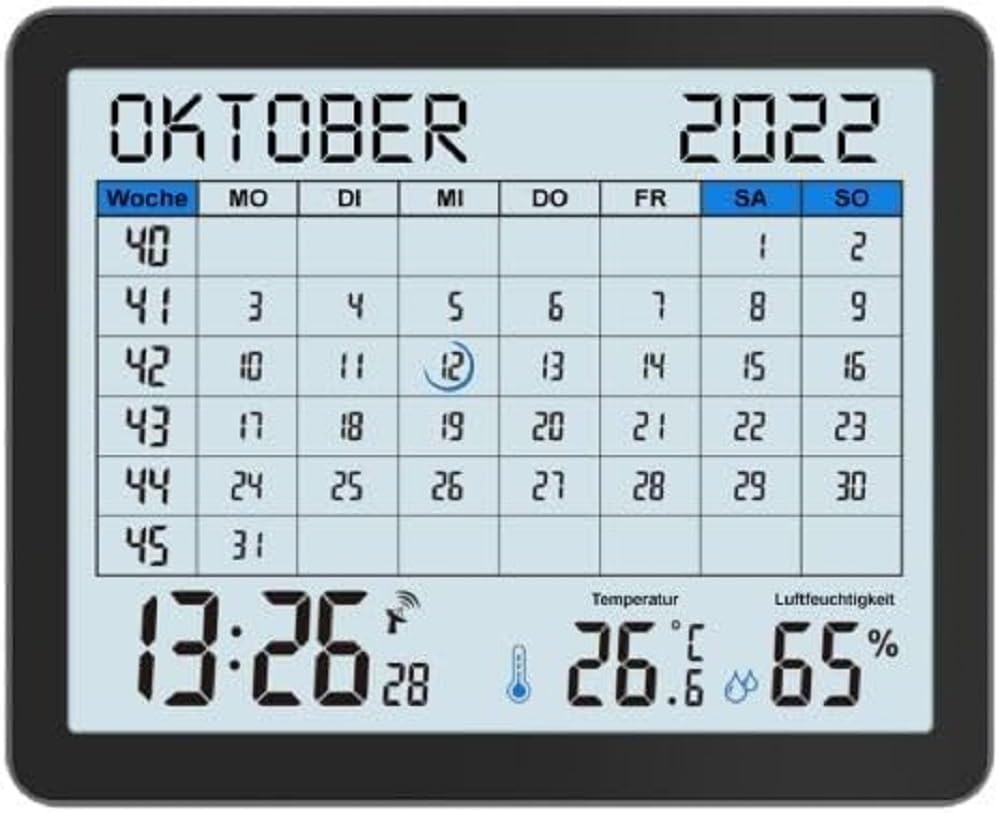
Image of the techno line WT2600 Digital Calendar packaging, showing the device and its key features.
4. Produktmerkmale
The techno line WT2600 Digital Calendar offers the following key features:
- DCF-77 Radio-Controlled Clock: Automatic time synchronization for precise timekeeping, with an option for manual setting.
- 12/24 Hour Time Display: Select your preferred time format.
- Kalenderanzeige: Shows the current date, day of the week, and month.
- 7-Language Month Display: Choose from seven languages for the month display.
- Anzeige der Innentemperatur: Shows indoor temperature in Celsius (°C) or Fahrenheit (°F).
- Indoor Humidity Display: Displays the current indoor humidity level.
- MIN/MAX Display: Records and displays the minimum and maximum temperature and humidity values.
- Doppelwecker mit Schlummerfunktion: Set two independent alarms with a convenient snooze function.
- Anzeige für niedrigen Batteriestand: Benachrichtigt Sie, wenn die Batterien ausgetauscht werden müssen.
- Vielseitige Platzierung: Designed for both wall mounting and table standing.

Front view of the techno line WT2600 Digital Calendar display, showing the calendar grid, current time, temperature, and humidity.
5. Einrichtung
5.1 Einlegen der Batterie
- Suchen Sie das Batteriefach auf der Rückseite des Geräts.
- Öffnen Sie die Abdeckung des Batteriefachs.
- Insert the required batteries (e.g., 2 x AAA, not specified in data, common for such devices) according to the polarity markings (+ and -).
- Schließen Sie den Batteriefachdeckel fest.
5.2 Initial Power On and DCF-77 Signal Reception
Upon battery insertion, the device will power on and automatically begin searching for the DCF-77 radio signal. This process may take several minutes. For optimal reception, place the unit near a window and away from electronic interference.
- A signal icon (e.g., an antenna symbol) will flash during signal search.
- Once the signal is received, the time and date will be set automatically, and the signal icon will become solid.
- If no signal is received after 10-15 minutes, try repositioning the unit.
5.3 Manuelle Zeit- und Datumseinstellung
If automatic synchronization is not desired or unsuccessful, you can set the time and date manually.
- Press and hold the 'SET' button (or similar, refer to device buttons) for a few seconds to enter manual setting mode.
- Verwenden Sie die Tasten '+' oder '-', um den blinkenden Wert anzupassen (z. B. Stunde, Minute, Jahr, Monat, Tag).
- Press 'SET' again to confirm the current setting and move to the next adjustable parameter.
- Repeat until all settings are complete.
5.4 Spracheinstellung
To change the display language for the month:
- Enter the setting mode (e.g., by pressing 'SET').
- Navigate through the settings until the language option appears.
- Use the '+' or '-' buttons to cycle through the available 7 languages.
- Bestätigen Sie Ihre Auswahl.
6. Betrieb
6.1 Viewing Time, Date, Temperature, and Humidity
The main display continuously shows the current time, date, indoor temperature, and indoor humidity. You can switch between 12-hour and 24-hour time formats by pressing a dedicated button (e.g., '12/24H' or 'MODE').
6.2 Alarme einstellen
The device features two independent alarms.
- Press the 'ALARM' button (or similar) to view Alarmzeit 1.
- Press and hold 'ALARM' to enter Alarm 1 setting mode.
- Use '+' or '-' to adjust the hour and minute, pressing 'ALARM' to confirm each.
- Repeat for Alarm 2.
- To activate/deactivate an alarm, press 'ALARM' repeatedly until the alarm icon appears/disappears.
6.3 Schlummerfunktion verwenden
When an alarm sounds, press the 'SNOOZE' button (or similar, often a large button on top) to temporarily silence the alarm. The alarm will sound again after a few minutes (typically 5-10 minutes). To stop the alarm completely, press any other button.
6.4 MIN/MAX Display Function
The device records the minimum and maximum temperature and humidity values since the last reset.
- Press the 'MIN/MAX' button (or similar) once to view die maximal aufgezeichneten Werte.
- Press it again to view die minimal aufgezeichneten Werte.
- To reset the MIN/MAX records, press and hold the 'MIN/MAX' button while viewdie Aufzeichnungen.

Close-up of the techno line WT2600 Digital Calendar display, highlighting the time, temperature, and humidity readings.
7. Wartung
7.1 Reinigung
Wischen Sie das Gerät mit einem weichen, damp Verwenden Sie kein scheuerndes Reinigungs- oder Lösungsmittel, da diese das Display oder die Elektronik beschädigen können.asing.
7.2 Batteriewechsel
When the low battery indicator appears on the display, replace all batteries with new ones of the same type. Follow the battery installation steps in Section 5.1.
8. Fehlerbehebung
- Kein Bildschirm: Prüfen Sie die Batteriepolarität und stellen Sie sicher, dass die Batterien neu sind.
- Falsche Uhrzeit/falsches Datum: Ensure the DCF-77 signal icon is solid. If not, reposition the unit or set the time manually (Section 5.3). Check your time zone setting if applicable (not explicitly mentioned in data, but common).
- Temperature/Humidity Readings Seem Inaccurate: Ensure the unit is placed in a location with good air circulation, away from direct heat sources or drafts. Allow some time for readings to stabilize after initial setup or relocation.
- Alarm ertönt nicht: Verify that the alarm is activated (alarm icon displayed) and the alarm time is set correctly.
9. Spezifikationen
| Besonderheit | Spezifikation |
|---|---|
| Modellnummer | WT2600 |
| Abmessungen (L x B x H) | 17.3 x 3.81 x 14 cm |
| Gewicht | 380 g |
| Farbe | Schwarz |
| Material | Plastik |
| Stromquelle | Batteriebetrieben |
| Anzeigetyp | Digitales |
| Innen-/Außenbereich | Innenbereich |
10. Garantie und Support
Information regarding product warranty and customer support was not available in the provided product data. Please refer to the retailer or manufacturer's official webAuf der Webseite finden Sie Einzelheiten zu Garantieumfang und Supportoptionen.