
1. Einleitung
Welcome to the KRUPS Sensation C10 EA910A10 Superautomatic Coffee Machine user manual. This guide provides comprehensive instructions for the safe and efficient operation, maintenance, and troubleshooting of your new coffee machine. Please read this manual thoroughly before first use and keep it for future reference.
2. Wichtige Sicherheitshinweise
Um einen sicheren Betrieb zu gewährleisten, beachten Sie bitte stets diese grundlegenden Sicherheitsvorkehrungen:
- Lesen Sie vor der Verwendung des Geräts alle Anweisungen.
- Das Gerät, das Netzkabel und der Stecker dürfen nicht in Wasser oder andere Flüssigkeiten getaucht werden.
- Dieses Gerät ist nur für den Hausgebrauch bestimmt.
- Stellen Sie sicher, dass die LautstärketagDie auf dem Gerät angegebene Spannung e entspricht Ihrer Netzspannung.tage.
- Vor der Reinigung oder wenn das Gerät nicht benutzt wird, ziehen Sie immer den Netzstecker.
- Betreiben Sie kein Gerät, dessen Kabel oder Stecker beschädigt ist, oder wenn das Gerät eine Fehlfunktion aufweist oder auf sonstige Weise beschädigt wurde.
- Halten Sie Kinder während des Betriebs vom Gerät fern.
- Verwenden Sie nur vom Hersteller empfohlenes Zubehör.
- Avoid contact with hot surfaces, such as the coffee spouts or steam nozzle.
3. Produktkomponenten
Familiarize yourself with the main components of your KRUPS Sensation C10 EA910A10 coffee machine:
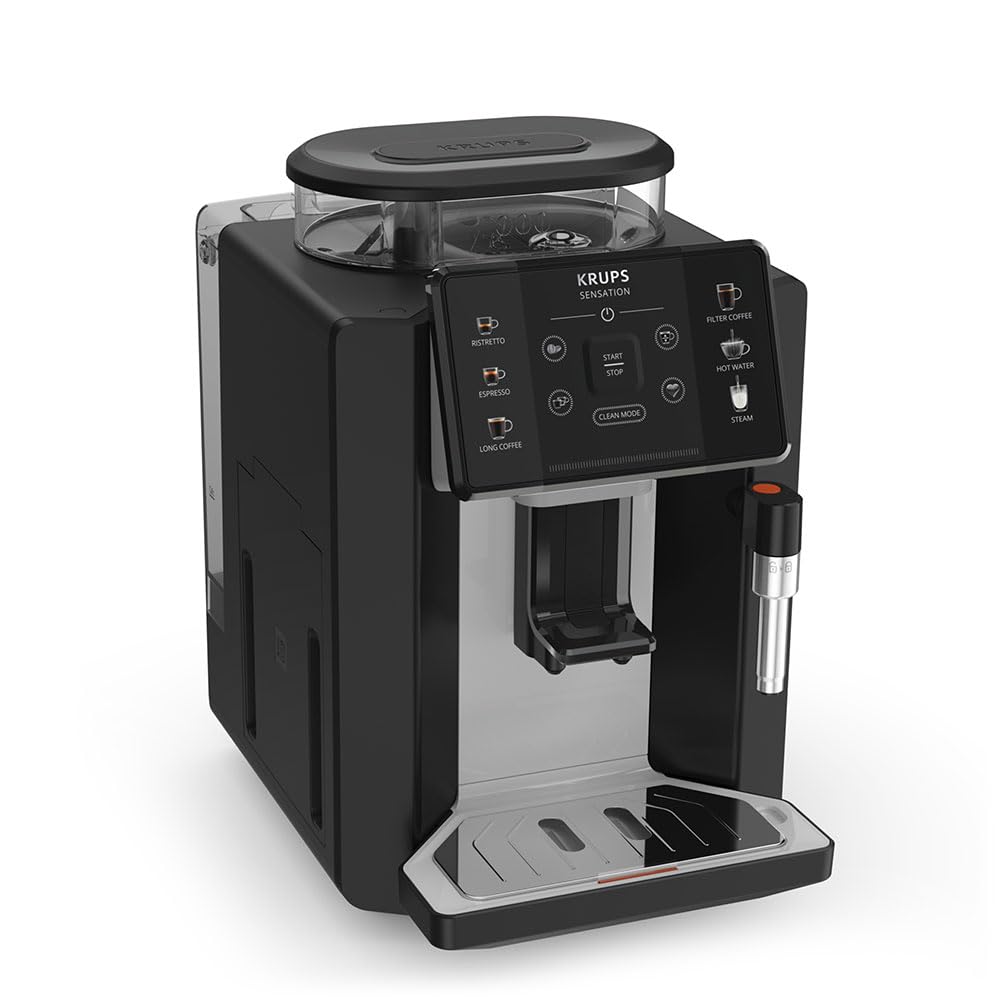
Abbildung: Vorderseite rechts view of the KRUPS Sensation C10 EA910A10 Superautomatic Coffee Machine, showing the bean hopper, control panel, coffee spouts, and drip tray. Two cups of coffee are being dispensed.
- Bohnenbehälter mit Deckel
- Wassertank
- Control Panel (Touchscreen)
- Coffee Spouts (Adjustable)
- Tropfschale mit Gitter
- Behälter für Kaffeesatz
- Steam Nozzle / Hot Water Spout
- Netzkabelanschluss
4. Ersteinrichtung
4.1. Auspacken
- Nehmen Sie die Kaffeemaschine vorsichtig aus der Verpackung.
- Entfernen Sie sämtliches Verpackungsmaterial, einschließlich Schutzfolien und Aufkleber.
- Stellen Sie das Gerät auf eine stabile, ebene und hitzebeständige Oberfläche, fern von Wasserquellen und Hitzequellen.
4.2. Vorbereitung für den ersten Gebrauch
- Spülen Sie den Wassertank aus: Remove the water tank, rinse it thoroughly with fresh water, and fill it to the MAX level. Reinsert the tank securely.
- Füllen Sie den Bohnenbehälter: Open the lid of the bean hopper and fill it with fresh coffee beans. Do not use ground coffee in the bean hopper.
- Stromanschluss: Stecken Sie das Netzkabel in das Gerät und anschließend in eine geerdete Steckdose.
- Erster Spülgang: The machine will prompt you to perform an initial rinse cycle. Follow the instructions on the touchscreen. This primes the system and cleans internal components.
5. Bedienungsanleitung
5.1. Systemsteuerung überview

Image: A hand interacting with the intuitive touchscreen control panel of the KRUPS Sensation C10 EA910A10, highlighting its ease of use.
The KRUPS Sensation C10 EA910A10 features an intuitive touchscreen control panel for easy operation. Key functions include:
- Ristretto: For a very short, concentrated espresso.
- Espresso: For a classic espresso shot.
- Langer Kaffee: For a larger volume of coffee.
- Filterkaffee: For a milder, filter-style coffee.
- Warmes Wasser: Für Tee oder andere Heißgetränke.
- Dampf: Zum Aufschäumen von Milch.
- Start/Stopp: To begin or end a brewing cycle.
- Reinigungsmodus: Initiates cleaning cycles.
- Coffee Strength/Volume Adjustment: Icons to customize your drink.
5.2. Kaffee kochen
To brew a coffee beverage:
- Stellen Sie sicher, dass der Wassertank gefüllt ist und sich genügend Bohnen im Bohnenbehälter befinden.
- Place a cup under the coffee spouts. Adjust the spout height if necessary.
- Select your desired coffee type (e.g., Espresso, Long Coffee) from the touchscreen.
- Adjust coffee strength and volume using the on-screen options if desired.
- Press the "Start" button to begin brewing.
- Die Maschine mahlt die Bohnen, brüht den Kaffee und füllt ihn in Ihre Tasse.
- The machine will automatically stop when the brewing is complete.

Image: A selection of coffee beverages, including espresso, long coffee, and a milk-based drink, demonstrating the versatility of the KRUPS Sensation C10 EA910A10.
5.3. Heißwasserfunktion
- Stellen Sie eine Tasse unter den Heißwasserauslauf.
- Select the "Hot Water" option on the touchscreen.
- Press "Start" to dispense hot water. Press "Stop" to cease dispensing.
5.4. Steam Function (for milk frothing)
- Füllen Sie einen Krug mit kalter Milch.
- Positionieren Sie die Dampfdüse in der Milch.
- Select the "Steam" option on the touchscreen.
- Press "Start" to activate the steam. Move the pitcher up and down to froth the milk.
- Press "Stop" when desired froth is achieved.
- Wichtig: Clean the steam nozzle immediately after use to prevent milk residue buildup.
6. Wartung und Reinigung
Regelmäßige Reinigung und Wartung gewährleisten optimale Leistung und Langlebigkeit Ihrer Kaffeemaschine.
6.1. Tägliche Reinigung
- Abtropfschale und Behälter für Kaffeesatz: Leeren und spülen Sie die Tropfschale und den Kaffeesatzbehälter täglich oder wenn Sie von der Maschine dazu aufgefordert werden.
- Kaffeeausläufe: Wischen Sie die Kaffeeausläufe mitamp Tuch.
- Wassertank: Spülen Sie den Wassertank täglich mit frischem Wasser aus.
6.2. Entkalken
The machine will indicate when descaling is required. Follow the on-screen instructions and use a KRUPS-approved descaling solution.

Image: A hand inserting a cleaning tablet into the designated slot of the KRUPS Sensation C10 EA910A10, illustrating the ease of the cleaning process.
6.3. Austausch des Wasserfilters
If your machine uses a water filter, replace it every 2-3 months or as indicated by the machine to ensure optimal water quality and prevent limescale buildup.
7. Fehlerbehebung
In der folgenden Tabelle finden Sie häufig auftretende Probleme und deren Lösungen.
| Problem | Mögliche Ursache/Lösung |
|---|---|
| Maschine lässt sich nicht einschalten. | Prüfen Sie, ob das Netzkabel fest mit dem Gerät und der Steckdose verbunden ist. Stellen Sie sicher, dass die Steckdose funktioniert. |
| Es wird kein Kaffee ausgeschenkt. | Water tank empty: Fill the water tank. Bean hopper empty: Fill with coffee beans. Coffee grounds container full: Empty and clean. Descaling required: Perform descaling cycle. |
| Kaffee ist zu schwach. | Adjust coffee strength settings on the control panel. Check if the bean hopper is sufficiently filled. Ensure fresh beans are used. |
| Wasser tritt aus der Maschine aus. | Check if the water tank is correctly inserted. Ensure the drip tray is properly positioned. If leakage persists, contact customer support. |
| "Clean Mode" alert persists. | Perform the indicated cleaning cycle (e.g., descaling, rinsing). Ensure all removable parts are clean and correctly reinserted. |
| Steam nozzle not frothing milk effectively. | Clean the steam nozzle thoroughly after each use to prevent blockages. Ensure cold milk is used. |
| Grinder is unusually loud or not grinding. | Check for foreign objects in the bean hopper. Ensure the bean hopper is not empty. Contact customer support if the issue persists. |
8. Technische Daten
| Besonderheit | Spezifikation |
|---|---|
| Modellnummer | EA910A10 |
| Marke | KRUPS |
| Bandtage | 145 Volt |
| Leistung | 1450 Watt |
| Material | Stahl |
| Produktgewicht | 7.5 kg |
| Schnittstelle | Touch-Screen |

Image: The KRUPS Sensation C10 EA910A10 coffee machine with indicated dimensions: 24 cm width, 34.6 cm depth, and 36.4 cm height.
9. Garantieinformationen
Your KRUPS Sensation C10 EA910A10 Superautomatic Coffee Machine is covered by a manufacturer's warranty. Please refer to the warranty card included in your product packaging for specific terms, conditions, and duration. Keep your proof of purchase for warranty claims.
10. Kundendienst
For further assistance, technical support, or spare parts, please contact KRUPS customer service. Contact details can typically be found on the KRUPS official webauf der Website oder in der mit Ihrem Gerät gelieferten Garantiedokumentation.