
1. Wichtige Sicherheitshinweise
Please read all instructions carefully before using the EVTSCAN Projection Clock. Keep this manual for future reference.
- Setzen Sie das Gerät keinen extremen Temperaturen, direkter Sonneneinstrahlung oder hoher Luftfeuchtigkeit aus.
- Vermeiden Sie es, die Uhr fallen zu lassen oder starken Stößen auszusetzen.
- Versuchen Sie nicht, das Gerät selbst zu zerlegen oder zu reparieren. Wenden Sie sich an qualifiziertes Servicepersonal.
- Use only the specified power adapter (DC 5.0V, 1.2A) or appropriate batteries (2xAAA, not included).
- Außerhalb der Reichweite von Kindern aufbewahren.
2. Produktüberschreitungview
The EVTSCAN Projection Clock is a versatile digital alarm clock featuring a 3-inch backlit LCD screen that displays time, date, day of the week, temperature, and humidity. It includes a projection function to display time and temperature on a wall or ceiling, dual alarms with snooze, and a USB port for charging mobile phones.
Hauptmerkmale:
- 12/24-hour time format display.
- Date and day of the week display (7 languages for week).
- Temperature detection (-9℃ to +50℃) and humidity detection (20% to 95%).
- Projection function with 180-degree rotation for time and temperature.
- Dual alarm clocks with slowly increasing Volumen.
- 5-Minuten-Schlummerfunktion.
- USB charging port for mobile devices.
- Adjustable backlight with 4 levels (high, medium, low, off).

Abbildung 2.1: Front view of the EVTSCAN Projection Clock, showing the LCD display and projection lens.
3. Packungsinhalt
Bitte überprüfen Sie beim Auspacken, ob alle unten aufgeführten Artikel vorhanden und in gutem Zustand sind:
- 1 x EVTSCAN Projection Clock
- 1 x USB-Kabel
- 1 x englisches Benutzerhandbuch
Note: 2xAAA batteries are required for battery power and are not included in the package.
4. Einrichtung
4.1 Einschalten des Geräts
The EVTSCAN Projection Clock can be powered by either AAA batteries or via the included USB cable.
4.1.1 Einlegen der Batterie
- Suchen Sie den Batteriefachdeckel auf der Rückseite der Uhr.
- Slide open the cover.
- Legen Sie zwei (2) AAA-Batterien ein und achten Sie dabei auf die richtige Polarität (+/-).
- Schließen Sie den Batteriefachdeckel fest.
Note: When powered by batteries, the backlight will only light up for 8 seconds when activated to conserve power. The projection lamp will also light up for 8 seconds.
4.1.2 USB-Stromanschluss
- Connect the small end of the provided USB cable to the DC 5.0V 1.2A input port on the back of the clock.
- Verbinden Sie das größere Ende des USB-Kabels mit einem kompatiblen USB-Netzteil (nicht im Lieferumfang enthalten) oder einem USB-Anschluss mit Stromversorgung.
Note: When powered by USB, the backlight and projection lamp can remain continuously on, with adjustable brightness for the backlight.
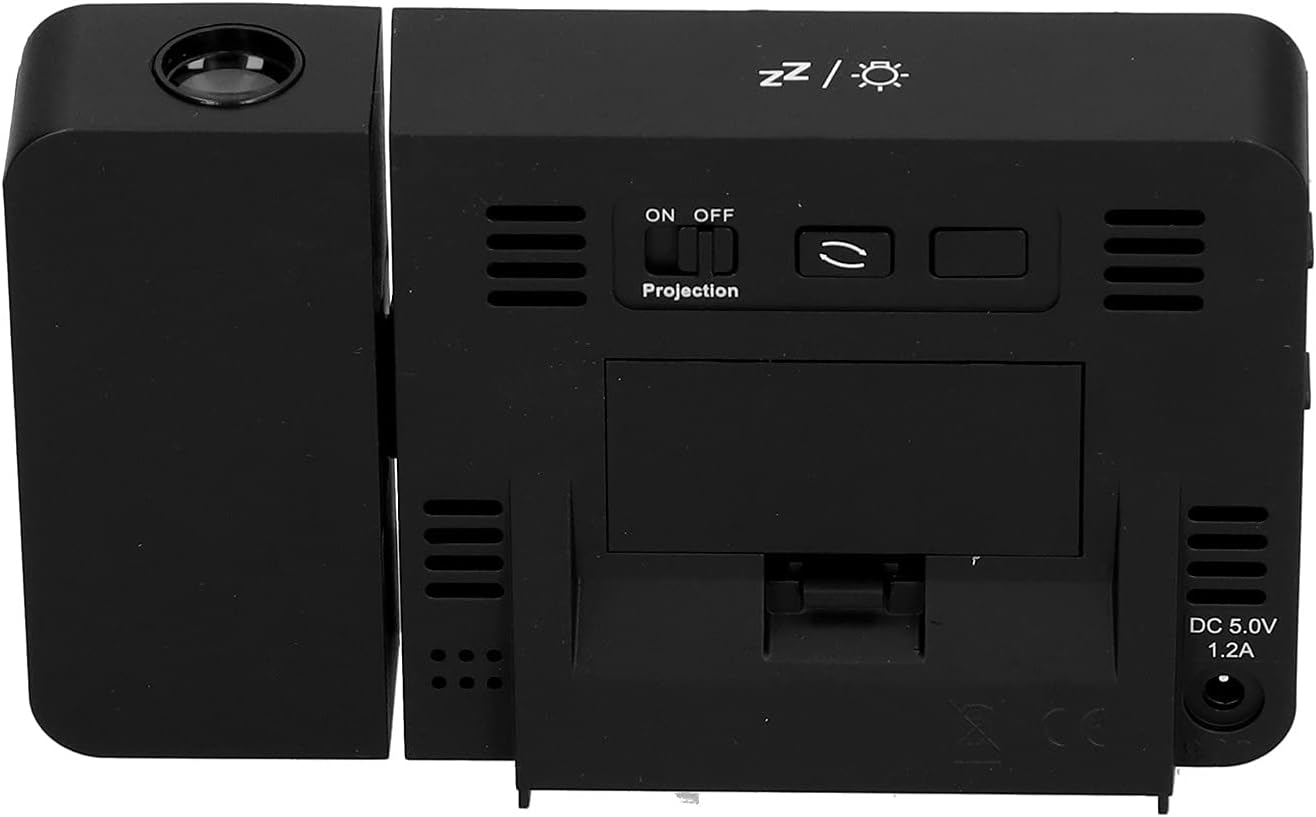
Abbildung 4.1: Hinteren view of the clock, indicating the battery compartment and DC 5.0V 1.2A power input.
5. Bedienungsanleitung
5.1 Tastenfunktionen
Familiarize yourself with the control buttons located on the front and sides of the clock:
- ZEIT: Wechselt in den Zeiteinstellungsmodus.
- ALARM: Wechselt in den Alarmeinstellungsmodus.
- +: Increases values, switches 12/24HR format, adjusts backlight.
- -: Decreases values, switches temperature units (℃/℉).
- Projection ON/OFF Switch: Activates or deactivates the projection. (Located on the back/side)
- Alarm 1 ON/OFF Switch: Activates or deactivates Alarm 1. (Located on the side)
- Alarm 2 ON/OFF Switch: Activates or deactivates Alarm 2. (Located on the side)
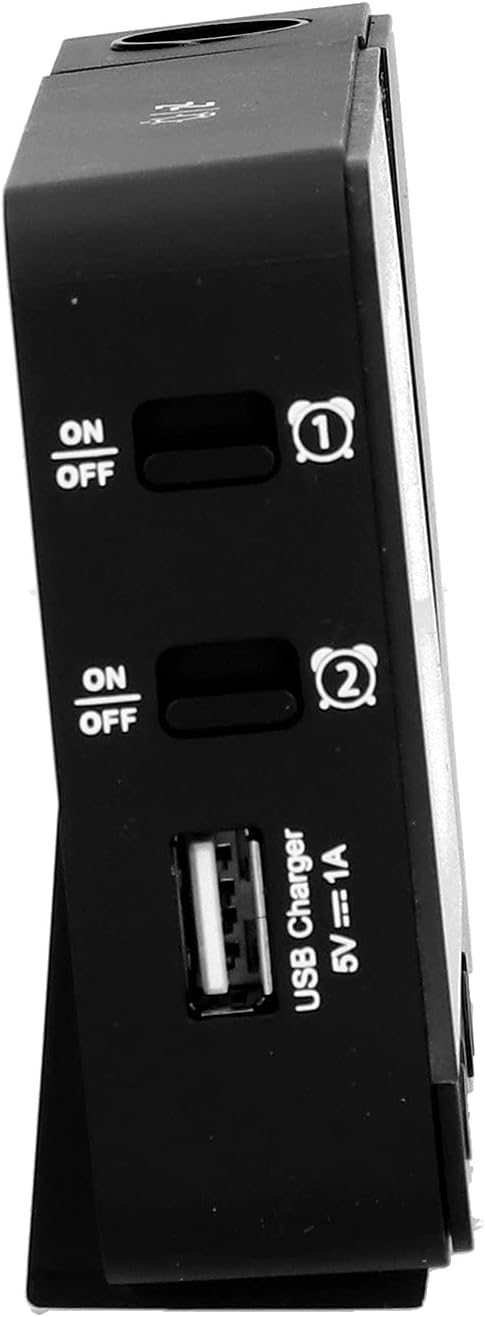
Abbildung 5.1: Seite view showing Alarm 1 and Alarm 2 ON/OFF switches, and the USB charging port.
5.2 Uhrzeit und Datum einstellen
- Halten Sie die ZEIT Drücken Sie diese Taste, um in den Zeiteinstellungsmodus zu gelangen. Die Stundenanzeige blinkt.
- Verwenden Sie die + or - Tasten zum Einstellen der Stunde.
- Drücken ZEIT Um die Stunde erneut zu bestätigen, wechseln Sie zur Minuteneinstellung. Einstellen mit + or -.
- Drücken Sie weiter ZEIT to cycle through setting year, month, and day. Adjust each with + or -.
- Nachdem Sie den Tag eingestellt haben, drücken Sie ZEIT Ein letztes Mal, um den Einstellungsmodus zu verlassen.
- Um zwischen 12-Stunden- und 24-Stunden-Format umzuschalten, drücken Sie die Taste + button during normal time display.
- To switch between Celsius (℃) and Fahrenheit (℉) for temperature, press the - button during normal time display.
5.3 Alarme einstellen
Die Uhr verfügt über zwei unabhängige Wecker (Wecker 1 und Wecker 2).
- Halten Sie die ALARM button to enter Alarm 1 setting mode. The Alarm 1 hour display will flash.
- Verwenden Sie die + or - Tasten, um die Weckstunde einzustellen.
- Drücken ALARM again to confirm the hour and move to Alarm 1 minute setting. Adjust with + or -.
- Drücken ALARM again to move to Alarm 2 hour setting, and repeat the process for Alarm 2.
- Nachdem der Alarm auf 2 Minuten eingestellt wurde, drücken Sie ALARM Ein letztes Mal, um den Einstellungsmodus zu verlassen.
- To activate or deactivate an alarm, use the corresponding Alarm 1 EIN/AUS or Alarm 2 EIN/AUS switch on the side of the clock. An alarm icon will appear on the display when active.
5.3.1 Schlummerfunktion
When an alarm sounds, press any button (except the alarm ON/OFF switch) to activate the 5-minute snooze function. The alarm will sound again after 5 minutes. To turn off the alarm completely, slide the corresponding alarm ON/OFF switch to OFF.
5.4 Projektionsfunktion
The clock can project the time and temperature onto a wall or ceiling.
- Suchen Sie die Projektion EIN/AUS switch on the back of the clock. Slide it to ON to activate the projection.
- Adjust the angle of the projection arm (the part with the lens) to direct the projection as desired. The arm can rotate nearly 180 degrees.
- The projection will display the current time and temperature in a soft red color.

Abbildung 5.2: Seite view showing the projection arm extended and ready for use.

Abbildung 5.3: The clock projecting time and temperature onto a wall in a bedroom setting.
5.5 Einstellung der Hintergrundbeleuchtung
When the clock is powered by USB, the backlight can be adjusted to four levels: high, medium, low, or off. Repeatedly press the + button during normal time display to cycle through the brightness levels.
When powered by batteries, the backlight will illuminate for 8 seconds when any button is pressed, then turn off to conserve power.
5.6 USB-Ladeanschluss
The clock features a USB charging port (5V=1A) on its side. You can use this port to charge your mobile phone or other small electronic devices while the clock is connected to USB power.
Note: The USB charging port only functions when the clock is powered via the USB cable. It does not work when the clock is running on battery power.
6. Wartung
6.1 Reinigung
- Wischen Sie die Oberfläche der Uhr mit einem weichen, trockenen Tuch ab.
- Verwenden Sie keine Scheuermittel, Lösungsmittel oder chemische Sprays, da diese die Oberfläche oder die elektronischen Bauteile beschädigen können.
- Keep the projection lens clean for clear projection. Use a soft, lint-free cloth.
6.2 Batteriewechsel
When the display becomes dim or the clock functions erratically while on battery power, it's time to replace the AAA batteries. Refer to Section 4.1.1 for battery installation instructions. Always replace both batteries at the same time with new ones.
7. Fehlerbehebung
| Problem | Mögliche Ursache | Lösung |
|---|---|---|
| Die Uhranzeige ist leer oder schwach. | No power, low batteries, or USB cable not connected. | Check battery installation and replace if necessary. Ensure USB cable is securely connected to a power source. |
| Projection is unclear or not visible. | Projection switch is OFF, lens is dirty, or projection distance is too far/close. | Ensure Projection switch is ON. Clean the projection lens. Adjust the clock's distance from the projection surface. |
| Der Alarm ertönt nicht. | Der Alarm ist nicht eingestellt oder deaktiviert. | Verify alarm time is set correctly. Ensure the corresponding Alarm ON/OFF switch is in the ON position. |
| Der USB-Ladeanschluss funktioniert nicht. | Clock is running on battery power, or USB cable is not connected to a power source. | Ensure the clock is powered via the USB cable and connected to a functional power adapter. |
| Falsche Uhrzeit/falsches Datum. | Datum/Uhrzeit nicht korrekt eingestellt. | Refer to Section 5.2 to reset the time and date. |
8. Spezifikationen
| Modell: | B0CLGDFCGX |
| Marke: | EVTSCAN |
| Material: | ABS (Acrylnitril-Butadien-Styrol) |
| Produktabmessungen: | Ca. 13.5 x 8 x 2.5 cm (5.3 x 3.1 x 1.0 Zoll) |
| Gewicht: | Ca. 242 g |
| Anzeigetyp: | Digitales LCD-Display mit Hintergrundbeleuchtung |
| Energiequelle: | 2xAAA batteries (not included) or DC 5.0V 1.2A via USB cable |
| USB-Ladeausgang: | 5 V = 1 A |
| Temperaturerfassungsbereich: | -9℃ to +50℃ (1℃ resolution) |
| Feuchtigkeitserkennungsbereich: | 20% to 95% (1% resolution) |
| Temperature/Humidity Calibration Time: | 30 Sekunden |
| Hintergrundbeleuchtungsstufen: | 4 levels (High, Medium, Low, Off) when USB powered; 8s illumination when battery powered. |
| Projektion Lamp: | Always on when USB powered; 8s illumination when battery powered. |

Abbildung 8.1: Produktabmessungen: 5.3 Zoll breit x 3.1 Zoll hoch.
9. Garantie und Support
EVTSCAN products are manufactured to high quality standards. For specific warranty information, please refer to the warranty card included with your purchase or contact your retailer.
If you encounter any issues or have questions regarding your EVTSCAN Projection Clock, please contact the seller or EVTSCAN customer support for assistance. Please have your model number (B0CLGDFCGX) ready when contacting support.
Weitere Unterstützung finden Sie unter EVTSCAN Store on Amazon.