
1. Einleitung
Vielen Dank für Ihren Einkauf.asing the JVC XS-N1123PB Party Bluetooth Speaker. This manual provides essential information for the safe and efficient operation of your speaker. Please read it thoroughly before use and retain it for future reference.
2. Sicherheitshinweise
- Setzen Sie den Lautsprecher keinen extremen Temperaturen, direkter Sonneneinstrahlung oder hoher Luftfeuchtigkeit aus.
- Vermeiden Sie, den Lautsprecher fallen zu lassen oder starken Stößen auszusetzen.
- Zerlegen Sie den Lautsprecher nicht und versuchen Sie nicht, ihn selbst zu reparieren. Überlassen Sie alle Wartungsarbeiten qualifiziertem Fachpersonal.
- Um Stromschläge oder Beschädigungen zu vermeiden, halten Sie den Lautsprecher von Wasser und anderen Flüssigkeiten fern.
- Verwenden Sie nur die angegebene Ladespannung.tage (5 Volts) and compatible charger.
3. Packungsinhalt
Überprüfen Sie, ob alle Artikel im Paket vorhanden sind:
- JVC XS-N1123PB Party Bluetooth Speaker
- USB-Ladekabel
- Bedienungsanleitung
4. Produktüberschreitungview
4.1-Vorderseite View

The front of the speaker features the main speaker grille with integrated RGB lighting, displaying various color patterns.
4.2 Seite View

Die Seite view shows the compact and portable design of the speaker, suitable for easy transport.
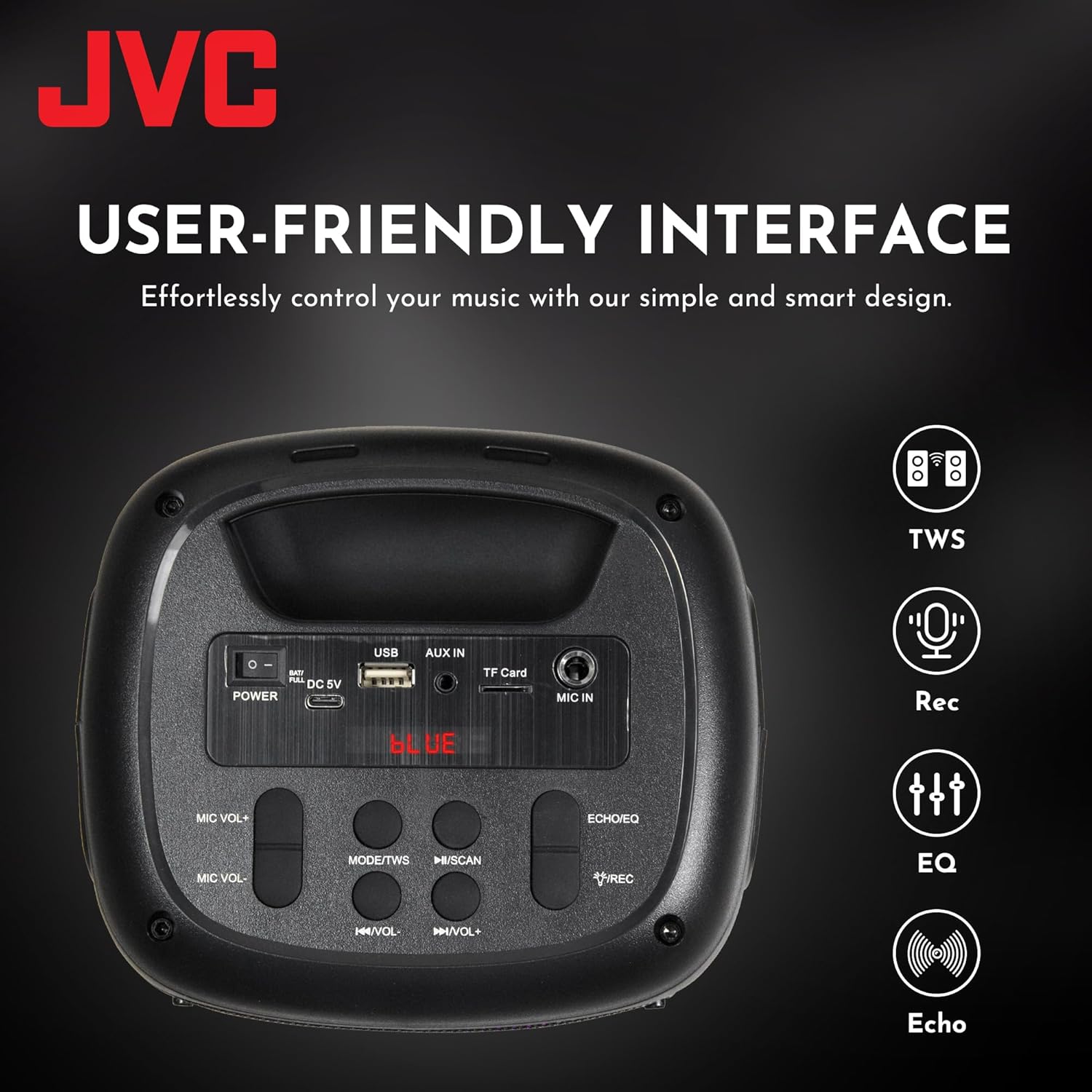
4.3 Bedienelemente und Anschlüsse auf der Oberseite

This image displays the top control panel, including buttons for power, mode selection, volume, track control, and recording. It also shows the USB, AUX IN, TF Card, and MIC IN ports.
4.4 Rückseite View

Das Heck view of the speaker, highlighting its robust enclosure and design.
5. Einrichtung
5.1 Aufladen des Lautsprechers
Laden Sie den Lautsprecher vor der ersten Benutzung vollständig auf. Verbinden Sie das mitgelieferte USB-Ladekabel mit dem 5-V-DC-Anschluss des Lautsprechers und das andere Ende mit einem USB-Netzteil (nicht im Lieferumfang enthalten) oder einem USB-Anschluss Ihres Computers.
- Die Ladeanzeigeleuchte leuchtet während des Ladevorgangs.
- The light will turn off or change color when charging is complete.
The speaker features a 1500 mAh dual battery system for extended playback.
5.2 Ein-/Ausschalten
To power on the speaker, press and hold the Power button located on the top panel. To power off, press and hold the Power button again.
5.3 Bluetooth-Kopplung
- Schalten Sie den Lautsprecher ein. Er wechselt automatisch in den Bluetooth-Kopplungsmodus, was durch eine blinkende LED-Leuchte angezeigt wird.
- Aktivieren Sie Bluetooth auf Ihrem Mobilgerät (Smartphone, Tablet usw.).
- Suchen nach available Bluetooth devices and select "JVC XS-N1123PB" from the list.
- Nach erfolgreicher Kopplung gibt der Lautsprecher einen Bestätigungston von sich und die LED-Leuchte hört auf zu blinken.
5.4 True Wireless Stereo (TWS) Kopplung
TWS allows you to connect two JVC XS-N1123PB speakers for a stereo sound experience.

Pair two speakers wirelessly for a dynamic stereo sound experience.
- Stellen Sie sicher, dass beide Lautsprecher eingeschaltet und nicht mit anderen Bluetooth-Geräten verbunden sind.
- On one speaker (this will be the primary speaker), press and hold the TWS button (if available, or a designated pairing button) until you hear a pairing tone.
- Die beiden Lautsprecher verbinden sich automatisch miteinander. Nach erfolgreicher TWS-Kopplung ertönt ein Bestätigungston.
- Verbinden Sie nun Ihr Mobilgerät über Bluetooth mit dem Hauptlautsprecher, wie in Abschnitt 5.3 beschrieben. Beide Lautsprecher geben den Ton in Stereo wieder.
6. Bedienungsanleitung
6.1 Modusauswahl
Press the 'MODE' button on the top panel to switch between different input modes: Bluetooth, USB, TF Card, AUX, and FM Radio.
6.2 Audiowiedergabe
- Bluetooth-Modus: Nach erfolgreicher Kopplung können Sie Audio von Ihrem verbundenen Gerät abspielen.
- USB/TF-Kartenmodus: Stecken Sie einen USB-Stick oder eine TF-Karte in den entsprechenden Anschluss. Der Lautsprecher erkennt dies automatisch und gibt die Audioausgabe wieder. files.
- AUX-Modus: Connect an external audio device using a 3.5mm audio cable to the AUX IN port.
- UKW-Radiomodus: In FM mode, press the Play/Pause button to auto-scan and save available radio stations. Use the Previous/Next buttons to navigate between saved stations.
6.3 Lautstärkeregelung
Use the 'VOL-' and 'VOL+' buttons on the top panel to decrease or increase the volume.
6.4 Track Control
- Press the 'Previous Track' button to go to the beginning of the current track or the previous track.
- Press the 'Next Track' button to skip to the next track.
- Press the 'Play/Pause' button to play or pause audio.
6.5 Lichtshow-Steuerung
The speaker features built-in RGB lights. Specific controls for the light show (e.g., changing patterns, turning on/off) may be integrated with the 'MODE' button or a dedicated light button if available. Refer to the quick start guide for specific light control functions.
6.6 Microphone and Guitar Input (Karaoke Function)

Connect a microphone or guitar to the respective input ports for karaoke or live performance. Adjust microphone volume using the MIC VOL+/- buttons.
7. Wartung
7.1 Reinigung
Wipe the speaker with a soft, dry cloth. Do not use abrasive cleaners, waxes, or solvents as they may damage the finish.
7.2 Speicherung
When not in use for extended periods, store the speaker in a cool, dry place, away from direct sunlight and extreme temperatures. It is recommended to charge the battery periodically to maintain its lifespan.
8. Fehlerbehebung
| Problem | Mögliche Ursache | Lösung |
|---|---|---|
| Der Lautsprecher lässt sich nicht einschalten | Niedriger Batteriestand; Ein-/Ausschalter nicht richtig gedrückt | Laden Sie den Lautsprecher auf; Halten Sie die Ein-/Aus-Taste einige Sekunden lang gedrückt. |
| Kein Ton | Lautstärke zu niedrig; Falscher Eingangsmodus; Gerät nicht angeschlossen | Increase volume; Select correct input mode; Reconnect Bluetooth device or AUX cable |
| Die Bluetooth-Kopplung schlägt fehl | Lautsprecher nicht im Kopplungsmodus; Gerät zu weit entfernt; Störungen | Stellen Sie sicher, dass sich der Lautsprecher im Kopplungsmodus befindet; Bringen Sie das Gerät näher heran; Schalten Sie andere Bluetooth-Geräte aus |
| TWS-Pairing schlägt fehl | Die Lautsprecher stehen zu weit auseinander; ein Lautsprecher ist bereits mit einem Gerät verbunden | Ensure speakers are within range; Disconnect any Bluetooth devices from both speakers before TWS pairing |
| Der FM-Radioempfang ist schlecht. | Schwaches Signal; Störungen | Relocate the speaker; Extend the antenna (if applicable) |
9. Spezifikationen
| Besonderheit | Spezifikation |
|---|---|
| Modellnummer | XS-N1123PB (AP-W113Y) |
| Ausgangsleistung | 15W RMS (40 Watts Peak) |
| Lautsprechergröße | 4 Zoll |
| Konnektivität | Bluetooth, USB, TF-Karte, AUX-Eingang, FM-Radio |
| Audioausgabemodus | Stereo |
| Eingangslautstärketage | 5 Volt |
| Batterie | 1 Lithium-Ionen-Akku (im Lieferumfang enthalten) |
| Material | Plastik |
| Abmessungen (T x B x H) | 15.7 cm (T) x 13.3 cm (B) x 21.8 cm (H) |
| Besondere Merkmale | Bass Boost, RGB Light Show, TWS Function, Microphone Input |
| Ursprungsland | China |

Product dimensions for the JVC XS-N1123PB speaker.
10. Garantie und Support
10.1 Garantieinformationen
This JVC XS-N1123PB Party Bluetooth Speaker comes with a 1 Jahr Garantie Ab Kaufdatum. Bitte bewahren Sie Ihren Kaufbeleg für Garantieansprüche auf. Die Garantie deckt Herstellungsfehler ab, jedoch keine Schäden durch unsachgemäße Verwendung, Unfälle, nicht autorisierte Änderungen oder normale Abnutzung.
10.2 Kundendienst
For technical assistance, warranty claims, or further information, please contact JVC customer support through their official website or the retailer where the product was purchased. Please have your model number (XS-N1123PB) and proof of purchase ready when contacting support.