
1. Einleitung
The Tramex Moisture Encounter MEX5 is a versatile, digital, non-destructive moisture meter designed for accurate moisture content assessment in a wide range of building materials and wood. It features dual-depth penetration, a built-in hygrometer for ambient conditions, an infrared surface thermometer, and compatibility with external in-situ RH and pin probes. This instrument is an essential tool for professionals in wood, wood flooring, building moisture inspection, and water damage restoration industries.
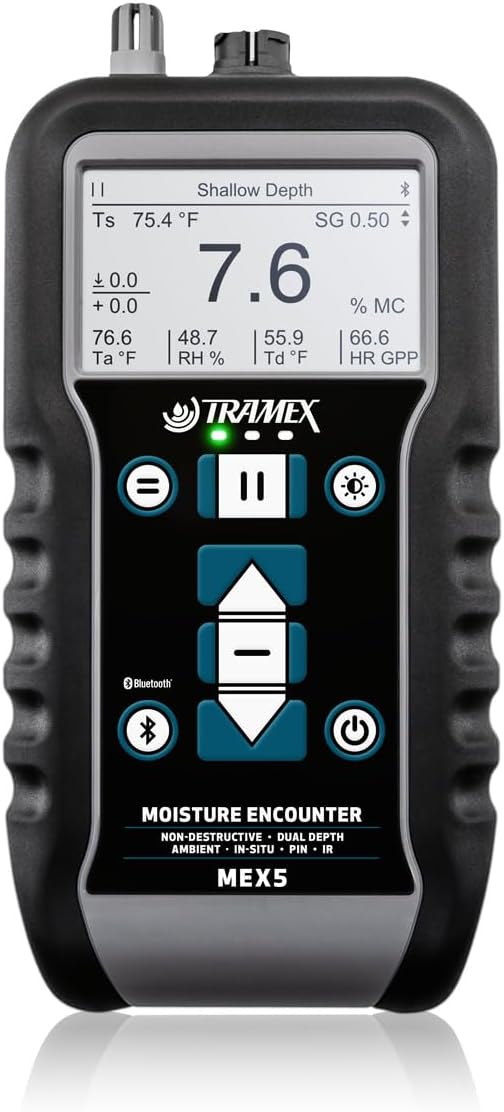
Image 1.1: The Tramex Moisture Encounter MEX5 device, showing its digital display and control buttons.
2. Hauptmerkmale
- Rugged Ergonomic Design: Built for durability and comfortable handling.
- Dual-Depth Penetration: Allows for comparative analysis of surface and core moisture, minimizing substrate influence on readings.
- Shallow Depth Scale: Provides field penetration up to 0.4 inches (9mm).
- Five Non-Destructive Sensitivity Ranges: Dedicated settings for Wood & Timber, Shallow Depth, Drywall & Roofing, Plaster & Tile, and Masonry.
- Optional Probes: Supports external pin and relative humidity (RH) probes for expanded measurement capabilities.
- Integriertes Hygrometer: Measures ambient conditions and psychrometric values.
- Infrared Surface Thermometer: Provides surface temperature readings.
- Advanced Wood Measurement: Features 500+ wood species selection, Specific Gravity (SG) adjustment, and automatic temperature correction for precise wood %MC.
- Bluetooth-Konnektivität: Connects to the Tramex Meters App for data visualization, geotagging, reporting, and charting.

Image 2.1: Visual representation of the Tramex MEX5's key benefits, including dual-depth measuring range, multi-material application, and an easy-to-read digital display.
3. Einrichtung
3.1 Einlegen der Batterie
- Suchen Sie das Batteriefach auf der Rückseite des Geräts.
- Öffnen Sie die Fachabdeckung.
- Insert the required batteries, ensuring correct polarity. The MEX5 requires batteries for operation.
- Schließen Sie den Batteriefachdeckel fest.
3.2 Erstes Einschalten
Halten Sie die Einschalttaste (U) until the display illuminates. The device will perform a self-check and then display the default measurement screen.
3.3 App-Verbindung (Bluetooth)
- Download the Tramex Meters App from your device's app store (available for iOS and Android).
- Stellen Sie sicher, dass Bluetooth auf Ihrem Mobilgerät aktiviert ist.
- Open the Tramex Meters App and follow the on-screen instructions to pair with your MEX5 device. The MEX5 has a dedicated Bluetooth button for activation.
- Einmal verbunden, können Sie view, log, and generate reports of your moisture readings.
4. Bedienungsanleitung
4.1 Non-Destructive Measurement
The MEX5 offers non-destructive testing across five material ranges:
- Wood & Timber: For various wood types.
- Shallow Depth: For surface-level moisture detection up to 0.4 inches (9mm).
- Drywall & Roofing: Optimized for these materials.
- Plaster & Tile: For plaster and ceramic tile surfaces.
- Mauerwerk: For concrete, brick, and other masonry materials.
- Select the appropriate material range using the device's navigation buttons.
- Place the base of the MEX5 firmly against the surface of the material to be tested.
- Read the moisture measurement directly from the digital display.
- For dual-depth analysis, compare readings from the standard depth and shallow depth modes.

Image 4.1: A three-step guide illustrating the operation of the Tramex MEX5: placing the device on the material, instantly reading the measurement on the screen, and syncing data to the Tramex Meters App for detailed reporting.
4.2 Using Optional Pin and RH Probes
The MEX5 supports external probes for specific applications:
- Pin Probes: Connect a pin probe to the designated port for direct moisture content measurement in wood, drywall, and WME (Wood Moisture Equivalent) readings. Insert the pins into the material.
- In-situ RH Probes: Connect an in-situ RH probe for equilibrium relative humidity readings within concrete or other materials. Follow the probe's specific instructions for installation.

Image 4.2: Demonstrates the multi-test capability of the Tramex MEX5, showing the device in use with pin-type probes for wood and drywall, as well as its pinless non-destructive function. Accessories are sold separately.
4.3 Hygrometer and IR Thermometer Functions
- Hygrometer: The built-in hygrometer continuously monitors ambient temperature, relative humidity, and calculates psychrometric values. These readings are displayed on the screen.
- Infrared Surface Thermometer: Point the IR sensor towards the desired surface to obtain its temperature. This can be used to calculate dew point and other related values.
4.4 Wood Species and Temperature Correction
For accurate wood moisture content measurements:
- Wood Species Selection: Navigate through the menu to select the specific wood species being tested from over 500 options.
- Specific Gravity (SG) Adjustment: Adjust the Specific Gravity setting if known for the wood type to further refine accuracy.
- Automatic Temperature Correction: The device automatically corrects for temperature variations to ensure precise %MC readings.
4.5 App Integration and Reporting
The Tramex Meters App enhances the functionality of the MEX5:
- Datenvisualisierung: View real-time readings and historical data.
- Geotaging: Automatisch tag measurement locations.
- Moisture Mapping: Create visual moisture maps of tested areas.
- Berichterstattung: Generate detailed reports and charts for sharing.

Image 4.3: Illustrates the Tramex MEX5's app integration, showing how geo-tagged and time-stamped moisture mapping data can be viewed and shared through the iOS and Android application.

Image 4.4: Shows various applications for the Tramex MEX5 in moisture detection, including wood, flooring inspection, drywall, and water damage restoration, highlighting its versatility across different industries.
5. Wartung
5.1 Reinigung
Reinigen Sie das Gerät mit einem weichen, trockenen Tuch. Verwenden Sie keine Scheuermittel oder Lösungsmittel, da diese das Gerät beschädigen können.asing or display. Ensure the sensor areas are free from dust and debris.
5.2 Speicherung
Store the MEX5 in its protective pouch in a cool, dry place when not in use. Avoid extreme temperatures and direct sunlight. Remove batteries if storing for extended periods to prevent leakage.
5.3 Batteriewechsel
When the battery indicator shows low power, replace the batteries as described in Section 3.1. Use only the recommended battery type.
5.4 Kalibrierung
The Tramex MEX5 is supplied with a calibration certificate. Regular calibration checks are recommended to ensure continued accuracy. Refer to Tramex support for information on calibration services.
6. Fehlerbehebung
- Gerät lässt sich nicht einschalten: Überprüfen Sie den Batterieeinbau und stellen Sie sicher, dass die Batterien geladen oder ausgetauscht sind.
- Ungenaue Messwerte: Ensure the correct material range is selected. Verify proper contact with the surface. Check for environmental factors affecting readings. Consider recalibration if issues persist.
- Probleme mit der Bluetooth-Konnektivität: Ensure Bluetooth is enabled on both the MEX5 and your mobile device. Restart both devices. Check the Tramex Meters App for updates.
- Anzeige funktioniert nicht: Check battery level. If the issue persists after battery replacement, contact support.
7. Spezifikationen
| Spezifikation | Wert |
|---|---|
| Hersteller | Tramex |
| Teilenummer | MEX5 |
| Artikelgewicht | 10.2 Unzen |
| Verpackungsabmessungen | 10 x 7 x 4 Zoll |
| Artikelmodellnummer | MEX5 |
| Stromquelle | Batteriebetrieben |
| Artikelpaket Menge | 1 |
| Im Lieferumfang enthaltene Komponenten | Instrument, Batteries, Pouch, Quick User Guide, Calibration Certificate |
| Batterien erforderlich? | Ja |
| Datum der ersten Verfügbarkeit | 20. Oktober 2023 |
8. Garantie und Support
8.1 Garantieinformationen
For detailed warranty information regarding your Tramex Moisture Encounter MEX5, please refer to the documentation included with your product or visit the official Tramex webDie Garantiebedingungen decken in der Regel Herstellungsfehler für einen bestimmten Zeitraum ab Kaufdatum ab.
8.2 Technischer Support
If you encounter any issues or require technical assistance with your Tramex MEX5, please contact Tramex customer support. Contact details can usually be found on the Tramex website or in the quick user guide provided with the instrument.