
Einführung
The M-Vave Cube Baby Bass is a portable and user-friendly multi-effects processor designed for bass guitarists. It offers a range of classic amplifier emulations and essential effects to enhance your bass sound. This manual provides instructions for setting up, operating, and maintaining your Cube Baby Bass pedal.
Hauptmerkmale
- 8 Klassiker amplifier emulations
- 5 essential effects: Chorus, Vibrato, Compressor, Delay, and Reverb
- Support for third-party Impulse Responses (IRs)
- Built-in precise tuner
- Integrated rechargeable battery for portable use
- USB charging via power bank or mobile phone adapter
- Kompaktes und robustes Design
Packungsinhalt
Bitte überprüfen Sie, ob alle Artikel im Paket vorhanden sind:
- M-Vave Cube Baby Bass Multi-Effects Pedal
- USB-Ladekabel
- Benutzerhandbuch (dieses Dokument)

Image: M-Vave Cube Baby Bass pedal, USB cables, and user manual as included in the package.
Bedienelemente und Anschlüsse
Familiarize yourself with the controls and connection points on your Cube Baby Bass pedal.
Oberes Bedienfeld
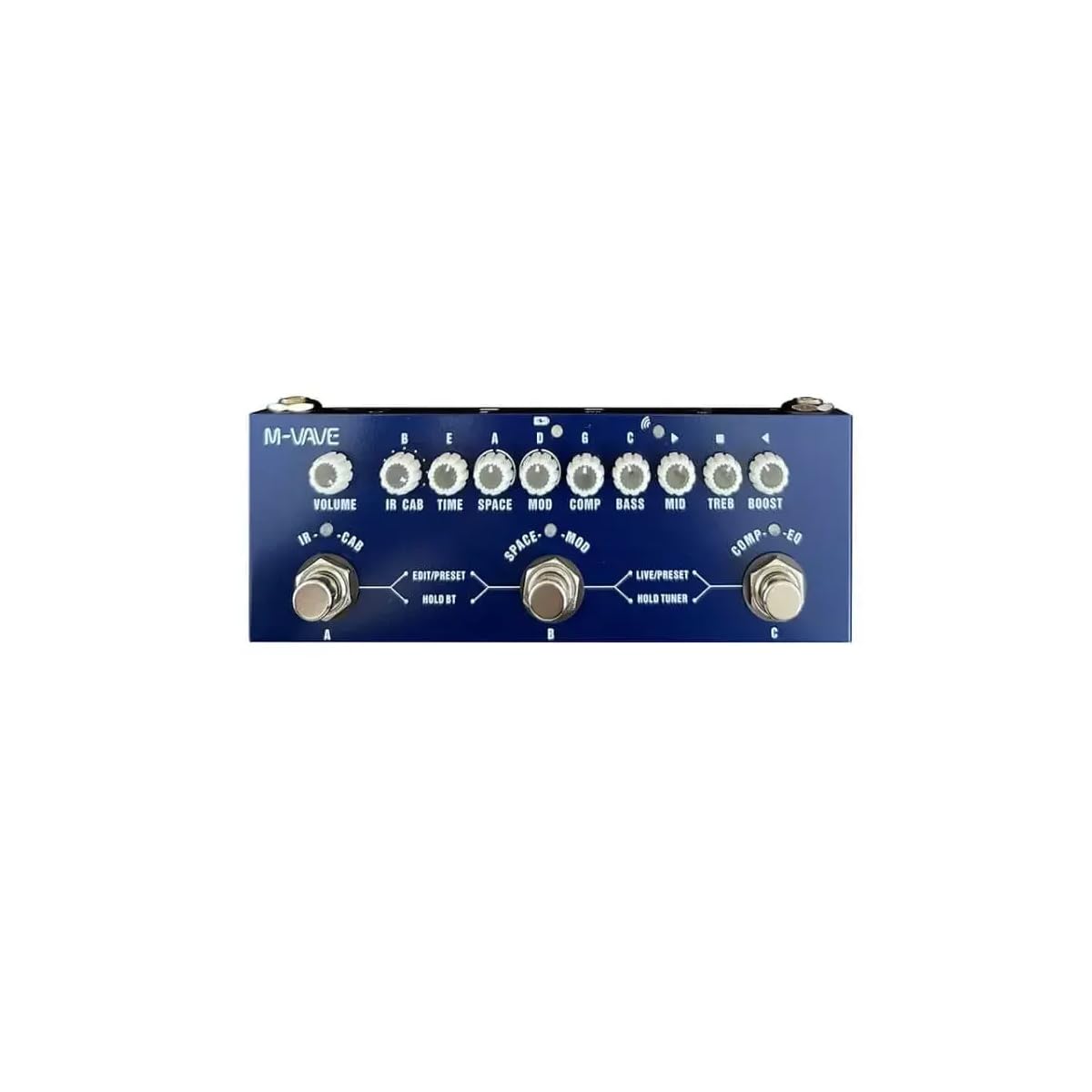
Bild: Oben view of the M-Vave Cube Baby Bass pedal. It features multiple control knobs for various effects and two footswitches for preset selection and tuner activation.
- Lautstärkeregler: Passt die Gesamtausgabelautstärke an.
- CAB Knob: Selects and adjusts cabinet simulations.
- TIME-Knopf: Controls the delay time or other time-based effect parameters.
- SPACE-Knopf: Adjusts reverb parameters.
- MOD-Knopf: Controls modulation effects like Chorus or Vibrato.
- COMP-Knopf: Adjusts the compressor effect.
- BASS-Regler: Adjusts the low-frequency equalization.
- MID-Regler: Adjusts the mid-frequency equalization.
- TREB Knob: Adjusts the high-frequency equalization.
- BOOST-Knopf: Steuert den Boost-Level.
- LEFT Footswitch (PRESET): Toggles between presets or modes.
- RIGHT Footswitch (TUNER/BOOST): Activates the tuner or boost function.
Rückseite

Bild: Rückseite view of the M-Vave Cube Baby Bass pedal. From left to right, it shows the IN (input) jack, a power button, a USB-C port for charging and data, a micro-USB port (likely for OTG/external device), a headphone output, and the OUT (output) jack.
- IN Jack (1/4-inch): Schließen Sie hier Ihre Bassgitarre an.
- Netzschalter: Schaltet das Gerät ein oder aus.
- USB-C-Anschluss: For charging the internal battery and connecting to a computer for IR loading or software updates.
- Micro-USB-Anschluss: (Likely for OTG or specific data functions, refer to software manual for details).
- Headphone Jack (1/8-inch): Schließen Sie Kopfhörer für lautloses Üben an.
- OUT Jack (1/4-inch): Verbinden Sie sich mit Ihrem ampVerstärker, Audio-Interface oder Mischpult.
Aufstellen
- Laden des Akkus: Connect the USB charging cable to the USB-C port on the pedal and to a USB power adapter (not included) or a power bank. The pedal takes approximately 2 hours to fully charge and provides 6-8 hours of operation.
- Anschluss Ihres Instruments: Schließe deine Bassgitarre an den/die/das an IN Anschluss über ein Standard-Instrumentenkabel mit 6,35-mm-Klinkenstecker.
- Herstellen einer Verbindung mit einem AmpVerstärker/Mischer: Verbinden Sie AUS jack to your bass amplifier, audio interface, or mixer using a standard 1/4-inch instrument cable.
- Kopfhöreranschluss: For silent practice, plug your headphones into the Kopfhöreranschluss.
- Einschalten: Press and hold the Power Button to turn on the Cube Baby Bass.
Bedienungsanleitung
Grundlegende Bedienung
- Voreinstellungen auswählen: Verwenden Sie die LEFT Footswitch (PRESET) to cycle through available presets. The LED indicator will show the currently selected preset.
- Anpassungseffekte: Turn the corresponding knobs (VOLUME, CAB, TIME, SPACE, MOD, COMP, BASS, MID, TREB, BOOST) to adjust the parameters of the active effects.
- Verwenden des Tuners: Halten Sie die RIGHT Footswitch (TUNER/BOOST) to activate the built-in tuner. Play a single note on your bass, and the display will indicate the note and tuning accuracy. Press the footswitch again to exit tuner mode.
- Activating Boost: A quick press of the RIGHT Footswitch (TUNER/BOOST) will engage or disengage the boost function, controlled by the BOOST knob.
Advanced Features (IR Loading)
The Cube Baby Bass supports loading third-party Impulse Responses (IRs) to expand its cabinet simulation capabilities.
- Mit Computer verbinden: Use the USB-C cable to connect the pedal to your computer.
- Software: Download and install the dedicated M-Vave software (available from the M-Vave official webSeite? ˅).
- Load IRs: Follow the software instructions to load your desired IR files into the pedal's memory.
Wartung
- Reinigung: Wischen Sie das Pedal mit einem weichen, trockenen Tuch ab. Verwenden Sie keine Scheuermittel oder Lösungsmittel.
- Lagerung: Lagern Sie das Pedal an einem kühlen, trockenen Ort, geschützt vor direkter Sonneneinstrahlung und extremen Temperaturen.
- Batteriepflege: To prolong battery life, avoid fully discharging the battery frequently. Charge the pedal regularly, even if not in use for extended periods.
- Firmware-Updates: Check the M-Vave official webBesuchen Sie die Website regelmäßig, um Firmware-Updates zu erhalten und so eine optimale Leistung und den Zugriff auf neue Funktionen zu gewährleisten.
Fehlerbehebung
- Keine Tonausgabe:
- Stellen Sie sicher, dass das Pedal eingeschaltet und vollständig aufgeladen ist.
- Überprüfen Sie alle Kabelverbindungen (Instrument an IN, OUT an ampVerstärker/Mixer, Kopfhörer).
- Verify that the VOLUME knob is turned up.
- Bypass the pedal to check if the issue is with the instrument or ampschwerer.
- Verzerrter Klang:
- Reduce the input level from your bass or the gain settings on the pedal.
- Prüfen Sie auf defekte Kabel.
- Stellen Sie sicher, dass ampDer Eingang des Verstärkers wird nicht übersteuert.
- Pedal lädt nicht:
- Ensure the USB-C cable is securely connected to both the pedal and the power source.
- Try a different USB power adapter or power bank.
- Überprüfen Sie, ob das USB-C-Kabel beschädigt ist.
- Effekte funktionieren nicht:
- Ensure the specific effect is enabled within the selected preset.
- Adjust the effect's corresponding knob to hear its impact.
- If using custom IRs, ensure they are loaded correctly.
Technische Daten
| Besonderheit | Spezifikation |
|---|---|
| Modell | MVA-CBB |
| Maße | 19 x 13.5 x 3.7 cm (7.5 x 5.3 x 1.5 Zoll) |
| Gewicht | 340 g (0.75 Pfund) |
| Auswirkungen | 8 Amp Emulations, Chorus, Vibrato, Compressor, Delay, Reverb |
| IR-Unterstützung | Yes, third-party IR loading |
| Tuner | Built-in precise tuner |
| Stromquelle | Eingebauter Akku |
| Ladezeit | Ca. 2 Stunden |
| Betriebsdauer | 6-8 Stunden |
| Eingang | 1/4-inch Audio Jack |
| Ausgabe | 1/4-inch Audio Jack |
| Kopfhörerausgang | 1/8-inch Audio Jack |
| USB-Schnittstelle | USB-C (charging, data), Micro-USB |
Garantie und Support
Garantie: This product comes with a 2-year manufacturer's warranty from the date of purchase. Please retain your proof of purchase for warranty claims. The warranty covers defects in materials and workmanship under normal use. It does not cover damage caused by misuse, accidents, unauthorized modifications, or normal wear and tear.
Unterstützung: For technical support, troubleshooting assistance, or warranty inquiries, please contact M-Vave customer service through their official webWebsite oder Ihren örtlichen Händler.


