
Asus A303 TG H1 GEN II MIKU
ASUS TUF Gaming H1 GEN II Hatsune Miku Edition Wired Gaming Headset User Manual
Model: A303 TG H1 GEN II MIKU
Einführung
Thank you for choosing the ASUS TUF Gaming H1 GEN II Hatsune Miku Edition Wired Gaming Headset. This manual provides essential information for setting up, operating, maintaining, and troubleshooting your new headset. Please read it thoroughly to ensure optimal performance and longevity of your device.
Produkt überview
The ASUS TUF Gaming H1 GEN II Hatsune Miku Edition headset is designed for immersive gaming audio and clear communication. It features 40mm ASUS Essence drivers, virtual 7.1 surround sound, and a TeamSpeak-certified unidirectional microphone. Its lightweight design and durable ear cushions ensure comfort during extended use.

Figure 1: ASUS TUF Gaming H1 GEN II Hatsune Miku Edition Headset with in-line controls.
Hauptmerkmale:
- Leichtes und ergonomisches Design: Weighing approximately 297 grams with a metal suspension headband for comfortable, extended gaming sessions.
- Außergewöhnliche Audioqualität: Equipped with 40mm ASUS Essence drivers and virtual 7.1 surround sound for immersive in-game audio.
- Verbesserte Kommunikation: Features a TeamSpeak-certified unidirectional microphone for clear voice chat.
- Durable Ear Cushions: Easy-to-remove and resistant to alcohol and hypochlorous acid for convenient daily cleaning.
- Inline-Bedienelemente: Convenient controls for volume adjustment, audio mute, virtual 7.1 surround sound activation, and lighting.
- Eye-catching Style: Incorporates Hatsune Miku’s signature teal color and lighting for a distinctive look.
- Kompatibilität mehrerer Plattformen: Connects via USB Type-A, compatible with PCs, PlayStation 4, and PlayStation 5.
Packungsinhalt
Prüfen Sie beim Öffnen der Verpackung, ob alle Artikel vorhanden und in einwandfreiem Zustand sind.
- ASUS TUF Gaming H1 GEN II Hatsune Miku Edition Gaming Headset
- Bedienungsanleitung
- Additional accessories (refer to packaging for specific items like stickers or promotional materials)
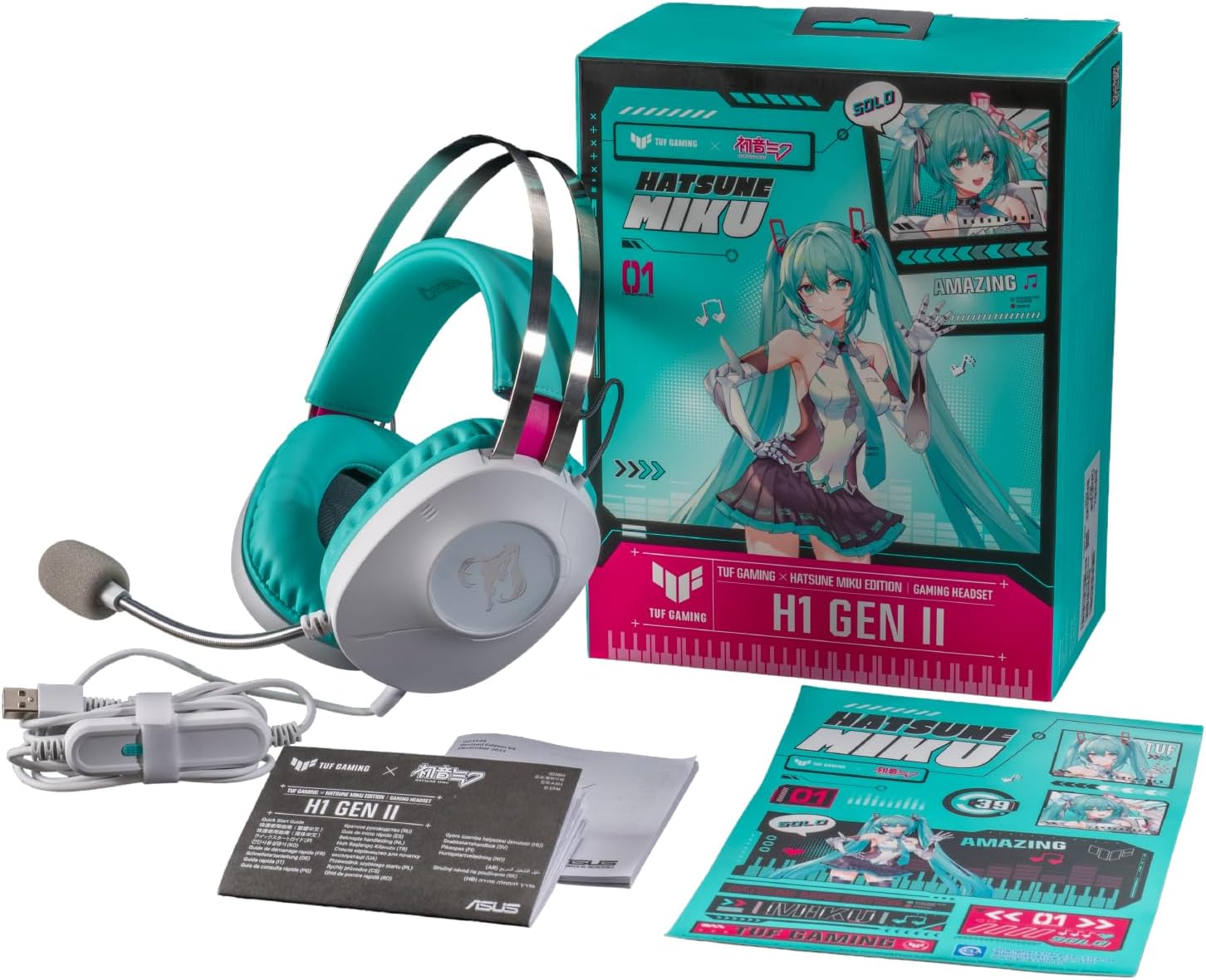
Figure 2: Contents of the headset package, including the headset, manual, and stickers.
Aufstellen
Anschließen des Headsets:
- Locate the USB Type-A connector on your headset cable.
- Plug the USB Type-A connector into an available USB port on your PC, PlayStation 4, or PlayStation 5.
- The headset should be automatically recognized by your device. You may need to select it as the default audio input/output device in your system settings.
Mikrofoneinstellung:
- The unidirectional microphone is designed for clear voice pickup. Position the microphone boom arm close to your mouth for optimal clarity.
- Use the in-line controls to mute or unmute the microphone as needed.
Bedienung des Headsets
Inline-Bedienelemente:
The headset features convenient in-line controls for quick adjustments during use.
- Lautstärkeregelung: Use the scroll wheel or buttons to adjust the audio volume.
- Audio-Stummschaltung: Press the dedicated button to mute or unmute the headset audio.
- Mikrofonstummschaltung: Press the dedicated button to mute or unmute the microphone.
- Virtueller 7.1-Surround-Sound: Activate or deactivate virtual 7.1 surround sound for an immersive audio experience.
- Lichtsteuerung: Adjust or toggle the headset's lighting effects.

Figure 3: Headset with visible in-line controls for volume, mute, and 7.1 surround sound.

Figure 4: Close-up of the headset earcup, emphasizing the 40mm ASUS Essence drivers for exceptional audio quality.

Figure 5: Headset with its TeamSpeak-certified unidirectional microphone for clear communication.
Wartung
Reinigen des Headsets:
- Verwenden Sie ein weiches, trockenes Tuch, um die Außenseite des Headsets abzuwischen.
- The ear cushions are designed to be easy to remove and are resistant to alcohol and hypochlorous acid. For thorough cleaning, gently remove the ear cushions and wipe them with a suitable cleaning solution. Ensure they are completely dry before reattaching.
- Avoid using abrasive cleaners or solvents that may damage the headset's finish.
Lagerung:
- Bewahren Sie das Headset an einem kühlen, trockenen Ort fern von direkter Sonneneinstrahlung und extremen Temperaturen auf.
- Um Beschädigungen zu vermeiden, sollten Sie keine schweren Gegenstände auf das Headset stellen.
Fehlerbehebung
| Problem | Mögliche Ursache | Lösung |
|---|---|---|
| Kein Ton vom Headset |
|
|
| Mikrofon funktioniert nicht |
|
|
| Virtual 7.1 surround sound not working |
|
|
Technische Daten
| Besonderheit | Detail |
|---|---|
| Modell | A303 TG H1 GEN II MIKU |
| Konnektivität | Kabelgebunden (USB Typ-A) |
| Treiber | 40mm ASUS Essence Drivers |
| Impedanz | 32 Ohm |
| Frequenzgang | 20 Hz - 20 kHz |
| Mikrofon | TeamSpeak-certified unidirectional microphone |
| Virtual Surround Sound | Virtueller 7.1-Surround-Sound |
| Gewicht | Ungefähr 297 g (0.7 Pfund) |
| Ohrpolster | Durable, easy-to-remove, alcohol- and hypochlorous acid-resistant |
| Bedienelemente | In-line: Volume, Audio Mute, Virtual 7.1 Surround Sound, Lighting |
| Kompatible Geräte | Desktops, Laptops, PlayStation 4, PlayStation 5 |
| Material | Metall, Kunststoff |
| Farbe | White with Teal accents |
Garantie und Support
For warranty information, please refer to the warranty card included in your product packaging or visit the official ASUS support website. You can find drivers, FAQs, and contact information for technical support there.
ASUS-Kundendienst WebWebsite: www.asus.com/support/