
1. Einleitung
Thank you for choosing the Rojeco 2L Automatic Pet Feeder, Model RWSQ-02. This device is designed to provide consistent and timely meals for your pet, ensuring they maintain a healthy eating schedule. Please read this manual thoroughly before using the feeder to ensure proper operation and to maximize its lifespan.
Sicherheitshinweise
- Dieses Gerät ist nur für den Gebrauch in Innenräumen bestimmt.
- Tauchen Sie das Hauptgerät nicht in Wasser oder andere Flüssigkeiten.
- Bei Nichtgebrauch oder während der Reinigung außerhalb der Reichweite von Kindern und Haustieren aufbewahren.
- Verwenden Sie ausschließlich das mit dem Futterspender gelieferte Original-Netzteil.
- Stellen Sie sicher, dass der Futterautomat auf einer stabilen, ebenen Fläche steht.
- Only use dry pet food with a diameter suitable for the dispenser mechanism.
2. Produktüberschreitungview
The Rojeco RWSQ-02 Automatic Pet Feeder consists of several key components designed for easy assembly and use.
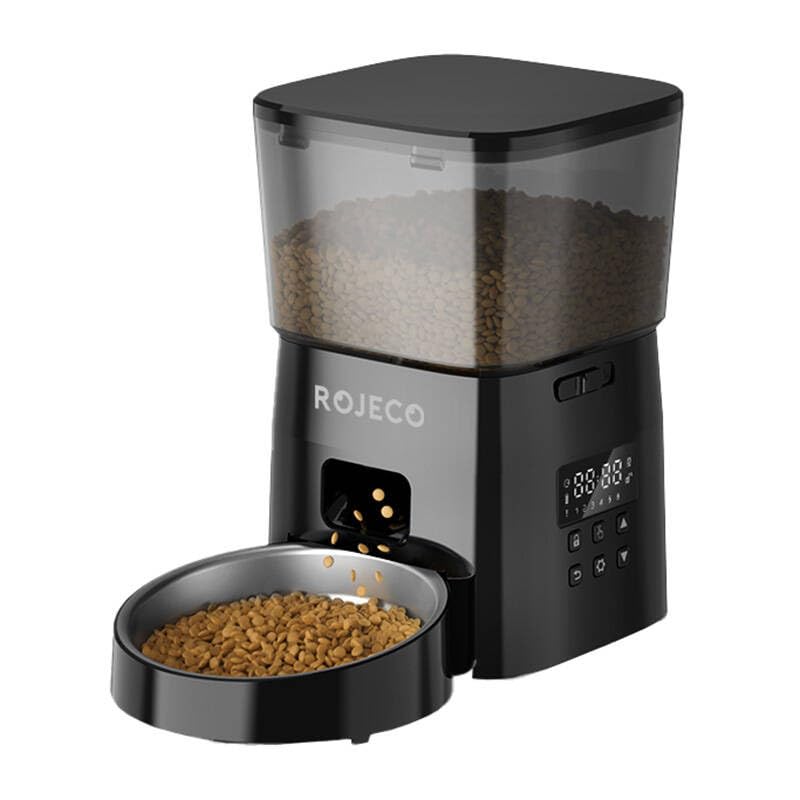
Abbildung 2.1: Vorderseite view of the Rojeco 2L Automatic Pet Feeder.

Abbildung 2.2: Seite view of the Rojeco 2L Automatic Pet Feeder.
Komponenten:
- Futtertank: Transparenter Behälter zur Aufbewahrung von Trockenfutter für Haustiere.
- Haupteinheit: Houses the dispensing mechanism, control panel, and power input.
- Futternapf: Stainless steel bowl for pet food.
- Deckel: Sichert den Futterbehälter und hält das Futter frisch.
- Netzteil: Zum Anschluss der Zuleitung an eine Steckdose.
3. Einrichtung
3.1 Auspacken und Zusammenbau
- Entnehmen Sie vorsichtig alle Komponenten aus der Verpackung.
- Stellen Sie das Hauptgerät auf eine ebene, stabile Oberfläche.
- Attach the stainless steel food bowl to the base of the main unit, ensuring it clicks securely into place.
- Place the food tank onto the main unit, aligning it properly.
- Secure the lid onto the food tank.
3.2 Netzteil
- Connect the power adapter to the power input port on the back or side of the main unit.
- Stecken Sie den Adapter in eine normale Steckdose.
- Das Gerät schaltet sich ein, und Kontrollleuchten leuchten möglicherweise auf.
- Note: This model does not require batteries for primary operation.
3.3 Befüllen des Futtertanks
- Remove the lid from the food tank.
- Pour dry pet food into the tank. Ensure the food kibble size is appropriate for automatic feeders (typically 5-15mm in diameter) to prevent jamming.
- Überfüllen Sie den Tank nicht.
- Setzen Sie den Deckel sicher wieder auf.
4. Bedienungsanleitung
The Rojeco RWSQ-02 features a simple button interface for programming meal schedules.
4.1 Bedienfeld vorbeiview
The control panel typically includes buttons for setting time, meals, portions, and a manual feed button. Refer to the markings on your specific unit for exact button functions.
4.2 Festlegung von Essenszeiten und Portionsgrößen
- Aktuelle Uhrzeit einstellen: Press and hold the "SET" button (or equivalent) until the time display flashes. Use the "UP" and "DOWN" buttons to adjust the hour and minute. Press "SET" again to confirm.
- Program Meal 1: Press the "MEAL" button (or equivalent) to enter meal programming mode. The display will show "M1". Use "UP" and "DOWN" to set the desired feeding time for Meal 1. Press "SET" to confirm.
- Set Portion for Meal 1: After setting the time for Meal 1, the portion size will flash. Use "UP" and "DOWN" to select the number of portions (each portion typically corresponds to a specific volume of food). Press "SET" to confirm.
- Program Additional Meals: Repeat steps for Meal 2, Meal 3, etc., as supported by your feeder (up to 4 meals are common).
- Programm beenden: The feeder will automatically exit programming mode after a few seconds of inactivity, or you can press a designated "EXIT" button if available.
4.3 Manuelle Fütterung
To dispense food manually, press the "MANUAL" button (or equivalent). Each press will dispense one portion of food. This is useful for extra treats or to test the feeder.
4.4 Kontrollleuchten
The feeder may have indicator lights to show its status:
- Grünes Licht: Zeigt den Normalbetrieb an.
- Red Light (Flashing/Solid): May indicate a low food level, a jam, or an error. Refer to the troubleshooting section.
5. Wartung
Regular cleaning ensures hygiene for your pet and extends the life of your feeder.
5.1 Demontage zur Reinigung
- Unplug the power adapter from the wall outlet and the feeder.
- Remove any remaining food from the tank.
- Remove the lid and the food tank from the main unit.
- Detach the stainless steel food bowl from the base.
5.2 Reinigungshinweise
- Food Tank and Bowl: Wash these components with mild soap and water. Rinse thoroughly and dry completely before reassembly. These parts are typically dishwasher-safe on the top rack, but hand washing is recommended for longevity.
- Haupteinheit: Wischen Sie die Außenseite des Hauptgeräts mit einem weichen, fusselfreien Tuch ab.amp Tuch. Tauchen Sie das Hauptgerät nicht in Wasser. Ensure no water enters the control panel or power input.
- Dispenser Mechanism: Use a dry brush or cloth to remove any food residue from the dispenser chute.
5.3 Zusammenbau
- Stellen Sie sicher, dass alle gereinigten Teile vollständig trocken sind.
- Reattach the food bowl to the main unit.
- Place the food tank back onto the main unit.
- Befestigen Sie den Deckel.
- Refill with dry pet food and reconnect the power.
6. Fehlerbehebung
If you encounter issues with your Rojeco Automatic Pet Feeder, refer to the following common problems and solutions:
| Problem | Mögliche Ursache | Lösung |
|---|---|---|
| Futterautomat gibt kein Futter aus. | Food tank is empty. Food kibble is jammed. Dispenser mechanism is blocked. Feeder is not powered on. | Füllen Sie den Futtertank wieder auf. Check for and clear any kibble jams in the chute. Clean the dispenser mechanism. Stellen Sie sicher, dass das Netzteil fest eingesteckt ist. |
| Indicator light is red/flashing. | Niedriger Nahrungsbestand. Motor error or jam. | Füllen Sie den Futtertank wieder auf. Check for jams and clear them. If the issue persists, contact customer support. |
| Scheduled meals are not dispensing. | Incorrect meal time settings. Feeder is not powered on. Food tank is empty. | Review and reset meal times and portions. Stellen Sie sicher, dass das Netzteil fest eingesteckt ist. Füllen Sie den Futtertank wieder auf. |
| Food gets stuck in the chute. | Kibble size is too large. Food is damp oder klebrig. | Use dry food with appropriate kibble size (5-15mm). Ensure food is dry and stored properly. Clean the chute regularly. |
7. Spezifikationen
| Besonderheit | Detail |
|---|---|
| Marke | Rojeco |
| Modellnummer | RWSQ-02 |
| Kapazität | 2 Liter |
| Farbe | Schwarz |
| Stromquelle | AC Power Adapter (No batteries required for primary operation) |
| Im Lieferumfang enthaltene Komponenten | 1 Automatic Pet Feeder, 1 Power Adapter |
| Empfohlene Lebensmittelart | Dry pet food (kibble size 5-15mm) |
8. Garantie und Support
8.1 Garantieinformationen
The Rojeco 2L Automatic Pet Feeder (Model RWSQ-02) comes with a standard manufacturer's warranty. Please refer to the warranty card included in your product packaging for specific terms and conditions, including the warranty period and coverage details. Keep your purchase receipt as proof of purchase for warranty claims.
8.2 Kundendienst
For technical assistance, troubleshooting beyond this manual, or warranty inquiries, please contact Rojeco customer support. Contact details can typically be found on the product packaging, the official Rojeco webWebsite oder Ihre Einkaufsplattform.
Please have your model number (RWSQ-02) and purchase information ready when contacting support.