
Einführung
This manual provides essential information for the installation, operation, and maintenance of your KPREPUBLIC Kailh Box Ice Cream Brown Switches. These switches are designed for mechanical keyboards, offering a pre-advanced tactile feel with durable POM housing and stem materials.
Produkt überview
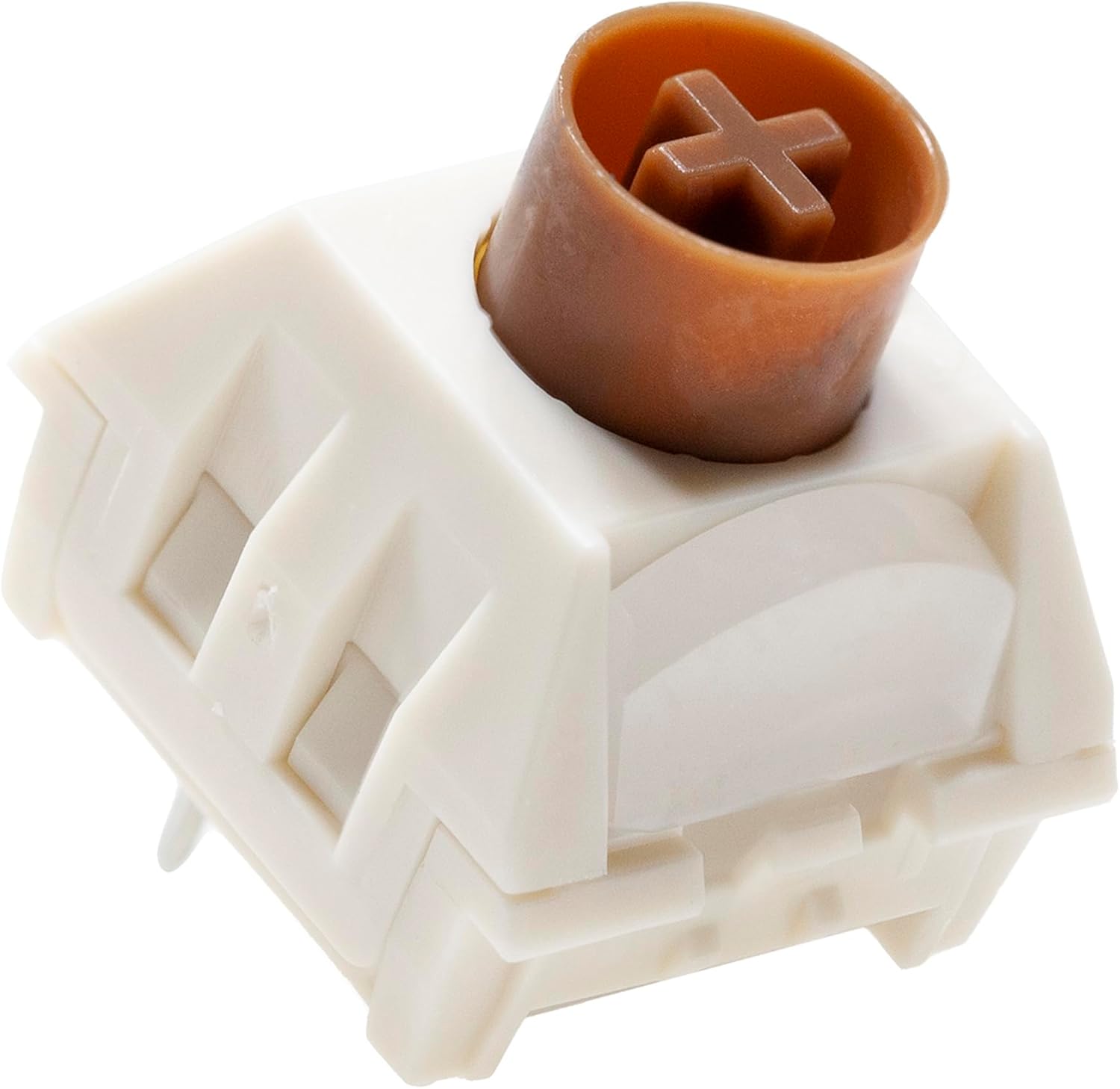


Setup und Installation
These switches are designed for mechanical keyboards that support hot-swappable switches or require soldering for installation. Ensure your keyboard is compatible before proceeding.
For Hot-Swappable Keyboards:
- Prepare your keyboard: Stellen Sie sicher, dass Ihre Tastatur ausgeschaltet und vom Computer getrennt ist.
- Remove existing keycaps: Use a keycap puller to carefully remove the keycaps from the switches you intend to replace.
- Remove existing switches: Use a switch puller tool to gently unclip and pull out the old switches from the PCB. Apply even pressure to avoid bending pins.
- Install new switches: Align the pins of the KPREPUBLIC Kailh Box Ice Cream Brown Switch with the holes on the PCB. Gently push the switch down until it clicks into place. Ensure the pins are straight and not bent.
- Test switches: Before replacing keycaps, plug in your keyboard and test each new switch to ensure it registers correctly.
- Reattach keycaps: Once all switches are installed and tested, reattach your keycaps.
For Soldering Installation:
- Prepare your PCB: Ensure your keyboard PCB is clean and ready for soldering.
- Position switches: Insert the KPREPUBLIC Kailh Box Ice Cream Brown Switches into the designated spots on the PCB. Ensure they sit flush.
- Solder pins: Carefully solder each pin of the switch to the corresponding pad on the PCB. Use appropriate soldering techniques to ensure strong, clean connections.
- Test and assemble: After soldering, test the switches for functionality. Then, proceed with assembling the keyboard case and attaching keycaps.
Funktionsprinzipien
The KPREPUBLIC Kailh Box Ice Cream Brown Switch is a taktil mechanical switch. This means it provides a noticeable bump during the keypress, indicating actuation, without producing an audible click sound. This tactile feedback is designed to enhance typing accuracy and feel.
- Betätigung: The switch actuates (sends a signal to the keyboard) when the stem travels approximately 2.0mm.
- Tactile Bump: The tactile bump occurs before the actuation point, providing feedback that the keypress has registered.
- Reset Point: The switch resets and is ready for another press when the stem returns to its original position.
- Schlüsselreise: The total distance the stem can travel is 3.6mm.
Wartung und Pflege
Proper maintenance can extend the lifespan and maintain the performance of your switches.
- Regelmäßige Reinigung: Periodically remove keycaps and use compressed air to clear dust and debris from around the switches. A soft brush can also be used.
- Vermeiden Sie das Verschütten von Flüssigkeiten: Liquids can damage the internal components of the switches. In case of a spill, immediately unplug the keyboard, remove keycaps, and allow it to dry completely before re-use. For severe spills, professional cleaning or switch replacement may be necessary.
- Schmierung (optional): For advanced users, switches can be carefully disassembled and lubricated with specialized switch lubricants to alter their feel and sound. This should only be attempted by experienced individuals as improper lubrication can degrade performance.
- Schonende Handhabung: When installing or removing switches, always use appropriate tools and apply gentle, even pressure to avoid bending pins or damaging the switch housing.
Fehlerbehebung
If you encounter issues with your KPREPUBLIC Kailh Box Ice Cream Brown Switches, consider the following:
- Schalter registriert sich nicht:
- Ensure the switch is fully seated in the hot-swap socket or properly soldered.
- Check for bent pins on the switch. If a pin is bent, carefully straighten it with tweezers before reinserting.
- Test the switch in another socket if possible to rule out a PCB issue.
- Inconsistent Feel/Sound:
- This can sometimes be due to manufacturing variations, but also check for debris inside the switch.
- Ensure the keycap is properly seated and not rubbing against the switch housing or adjacent keycaps.
- If you have lubricated the switches, ensure even application.
- Keycap Wobble:
- Some keycap wobble is normal. Excessive wobble might indicate a loose keycap stem or a slightly loose switch stem.
- Try a different keycap to see if the issue persists.
If problems persist, contact KPREPUBLIC customer support for further assistance.
Technische Daten
| Besonderheit | Spezifikation |
|---|---|
| Marke | KPREPUBLIC |
| Modell | Kailh Box Ice Cream Brown Switch |
| Schaltertyp | Pre Advanced Tactile |
| Oberes Gehäusematerial | POM |
| Material des unteren Gehäuses | POM |
| Schaftmaterial | POM |
| Federlänge | Etwa 19 mm |
| Betätigungskraft | 37±10gf |
| Bodenkraft | 50±10gf |
| Vorreise | 2.0 ± 0.4 mm |
| Gesamtreise | 3.6 ± 0.4 mm |
| Betriebsdauer | 50 Millionen Zyklen |
| Betriebsmodus | Mechanisch |
| Terminal | Durchgangsloch |
| Montagetyp | Leiterplattenhalterung |
| Ursprungsland | China |
Garantieinformationen
Warranty terms for KPREPUBLIC products are typically provided by the manufacturer or the point of purchase. Please refer to the documentation included with your purchase or visit the official KPREPUBLIC webAuf der Website finden Sie detaillierte Garantieinformationen. Bewahren Sie Ihren Kaufbeleg für eventuelle Garantieansprüche auf.
Unterstützung
For technical support, product inquiries, or assistance with your KPREPUBLIC Kailh Box Ice Cream Brown Switches, please contact KPREPUBLIC directly through their official website or customer service channels. Provide your product model number and any relevant purchase details when seeking support.
Hersteller: KPREPUBLIC